Activate Dataphin
This topic describes how to activate Dataphin so you can start using its features.
Prerequisites
You must have an Alibaba Cloud account that has passed real-name verification. For more information, see Prepare an Alibaba Cloud account.
Limitations
Each Alibaba Cloud account is limited to one Dataphin instance per region.
Permissions
To create a Dataphin instance as a Resource Access Management (RAM) user, the RAM user or the assigned RAM role must have the AliyunDataphinFullAccess and AliyunBSSOrderAccess permissions. For more information about permission policies for RAM users and RAM roles, see Permission Policy Overview.
Purchase
Currently, you cannot purchase Dataphin instances with a Finance Cloud account.
Dataphin supports auto-renewal to prevent service interruptions due to resource expiration. To enable this feature, select Auto-renewal on Expiration on the purchase page. The auto-renewal period is monthly, and you can cancel it at any time. For more information, see Renewals.
After you purchase a Dataphin instance, it typically takes 5 to 10 minutes to provision the service. If provisioning fails, you receive an automatic refund.
Dataphin supports only the MaxCompute compute engine. Your selection on the purchase page affects only the initial configuration. You still need to purchase the MaxCompute compute engine separately.
You can purchase different value-added modules for different service editions. For more information, see Billing - Fully managed.
Notes
Before you activate Dataphin, review the following notes:
We recommend contacting Alibaba Cloud pre-sales consultation to ensure the Dataphin edition meets your needs before purchase. You can proceed with the purchase after confirmation from the pre-sales team.
Dataphin does not offer unconditional refunds, so please carefully confirm your selected edition before making a purchase.
After you purchase Dataphin, if you need a refund due to special circumstances, submit a ticket and contact your account manager. If your request meets the refund conditions (refunds are not provided for non-product-related issues), a refund will be processed, minus any fees for usage.
Dataphin supports the Subscription billing model.
Only new users can purchase a Dataphin instance. If your Dataphin instance has expired and been stopped, and is within the 14-day retention period, you can only renew it.
Purchase a Dataphin instance
Dataphin offers various editions and features for different business scenarios and data volumes. You can choose from Personal Edition, Agile Development Edition, Basic Development Edition, and Intelligent Development Edition.
You can switch the Edition to view the available Add-ons for each edition.
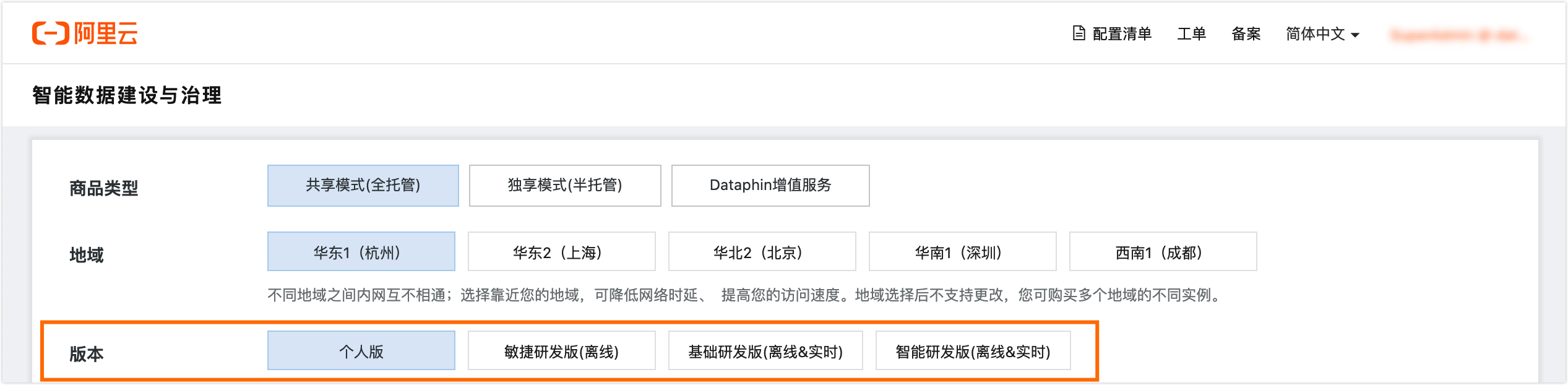
Personal Edition
Log on to the Alibaba Cloud official website with your main account.
On the Alibaba Cloud official website, hover over Products. In the left-side navigation pane, hover over Big Data Computing and then click Intelligent Data Construction and Governance (Dataphin) in the Data Development and Services column.
On the Dataphin product details page, in the Product Editions and Features section, click Purchase to open the Dataphin purchase page.
On the purchase page, select basic configurations such as Region, Edition, Compute Engine, and Data Processing Unit, and specify the quantity and subscription duration.
Parameter
Description
Basic configurations
Product type
Select Shared Model (Fully-managed).
Region
Select the Region for the Dataphin instance. The supported Regions include:
China (Shanghai)
China (Shenzhen)
China (Beijing)
China (Hangzhou)
China (Chengdu)
Edition
Select an edition based on your business requirements, such as Intelligent Development Edition.
Compute engine
You can select MaxCompute, EMR Serverless Spark, or Database.
Data processing unit
Select the specifications that meet your requirements.
Purchase quantity
Quantity
The default value is 1. You can purchase only one Dataphin instance in a region.
Subscription duration
1 month is selected by default. The supported options for Purchase Duration include 1 month, 1 year, 2 years, and 3 years.
Carefully review the purchase information. After you confirm that the information is correct, click Buy Now.
On the Confirm Order page, confirm the specifications of your Dataphin instance. After you verify the details, click Intelligent Data Construction and Governance Service Agreement next to Service Agreement, and carefully read the content of the agreement. After you agree to the terms, select the I have read and agree to the Intelligent Data Construction and Governance Service Agreement checkbox, and then click Go to Pay.
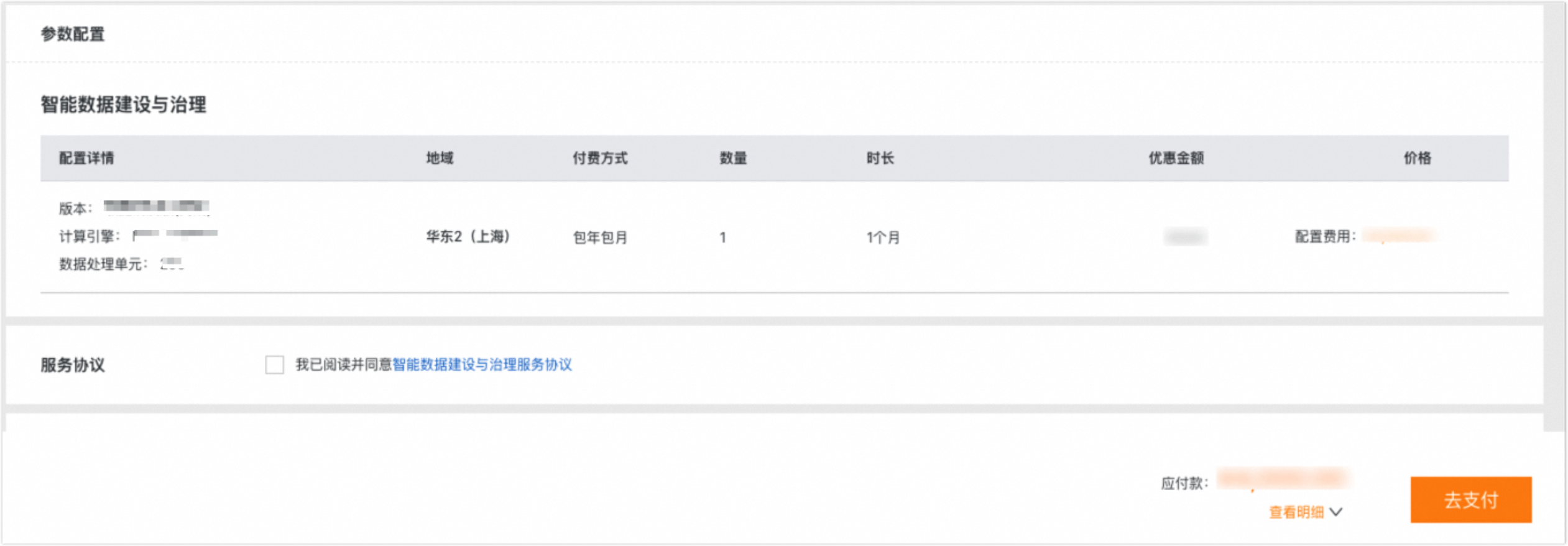
Agile Development Edition
Log on to the Alibaba Cloud official website with your main account.
On the Alibaba Cloud official website, hover over Products. In the left-side navigation pane, hover over Big Data Computing and then click Intelligent Data Construction and Governance (Dataphin) in the Data Development and Services column.
On the Dataphin product details page, in the Product Editions and Features section, click Purchase to open the Dataphin purchase page.
On the purchase page, select basic configurations such as Region, Edition, Compute Engine, and Data Processing Unit, and specify the quantity and subscription duration.
Parameter
Description
Basic configurations
Product type
Select Shared Model (Fully-managed).
Region
Select the Region for the Dataphin instance. The supported regions include:
China (Shanghai)
China (Shenzhen)
China (Beijing)
China (Hangzhou)
China (Chengdu)
Edition
Select an edition based on your business requirements, such as Intelligent Development Edition.
Compute engine
You can select MaxCompute, EMR Serverless Spark, or Database.
Data processing unit
Select a specification based on your business requirements. You can select 200, 500, or 1000.
Data Query Acceleration (Optional)
Allows you to configure SelectDB, Doris, or StarRocks as an acceleration engine to directly query MaxCompute data. This eliminates the need for data migration and reduces costs and latency.
You can purchase the Standard Edition. If you do not need this feature, select Not now.
NoteYou must prepare the resources for the acceleration engine.
This add-on is available only when you select MaxCompute as the compute engine.
Add-ons
Asset Operations
You can purchase the Basic Edition or Standard Edition. If you do not need this feature, select Not now.
NoteThis add-on is available only when you select MaxCompute as the compute engine.
Metadata Collection - Big Data Storage (Optional)
Metadata collection for relational databases is provided free of charge. You can purchase this add-on based on your business requirements.
Select Enable. If you do not need this feature, select Not now.
NoteThis add-on is available when you select MaxCompute or EMR Serverless Spark as the compute engine.
Metadata Management (Optional)
You can use attribute combinations to represent different types of objects and complete attribute information during asset onboarding for a more comprehensive asset description. This feature is typically used with the Metadata Collection and Asset Operations modules.
You must enable any edition of Asset Operations to purchase this add-on. Select Enable. If you do not need this feature, select Not now.
Data Services (Optional)
Data Services helps you unify data theme units in a standardized and configurable way. It also supports self-service API configuration, debugging, pre-release, go-live, and call monitoring for themes. It provides field-level control over data access permissions, making data access easier for business users while ensuring secure data sharing.
Available specifications include api.base (max 500 QPS/50 concurrency), api.s1.small (max 2500 QPS/250 concurrency), api.s1.medium (max 5000 QPS/500 concurrency), and api.s2.large (max 10000 QPS/1000 concurrency). If you do not need this feature, select Not now.
NoteQPS (Queries Per Second): The average number of requests that can be processed per second within a specific period.
concurrency: The number of API requests that can be processed at the same time.
QPS, concurrency, and response time (RT) are closely related. For a given concurrency, a longer API response time results in a lower QPS. Their relationship can be expressed by the following formula:
QPS = concurrency / RT (in seconds).Row-level security (Optional)
You can flexibly control the data range that different users can view based on field values to enhance data security.
Select Enable. If you do not need this feature, select Not now.
X-Asset Q&A (Optional)
This feature focuses on enterprise digital assets. It supports natural language queries and intelligent suggestions to accurately identify search intent, quickly locate target assets, and recommend related assets. This helps improve data asset utilization and unlock data value.
You must enable any edition of Asset Operations to purchase this add-on. You can purchase the Standard Edition. If you do not need this feature, select Not now.
NoteThis add-on is available only when you select MaxCompute as the compute engine.
X-Analysis (Optional)
This feature supports multi-database syntax and complex query logic. It intelligently generates query statements from natural language and allows one-click execution to retrieve data. This helps business personnel improve analysis efficiency and further unlock data value. Use this feature with the intelligent analysis collection.
You must enable any edition of Asset Operations to purchase this add-on. You can purchase the Standard Edition. If you do not need this feature, select Not now.
NoteThis add-on is available only when you select MaxCompute as the compute engine.
X-App Creation (Optional)
Based on the Data Services APIs provided by Dataphin, this feature combines user requirement descriptions with semantic knowledge to rapidly build data micro-applications and accelerate the release of data value.
You can purchase the Standard Edition. If you do not need this feature, select Not now.
Purchase quantity
Quantity
The default value is 1. You can purchase only one Dataphin instance in a region.
Subscription duration
1 Month is selected by default. The supported options for Subscription Duration are 1 Month, 1 Year, 2 Years, and 3 Years.
Carefully review the purchase information. After you confirm that the information is correct, click Buy Now.
On the Confirm Order page, confirm the specifications of your Dataphin instance. After you confirm that the details are correct, click Intelligent Data Construction and Governance Service Agreement next to Service Agreement and carefully read the content of the agreement. After you agree to the service agreement, select I have read and agree to the Intelligent Data Construction and Governance Service Agreement, and click Go to Pay.
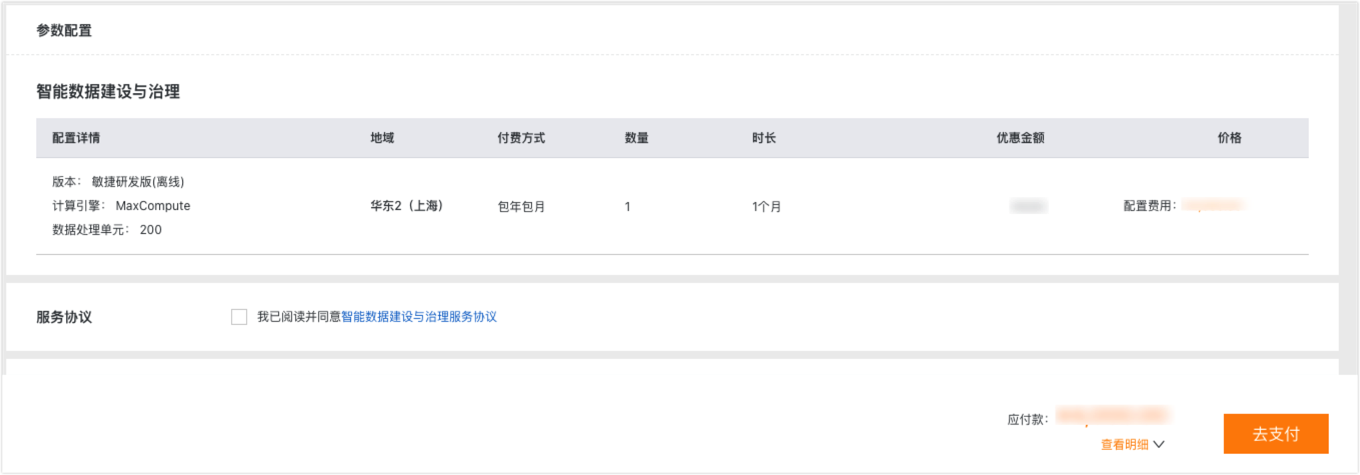
Basic Development Edition
Log on to the Alibaba Cloud official website with your main account.
On the Alibaba Cloud official website, hover over Products. In the left-side navigation pane, hover over Big Data Computing and then click Intelligent Data Construction and Governance (Dataphin) in the Data Development and Services column.
On the Dataphin product details page, in the Product Editions and Features section, click Purchase to open the Dataphin purchase page.
On the purchase page, select basic configurations such as Region, Edition, Compute Engine, Data Processing Unit, Real-time Development, and Data Quality. You can also specify the purchase quantity and subscription duration, and select Add-ons based on your business requirements.
Parameter
Description
Basic configurations
Product type
Select Shared Model (Fully-managed).
Region
Select the region where you want to purchase the Dataphin instance. The following regions are supported:
China (Shanghai)
China (Shenzhen)
China (Beijing)
China (Hangzhou)
China (Chengdu)
Edition
Select an edition based on your business requirements, such as Intelligent Development Edition.
Compute engine
You can select MaxCompute or EMR Serverless Spark.
Data processing unit
Select a specification based on your business requirements. You can select 200, 500, 1000, 1500, 2000, 2500, 3000, 3500, 4000, 4500, or 5000.
Data Query Acceleration (Optional)
Allows you to configure SelectDB, Doris, or StarRocks as an acceleration engine to directly query MaxCompute data. This eliminates the need for data migration and reduces costs and latency.
You can purchase the Standard Edition. If you do not need this feature, select Not now.
NoteYou must prepare the resources for the acceleration engine.
This add-on is available only when you select MaxCompute as the compute engine.
Real-time development (Free)
The Standard Edition is provided free of charge by default.
Data quality
500 Rules (Free) are provided by default. If you need more quality rules, you can select 1000 Rules, 1500 Rules, 2000 Rules, 3000 Rules, or 5000 Rules.
Add-ons
Data standard (Optional)
Data Standard provides unified creation and management of standards, reference data management, and association of standards with asset metadata. When combined with quality monitoring capabilities, it helps enterprises govern data assets throughout their entire lifecycle.
You can purchase the Standard Edition. If you do not need this feature, select Not now.
Data security (Optional)
Data Security allows you to define business categories and security levels for your data, build data identification rules, and configure data masking rules for sensitive data to secure your data assets.
You can purchase the Standard Edition. If you do not need this feature, select Not now.
Resource governance (Optional)
This feature provides a comprehensive view of computing and storage costs, improves efficiency, and helps you build a manageable data asset system.
You can purchase the Standard Edition. If you do not need this feature, select Not now.
Asset Operations
You can purchase the Basic Edition, Standard Edition, or Advanced Edition. If you do not need this feature, select Not now.
Metadata Collection - Big Data Storage (Optional)
Metadata collection for relational databases is provided free of charge. You can purchase this add-on based on your business requirements.
Select Enable. If you do not need this feature, select Not now.
Metadata Management (Optional)
You can use attribute combinations to represent different types of objects and complete attribute information during asset onboarding for a more comprehensive asset description. This feature is typically used with the Metadata Collection and Asset Operations modules.
You must enable any edition of Asset Operations to purchase this add-on. Select Enable. If you do not need this feature, select Not now.
Data Services (Optional)
Data Services helps you unify data theme units in a standardized and configurable way. It also supports self-service API configuration, debugging, pre-release, go-live, and call monitoring for themes. It provides field-level control over data access permissions, making data access easier for business users while ensuring secure data sharing.
Available specifications include api.base (max 500 QPS/50 concurrency), api.s1.small (max 2500 QPS/250 concurrency), api.s1.medium (max 5000 QPS/500 concurrency), and api.s2.large (max 10000 QPS/1000 concurrency). If you do not need this feature, select Not now.
NoteQPS (Queries Per Second): The average number of requests that can be processed per second within a specific period.
concurrency: The number of API requests that can be processed at the same time.
QPS, concurrency, and response time (RT) are closely related. For a given concurrency, a longer API response time results in a lower QPS. Their relationship can be expressed by the following formula:
QPS = concurrency / RT (in seconds).Tag Factory (Optional)
Tag Factory is a platform for enterprises to produce, apply, and manage first-party tags. It helps developers, business users, and administrators create valuable tag assets that are easy to develop, find, use, and govern.
Available specifications include Trial Edition (Free), Basic Edition, Standard Edition, and Advanced Edition.
Trial Edition (Free): 10 offline tags.
Basic Edition: 50 offline tags.
Standard Edition/Advanced Edition: 300, 500, 700, 1,000, or 1,500 offline tags.
NoteThis add-on is available only when you select MaxCompute as the compute engine.
Intelligent O&M (Optional)
Intelligent O&M includes baseline monitoring and throttling features to ensure on-time data delivery and system stability. It also reduces manual O&M costs and improves efficiency.
3 Baselines + 1 Throttling Rule (Free) is provided by default. If you require a higher specification, you can select 10 Baselines + 10 Throttling Rules or 100 Baselines + 20 Throttling Rules.
Row-level security (Optional)
You can flexibly control the data range that different users can view based on field values to enhance data security.
Select Enable. If you do not need this feature, select Not now.
X-Data Standards (Optional)
This feature intelligently extracts data standard and code table definitions and identifies mapping relationships between standards and fields. This helps you quickly establish data standards at a low cost, improve data standardization, and achieve precise, efficient governance.
You must enable the Data Standard feature to purchase this add-on. You can purchase the Standard Edition. If you do not need this feature, select Not now.
X-Data Quality (Optional)
By combining sample data and data lineage analysis, this feature traces the root cause of quality issues, builds a complete evidence chain, and intelligently generates rectification suggestions and impact assessments to complete the governance process.
You must enable the Data Quality feature to purchase this add-on. You can purchase the Standard Edition. If you do not need this feature, select Not now.
X-Data Security (Optional)
This feature intelligently recommends classification and grading based on data asset semantics and sample data. It automatically generates regular expressions and field names from feature names to create identification rules efficiently, which reduces configuration costs and improves recognition accuracy.
You must enable the Data Security feature to purchase this add-on. You can purchase the Standard Edition. If you do not need this feature, select Not now.
X-Catalog Management (Optional)
This feature intelligently parses asset metadata, automatically matches business tags and catalogs, and generates asset descriptions in batches. This helps asset operators reduce operational costs and improve onboarding efficiency.
You must enable the Standard or Advanced edition of Asset Operations to purchase this add-on. You can purchase the Standard Edition. If you do not need this feature, select Not now.
X-Asset Q&A (Optional)
This feature focuses on enterprise digital assets. It supports natural language queries and intelligent suggestions to accurately identify search intent, quickly locate target assets, and recommend related assets. This helps improve data asset utilization and unlock data value.
You must enable any edition of Asset Operations to purchase this add-on. You can purchase the Standard Edition. If you do not need this feature, select Not now.
X-Analysis (Optional)
This feature supports multi-database syntax and complex query logic. It intelligently generates query statements from natural language and allows one-click execution to retrieve data. This helps business personnel improve analysis efficiency and further unlock data value. Use this feature with the intelligent analysis collection.
You must enable any edition of Asset Operations to purchase this add-on. You can purchase the Standard Edition. If you do not need this feature, select Not now.
X-App Creation (Optional)
Based on the Data Services APIs provided by Dataphin, this feature combines user requirement descriptions with semantic knowledge to rapidly build data micro-applications and accelerate the release of data value.
You can purchase the Standard Edition. If you do not need this feature, select Not now.
Unstructured data (Optional)
This feature provides unified management and governance for enterprise unstructured data. It offers core capabilities such as AI-powered multimodal data processing, end-to-end data lineage governance, and knowledge graph construction to efficiently support enterprise knowledge base development and model training.
You can purchase the Basic Edition, Standard Edition, or Enterprise Edition. If you do not need this feature, select Not now.
Purchase quantity
Quantity
The default value is 1. You can purchase only one Dataphin instance in a region.
Subscription duration
By default, 1 month is selected. The supported options for Purchase Duration are 1 month, 2 months, 3 months, 4 months, 5 months, 6 months, 1 year, 2 years, and 3 years.
Carefully review the purchase information. After you confirm that the information is correct, click Buy Now.
On the Confirm Order page, confirm the specifications of the Dataphin instance. After you confirm that the details are correct, click Intelligent Data Construction and Governance Service Agreement after Service Agreement and carefully read the agreement. Then, select the I have read and agree to Intelligent Data Construction and Governance Service Agreement checkbox and click Pay.
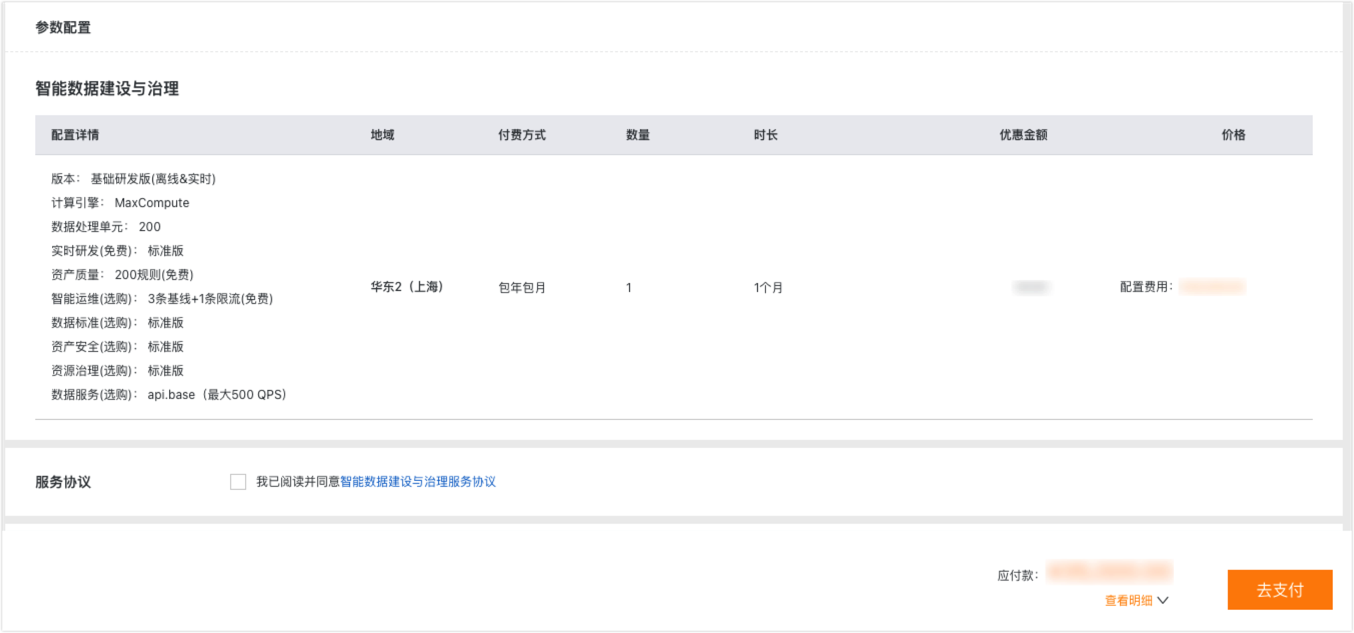
Intelligent Development Edition
Log on to the Alibaba Cloud official website with your main account.
On the Alibaba Cloud official website, hover over Products. In the left-side navigation pane, hover over Big Data Computing and then click Intelligent Data Construction and Governance (Dataphin) in the Data Development and Services column.
On the Dataphin product details page, in the Product Editions and Features section, click Purchase to open the Dataphin purchase page.
On the purchase page, select basic configurations such as Region, Edition, Compute Engine, Data Processing Unit, Real-time Development, and Data Quality. You can also specify the purchase quantity and subscription duration, and select Add-ons based on your business requirements.
Parameter
Description
Basic configurations
Product type
Select Shared Model (Fully-managed).
Region
Select the region where you want to purchase the Dataphin instance. The following regions are supported:
China (Shanghai)
China (Shenzhen)
China (Beijing)
China (Hangzhou)
China (Chengdu)
Edition
Select an edition based on your business requirements, such as Intelligent Development Edition.
Compute engine
You can select MaxCompute or EMR Serverless Spark.
Data processing unit
Select a specification based on your business requirements. You can select 200, 500, 1000, 1500, 2000, 2500, 3000, 3500, 4000, 4500, or 5000.
Data Query Acceleration (Optional)
Allows you to configure SelectDB, Doris, or StarRocks as an acceleration engine to directly query MaxCompute data. This eliminates the need for data migration and reduces costs and latency.
You can purchase the Standard Edition. If you do not need this feature, select Not now.
NoteYou must prepare the resources for the acceleration engine.
This add-on is available only when you select MaxCompute as the compute engine.
Real-time development (Free)
The Standard Edition is provided free of charge by default.
Data quality
500 Rules (Free) are provided by default. If you need more quality rules, you can select 1000 Rules, 1500 Rules, 2000 Rules, 3000 Rules, or 5000 Rules.
Add-ons
Data standard (Optional)
Data Standard provides unified creation and management of standards, reference data management, and association of standards with asset metadata. When combined with quality monitoring capabilities, it helps enterprises govern data assets throughout their entire lifecycle.
You can purchase the Standard Edition. If you do not need this feature, select Not now.
Data security (Optional)
Data Security allows you to define business categories and security levels for your data, build data identification rules, and configure data masking rules for sensitive data to secure your data assets.
You can purchase the Standard Edition. If you do not need this feature, select Not now.
Resource governance (Optional)
This feature provides a comprehensive view of computing and storage costs, improves efficiency, and helps you build a manageable data asset system.
You can purchase the Standard Edition. If you do not need this feature, select Not now.
Metadata Collection - Big Data Storage (Optional)
Metadata collection for relational databases is provided free of charge. You can purchase this add-on based on your business requirements.
Select Enable. If you do not need this feature, select Not now.
Metadata Management (Optional)
You can use attribute combinations to represent different types of objects and complete attribute information during asset onboarding for a more comprehensive asset description. This feature is typically used with the Metadata Collection and Asset Operations modules.
Select Enable. If you do not need this feature, select Not now.
Data Services (Optional)
Data Services helps you unify data theme units in a standardized and configurable way. It also supports self-service API configuration, debugging, pre-release, go-live, and call monitoring for themes. It provides field-level control over data access permissions, making data access easier for business users while ensuring secure data sharing.
Available specifications include api.base (max 500 QPS/50 concurrency), api.s1.small (max 2500 QPS/250 concurrency), api.s1.medium (max 5000 QPS/500 concurrency), and api.s2.large (max 10000 QPS/1000 concurrency). If you do not need this feature, select Not now.
NoteQPS (Queries Per Second): The average number of requests that can be processed per second within a specific period.
concurrency: The number of API requests that can be processed at the same time.
QPS, concurrency, and response time (RT) are closely related. For a given concurrency, a longer API response time results in a lower QPS. Their relationship can be expressed by the following formula:
QPS = concurrency / RT (in seconds).Tag Factory (Optional)
Tag Factory is a platform for enterprises to produce, apply, and manage first-party tags. It helps developers, business users, and administrators create valuable tag assets that are easy to develop, find, use, and govern.
Available specifications include Trial Edition (Free), Basic Edition, Standard Edition, and Advanced Edition.
Trial Edition (Free): 10 offline tags.
Basic Edition: 50 offline tags.
Standard Edition/Advanced Edition: 300, 500, 700, 1,000, or 1,500 offline tags.
NoteThis add-on is available only when you select MaxCompute as the compute engine.
Intelligent O&M (Optional)
Intelligent O&M includes baseline monitoring and throttling features to ensure on-time data delivery and system stability. It also reduces manual O&M costs and improves efficiency.
3 Baselines + 1 Throttling Rule (Free) is provided by default. If you require a higher specification, you can select 10 Baselines + 10 Throttling Rules or 100 Baselines + 20 Throttling Rules.
Row-level security (Optional)
You can flexibly control the data range that different users can view based on field values to enhance data security.
Select Enable. If you do not need this feature, select Not now.
X-Data Engineering (Optional)
Based on requirement specifications and business process documents, this feature intelligently creates conceptual and topic domain models and recommends business entities and relationship definitions to help you build data models.
You can purchase the Standard Edition. If you do not need this feature, select Not now.
X-Data Standards (Optional)
This feature intelligently extracts data standard and code table definitions and identifies mapping relationships between standards and fields. This helps you quickly establish data standards at a low cost, improve data standardization, and achieve precise, efficient governance.
You must enable the Data Standard feature to purchase this add-on. You can purchase the Standard Edition. If you do not need this feature, select Not now.
X-Data Quality (Optional)
By combining sample data and data lineage analysis, this feature traces the root cause of quality issues, builds a complete evidence chain, and intelligently generates rectification suggestions and impact assessments to complete the governance process.
You must enable the Data Quality feature to purchase this add-on. You can purchase the Standard Edition. If you do not need this feature, select Not now.
X-Data Security (Optional)
This feature intelligently recommends classification and grading based on data asset semantics and sample data. It automatically generates regular expressions and field names from feature names to create identification rules efficiently, which reduces configuration costs and improves recognition accuracy.
You must enable the Data Security feature to purchase this add-on. You can purchase the Standard Edition. If you do not need this feature, select Not now.
X-Catalog Management (Optional)
This feature intelligently parses asset metadata, automatically matches business tags and catalogs, and generates asset descriptions in batches. This helps asset operators reduce operational costs and improve onboarding efficiency.
You can purchase the Standard Edition. If you do not need this feature, select Not now.
X-Asset Q&A (Optional)
This feature focuses on enterprise digital assets. It supports natural language queries and intelligent suggestions to accurately identify search intent, quickly locate target assets, and recommend related assets. This helps improve data asset utilization and unlock data value.
You can purchase the Standard Edition. If you do not need this feature, select Not now.
X-Analysis (Optional)
This feature supports multi-database syntax and complex query logic. It intelligently generates query statements from natural language and allows one-click execution to retrieve data. This helps business personnel improve analysis efficiency and further unlock data value. Use this feature with the intelligent analysis collection.
You can purchase the Standard Edition. If you do not need this feature, select Not now.
X-App Creation (Optional)
Based on the Data Services APIs provided by Dataphin, this feature combines user requirement descriptions with semantic knowledge to rapidly build data micro-applications and accelerate the release of data value.
You can purchase the Standard Edition. If you do not need this feature, select Not now.
Unstructured data (Optional)
This feature provides unified management and governance for enterprise unstructured data. It offers core capabilities such as AI-powered multimodal data processing, end-to-end data lineage governance, and knowledge graph construction to efficiently support enterprise knowledge base development and model training.
You can purchase the Basic Edition, Standard Edition, or Enterprise Edition. If you do not need this feature, select Not now.
Purchase quantity
Quantity
The default value is 1. You can purchase only one Dataphin instance in a region.
Subscription duration
1 month is selected by default. The supported options for Purchase Duration include 1 month, 2 months, 3 months, 4 months, 5 months, 6 months, 1 year, 2 years, and 3 years.
Carefully review the purchase information. After you confirm that the information is correct, click Buy Now.
On the Confirm Order page, confirm the specifications of the Dataphin instance. After you confirm that the details are correct, click Intelligent Data Construction and Governance Service Agreement after Service Agreement, and carefully read the service agreement content. After you read and agree to the service agreement, select I have read and agree to the Intelligent Data Construction and Governance Service Agreement, and then click Go to Pay.
Next steps
After you activate Dataphin, add RAM users as members to begin data development. For detailed instructions, see Sync RAM users to Dataphin.