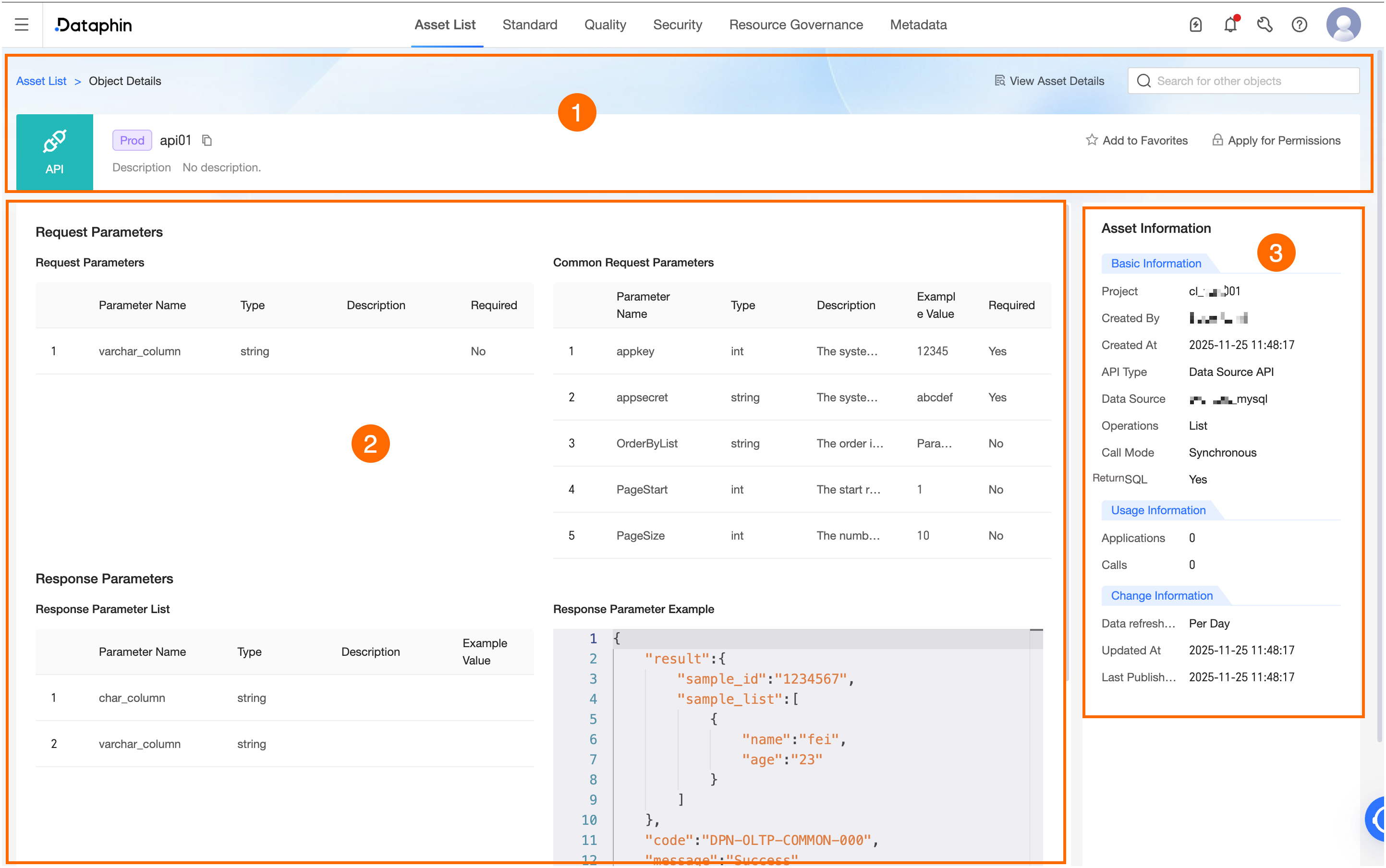
Item | Description |
①Overview | This section shows the name, environment, and description of the data service. You can also perform the following actions: Search for other assets: Quickly search for and switch to the details of other assets. Favorite: Click to add the asset to or remove it from favorites. After you favorite an asset, you can view all favorited assets in My Data. For more information, see View and manage my favorited assets. Apply for Permissions: Click to go to the permission application page for the API. For more information, see data service permission list.
|
②Asset Details | Shows the request and response parameters. Information about row-level security is displayed only if it is enabled for the API. This section is not supported for workflow APIs. The request and response parameters of a workflow API display the parameters declared in the bound API dataset version. However, for common request parameters, only appkey and appsecret are displayed.
|
③Asset Information | Displays the Basic Information, Usage Information, and Change Information of the data service. Basic Information: Includes project, Created by, Created at, API Type, data source, Operation Type, Data Volume, Maximum Number of Input Records, Invocation Mode, Return SQL, Bound API Dataset, Bound Online Workflow, and Binding Status. APIType: Valid values include: Direct data source API, Service unit API, Logical table API, Dataset API, Registered API, Composite API, and workflow API. Maximum Number of Input Records: Displayed only when Operation Type is Create, Update, or Delete, and Data Volume is Batch. Invocation Mode: Can be synchronous invocation or asynchronous invocation. Bound API Dataset: Click to open the details page for the API dataset in the asset inventory. Bound Online Workflow: Click to open the workflow's configuration page in Data Development.
Usage Information: Includes Number of Applications and Number of Calls. Change Information: Includes Data Update Frequency, Data Update Time, and Last Published Time. Data Update Frequency: The frequency at which the API's data source is updated. This helps callers understand data freshness.
Important For a workflow API, only Last Published Time is available.
|
 icon in the Actions column to open the object details page.