Create a sync destination table
A sync destination table is a table on the Dataphin platform used for processing business data. This topic describes how to create a sync destination table.
Create a destination table using an ad hoc query
Log on to the Dataphin console.
On the Dataphin console page, select a region for your workspace and click Enter Dataphin>>.
On the Dataphin home page, click Develop in the top menu bar.
On the Data Development page, follow the steps shown in the figure to open the Create Ad-hoc Query File dialog box.
In the Create Ad-hoc Query dialog box, enter a Name and Description, and select a folder in the Select Directory field.
In the New Ad Hoc Query dialog box, configure the parameters.
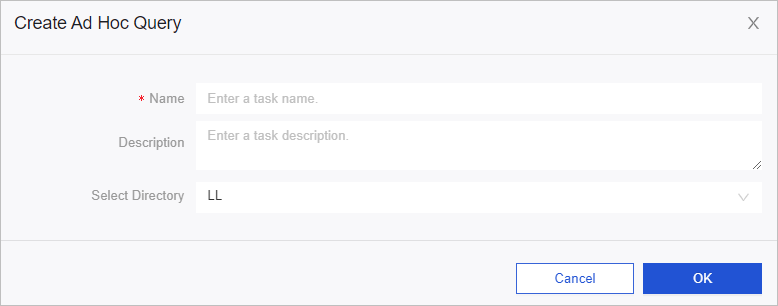
Parameter
Description
Name
The name can contain Chinese characters, digits, letters, and underscores (_). The name cannot exceed 64 characters in length.
Description
Enter a description for the task.
Select Directory
Select a folder for the resource.
Click OK.
On the code editor page, write, precompile, format, and run the code as shown in the following figure.
Create a destination table using a computing task
On the Data Development page, navigate to the Script Task page as shown in the following figure.
On the Script Task page, click the
 icon and select MAX_COMPUTE_SQL.
You can write and run the code.
Configure the parameters in the Create MAX_COMPUTE_SQL Job dialog box.
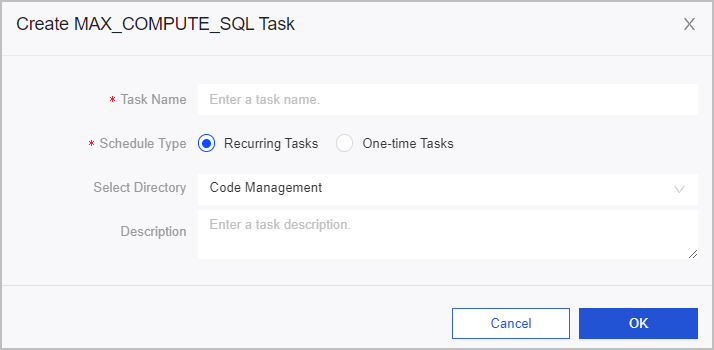
Parameter
Description
Task Name
Enter a name for the offline computing task, such as SQL.
Schedule Type
Select a schedule type for the task. Schedule Type includes:
Recurring Task: The task is periodically scheduled by the system.
One-Time Task: You must manually trigger the task to run.
Description
Enter a brief description of the task.
Select Directory
Select a folder for the offline computing task.
Click OK.
On the Code Editor page, refresh, save, and run the code as shown in the following figure.