Introduction to the management console
The Dataphin management console interface offers a comprehensive overview of features, combining different versions and value-added packages. It displays various time-related information, such as activation time, expiration time, and remaining available time. This topic provides an introduction to the Dataphin management console interface.
Log on to the management console
Log on to the Dataphin console using an Alibaba Cloud account.
If the primary account has an active Dataphin subscription, you can use Dataphin normally after logging on to the management console. However, the console may become unavailable in the following scenarios:
If Dataphin has not been purchased by the primary account, please complete the purchase of the Dataphin instance. For more information, see Activate Dataphin--Semi-managed.
If the Dataphin instance purchased by the primary account has expired and the overdue payment is within 14 days, the management console will indicate that the payment is overdue. During this 14-day grace period, you cannot access the product page, but all data will be retained. You have the option to renew the product service. For more information, see Renew.
Failure to renew within 14 days will result in the release of your historical Dataphin instance and the deletion of all user data, which cannot be restored.
NoteOnly the primary account is authorized to purchase, renew, and upgrade Dataphin instances.
Interface introduction
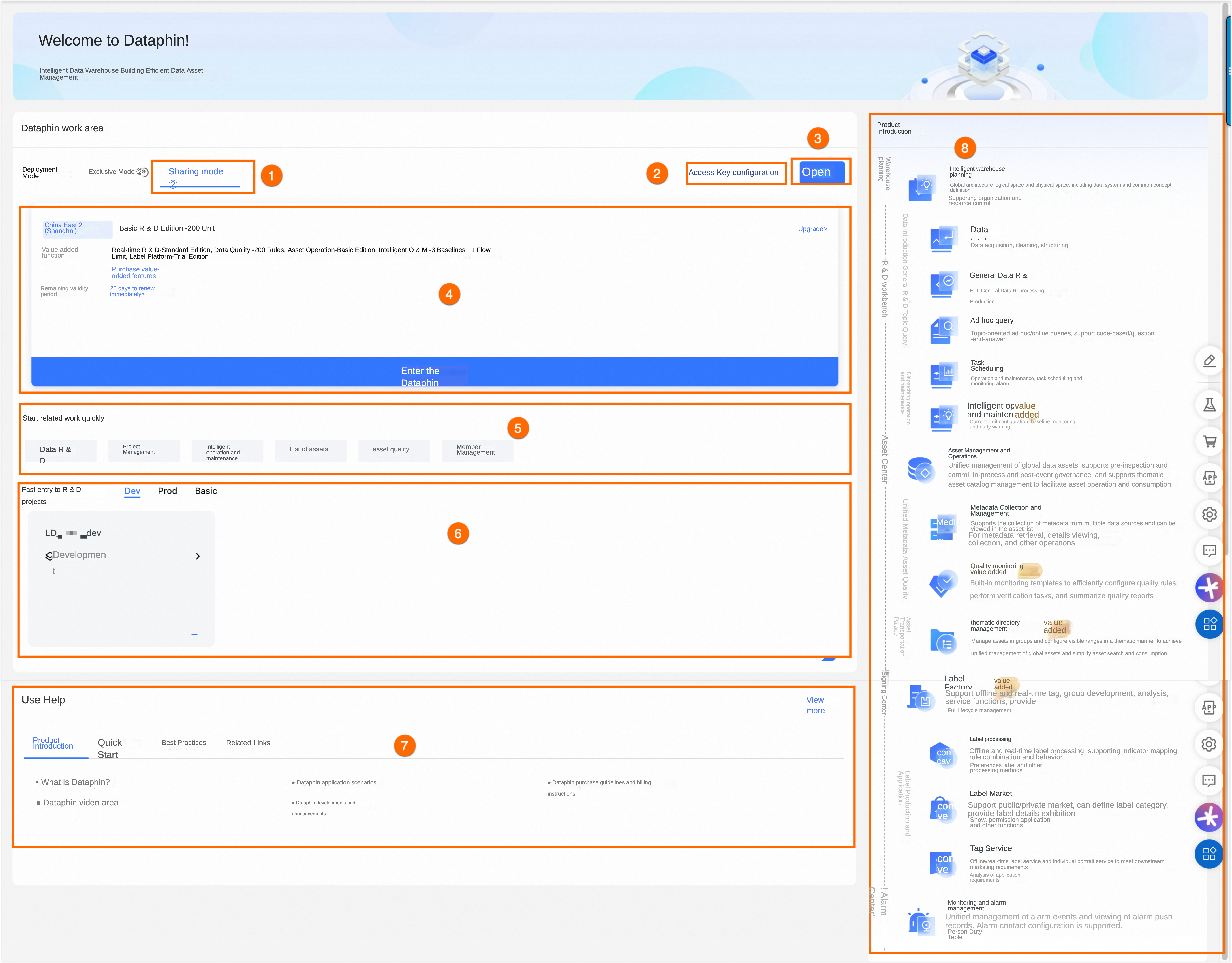
The management console interface is outlined below.
Numbered area | Description |
① | The fully managed, or public cloud multitenancy mode, enables quick start-up by purchasing Dataphin software and compute engine resources. The cloud platform manages the deployment, software upgrades, and maintenance, providing a ready-to-use solution without the need for deployment or operational concerns. |
② | The Access Key information entered here is solely for authentication purposes and to retrieve the account list under the primary account for member addition. Dataphin ensures your Access Key information is not stored in plaintext. Configuration steps include:
|
③ | This section displays the region of the purchased Dataphin instance and allows for the purchase of instances in regions where the service is not yet activated. Details include:
Note Dataphin is available for purchase in the China (Shanghai), China (Shenzhen), China (Beijing), and China (Hangzhou) regions. |
④ | The following information is provided:
|
⑤ | Quick access to various functional modules of the Dataphin instance is provided, including:
Note The system provides quick start entry points for related tasks based on the purchased version and function package. |
⑥ | The projects joined by the current account in the selected region are displayed, categorized by project environment according to business segments. |
⑦ | Quick access to helpful resources such as Product Introduction, Getting Started, Best Practices, and Related Links is provided. |
⑧ | The functional module combination corresponding to the selected activated instance is displayed, facilitating a quick understanding of product features and enabling you to embark on your data journey. |