Grant and Revoke Data Source Permissions
Batch grant and revoke permissions on data sources to control access for user accounts, project accounts, and user groups.
Prerequisites
Create a data source. For more information, see Data Source Management.
Grant Data Source Permissions
-
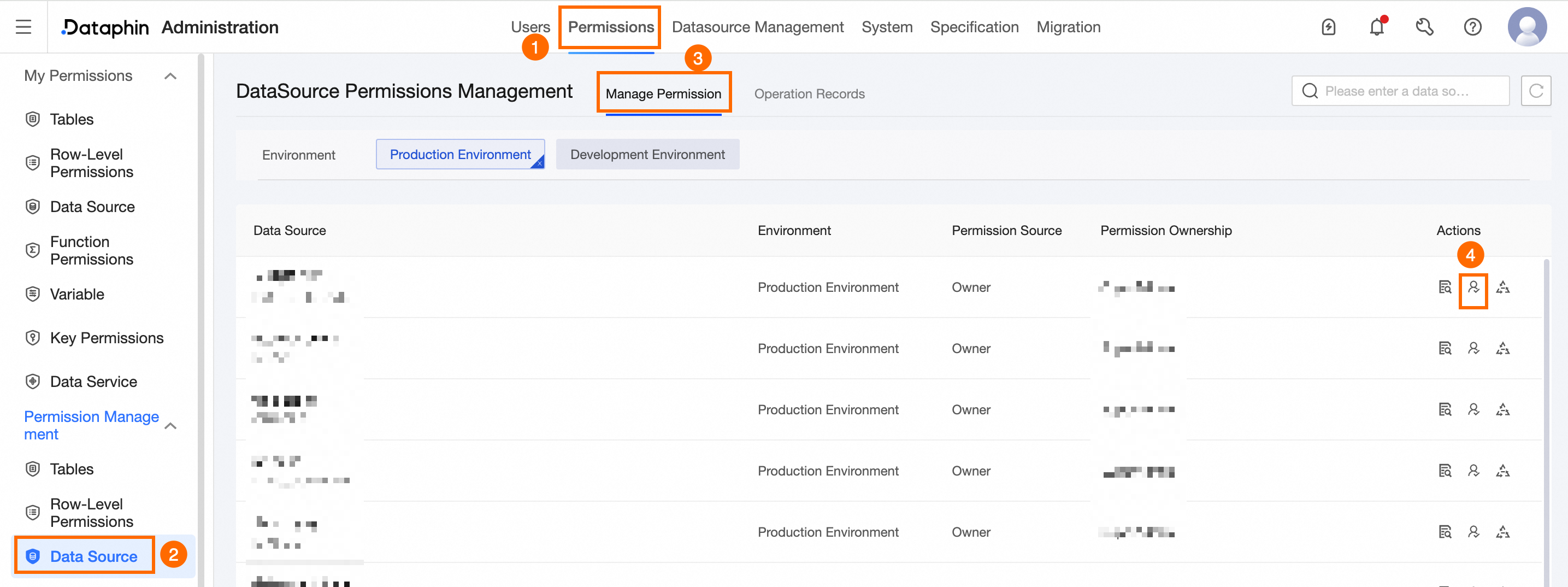
Navigate to the Dataphin home page and single click the Management Center in the top menu bar.
-
Use the instructions in the image to access the Data Source Authorization dialog box.
-
In the displayed dialog box, configure the parameters as needed.
Parameter
Description
Account Type
Grant permissions to User Account, Project Account, and User Group simultaneously or individually.
-
Use a User Account for modeling and development in the production environment, and to publish developed data. If you choose User Account, you must select a Valid Until date.
-
A Project Account manages and executes tasks in the production environment. If you choose Project Account, you must select a Project.
-
A User Group manages permissions for its members. If you choose User Group, you must select a User Group and a Valid Until date. You can authorize up to 20 groups at once.
Permission Type
Select the permission type to grant: Read-through, Write-through, or Execute.
-
Read-through: Reads data from the source storage through the synchronization component.
-
Write-through: Writes data to the target storage through the synchronization component.
-
Execute: Runs database SQL tasks. This permission does not include read-through or write-through permissions.
Authorization Reason
The reason for granting permissions. Maximum length: 128 characters.
-
-
Click OK to complete the authorization.
Revoke Data Source Permissions
-
On the Datasource Permission page, locate the row of the data source with permissions to revoke and click the Actions column
 icon.
icon.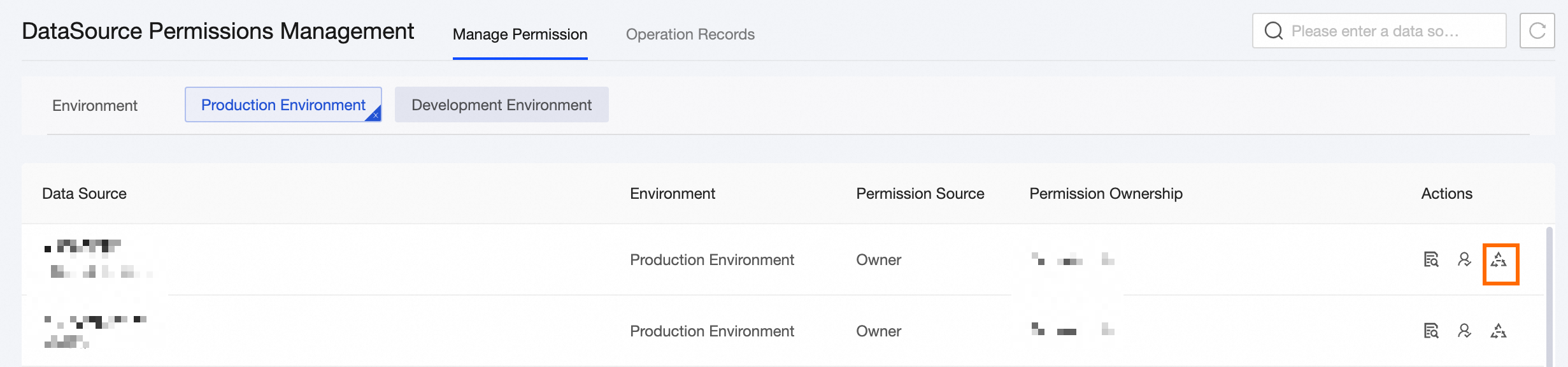
-
In the Data Source Permission Revoke dialog box, set the required parameters.
Parameter
Description
Revoke Account
Select the account type to revoke: User Account, Project Account, or User Group.
-
If User Account is selected, choose the user account to revoke.
-
If Project Account is selected, choose the tenant account to revoke.
-
If User Group is selected, choose the user group to revoke.
Permission Type
Select the permission type to revoke: Read-through, Write-through, or Execute.
-
Read-through: Reads data from the source storage through the synchronization component.
-
Write-through: Writes data to the target storage through the synchronization component.
-
Execute: Runs database SQL tasks. This permission does not include read-through or write-through permissions.
Revoke Reason
The reason for revoking permissions. Maximum length: 128 characters.
-
-
Click OK to complete the revocation.
View Data Source Details
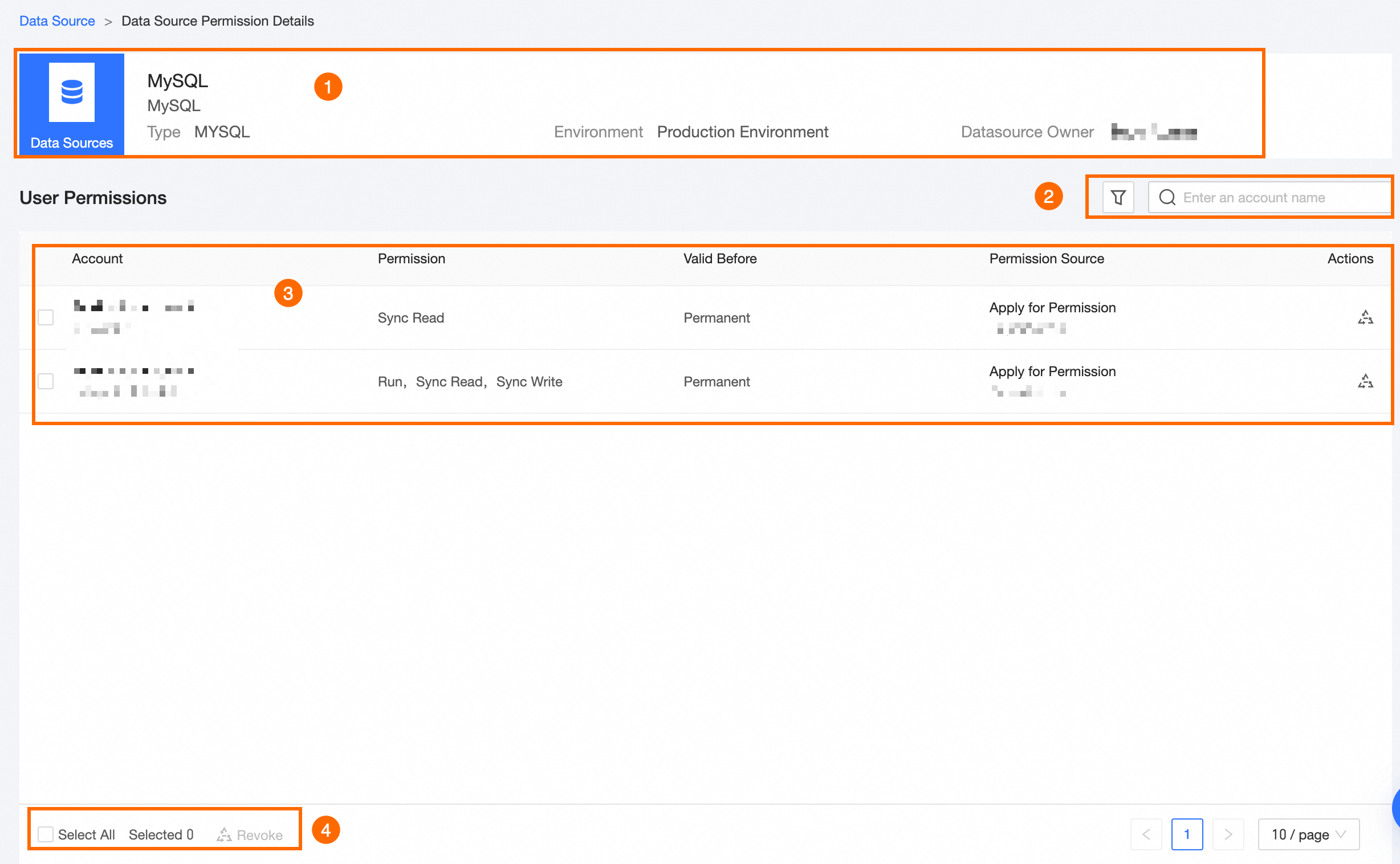
To view details of data source permissions, single click the data source name or the  icon in the Actions column.
|
Area |
Parameter |
|
①Basic Information Area |
Displays the data source name, type, environment, and owner. |
|
②Filter and Search Area |
Search by account name or filter by account type and permission type. |
|
③List Area |
Lists the authorized accounts, permission types, validity periods, and permission sources. You can also click Revoke in the Actions column to revoke permissions. To revoke an account's overall data source permissions, click Revoke in the Data Source Revoke dialog box, enter the Revoke Reason, and then click OK. |
|
④Batch Operation Area |
To batch revoke permissions, click Revoke in the Data Source Revoke dialog box, provide the Revoke Reason, and then click OK. |
Operation Log
The Operation Log tab records all data source authorization and revocation activities.
Click the  icon in the Actions column to view detailed operation logs.