Standard access method for metadata warehouse shared model
The metadata shared model consists of physical tables that aggregate system metadata from Dataphin and metadata from associated compute engines. These tables are stored in the metadata warehouse project under the metadata warehouse tenant and updated on a T+1 basis. To access the shared model, use an integration task to synchronize the required data tables from the metadata warehouse tenant's compute source to your business tenant's compute source.
Procedure
-
Create a metadata warehouse project data source.
In the business tenant, add the compute source of the metadata warehouse project as a data source. This data source serves as the input for the integration task. For example, if the compute source is MaxCompute, create a MaxCompute data source in the business tenant.
-
Check if the latest data is produced.
Use the communication tables of the metadata warehouse shared model to verify that the latest data has been produced. These tables are updated after each daily production run. The communication tables include:
-
data_share_finish: The basic metadata model communication table.
-
data_security_finish: The communication table for the data security module shared model.
-
data_service_finish: The communication table for the data service module shared model.
ImportantSome shared model tables require the purchase of corresponding value-added modules, such as data security. If a module is not purchased, its tables will not generate data and the communication tables will not be produced.
-
-
Create an integration task.
Configure the data source of the metadata warehouse compute source as the input, set the target project as the output, select the required metadata tables, and complete the integration task configuration.
-
Integration task scheduling configuration.
-
Schedule the integration task based on the average completion time of shared model tasks under the metadata warehouse tenant. To manage start times collectively, configure a unified VIRTUAL task node as the upstream dependency for all related integration tasks. Adjusting the VIRTUAL task node's scheduling time controls the overall execution. For detailed instructions, see .
-
To ensure you use the latest data and receive timely production notifications, create a check task (such as a PyODPS task) and set it as the upstream dependency for all integration tasks. When the check task confirms the shared model data table is updated, it triggers the downstream integration tasks. For detailed instructions, see .
-
Create a VIRTUAL task node
-
In the Dataphin project space, set up a timed VIRTUAL task node to acquire metadata.
-
Navigate to the Dataphin home page, click the top menu bar Development, and by default, enter the data Development page.
-
Choose the Dataphin project space for metadata acquisition and sequentially click Compute tasks ->
 Icon ->VIRTUAL compute tasks.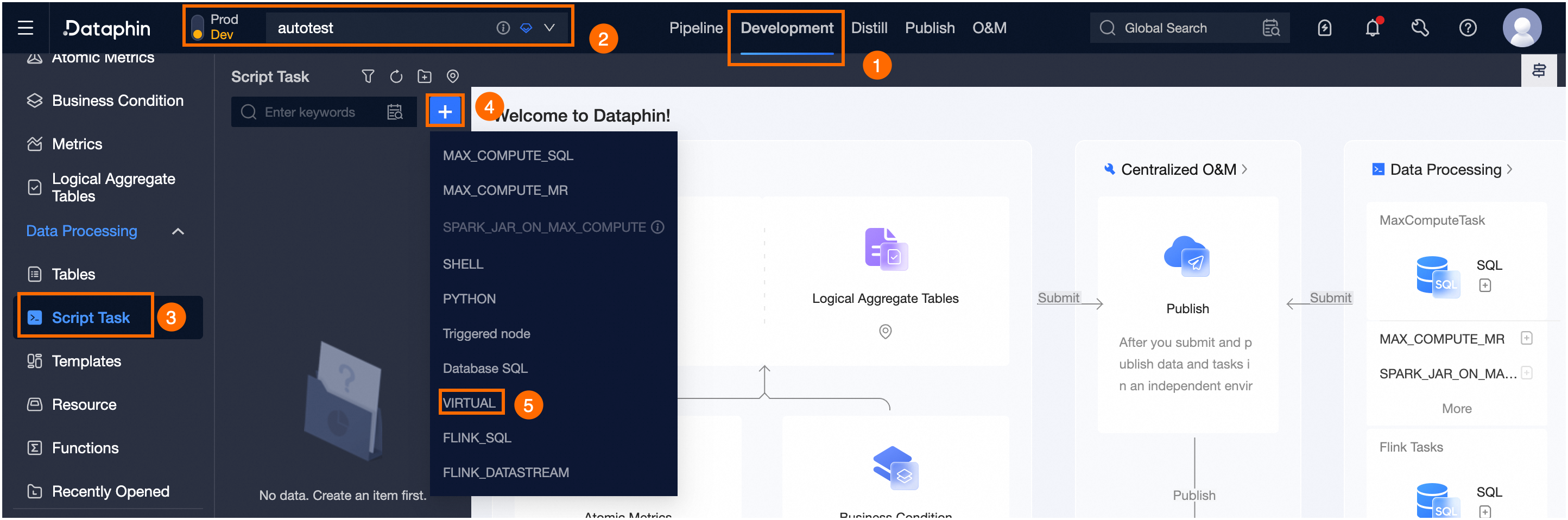
-
-
Configure the VIRTUAL task node's upstream dependency as the root node and set the runtime, for example, at 3:30 AM.
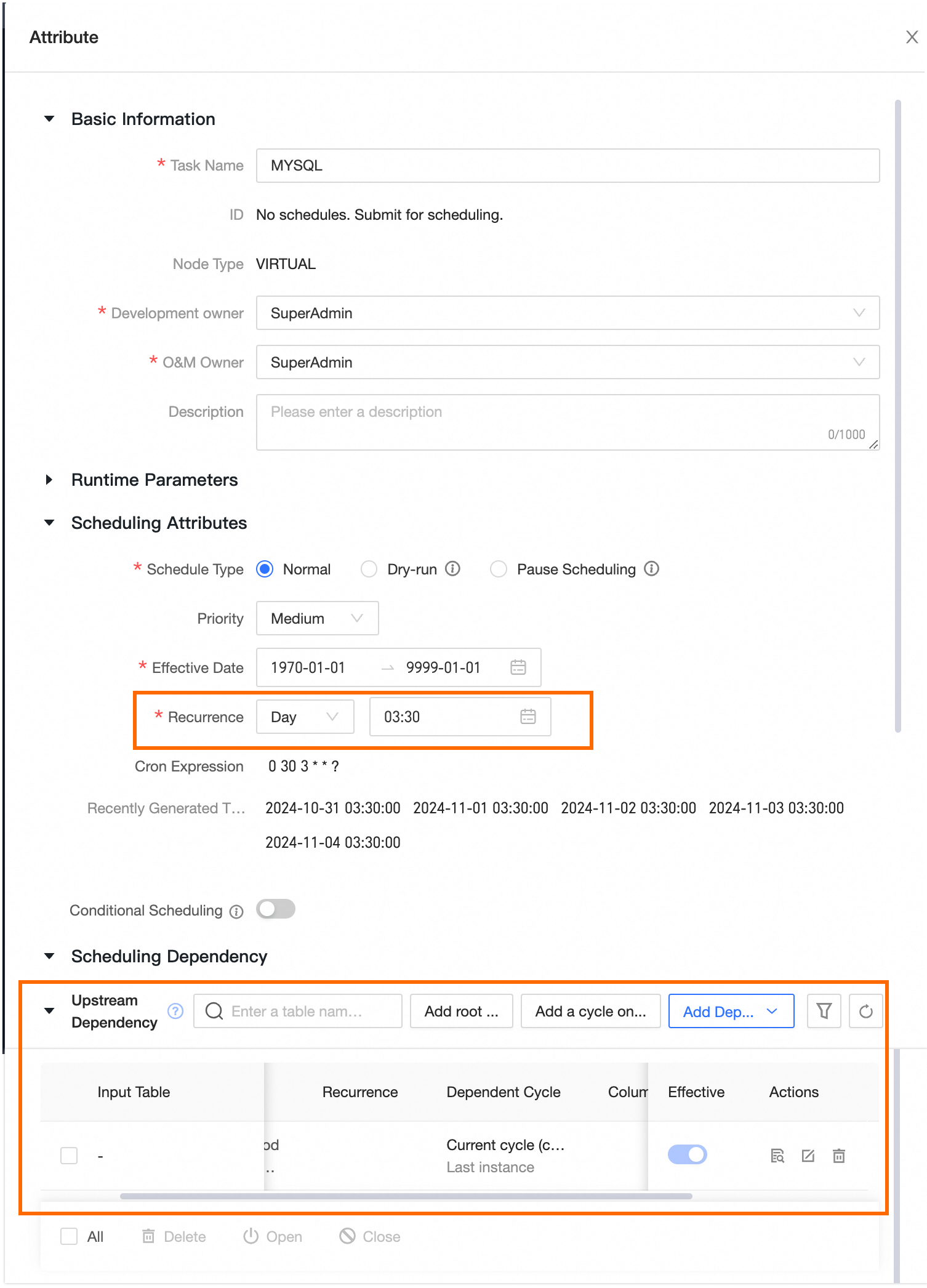 Note
NoteTypically, the metadata warehouse task is completed before 2:00 AM when there are sufficient computing resources.
-
Link the created integration task node to the VIRTUAL task node.
Create a check task node
The following example creates a PyODPS check task on the MaxCompute compute engine. For other compute engines, use Shell, Python, or other script tasks instead.
-
In the Dataphin project space where metadata is to be output (not the metadata warehouse project space), create a PyODPS task.
For more information about PyODPS tasks, see PyODPS.
-
Compose the check code within the PyODPS task. The code snippet is as follows:
#!/usr/bin/env python import time from odps import ODPS table_list = ['data_share_finish','data_security_finish','data_service_finish','data_quality_finish','data_standard_finish'] o = ODPS('**your-access-id**', '**your-secret-access-key**', '**your-default-project**',endpoint='**your-end-point**') success = False ds = '${bizdate}' sleepTime = 15 ready_table_list = [] for i in range(1, 2000): for t in table_list: table = o.get_table(t) if table.exist_partition('ds=%s' % ds): success = True table_list.remove(t) ready_table_list.append(t) break else: print ('sleep %ds,table %s partition %s is not ready' % (sleepTime, t, ds)) time.sleep(sleepTime) if not success: raise Exception('partition is not ready') else: print ('all meta table %s partition is ready' % (','.join(ready_table_list)))Note-
The script periodically checks whether the communication table in the metadata warehouse project has updated data for the specified business date. Modify the script as needed to check specific tables.
-
Contact the Dataphin O&M engineer or the development owner for compute source details of the metadata warehouse project, including the MaxCompute project name, AccessKey, and endpoint.
-
-
Depend the integration task node on the check task node that has been created.
What to do next
-
If you are operating in Dev-Prod mode, you must publish the task. For more information, see Manage publish tasks.
-
In Basic mode development, upon successful submission, the task becomes eligible for scheduling within the production environment. To view your published tasks, visit the .