View and manage quality validation records
Quality validation records track the results of quality rule checks on Dataphin tables, domain-wide tables, metrics, data sources, and real-time metadata tables. You can view, filter, and manage these records from the Data Quality module.
View validation records
-
Navigate to the Dataphin home page, and from the top menu bar, select Administration > Data Quality.
-
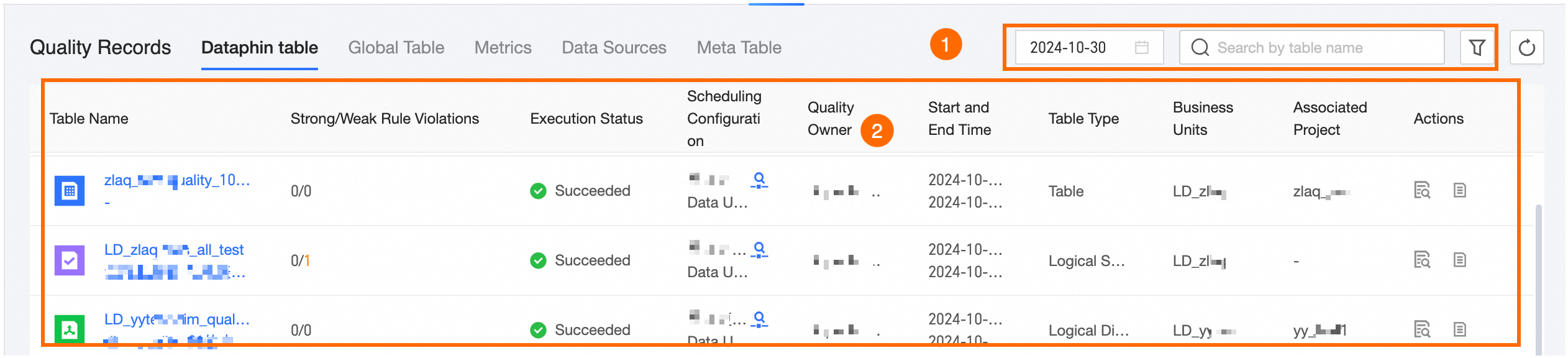
In the left-side navigation pane, click Quality Record, then select Dataphin Table to access the validation record page for Dataphin tables. The layout of validation record pages is similar across different object types, as illustrated below with the Dataphin Table example.
Parameter
Description
① Filter and search
Filter validation records by supported fields, date, or My Responsible records, and search by object name keyword.
② List area
View validation information for different object types. You can examine validation details, view quality reports, and stop validations.
-
View Validation Details: Click the
 icon or the table name to view validation details for the current object. For more information, see or Validation Record Details.
 -
View Quality Report: Click the
 icon to open the quality rule details page for the current object.
 -
Stop: Click the
 icon to stop the quality rule validation task.Note
Once stopped, the execution status changes to canceled. Completed rules are unaffected, while rules still in progress are marked as canceled.
-
Validation record details
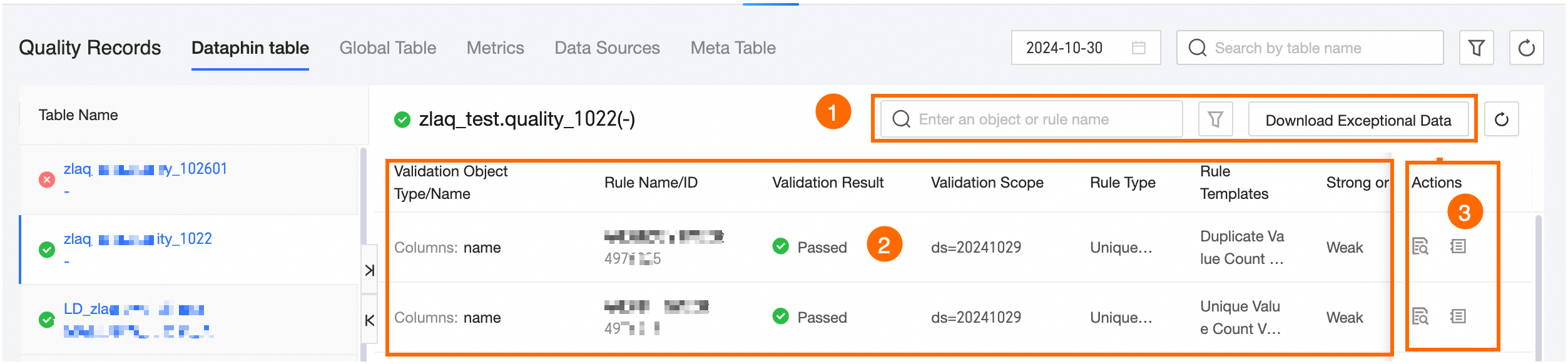
Click the object name or the  icon in the operation column to view validation record details. The detail page layout is consistent across object types, as shown in the Dataphin Table example below.
|
Area |
Description |
|
① Filter, search, and download abnormal data area |
|
|
② List area |
Displays the validation object type/name, rule name/ID, result, scope, type, template, strength, and validation start time. |
|
③ Operation area |
|
 icon to view rule validation details, including basic information, configuration settings, and validation results.
 icon to view the execution log for the current object's quality rule validation.
 icon to compare past and present table structure results.