DataV custom component performance optimization
This topic describes how to optimize the performance of custom components by using browser critical path rendering, memory leakage, and resource optimization.
Critical Rendering Path
The browser critical rendering path consists of five parts: JavaScript, Style, Layout, Paint, and Composite. 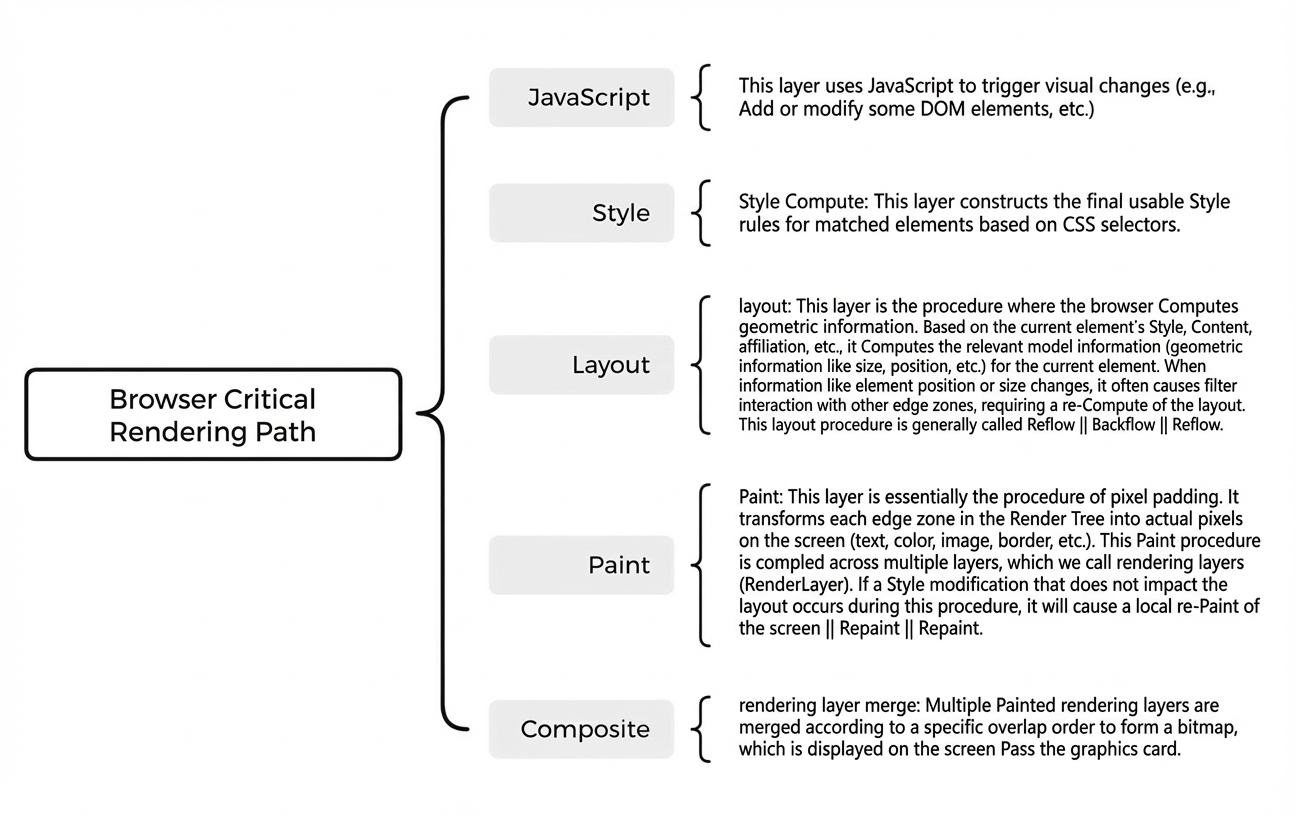
JavaScript
The optimization of JavaScript is generally completed in four parts: reducing the amount of code, limiting the frequency of code execution, accelerating the speed of code execution, and accelerating the compilation time of code parsing.
Reduce the amount of code:
Method 1: Delete unused code and features.
Method 2: Remove code that is not referenced in the context (Tree shaking technique).
NoteTree shaking is used to check whether code modules are imported or exported.
Method 3: Merge and compress.
Limit the code execution frequency: Generally, you can use Throttle and Debounce to control the function execution frequency. Throttling means that a function is continuously called within a certain period of time and is executed once at a certain interval. Anti-shake means that a function is executed only the last time no matter how many times it is triggered within a certain period of time.
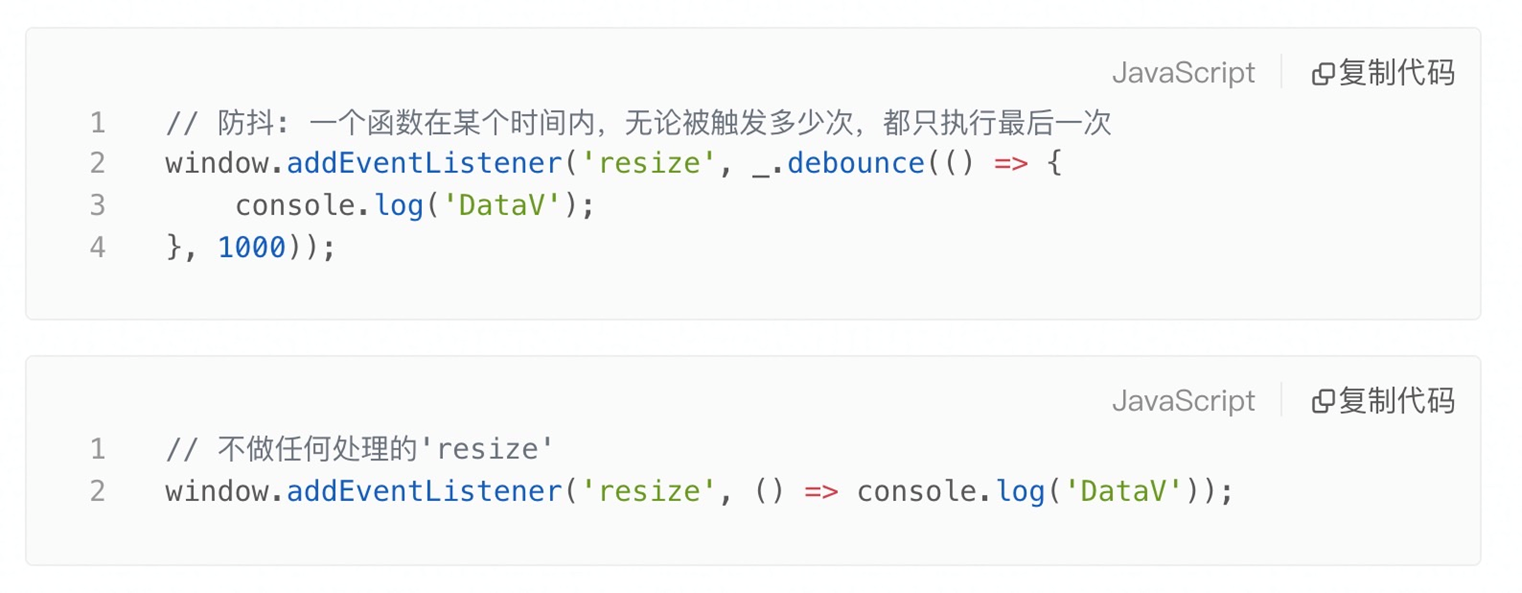
Accelerate code execution: Because there are many optimization details based on code behavior, only the part is listed for explanation.
Reasonable use of the cache mechanism: The code does not have strict real-time requirements, and the content is frequently accessed but infrequently changed.
Loop optimization: Avoid using for... in loops, reduce the number of iterations and the workload of each iteration as much as possible, and use return to exit multiple loops as soon as possible.
When there are too many conditional statements: the priority used is, lookup table,
switch, andif-else.
Accelerate code parsing and compilation-Function optimization: During the definition of a function, it will only be "pre-parsed" and will only be "parsed" and compiled when it is called. If the function needs to be executed immediately, it is a waste of resources to "pre-parse" it. Therefore, the function can be optimized in the following ways:
Avoid pre-parsing of the function, enclose the function in parentheses and assign it to a variable. When parsing the script, V8 will not pre-parse the sayHi function, but will fully parse the entire script and compile the local code.

Make sure that the types and number of input parameters of the function are consistent as much as possible. In this way, the compiler will improve the execution efficiency of the current function. Otherwise, it will lead to non-optimization or optimization rollback.
NoteThe type of the parameter has a significant impact on the compiler's optimization mechanism.
Accelerate code parsing and compilation speed-object optimization: an important optimization mechanism in V8 is inline cache (inline cache). the general idea is to save the hidden class and offset value found before. when searching next time, first compare whether the current object is the previous hidden class. if the previous cache result is directly used, the query time is reduced.
Avoid creating a broad element type; once marked as a broad element type, it cannot be changed to a more precise type during its lifetime. The process is irreversible, and if you need to change the element type, you can only recreate the element.
Avoid using class arrays. If you want to use them, you can convert them to arrays before you operate. The performance after conversion will be higher than that of using class arrays directly.
Avoid writing code that reads more than the length of the array, which is out of bounds, because in this case, V8 fails the bounds check and the property check also fails, which will sequentially look up the prototype chain and slow down the compilation.
Avoid element type conversion.
Style
The general optimization of style calculation can be completed by the following aspects:
Style sharing as much as possible, if it can be shared, there is no need to execute the matching algorithm, and the execution efficiency will be improved.
Reduce the overhead of expensive attributes, such as the use of box-shadow, filter,: nth-child, border-radius, and other attributes.
Use more advanced CSS properties, such as the new content-visibility property in Chromium85. When this new property is added, the rendering work for specific elements, including layout and drawing, is skipped directly, which makes the initial page load faster.
Test case: Create a test case with 185 images and test the data of content-visibility compared with Rendering. Each test is carried out 10 times respectively, the maximum and minimum values are removed, and the average value is taken. The result is that the loading rate of the page with content-visibility added is 31.42% higher than that without Rendering, i.e. the initialized rendering performance is improved by about 31.42%. Some of the test results in other peer technical articles are improved by as much as 7 times. This result reflects that the scheme is a CSS scheme that can make the initial user load faster.
In the CSS parsing calculation phase, for modern browsers, the output ratio brought by the code level is not high, most of the development specification level of the convention, on the basis of enhanced maintainability, as far as possible to fit the parsing process of the parser. Therefore, you need to focus on rendering performance issues caused by CSS.
Layout
Layout: Performance optimization on layout can be carried out from the following aspects.
As far as possible to reduce unnecessary elements, the layout of the entire document, if there are a large number of elements, the browser will take a long time to figure out the position and size of all elements.
When layout, use Flexbox as much as possible. Compared with floating layout, Flexbox will have 4 to 5 times the performance improvement under the same number of elements, and Flexbox is very easy to use.
Delete the default attribute of the element. The default attribute will increase the file size for no reason. At the same time, you need to reduce the use of iframes and avoid table layout.
Layout-rearrangement: In a real environment, rearrangement is inevitably triggered, which causes a significant loss of performance. Therefore, you can minimize rearrangement to reduce performance loss. For rearrangement, as long as the geometric information of the current element is modified, such as position, size, and hidden, the rearrangement will be triggered. The rearrangement can be reduced by the following aspects.
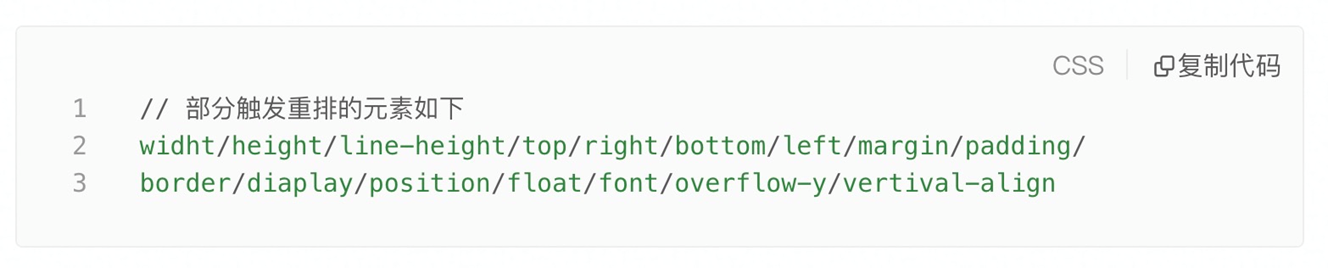
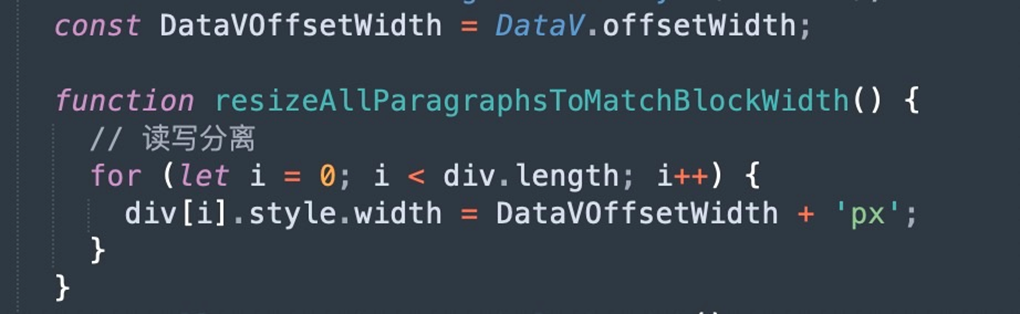
To avoid forced synchronous layout and layout jitter, you need to separate read and write operations. If read /write separation is disastrous for performance, DOM manipulation can be optimized using the FastDOM library.
Avoid frequent style changes and focus on style changes as much as possible.
Use absolute and fixed to separate document streams to reduce rearrangement overhead.
Take the DOM offline: Use
diaplay:none;to hide the style, modify it, and then display it, so that only two rearrangements are triggered.
Layout-read /write operation separation: the following two methods are compared between layout jitter and read /write splitting.
Layout Jitter (Read /Write Loop)
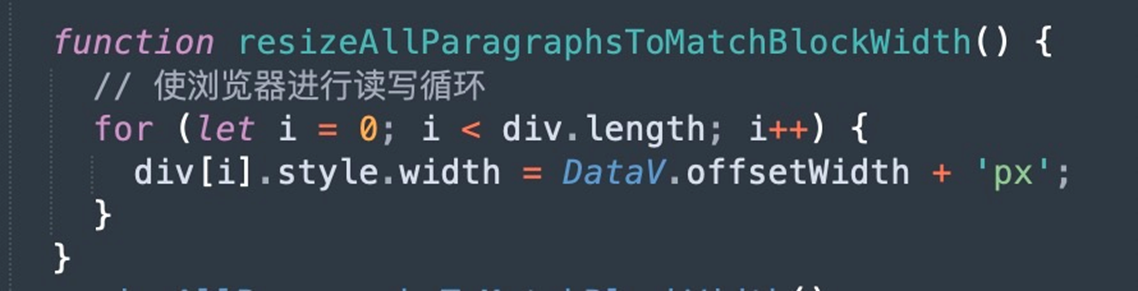
read /write splitting

Paint
Performance optimization in rendering can be achieved by reducing the use of expensive attributes, including box-shadow, filter, border-radius,: nth-child, and other attributes. For example, in the same layer, if a component has a large number of DOM elements, such as scrolling a long list. When the box-shadow attribute is added to the scrolling list, when the list is scrolled, other DOM elements that intersect with it will trigger redrawing. The more connected nodes, the greater the performance overhead.
Composite (Render Layer Merge)
Performance optimization of rendering layer merging can be achieved by the following methods.
Animations are implemented using transform: the transform-related elements are placed in a separate composite layer for rendering and drawing, and the animation does not affect other layers.
Reducing implicit composition means eliminating meaningless composition layers: For implicit composition, unnecessary overhead is caused. For example, both elements AB are added with positioning attributes. At this time, element A is rendered by GPU, and element B remains unchanged. At this time, the browser will promote element B to a separate composition layer to ensure the correct layer stacking order. This can be solved by constraining one's own layout habits. For example, when an element is individually rendered by GPU, the z-index of the current element is made greater than other values as much as possible, and the order of the current element in the document is ensured as much as possible, so as to eliminate meaningless composition layers.
Reduce the size of the composition and use scale to enlarge it to save memory usage. For example, for the following two elements: element a width: 100pxheight: 100px; Memory takes up 40KB;B element width: 10px; Height: 10px; Memory takes up 400B of memory in the synthesis layer, the difference is very large, b can be enlarged
transform: scale(10);
Leaked Memory
In terms of memory leaks, you can optimize performance in the following ways.
After a page cycle ends, you can use removeEventListener to destroy all event listeners on the page, such as click, visibilityChange, Promises, Observables, and EventEmitters.
If you use the timer setTimeout or setInterval, you need to use clearTimeout or clearInterval to clear them.
Clean up references to DOM elements.
Try to avoid using global variables.
After the task is completed, the local variables in the closure are cleared.
NoteYou can use the following methods to determine memory leaks.
Use Chrome debugging (Performance, Performance Monitor, Heapsnapshot).
Use queryObjects to determine the length of all objects on the page and determine whether memory leaks exist.
Resource optimization
Accelerate resource links
To speed up resource linking, you can optimize performance in the following ways.
Content distribution network (Alibaba Cloud Content Delivery Network): can close the absolute distance between the content and the user.
DNS Preload: can speed up DNS resolution.
Domain hashing: optimizes resource blocking caused by concurrent requests over earlier versions of HTTP.
Strong caching: Static resources force the use of local caching, which brings complexity only when the resource is updated and a different UR is published.
Reduce resource size
If you reduce the size of your resources, you can optimize performance in the following ways.
html/css/js: Remove, merge, or compress obsolete code (unused, unreferenced html or css, and default values).
Image: You can merge an image into a webp sprite or use iconfont to reduce the image size.
Video Link
DataV small class live video: Custom widgets-Performance optimization live video usage tutorial.