Add OceanBase for MySQL data source
Add an OceanBase for MySQL data source in DataV and configure the required connection parameters. OceanBase offers strong data consistency, high availability, high performance, online scaling, high SQL standards compatibility, and cost-effectiveness.
Prerequisites
An OceanBase for MySQL data source is prepared.
Add the IP addresses of the corresponding region to your data source whitelist to ensure that DataV can access your database. For more information, see Configure a database whitelist.
Limits
This feature is available only in DataV Enterprise Edition and later versions.
Add data source through private network
Access the DataV console.
-
On the Workbench page, click in the navigation pane on the left. On the Data Source page, click New Data Source.
-
From the Type list, select OceanBase for MySQL.
-
Choose Private Network and select the region where the OceanBase instance is located.
-
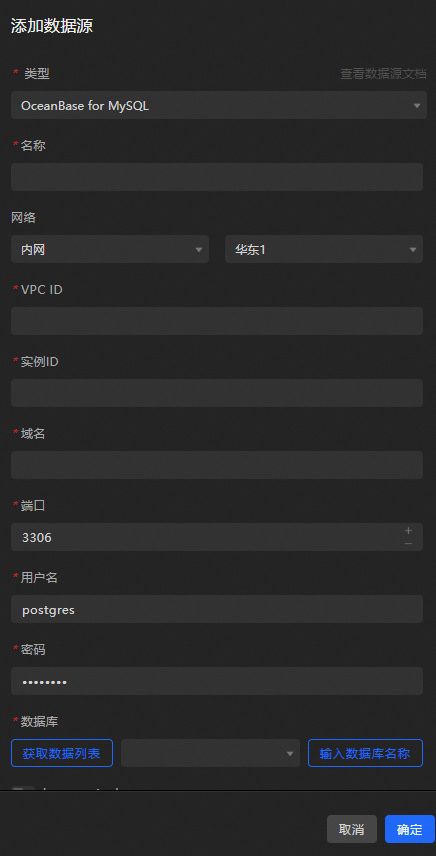
Enter the database information.
Parameter
Description
Name
The display name of the data source. You can specify a custom name.
VPC ID
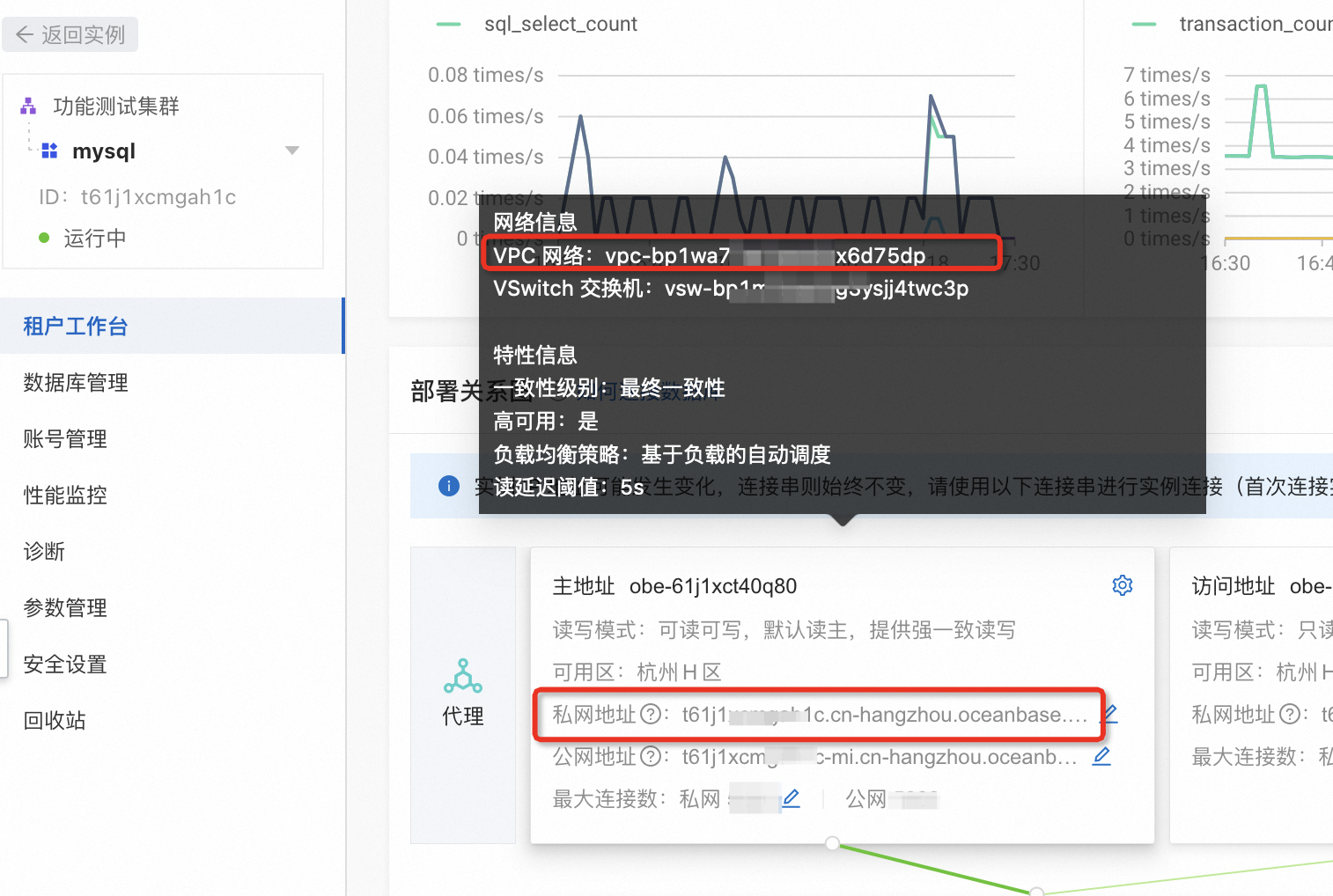
The VPC ID of the OceanBase instance. You can find it in the OceanBase console on the Tenant Details page, in the topology graph's proxy address information. For example, to connect through the primary endpoint's private IP, use the VPC ID shown on the primary endpoint card: "VPC Network: vpc-bp1******".
Instance ID
The instance ID of the database under the VPC. You can find it in the same location as the VPC ID. To connect through the primary endpoint's private IP, use the instance ID shown on the primary endpoint card: "Private IP is t61j1******1c.cn-hangzhou.oceanbase.aliyuncs.com".
Domain Name
The private network address for connecting to the database.
ImportantThis is the domain name or IP address through which the DataV server accesses your database over the public network or the internal network of certain Alibaba Cloud regions.
For example, in a private network environment, the domain name format is: xxxxxxxx.oceanbase.aliyuncs.com. Add the DataV VPC private network address to the whitelist in the OceanBase console on the Tenant Details page. The private network address can be used after it takes effect.
Port
The database connection port. Default: 3306.
Username
The username for logging on to the database.
Password
The password for logging on to the database.
Database
The name of the database to connect to.
insecureAuth
If your MySQL version is earlier, turn on this switch to allow connections with older authentication protocols.
-
After entering the database information, the system will automatically test the connection to ensure it is functioning properly.
-
Once the connection test succeeds, click OK to finalize the data source addition.
The new data source appears automatically in the data source list.
Add data source through public network
Access the DataV console.
-
On the Workbench page, click in the navigation pane on the left. On the Data Source page, click New Data Source.
-
From the Type list, select OceanBase for MySQL.
-
Choose Public Network from the list.
-
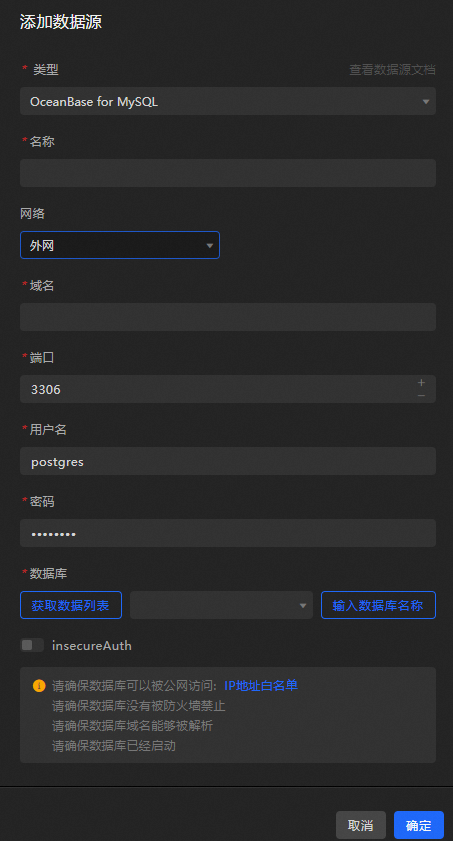
Provide the necessary information for the OceanBase for MySQL data source.
Parameter
Description
Name
The display name of the data source. You can specify a custom name.
Domain Name
The public network address for connecting to the database.
ImportantThis is the domain name or IP address through which the DataV server accesses your database over the public network or the internal network of certain Alibaba Cloud regions.
For example, in a public network environment, the domain name format is: xxxxxxxx.oceanbase.aliyuncs.com. Apply for a public network address and add the DataV public network IP to the whitelist in the OceanBase console on the Tenant Details page. The public network address can be used after it takes effect.
Port
The database connection port. Default: 3306.
Username
The username for logging on to the database.
Password
The password for logging on to the database.
Database
The name of the database to connect to.
insecureAuth
If your MySQL version is earlier, turn on this switch to allow connections with older authentication protocols.
-
After entering the information, click OK to add the data source.
The new data source appears automatically in the data source list.
What to do next
To use the data source in your widgets, see Configure a widget data source.
FAQ
For more information, see FAQ about data source configuration and usage.