Quantized-mesh Terrain Tiles
The Quantized-mesh Terrain Tiles layer is a global layer in the 3D City Builder. It supports independent style and data configurations, including general configurations and interaction settings. This topic describes the configuration items for this layer.
In the layer list on the left side of the scene editor, click the Quantized Terrain Tile layer to open the configuration panel, where you can configure the style and data of the Quantized Terrain Tile layer.
This widget is available only to users of DataV Premium Edition. To use this widget, upgrade your DataV edition to Premium.
If the layer list does not contain Quantized Terrain Tile, you need to add the Quantized Terrain Tile layer. For more information, see Add a Sub-widget.
Style pane
-
Search Configuration: To quickly find a specific configuration item, click on the Configuration panel in the upper right corner and enter the item's name in the Search Configuration field. The system utilizes a fuzzy match to assist in locating items. For more information, see search configuration items.
General
Parameter
Description
Service Type
Set the service type for the quantized-mesh terrain tiles. Options include Custom and Cesium.
BaseURL
The BaseURL for the quantized-mesh terrain tiles. When Service Type is set to Custom, you must enter the URL of the terrain's layer.json file. This parameter is displayed only when Service Type is set to Custom.
assetId
The resource ID of the Cesium service for the quantized-mesh terrain tiles. This parameter is displayed only when Service Type is set to Cesium.
token
The token parameter for the Cesium service of the quantized-mesh terrain tiles. This parameter is displayed only when Service Type is set to Cesium.
Interaction
Parameter
Description
Mouse Interaction
Enable or disable mouse click interactions.
Data pane
This layer does not require data configuration.
Blueprint interaction
On the scene editor page, in the layer list on the left, click the
 icon to the right of Quantized Terrain Tile.
Click the
 icon in the upper-left corner of the page.
On the Blueprint Editor page, click the Quantized-mesh Terrain Tiles layer in the Import Node section. The configuration parameters for the layer appear on the canvas, as shown in the following figure.
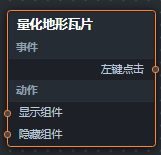
Events
Event
Description
Left-click
This event is triggered when you left-click the quantized-mesh terrain tiles. The event returns an object.
Actions
Action
Description
Show Widget
Shows the widget. No parameter is required.
Hide Widget
Hides the widget. No parameter is required.