Interactive Controls
Controls are a type of analysis unit in DataV-Note (Intelligent Analytics). Use controls to quickly build interactive queries. This enhances the user experience and improves the efficiency and effectiveness of data analysis. For example, in a sales report for an e-commerce platform, you can use a date control to view sales data for a specific date range. This topic describes how to work with date, radio button, check box, and text box controls.
Prerequisites
You have created a project.
Create an interactive control
Go to the project editing page.
Log in to the DataV-Note console.
On the tab, hover over the target project and click Edit to open the project's editing page.
Create an interactive control.
You can create controls such as date, radio button, check box, and text box to quickly build interactive queries.
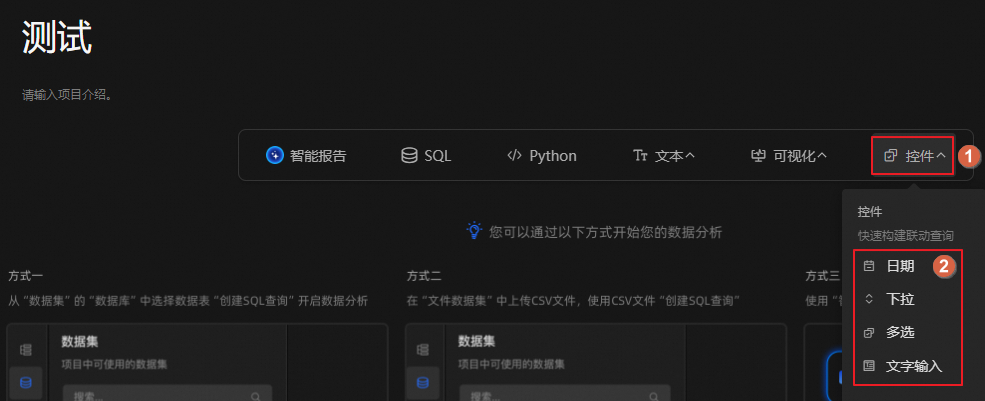
Use interactive controls
Date
The date control provides an intuitive calendar view for selecting a date or date range. By default, the date is displayed in yyyy-mm-dd format.
Click the  icon to select a time precise to the second, in yyyy-mm-dd hh:mm:ss format, or to select a time range.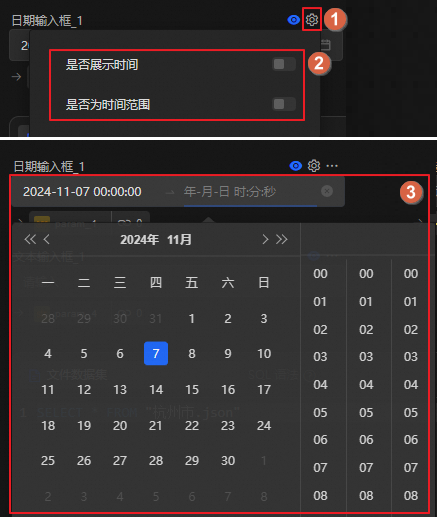
Radio button
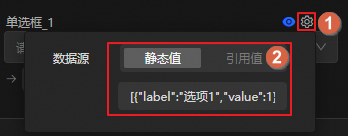
A radio button lets you select a single option from a predefined set. You can configure the options using static data or by referencing the output data of another analysis unit.
Click the icon to configure a static value or reference a value.
Example of a static value format: [{"label":"Option 1","value":1},{"label":"Option 2","value":2},{"label":"Option 3","value":3}].
Check box
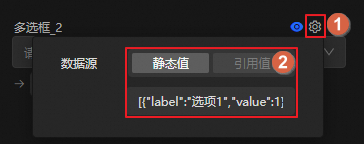
A check box lets you select multiple options.
You can configure the options using static data or by referencing the output data of another analysis unit.
Example of a static value format: [{"label":"Option 1","value":1},{"label":"Option 2","value":2},{"label":"Option 3","value":3}].
Text box
A text box lets you enter custom information, such as notes or descriptions.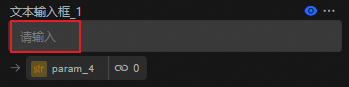
Related documents
To manage interactive controls, see Manage analysis units.
To learn about other analysis units, see Supported analysis unit types.