When you create projects for an enterprise big data platform, the project granularity is determined by the data layer. For the Operational Data Store (ODS), Common Data Model (CDM), and data warehouse service (DWS) layers, create projects based on business segments. For the application layer (ADS), create projects based on applications.
Project assignment
This tutorial uses the MaxCompute project structure shown in the following diagram. Each square represents a project.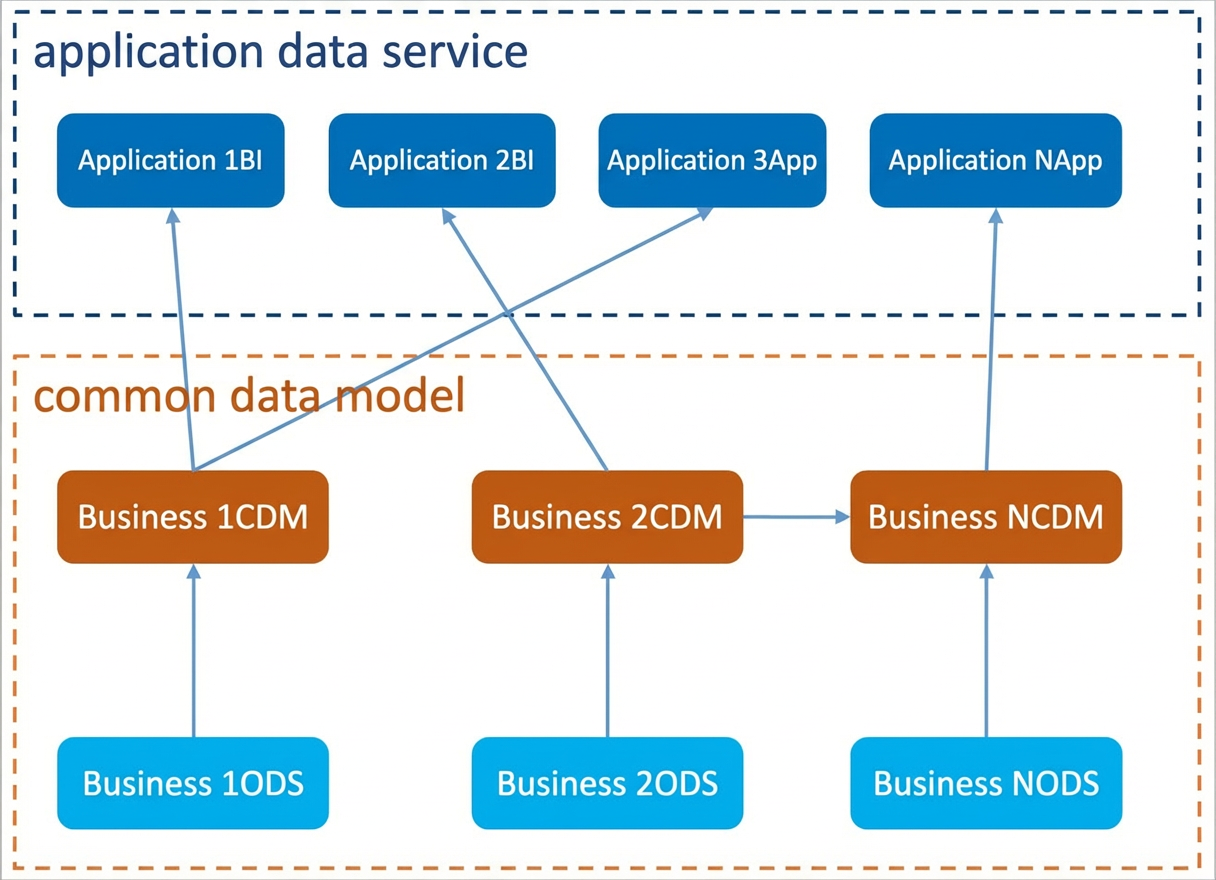
Use the
odssuffix for projects in the ODS layer. For example,asale_ods.Use the
cdmsuffix for projects in the CDM layer. For example,asale_cdm.The ADS application layer has two types of data:
For data reports and data analysis, use the
bisuffix. For example,asale_bi.For data product applications, use the
appsuffix. For example,asale_app.
Because this tutorial focuses on the transaction process in the e-commerce business segment, you need to create only one project for each of the ODS, CDM, and ADS layers.
Project mode selection
In standard mode, one DataWorks project corresponds to two MaxCompute projects. This setup provides separate development and production environments. This mode improves coding standards, allows for strict control over table permissions, prevents unauthorized operations on production tables, and ensures data security.
When you create a project in DataWorks, use standard mode to secure your production environment. For more information, see Workspace mode differences. After the project is created, you will have a production environment project and a development environment project with a _dev suffix. For example, asaleods and asaleods_dev.
Project permission configuration
You can assign different permissions to member roles in your project to control various operations. For example, you can specify which members can edit and test code, which members can publish tasks to the production environment, and how to protect production tasks from unauthorized changes. You can also grant permissions for resource usage during data development and ensure proper data security isolation.
For more information about MaxCompute data warehouse security and permission configuration, see Permission overview.