Best practices for do-while nodes
Use a loop to sequentially process each row of a dataset.
Prerequisites
Before you begin, make sure you understand the logic of a do-while node. For more information, see Introduction to the do-while node logic.
Background information
A loop node iterates through the result set of an assignment node.
-
Use an assignment node as the upstream node to pass its queried data to a downstream node.
-
Configure a context dependency so the loop node can retrieve the upstream assignment node's output.
-
Nodes in the loop body reference each row's data through the ${dag.offset} built-in variable.
For example: 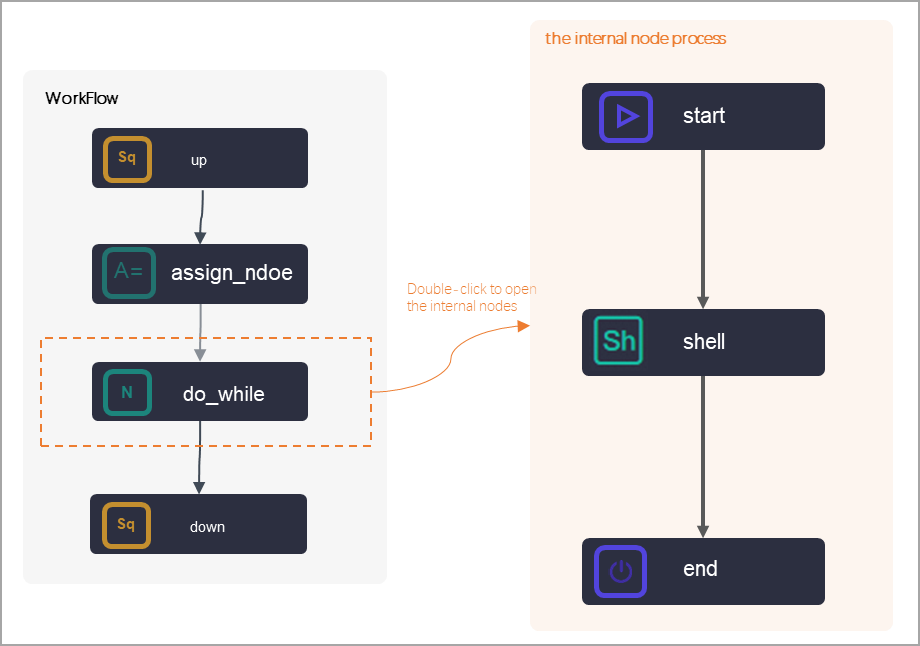
-
An assignment node outputs a two-dimensional array and passes it to the do-while node.
Example two-dimensional array:
+----------------------------------------------+ | uid | region | age_range | zodiac | +----------------------------------------------+ | 0016359810821 | Hubei Province | 30-40 years | Cancer | | 0016359814159 | Unknown | 30-40 years | Cancer | +----------------------------------------------+ -
The internal nodes use variables to retrieve and print the current loop parameters, offset, and values from the upstream assignment node.
Procedure
Inside the loop node, use the following DAG variables to access parameter values: ${dag.inputs} to get the complete dataset, ${dag.inputs[${dag.offset}]} to get the data for the current row, ${dag.offset} to get the offset, ${dag.loopTimes} to get the loop count, ${dag.inputs.length} to get the dataset length, and ${dag.inputs[0][1]} to retrieve data from a specific row and column as you would in a two-dimensional array.
-
Configure node dependencies
The do-while node depends on the assignment node.
-
Pass the assigned result set
The built-in Parameters output parameter outputs of the assignment node must be used as the Parameters input parameter for the do-while loop node.
-
Retrieve parameters within the do-while node's internal nodes
Customize the internal workflow of the do-while node based on your business requirements, and use variables in the internal nodes to retrieve the required parameter values.
Create and configure an assignment node
Key points:
-
Assignment code and context parameters: Select a language for the assignment node and use a statement to define the final result set. The assignment node assigns the output of its last statement to the built-in
outputsoutput parameter.NoteThe do-while node uses the assignment node's output as its input. The following code is for testing only — you cannot directly access the table used here. After you understand the loop node, replace the table with one in your workspace.
Example assignment code is
select * from xc_dpe_e2.xc_rpt_user_info_d limit 2;. In the Output Parameters of the node context, the system generates a default parameter namedoutputs, with a type of variable and a value of${outputs}. The value is determined at runtime. -
Upstream and downstream dependencies: Create an assignment node in your workflow and connect it to the do-while node to set it as the upstream node.
For detailed steps, see Assignment node.
Configure the do-while node input
On the editor page for the do-while node, click Scheduling Settings on the right. In the Parameters section, click Add. Set Parameter name to input and Value Source to the output of the upstream assignment node.
This context configuration defines the relationship between the assignment node and the do-while node, not the internal node configuration.
Define the loop body
Double-click the do-while node to open its editor page and define the loop body.
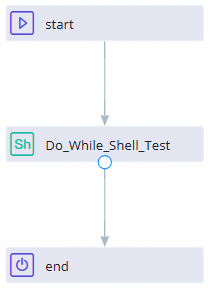
By default, a do-while node contains a start node, a shell node, and an end node. You can edit the code in the shell node to print the loop parameters. The key steps are as follows:
-
Upstream and downstream dependencies: Connect the internal nodes to establish their dependencies.
-
Loop task code: When writing the code for the internal shell node, you can use built-in variables to print various loop parameters. For available built-in variables for a do-while node, see Built-in variables. The following is sample code for the shell node:
echo '${dag.input}';
echo 'Get the row data for the current loop:'${dag.input[${dag.offset}]};
echo 'Get the offset:'${dag.offset};
echo 'Get the number of loops:'${dag.loopTimes};
echo 'Get the length of the dataset passed from the upstream assignment node:'${dag.input.length};
echo 'To get data from a specific row and column in the dataset from the assignment node, access it as a two-dimensional array:'${dag.input[0][1]};
Define the loop exit condition
Use the do-while node's built-in variables for loop control. For example, compare the dag.loopTimes variable (number of loops) with the dag.input.length variable (input length). If dag.loopTimes is less than dag.input.length, the node outputs True and the loop continues. Otherwise, it outputs False and the loop exits. Sample code:
if ${dag.loopTimes}<${dag.input.length}:
    print True;
else:
    print False;
Run the node and view the results
Go to Operation Center, right-click the node, and select . Select the assignment node and the loop node. After the run completes, check the run log for the results.
-
If you use the assignment node's value within the do-while node, run both nodes when testing in Operation Center.
-
To view the run log of the do-while node in Operation Center, right-click the instance and click View Inner Nodes to view the run logs of the internal nodes.
-
The assignment node's run log shows the following output.
Output Resultis the value passed to the downstream node:odps output: WARNING:[0,0] Table(xc_dpe_e2,xc_rpt_user_info_d) is full scan with all partitions, please specify partit... odps output: odps output: resource cost: cpu 0.00 Core * Min, memory 0.00 GB * Min odps output: inputs: odps output: outputs: odps output: 2021-08-12 16:58:39.784 INFO - ===Output Result: [["00163359810821","Hubei Province","windows_pc","1","Female","30-40 years","Cancer"]] 2021-08-12 16:58:40.105 INFO - cost time: 5 2021-08-12 16:58:40 INFO =================================================================== 2021-08-12 16:58:40 INFO Exit code of the Shell command 0 2021-08-12 16:58:40 INFO --- Invocation of Shell command completed --- 2021-08-12 16:58:40 INFO Shell run successfully! 2021-08-12 16:58:40 INFO Current task status: FINISH -
In the first iteration, the end node's run log shows that the Python code
if 1 < 2: print Truewas executed, which produced an output ofTrueand an exit code of 0. The loop has run twice with a duration of 5s. -
In the second iteration, the end node's run log shows that the conditional statement in codeContent is
if 2 < 2: print True else: print False. The Python output is False, and the log shows===>Output Result: False. Because the loop condition is not met, the do-while loop terminates. The loop ran a total of 2 times.