How to call the Direct Mail API using the Alibaba Cloud CLI
This topic describes how to call the Direct Mail API using the Alibaba Cloud command-line interface (CLI).
Install and configure the Alibaba Cloud CLI
Make sure that you have installed the Alibaba Cloud CLI.
If you have not installed the CLI, see Install the CLI (Windows).
After the installation is complete, run the `aliyun configure` command to configure your Alibaba Cloud account information, including your AccessKey ID and AccessKey secret. Select the correct region ID. For example, the region ID for China (Hangzhou) is "cn-hangzhou". For other regions, see API endpoints.
aliyun configure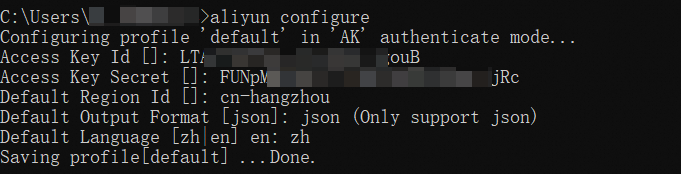
Call the Direct Mail API
Log on to the Direct Mail console. Create and configure the Direct Mail service. Obtain your sender address, and prepare the email body and recipient addresses.
The following examples show how to call the Direct Mail API using the CLI:
Example 1: Retrieve account information using DescAccountSummary.
Specify the endpoint for the region: "dm.aliyuncs.com". For other regions, see API endpoints.
aliyun dm DescAccountSummary --endpoint dm.aliyuncs.comOutput:
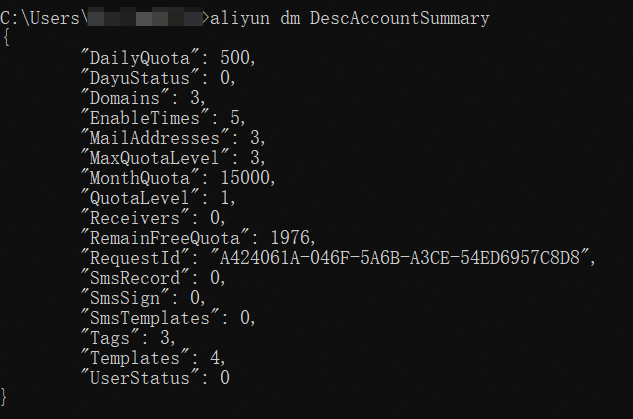
Example 2: Send a single email using SingleSendMail.
aliyun dm SingleSendMail --endpoint dm.aliyuncs.com --AccountName "test1@example.net" --AddressType 1 --ReplyToAddress false --ToAddress "test2@example.net" --Subject "Test Subject" --HtmlBody "<div>Hello, this is a test email.</div>"Output:

Help commands
# Get API operation names
aliyun dm help
# Get API operation parameters
aliyun dm SingleSendMail help
FAQ
Why is the China (Hangzhou) region called even though I set the region ID to another region?
Specify the `--endpoint` parameter when you call the API.
Run the following command in the terminal to set an environment variable and enable debug mode.
Mac
export DEBUG=sdkWindows
set DEBUG=sdkWhen you call the API, the current host, which is the endpoint value, is displayed:
