Digital document parsing
The digital document parsing API parses semi-structured documents to extract simplified layout information, style information, and text content. It supports various document formats, such as PDF, Word, Excel, HTML, EPUB, MOBI, Markdown, and TXT. This topic describes how to call the digital document parsing API. Before you call the OpenAPI, read the API guide.
How to call the API
The digital document parsing API is a synchronous API. You can submit a sync task by calling the SubmitDigitalDocStructureJob or SubmitDigitalDocStructureJobAdvance operation. The timeout period can be set to 5 minutes.
Supported formats include HTML, PDF, PPT, PPTX, XLSX, XLS, DOC, DOCX, MOBI, EPUB, Markdown, and TXT.
Digital document parsing supports tables in documents but does not support images or scanned PDF documents.
For parsing tables in documents, the performance is ranked as follows: Document Parsing (LLM Edition) = Intelligent Document Analysis > Digital Document Parsing. We recommend that you first try Document Parsing (LLM Edition). For overall parsing speed, the ranking is as follows: Digital Document Parsing > Document Parsing (LLM Edition) > Intelligent Document Analysis.
Call the SubmitDigitalDocStructureJob operation to submit a parsing job
The synchronous submission service supports uploading a local file or using a file URL.
To upload a local file, call the SubmitDigitalDocStructureJobAdvance operation.
To use a file URL, call the SubmitDigitalDocStructureJob operation.
The asynchronous processing time varies based on actual testing. After you activate the digital document parsing service, you are provided with a free quota for testing.
For the FileName and FileNameExtension parameters, the service selects a parser based on the file extension. If you are unsure of the document type, you can specify a filename without an extension. The backend then uses default routing to prevent unexpected parsing results.
Request parameters
Name | Type | Required | Description | Example value |
FileUrl | string | No (Cannot be empty if the next parameter is empty) | Use this parameter when providing a document URL. The document must be no larger than 150 MB and have no more than 15,000 pages. | https://example.com/example.xlsx |
FileUrlObject | stream | No (Cannot be empty if the previous parameter is empty) | Use this parameter when uploading a local file. The document must be no larger than 100 MB and have no more than 1,000 pages. | A FileInputStream generated from a local file |
FileName | string | No | The filename must include the file extension. You must specify either this parameter or FileNameExtension. | example.xlsx |
FileNameExtension | string | No | The file extension. You must specify either this parameter or FileName. | xlsx |
RevealMarkdown | boolean | No | Specifies whether to output the text in Markdown format. | true |
ImageStrategy | String | No | The storage method for images in the markdownContent. | url: Provides an OSS URL (with an expiration time). base64: Provides a base64 field. |
UseUrlResponseBody | bool | No | Specifies whether to return the result as a URL. The default value is false. | true |
OssBucket | string | No | The name of your OSS bucket. For more information, see OSS hosting support | docmind-trust |
OssEndpoint | string | No | The endpoint of your OSS bucket. For more information, see OSS hosting support | oss-cn-hangzhou.aliyuncs.com |
ImageStrategy takes effect only when Markdown output is enabled. This parameter controls how images are stored in the Markdown content. The base64 method is suitable for small files. We recommend that you use this method for images smaller than 1 MB. The url method is also recommended, but note that the URL expires, typically after 12 hours.
If you upload a large file or a file that contains a large amount of content, we recommend that you enable UseUrlResponseBody. This can help prevent issues such as API timeouts. Note that the URL expires, typically after 12 hours.
Response parameters
Name | Type | Description | Example |
RequestId | string | The unique ID of the request. | 43A29C77-405E-4CC0-BC55-EE694AD0**** |
Id | String | The order ID. | docmind-20220712-b15f**** |
Status | String | The final status of the sync task. Success indicates that the task was successful. Fail indicates that the task failed. | Success |
Data | map | The returned data. This is the parsing result, which is a JSON data structure that includes the document content, styles, and logical information (hierarchy tree). | - |
Code | string | The status code. | 200 |
Message | string | The detailed message. | Message |
Usage examples
This API supports two invocation methods: uploading a local document or passing a document URL.
The following code provides an example of how to upload a local document using the Java SDK. You can call the SubmitDigitalDocStructureJobAdvance operation and use the fileUrlObject parameter to upload the local document.
NoteFor more information about how to obtain and use AccessKey pairs, see the SDK usage guides for different languages in SDK Overview.
import com.aliyun.docmind_api20220711.models.*; import com.aliyun.teaopenapi.models.Config; import com.aliyun.docmind_api20220711.Client; import com.aliyun.teautil.models.RuntimeOptions; import java.io.File; import java.io.FileInputStream; public static void main(String[] args) throws Exception { submit(); } public static void submit() throws Exception { // Initialize the Credentials client using the default credential provider. com.aliyun.credentials.Client credentialClient = new com.aliyun.credentials.Client(); Config config = new Config() // Obtain the AccessKey ID from the credentials. .setAccessKeyId(credentialClient.getAccessKeyId()) // Obtain the AccessKey secret from the credentials. .setAccessKeySecret(credentialClient.getAccessKeySecret()); // The endpoint. Both IPv4 and IPv6 are supported. For IPv6, use docmind-api-dualstack.cn-hangzhou.aliyuncs.com. config.endpoint = "docmind-api.cn-hangzhou.aliyuncs.com"; Client client = new Client(config); // Create a RuntimeOptions instance and set the runtime parameters. RuntimeOptions runtime = new RuntimeOptions(); SubmitDigitalDocStructureJobAdvanceRequest request = new SubmitDigitalDocStructureJobAdvanceRequest(); File file = new File("D:\\example.xlsx"); request.fileUrlObject = new FileInputStream(file); request.fileName = "example.xlsx"; request.revealMarkdown=true; // Send the request and handle the response or exceptions. SubmitDigitalDocStructureJobResponse response = client.submitDigitalDocStructureJobAdvance(request, runtimeOptions); System.out.println(JSON.toJSON(response.getBody())); }const Client = require('@alicloud/docmind-api20220711'); const Credential = require('@alicloud/credentials'); const Util = require('@alicloud/tea-util'); const fs = require('fs'); const getResult = async () => { // Initialize the Credentials client using the default credential provider. const cred = new Credential.default(); const client = new Client.default({ // The endpoint. Both IPv4 and IPv6 are supported. For IPv6, use docmind-api-dualstack.cn-hangzhou.aliyuncs.com. endpoint: 'docmind-api.cn-hangzhou.aliyuncs.com', // Obtain the AccessKey ID from the credentials. accessKeyId: cred.credential.accessKeyId, // Obtain the AccessKey secret from the credentials. accessKeySecret: cred.credential.accessKeySecret, type: 'access_key', regionId: 'cn-hangzhou' }); const advanceRequest = new Client.SubmitDigitalDocStructureJobAdvanceRequest(); const file = fs.createReadStream('./example.pdf'); advanceRequest.fileUrlObject = file; advanceRequest.fileName = 'example.pdf'; const runtimeObject = new Util.RuntimeOptions({}); const response = await client.submitDigitalDocStructureJobAdvance(advanceRequest, runtimeObject); return response.body; };from alibabacloud_docmind_api20220711.client import Client as docmind_api20220711Client from alibabacloud_tea_openapi import models as open_api_models from alibabacloud_docmind_api20220711 import models as docmind_api20220711_models from alibabacloud_tea_util.client import Client as UtilClient from alibabacloud_credentials.client import Client as CredClient if __name__ == '__main__': # Initialize the Credentials client using the default credential provider. cred=CredClient() config = open_api_models.Config( # Obtain the AccessKey ID from the credentials. access_key_id=cred.get_credential().get_access_key_id(), # Obtain the AccessKey secret from the credentials. access_key_secret=cred.get_credential().get_access_key_secret() ) # The endpoint. config.endpoint = f'docmind-api.cn-hangzhou.aliyuncs.com' client = docmind_api20220711Client(config) request = docmind_api20220711_models.SubmitDigitalDocStructureJobAdvanceRequest( # file_url_object: The local file stream. file_url_object=open("./example.xlsx", "rb"), # file_name: The name of the file. The name must include the file extension. file_name='123.xlsx', reveal_markdown=True, # file_name_extension: The file extension. Specify either this parameter or file_name. # file_name_extension='xlsx' ) runtime = util_models.RuntimeOptions() try: # If you copy the code to run, print the API return value. response = client.submit_digital_doc_structure_job_advance(request, runtime) # The format of the API return value is body -> data -> specific properties. print(response.body) except Exception as error: # If necessary, print the error. UtilClient.assert_as_string(error.message)import ( "fmt" "os" openClient "github.com/alibabacloud-go/darabonba-openapi/v2/client" "github.com/alibabacloud-go/docmind-api-20220711/client" "github.com/alibabacloud-go/tea-utils/v2/service" "github.com/aliyun/credentials-go/credentials" ) func submit(){ // Initialize the Credentials client using the default credential provider. credential, err := credentials.NewCredential(nil) // Obtain the AccessKey ID from the credentials. accessKeyId, err := credential.GetAccessKeyId() // Obtain the AccessKey secret from the credentials. accessKeySecret, err := credential.GetAccessKeySecret() // The endpoint. Both IPv4 and IPv6 are supported. For IPv6, use docmind-api-dualstack.cn-hangzhou.aliyuncs.com. var endpoint string = "docmind-api.cn-hangzhou.aliyuncs.com" config := openClient.Config{AccessKeyId: accessKeyId, AccessKeySecret: accessKeySecret, Endpoint: &endpoint} // Initialize the client. cli, err := client.NewClient(&config) if err != nil { panic(err) } // Call the operation to upload a local document. filename := "D:\\example.pdf" f, err := os.Open(filename) if err != nil { panic(err) } // Initialize the request for the operation. request := client.SubmitDigitalDocStructureJobAdvanceRequest{ FileName: &filename, FileUrlObject: f, } // Create a RuntimeOptions instance and set the runtime parameters. options := service.RuntimeOptions{} response, err := cli.SubmitDigitalDocStructureJobAdvance(&request, &options) if err != nil { panic(err) } // Print the result. fmt.Println(response.Body.String()) }using Newtonsoft.Json; using System; using System.Collections; using System.Collections.Generic; using System.IO; using System.Threading.Tasks; using Tea; using Tea.Utils; public static void SubmitFile() { // Initialize the Credentials client using the default credential provider. var akCredential = new Aliyun.Credentials.Client(null); AlibabaCloud.OpenApiClient.Models.Config config = new AlibabaCloud.OpenApiClient.Models.Config { // Obtain the AccessKey ID from the credentials. AccessKeyId = akCredential.GetAccessKeyId(), // Obtain the AccessKey secret from the credentials. AccessKeySecret = akCredential.GetAccessKeySecret(), }; // The endpoint. config.Endpoint = "docmind-api.cn-hangzhou.aliyuncs.com"; AlibabaCloud.SDK.Docmind_api20220711.Client client = new AlibabaCloud.SDK.Docmind_api20220711.Client(config); // You must install the AlibabaCloud.DarabonbaStream dependency library. Stream bodySyream = AlibabaCloud.DarabonbaStream.StreamUtil.ReadFromFilePath("<YOUR-FILE-PATH>"); AlibabaCloud.SDK.Docmind_api20220711.Models.SubmitDigitalDocStructureJobAdvanceRequest request = new AlibabaCloud.SDK.Docmind_api20220711.Models.SubmitDigitalDocStructureJobAdvanceRequest { FileUrlObject = bodySyream, FileNameExtension = "pdf" }; AlibabaCloud.TeaUtil.Models.RuntimeOptions runtime = new AlibabaCloud.TeaUtil.Models.RuntimeOptions(); try { // If you copy the code to run, print the API return value. client.SubmitDigitalDocStructureJobAdvance(request, runtime); } catch (TeaException error) { // If necessary, print the error. AlibabaCloud.TeaUtil.Common.AssertAsString(error.Message); } catch (Exception _error) { TeaException error = new TeaException(new Dictionary<string, object> { { "message", _error.Message } }); // If necessary, print the error. AlibabaCloud.TeaUtil.Common.AssertAsString(error.Message); } }The following code provides an example of how to pass a document URL using the Java SDK. You can call the SubmitDigitalDocStructureJob operation and use the fileUrl parameter to pass the document URL. Note that the document URL must be a publicly accessible download URL, have no cross-domain restrictions, and contain no special escape characters.
NoteFor more information about how to obtain and use AccessKey pairs, see the SDK usage guides for different languages in SDK Overview.
import com.aliyun.docmind_api20220711.models.*; import com.aliyun.teaopenapi.models.Config; import com.aliyun.docmind_api20220711.Client; public static void main(String[] args) throws Exception { submit(); } public static void submit() throws Exception { // Initialize the Credentials client using the default credential provider. com.aliyun.credentials.Client credentialClient = new com.aliyun.credentials.Client(); Config config = new Config() // Obtain the AccessKey ID from the credentials. .setAccessKeyId(credentialClient.getAccessKeyId()) // Obtain the AccessKey secret from the credentials. .setAccessKeySecret(credentialClient.getAccessKeySecret()); // The endpoint. Both IPv4 and IPv6 are supported. For IPv6, use docmind-api-dualstack.cn-hangzhou.aliyuncs.com. config.endpoint = "docmind-api.cn-hangzhou.aliyuncs.com"; Client client = new Client(config); SubmitDigitalDocStructureJobRequest request = new SubmitDigitalDocStructureJobRequest(); request.fileName = "example.xlsx"; request.fileUrl = "https://example.com/example.xlsx"; request.revealMarkdown=true; SubmitDigitalDocStructureJobResponse response = client.submitDigitalDocStructureJob(request); System.out.println(JSON.toJSON(response.getBody())); }const Client = require('@alicloud/docmind-api20220711'); const Credential = require('@alicloud/credentials'); const getResult = async () => { // Initialize the Credentials client using the default credential provider. const cred = new Credential.default(); const client = new Client.default({ // The endpoint. Both IPv4 and IPv6 are supported. For IPv6, use docmind-api-dualstack.cn-hangzhou.aliyuncs.com. endpoint: 'docmind-api.cn-hangzhou.aliyuncs.com', // Obtain the AccessKey ID from the credentials. accessKeyId: cred.credential.accessKeyId, // Obtain the AccessKey secret from the credentials. accessKeySecret: cred.credential.accessKeySecret, type: 'access_key', regionId: 'cn-hangzhou' }); const request = new Client.SubmitDigitalDocStructureJobRequest(); request.fileName = 'example.pdf'; request.fileUrl = 'https://example.com/example.pdf'; const response = await client.submitDigitalDocStructureJob(request); return response.body; }from alibabacloud_docmind_api20220711.client import Client as docmind_api20220711Client from alibabacloud_tea_openapi import models as open_api_models from alibabacloud_docmind_api20220711 import models as docmind_api20220711_models from alibabacloud_tea_util.client import Client as UtilClient from alibabacloud_credentials.client import Client as CredClient if __name__ == '__main__': # Initialize the Credentials client using the default credential provider. cred=CredClient() config = open_api_models.Config( # Obtain the AccessKey ID from the credentials. access_key_id=cred.get_credential().get_access_key_id(), # Obtain the AccessKey secret from the credentials. access_key_secret=cred.get_credential().get_access_key_secret() ) # The endpoint. config.endpoint = f'docmind-api.cn-hangzhou.aliyuncs.com' client = docmind_api20220711Client(config) request = docmind_api20220711_models.SubmitDigitalDocStructureJobRequest( # file_url: The URL of the file. file_url='https://example.com/example.xlsx', # file_name: The name of the file. The name must include the file extension. file_name='123.xlsx', reveal_markdown=True, # file_name_extension: The file extension. Specify either this parameter or file_name. # file_name_extension='xlsx' ) try: # If you copy the code to run, print the API return value. response = client.submit_digital_doc_structure_job(request) # The format of the API return value is body -> data -> specific properties. print(response.body) except Exception as error: # If necessary, print the error. UtilClient.assert_as_string(error.message)import ( "fmt" openClient "github.com/alibabacloud-go/darabonba-openapi/v2/client" "github.com/alibabacloud-go/docmind-api-20220711/client" "github.com/aliyun/credentials-go/credentials" ) func submit(){ // Initialize the Credentials client using the default credential provider. credential, err := credentials.NewCredential(nil) // Obtain the AccessKey ID from the credentials. accessKeyId, err := credential.GetAccessKeyId() // Obtain the AccessKey secret from the credentials. accessKeySecret, err := credential.GetAccessKeySecret() // The endpoint. Both IPv4 and IPv6 are supported. For IPv6, use docmind-api-dualstack.cn-hangzhou.aliyuncs.com. var endpoint string = "docmind-api.cn-hangzhou.aliyuncs.com" config := openClient.Config{AccessKeyId: accessKeyId, AccessKeySecret: accessKeySecret, Endpoint: &endpoint} // Initialize the client. cli, err := client.NewClient(&config) if err != nil { panic(err) } // The file URL. fileURL := "https://example.com/example.pdf" // The filename. fileName := "example.pdf" // Initialize the request for the operation. request := client.SubmitDigitalDocStructureJobRequest{ FileUrl: &fileURL, FileName: &fileName, } response, err := cli.SubmitDigitalDocStructureJob(&request) if err != nil { panic(err) } // Print the result. fmt.Println(response.Body.String()) }using Newtonsoft.Json; using System; using System.Collections; using System.Collections.Generic; using System.IO; using System.Threading.Tasks; using Tea; using Tea.Utils; public static void SubmitUrl() { // Initialize the Credentials client using the default credential provider. var akCredential = new Aliyun.Credentials.Client(null); AlibabaCloud.OpenApiClient.Models.Config config = new AlibabaCloud.OpenApiClient.Models.Config { // Obtain the AccessKey ID from the credentials. AccessKeyId = akCredential.GetAccessKeyId(), // Obtain the AccessKey secret from the credentials. AccessKeySecret = akCredential.GetAccessKeySecret(), }; // The endpoint. config.Endpoint = "docmind-api.cn-hangzhou.aliyuncs.com"; AlibabaCloud.SDK.Docmind_api20220711.Client client = new AlibabaCloud.SDK.Docmind_api20220711.Client(config); AlibabaCloud.SDK.Docmind_api20220711.Models.SubmitDigitalDocStructureJobRequest request = new AlibabaCloud.SDK.Docmind_api20220711.Models.SubmitDigitalDocStructureJobRequest { FileUrl = "https://example.pdf", FileNameExtension = "pdf" }; try { // If you copy the code to run, print the API return value. client.SubmitDigitalDocStructureJob(request); } catch (TeaException error) { // If necessary, print the error. AlibabaCloud.TeaUtil.Common.AssertAsString(error.Message); } catch (Exception _error) { TeaException error = new TeaException(new Dictionary<string, object> { { "message", _error.Message } }); // If necessary, print the error. AlibabaCloud.TeaUtil.Common.AssertAsString(error.Message); } }use AlibabaCloud\SDK\Docmindapi\V20220711\Docmindapi; use AlibabaCloud\SDK\Docmindapi\V20220711\Models\SubmitDocStructureJobRequest; use Darabonba\OpenApi\Models\Config; use AlibabaCloud\Tea\Utils\Utils\RuntimeOptions; use AlibabaCloud\Tea\Exception\TeaUnableRetryError; use AlibabaCloud\Credentials\Credential; // Initialize the Credentials client using the default credential provider. $bearerToken = new Credential(); $config = new Config(); // The endpoint. Both IPv4 and IPv6 are supported. For IPv6, use docmind-api-dualstack.cn-hangzhou.aliyuncs.com. $config->endpoint = "docmind-api.cn-hangzhou.aliyuncs.com"; // Obtain the AccessKey ID from the credentials. $config->accessKeyId = $bearerToken->getCredential()->getAccessKeyId(); // Obtain the AccessKey secret from the credentials. $config->accessKeySecret = $bearerToken->getCredential()->getAccessKeySecret(); $config->type = "access_key"; $config->regionId = "cn-hangzhou"; $client = new Docmindapi($config); $request = new SubmitDigitalDocStructureJobRequest(); $runtime = new RuntimeOptions(); $runtime->maxIdleConns = 3; $runtime->connectTimeout = 10000; $runtime->readTimeout = 10000; $request->fileName = "example.pdf"; $request->fileUrl = "https://example.com/example.pdf"; try { $response = $client->submitDigitalDocStructureJob($request, $runtime); var_dump($response->toMap()); } catch (TeaUnableRetryError $e) { var_dump($e->getMessage()); var_dump($e->getErrorInfo()); var_dump($e->getLastException()); var_dump($e->getLastRequest()); }
If the task is successful, the value of Status is Success. The following code shows a sample response for a successful request:
{
  "data":{
    "docInfo":{
      "pageCountEstimate":3,
      "docType":"pdf"
    },
    "styles":[ ],
    "layouts":[
      {
        "pos":[
          {
            "x":0,
            "y":0
          },
          {
            "x":1113,
            "y":0
          },
          {
            "x":1113,
            "y":1440
          },
          {
            "x":0,
            "y":1440
          }
        ],
        "index":0,
        "subType":"none",
        "text":"",
        "type":"image",
        "pageNum":[
          0
        ],
        "uniqueId":"31128703ac73c52f05717b3b654de020"
      },
      {
        "pos":[
          {
            "x":0,
            "y":0
          },
          {
            "x":1113,
            "y":0
          },
          {
            "x":1113,
            "y":1440
          },
          {
            "x":0,
            "y":1440
          }
        ],
        "index":0,
        "subType":"none",
        "text":"",
        "type":"image",
        "pageNum":[
          1
        ],
        "uniqueId":"25b2a6f63bdf57f0d7a4f3da67c8616a"
      },
      {
        "pos":[
          {
            "x":0,
            "y":0
          },
          {
            "x":1113,
            "y":0
          },
          {
            "x":1113,
            "y":1440
          },
          {
            "x":0,
            "y":1440
          }
        ],
        "index":0,
        "subType":"none",
        "text":"",
        "type":"image",
        "pageNum":[
          2
        ],
        "uniqueId":"8c651c04c72a029b4be4ed80aa57fbbd"
      }
    ],
    "version":"1.2.0",
    "requestId":"docmind-20240820-6bf3e1bc1f164f0c99b8a12cfbcbeXXX"
  },
  "requestId":"1556A10B-E31C-5B21-8A5E-2179069D2XXX",
  "id":"docmind-20240820-6bf3e1bc1f164f0c99b8a12cfbcbeXXX",
  "status":"Success"
}
The processing result is in the Data node. The following table describes the format of the Data node.
Data | object | The parsing result |
styles | array | A list of styles. This is a deduplicated list of styles for all blocks in the document. |
styleId | int | The style ID. |
underline | bool | Indicates whether the text is underlined. |
deleteLine | bool | Indicates whether the text has a strikethrough. |
bold | bool | Indicates whether the text is bold. |
fontSize | int | The font size. |
fontName | string | The font name. |
color | string | The text color. |
charScale | float | The width-to-height ratio for alignment. The width changes while the font height remains constant. The value is calculated as width/height. |
layouts | array | A list of layout information. |
uniqueId | string | The unique ID of the layout information. |
index | int | The reading order of the layout. |
type | string | The layout type. Valid values: text, table, and image. |
text | string | The text content. |
markdownContent | string | The text content in Markdown format. This is supported only when the parameter is enabled. |
alignment | string | Pitch enumeration |
pos | array | The coordinates. |
pageNum | array | The page numbers where the layout is located. It can span multiple pages. |
numCol | int | The total number of columns in the table. This parameter is specific to the table layout type. |
numRow | int | The total number of rows in the table. This parameter is specific to the table layout type. |
cells | string | The cell information. This parameter is returned only when the type is table. |
cellId | string | The cell ID. It is unique within a single layout. |
cellUniqueId | string | The cell ID. It is globally unique. |
type | string | The cell type. |
alignment | string | The cell alignment. |
pageNum | array | The page numbers where the cell is located. It can span multiple pages. |
xsc | int | The starting column of the cell. |
ysc | int | The starting row of the cell. |
xec | int | The ending column of the cell. |
yec | int | The ending row of the cell. |
pos | array | The cell coordinates. |
text | string | The text content of the cell. |
layouts | array | The nested layout information. |
docInfo | object | The document information. |
docType | string | The document type. |
imageCount | int | The number of images. |
tableCount | int | The number of tables. |
pageCountEstimate | int | The number of pages in the document. For PDF, Word, and PPT files, this is the actual page count. For images, this is the number of images. For Excel, HTML, EPUB, and MOBI files, the page count is estimated based on the word count (1 page per 2,000 Chinese characters or 2,000 English words). |
paragraphCount | int | The number of paragraphs. |
tokens | long | The number of English words or Chinese characters. |
docUrl | string | The URL of the document. |
orignalDocName | string | The original document name provided by the user. |
originalDocUrl | string | The original document URL provided by the user. |
pages | array | A list of document pages. |
Scenario examples
This section provides suggestions and solutions for handling the JSON response in different scenarios.
Get Markdown information
In GetDocStructureResult, set RevealMarkdown to true and ImageStrategy to url.
import json
response = json.load(open("demo.json", "r"))
doc_json = response["Data"]

markdown_str = ""
for layout in doc_json["layouts"]:
  markdown_str += layout["markdownContent"] + "\n"
print(markdown_str)
Get content of a specified level
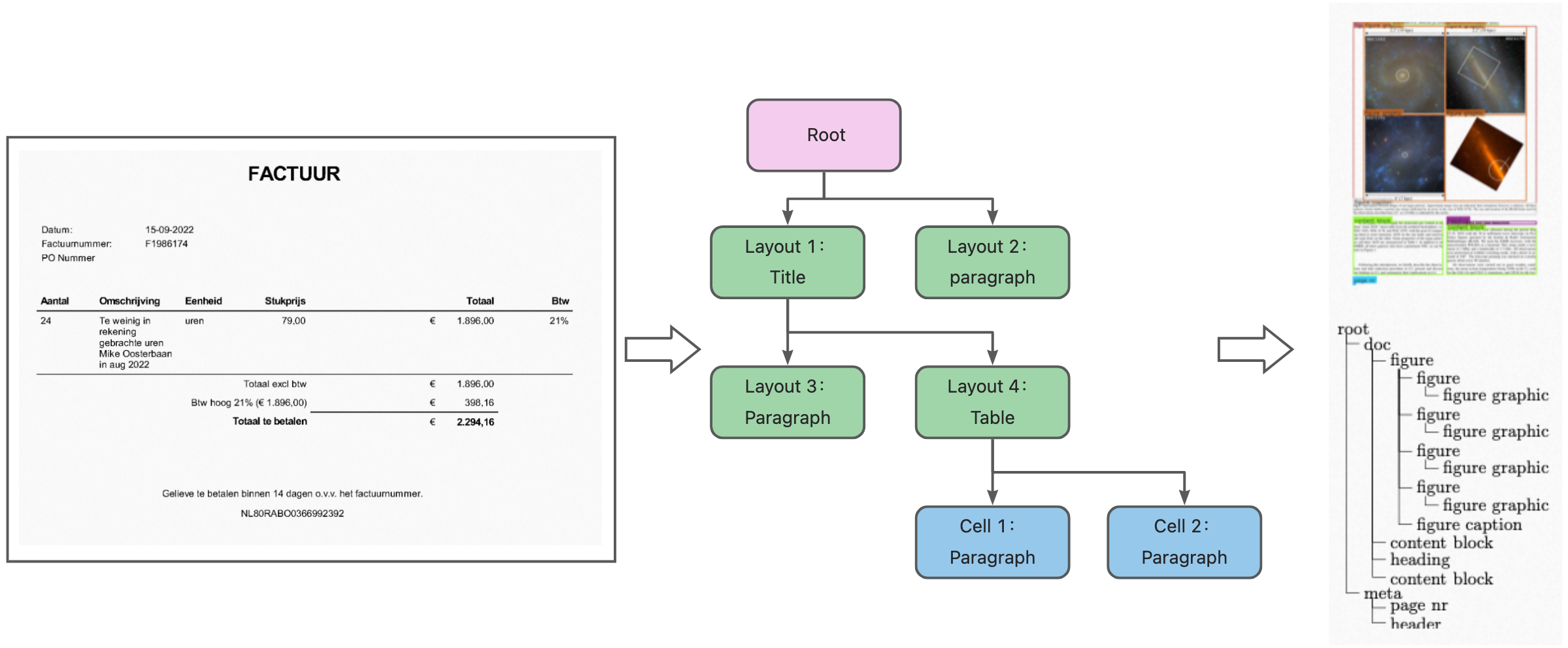
Digital document parsing relies on information, such as titles and body text, that is stored in the original document and outputs the information in a hierarchical structure.
import json
response = json.load(open("demo.json", "r"))
doc_json = response["Data"]
layout_cache: {} = {}
for layout in doc_json["layouts"]:
    layout_cache[layout["uniqueId"]] = layout
    layout["children"] = list()
for layout in doc_json["layouts"]:
    # Child layouts under the current layout
    print(layout["children"])
Appendix
doc-json data structure
VERSION (STRING: The version of the doc-json data structure)
Doc-json | styles (array: A collection of unique styles) |
layouts (array: A list of layout information, excluding coordinate information) | |
docInfo (object: Document information) | |
version (string: The version of the doc-json data structure) |
Layout types
The following table lists the layout types (type) and subtypes (subType) in the response from Document Mind.
type | Description | Subtype (subType) | Description |
title | Title | None | None |
table | Table | None | None |
text | Normal text | para | Paragraph |
figure | Chart | None | Image |
head | Header | page_header | Header |
foot_pagenum | Footer page number | page | Page number |