Document Intelligence parsing
Document Intelligence Analysis extracts hierarchical structure, text content, KV fields, and style information from documents. This topic describes how to call the API. Before calling the API, review the user guide for the SDK in your programming language, such as the Java SDK user guide.
Call method
Document Intelligence provides an asynchronous interface. To parse a document, submit an asynchronous task by calling the SubmitDocStructureJob or SubmitDocStructureJobAdvance operation. Then, poll for the result by calling the GetDocStructureResult operation. The following flowchart shows this process.

Poll for the result every 10 seconds for up to 120 minutes. If processing is not complete within 120 minutes, the task times out. After submitting an asynchronous task, you can query its result within 24 hours after the task reaches a terminal state (Success, Timeout, or Failure). After 24 hours, the result data is deleted.
The service includes a free quota of 100 pages. After the quota is exhausted, subsequent document parsing is charged on a pay-as-you-go basis, generating a post-paid bill.
Document Intelligence supports PDF, Word, and common image formats such as JPG and PNG. It can also parse tables within documents.
Parsing quality (highest to lowest): Document Parsing (Large Model Edition) > Document Intelligence > Electronic Document Parsing. Parsing speed (fastest to slowest): Electronic Document Parsing > Document Parsing (Large Model Edition) > Document Intelligence.
Step 1: Call the asynchronous submission API
This API supports two invocation methods: uploading a local file or providing a document URL.
For local file uploads, call the
SubmitDocStructureJobAdvanceAPI.To use a document URL, call the
SubmitDocStructureJobAPI.
The actual asynchronous processing time may vary. After you activate the DocMind service, you receive a free quota for testing.
The service uses the file extension from the
FileNameorFileNameExtensionparameter to select the appropriate parser. If you are unsure of the document type, you can provide a file name without an extension. The service then automatically selects a parser to prevent processing errors.
Examples
The following example shows how to upload a local file by using the Java SDK. Call the SubmitDocStructureJobAdvance API and use the fileUrlObject parameter to pass the file stream.
To learn how to get and use your AccessKey, see the SDK usage guides for different languages in the SDK overview.
import com.aliyun.docmind_api20220711.models.*;
import com.aliyun.teaopenapi.models.Config;
import com.aliyun.docmind_api20220711.Client;
import com.aliyun.teautil.models.RuntimeOptions;
import java.io.File;
import java.io.FileInputStream;

public static void main(String[] args) throws Exception {
        submit();
    }
public static void submit() throws Exception {
    // Initialize the credentials client by using the default provider chain.
    com.aliyun.credentials.Client credentialClient = new com.aliyun.credentials.Client();
    Config config = new Config()
        // Obtain the AccessKey ID from the credentials.
        .setAccessKeyId(credentialClient.getAccessKeyId())
        // Obtain the AccessKey secret from the credentials.
        .setAccessKeySecret(credentialClient.getAccessKeySecret());
    // The service endpoint. Both IPv4 and IPv6 are supported. For IPv6, use docmind-api-dualstack.cn-hangzhou.aliyuncs.com.
    config.endpoint = "docmind-api.cn-hangzhou.aliyuncs.com";
    Client client = new Client(config);
    // Create a RuntimeOptions instance and set runtime parameters.
    RuntimeOptions runtime = new RuntimeOptions();
    SubmitDocStructureJobAdvanceRequest advanceRequest = new SubmitDocStructureJobAdvanceRequest();
    File file = new File("D:\\example.pdf");
    advanceRequest.fileUrlObject = new FileInputStream(file);
    advanceRequest.fileName = "example.pdf";
    // Initiate the request and handle the response or exceptions.
    SubmitDocStructureJobResponse response = client.submitDocStructureJobAdvance(advanceRequest, runtime);
    System.out.println(JSON.toJSON(response.getBody()));
}const Client = require('@alicloud/docmind-api20220711');
const Credential = require('@alicloud/credentials');
const Util = require('@alicloud/tea-util');
const fs = require('fs');
const getResult = async () => {
// Initialize the credentials client by using the default provider chain.
const cred = new Credential.default();
const client = new Client.default({
// The service endpoint. Both IPv4 and IPv6 are supported. For IPv6, use docmind-api-dualstack.cn-hangzhou.aliyuncs.com.
endpoint: 'docmind-api.cn-hangzhou.aliyuncs.com',
// Obtain the AccessKey ID from the credentials.
accessKeyId: cred.credential.accessKeyId,
// Obtain the AccessKey secret from the credentials.
accessKeySecret: cred.credential.accessKeySecret,
type: 'access_key',
regionId: 'cn-hangzhou'
});
const advanceRequest = new Client.SubmitDocStructureJobAdvanceRequest();
const file = fs.createReadStream('./example.pdf');
advanceRequest.fileUrlObject = file;
advanceRequest.fileName = 'example.pdf';
const runtimeObject = new Util.RuntimeOptions({});
const response = await client.submitDocStructureJobAdvance(advanceRequest, runtimeObject);
return response.body;
}from alibabacloud_docmind_api20220711.client import Client as docmind_api20220711Client
from alibabacloud_tea_openapi import models as open_api_models
from alibabacloud_docmind_api20220711 import models as docmind_api20220711_models
from alibabacloud_tea_util.client import Client as UtilClient
from alibabacloud_credentials.client import Client as CredClient
if __name__ == '__main__':
# Initialize the credentials client by using the default provider chain.
cred=CredClient()
config = open_api_models.Config(
# Obtain the AccessKey ID from the credentials.
access_key_id=cred.get_credential().get_access_key_id(),
# Obtain the AccessKey secret from the credentials.
access_key_secret=cred.get_credential().get_access_key_secret()
)
# The service endpoint.
config.endpoint = f'docmind-api.cn-hangzhou.aliyuncs.com'
client = docmind_api20220711Client(config)
request = docmind_api20220711_models.SubmitDocStructureJobAdvanceRequest(
# file_url_object: The local file stream.
file_url_object=open("./example.pdf", "rb"),
# file_name: The name of the file. The name must include the file extension.
file_name='123.pdf',
# file_name_extension: The file extension. You must specify either this parameter or file_name.
file_name_extension='pdf'
)
runtime = util_models.RuntimeOptions()
try:
# If you copy this code, print the API response to see the output.
response = client.submit_doc_structure_job_advance(request, runtime)
# The API response is structured as body -> data -> specific properties.
# You can print the results as needed. The following example shows how to print the returned job ID.
# Property names start with a lowercase letter.
print(response.body)
except Exception as error:
# Print the error message if needed.
UtilClient.assert_as_string(error.message)import (
"fmt"
"os"
openClient "github.com/alibabacloud-go/darabonba-openapi/v2/client"
"github.com/alibabacloud-go/docmind-api-20220711/client"
"github.com/alibabacloud-go/tea-utils/v2/service"
"github.com/aliyun/credentials-go/credentials"
)
func submit(){
// Initialize the credentials client by using the default provider chain.
credential, err := credentials.NewCredential(nil)
// Obtain the AccessKey ID from the credentials.
accessKeyId, err := credential.GetAccessKeyId()
// Obtain the AccessKey secret from the credentials.
accessKeySecret, err := credential.GetAccessKeySecret()
// The service endpoint. Both IPv4 and IPv6 are supported. For IPv6, use docmind-api-dualstack.cn-hangzhou.aliyuncs.com.
var endpoint string = "docmind-api.cn-hangzhou.aliyuncs.com"
config := openClient.Config{AccessKeyId: accessKeyId, AccessKeySecret: accessKeySecret, Endpoint: &endpoint}
// Initialize the client.
cli, err := client.NewClient(&config)
if err != nil {
panic(err)
}
// Call the API to upload a local document.
filename := "D:\\example.pdf"
f, err := os.Open(filename)
if err != nil {
panic(err)
}
// Initialize the API request.
request := client.SubmitDocStructureJobAdvanceRequest{
FileName: &filename,
FileUrlObject: f,
}
// Create a RuntimeOptions instance and set runtime parameters.
options := service.RuntimeOptions{}
response, err := cli.SubmitDocStructureJobAdvance(&request, &options)
if err != nil {
panic(err)
}
// Print the result.
fmt.Println(response.Body.String())
}using Newtonsoft.Json;
using System;
using System.Collections;
using System.Collections.Generic;
using System.IO;
using System.Threading.Tasks;
using Tea;
using Tea.Utils;
public static void SubmitFile()
{
// Initialize the credentials client by using the default provider chain.
var akCredential = new Aliyun.Credentials.Client(null);
AlibabaCloud.OpenApiClient.Models.Config config = new AlibabaCloud.OpenApiClient.Models.Config
{
// Obtain the AccessKey ID from the credentials.
AccessKeyId = akCredential.GetAccessKeyId(),
// Obtain the AccessKey secret from the credentials.
AccessKeySecret = akCredential.GetAccessKeySecret(),
};
// The service endpoint.
config.Endpoint = "docmind-api.cn-hangzhou.aliyuncs.com";
AlibabaCloud.SDK.Docmind_api20220711.Client client = new AlibabaCloud.SDK.Docmind_api20220711.Client(config);
// You must install an additional dependency: AlibabaCloud.DarabonbaStream.
Stream bodySyream = AlibabaCloud.DarabonbaStream.StreamUtil.ReadFromFilePath("<YOUR-FILE-PATH>");
AlibabaCloud.SDK.Docmind_api20220711.Models.SubmitDocStructureJobAdvanceRequest request = new AlibabaCloud.SDK.Docmind_api20220711.Models.SubmitDocStructureJobAdvanceRequest
{
FileUrlObject = bodySyream,
FileNameExtension = "pdf"
};
AlibabaCloud.TeaUtil.Models.RuntimeOptions runtime = new AlibabaCloud.TeaUtil.Models.RuntimeOptions();
try
{
// If you copy this code, print the API response to see the output.
client.SubmitDocStructureJobAdvance(request, runtime);
}
catch (TeaException error)
{
// Print the error message if needed.
AlibabaCloud.TeaUtil.Common.AssertAsString(error.Message);
}
catch (Exception _error)
{
TeaException error = new TeaException(new Dictionary<string, object>
{
{ "message", _error.Message }
});
// Print the error message if needed.
AlibabaCloud.TeaUtil.Common.AssertAsString(error.Message);
}
}The following example shows how to process a document from a URL by using the Java SDK. Call the SubmitDocStructureJob API and pass the document URL in the fileUrl parameter. Note: The URL must be publicly accessible, free of cross-domain restrictions, and must not contain any special escape characters.
To learn how to get and use your AccessKey, see the SDK usage guides for different languages in the SDK overview.
import com.aliyun.docmind_api20220711.models.*;
import com.aliyun.teaopenapi.models.Config;
import com.aliyun.docmind_api20220711.Client;

public static void main(String[] args) throws Exception {
        submit();
    }
public static void submit() throws Exception {
    // Initialize the credentials client by using the default provider chain.
    com.aliyun.credentials.Client credentialClient = new com.aliyun.credentials.Client();
    Config config = new Config()
        // Obtain the AccessKey ID from the credentials.
        .setAccessKeyId(credentialClient.getAccessKeyId())
        // Obtain the AccessKey secret from the credentials.
        .setAccessKeySecret(credentialClient.getAccessKeySecret());
    // The service endpoint. Both IPv4 and IPv6 are supported. For IPv6, use docmind-api-dualstack.cn-hangzhou.aliyuncs.com.
    config.endpoint = "docmind-api.cn-hangzhou.aliyuncs.com";
    Client client = new Client(config);
    SubmitDocStructureJobRequest request = new SubmitDocStructureJobRequest();
    request.fileName = "example.pdf";
    request.fileUrl = "https://example.com/example.pdf";
    SubmitDocStructureJobResponse response = client.submitDocStructureJob(request);
    System.out.println(JSON.toJSON(response.getBody()));
}const Client = require('@alicloud/docmind-api20220711');
const Credential = require('@alicloud/credentials');
const getResult = async () => {
// Initialize the credentials client by using the default provider chain.
const cred = new Credential.default();
const client = new Client.default({
// The service endpoint. Both IPv4 and IPv6 are supported. For IPv6, use docmind-api-dualstack.cn-hangzhou.aliyuncs.com.
endpoint: 'docmind-api.cn-hangzhou.aliyuncs.com',
// Obtain the AccessKey ID from the credentials.
accessKeyId: cred.credential.accessKeyId,
// Obtain the AccessKey secret from the credentials.
accessKeySecret: cred.credential.accessKeySecret,
type: 'access_key',
regionId: 'cn-hangzhou'
});
const request = new Client.SubmitDocStructureJobRequest();
request.fileName = 'example.pdf';
request.fileUrl = 'https://example.com/example.pdf';
const response = await client.submitDocStructureJob(request);
return response.body;
}from alibabacloud_docmind_api20220711.client import Client as docmind_api20220711Client
from alibabacloud_tea_openapi import models as open_api_models
from alibabacloud_docmind_api20220711 import models as docmind_api20220711_models
from alibabacloud_tea_util.client import Client as UtilClient
from alibabacloud_credentials.client import Client as CredClient
if __name__ == '__main__':
# Initialize the credentials client by using the default provider chain.
cred=CredClient()
config = open_api_models.Config(
# Obtain the AccessKey ID from the credentials.
access_key_id=cred.get_credential().get_access_key_id(),
# Obtain the AccessKey secret from the credentials.
access_key_secret=cred.get_credential().get_access_key_secret()
)
# The service endpoint.
config.endpoint = f'docmind-api.cn-hangzhou.aliyuncs.com'
client = docmind_api20220711Client(config)
request = docmind_api20220711_models.SubmitDocStructureJobRequest(
# file_url: The URL of the file.
file_url='https://example.com/example.pdf',
# file_name: The name of the file. The name must include the file extension.
file_name='123.pdf',
# file_name_extension: The file extension. You must specify either this parameter or file_name.
file_name_extension='pdf'
)
try:
# If you copy this code, print the API response to see the output.
response = client.submit_doc_structure_job(request)
# The API response is structured as body -> data -> specific properties.
# You can print the results as needed. The following example shows how to print the returned job ID.
# Property names start with a lowercase letter.
print(response.body)
except Exception as error:
# Print the error message if needed.
UtilClient.assert_as_string(error.message)import (
"fmt"
openClient "github.com/alibabacloud-go/darabonba-openapi/v2/client"
"github.com/alibabacloud-go/docmind-api-20220711/client"
"github.com/aliyun/credentials-go/credentials"
)
func submit(){
// Initialize the credentials client by using the default provider chain.
credential, err := credentials.NewCredential(nil)
// Obtain the AccessKey ID from the credentials.
accessKeyId, err := credential.GetAccessKeyId()
// Obtain the AccessKey secret from the credentials.
accessKeySecret, err := credential.GetAccessKeySecret()
// The service endpoint. Both IPv4 and IPv6 are supported. For IPv6, use docmind-api-dualstack.cn-hangzhou.aliyuncs.com.
var endpoint string = "docmind-api.cn-hangzhou.aliyuncs.com"
config := openClient.Config{AccessKeyId: accessKeyId, AccessKeySecret: accessKeySecret, Endpoint: &endpoint}
// Initialize the client.
cli, err := client.NewClient(&config)
if err != nil {
panic(err)
}
// The URL of the file.
fileURL := "https://example.com/example.pdf"
// The name of the file.
fileName := "example.pdf"
// Initialize the API request.
request := client.SubmitDocStructureJobRequest{
FileUrl: &fileURL,
FileName: &fileName,
}
response, err := cli.SubmitDocStructureJob(&request)
if err != nil {
panic(err)
}
// Print the result.
fmt.Println(response.Body.String())
}using Newtonsoft.Json;
using System;
using System.Collections;
using System.Collections.Generic;
using System.IO;
using System.Threading.Tasks;
using Tea;
using Tea.Utils;
public static void SubmitUrl()
{
// Initialize the credentials client by using the default provider chain.
var akCredential = new Aliyun.Credentials.Client(null);
AlibabaCloud.OpenApiClient.Models.Config config = new AlibabaCloud.OpenApiClient.Models.Config
{
// Obtain the AccessKey ID from the credentials.
AccessKeyId = akCredential.GetAccessKeyId(),
// Obtain the AccessKey secret from the credentials.
AccessKeySecret = akCredential.GetAccessKeySecret(),
};
// The service endpoint.
config.Endpoint = "docmind-api.cn-hangzhou.aliyuncs.com";
AlibabaCloud.SDK.Docmind_api20220711.Client client = new AlibabaCloud.SDK.Docmind_api20220711.Client(config);
AlibabaCloud.SDK.Docmind_api20220711.Models.SubmitDocStructureJobRequest request = new AlibabaCloud.SDK.Docmind_api20220711.Models.SubmitDocStructureJobRequest
{
FileUrl = "https://example.pdf",
FileNameExtension = "pdf"
};
try
{
// If you copy this code, print the API response to see the output.
client.SubmitDocStructureJob(request);
}
catch (TeaException error)
{
// Print the error message if needed.
AlibabaCloud.TeaUtil.Common.AssertAsString(error.Message);
}
catch (Exception _error)
{
TeaException error = new TeaException(new Dictionary<string, object>
{
{ "message", _error.Message }
});
// Print the error message if needed.
AlibabaCloud.TeaUtil.Common.AssertAsString(error.Message);
}
}use AlibabaCloud\SDK\Docmindapi\V20220711\Docmindapi;
use AlibabaCloud\SDK\Docmindapi\V20220711\Models\SubmitDocStructureJobRequest;
use Darabonba\OpenApi\Models\Config;
use AlibabaCloud\Tea\Utils\Utils\RuntimeOptions;
use AlibabaCloud\Tea\Exception\TeaUnableRetryError;
use AlibabaCloud\Credentials\Credential;
// Initialize the credentials client by using the default provider chain.
$bearerToken = new Credential();
$config = new Config();
// The service endpoint. Both IPv4 and IPv6 are supported. For IPv6, use docmind-api-dualstack.cn-hangzhou.aliyuncs.com.
$config->endpoint = "docmind-api.cn-hangzhou.aliyuncs.com";
// Obtain the AccessKey ID from the credentials.
$config->accessKeyId = $bearerToken->getCredential()->getAccessKeyId();
// Obtain the AccessKey secret from the credentials.
$config->accessKeySecret = $bearerToken->getCredential()->getAccessKeySecret();
$config->type = "access_key";
$config->regionId = "cn-hangzhou";
$client = new Docmindapi($config);
$request = new SubmitDocStructureJobRequest();
$runtime = new RuntimeOptions();
$runtime->maxIdleConns = 3;
$runtime->connectTimeout = 10000;
$runtime->readTimeout = 10000;
$request->fileName = "example.pdf";
$request->fileUrl = "https://example.com/example.pdf";
try {
$response = $client->submitDocStructureJob($request, $runtime);
var_dump($response->toMap());
} catch (TeaUnableRetryError $e) {
var_dump($e->getMessage());
var_dump($e->getErrorInfo());
var_dump($e->getLastException());
var_dump($e->getLastRequest());
}Sample success response:
{
  "RequestId": "43A29C77-405E-4CC0-BC55-EE694AD0****",
  "Data": {
    "Id": "docmind-20220712-b15f****"
  }
}
Request parameters
Parameter | Type | Required | Description | Example |
FileUrl | string | No | The URL of the document to process. The document must be a PDF or Word file under 100 MB and 1,000 pages, or a single image file under 20 MB. | https://example.com/example.pdf |
FileUrlObject | stream | No | The stream of the local file to upload. The document must be a PDF or Word file under 100 MB and 1,000 pages, or a single image file under 20 MB. | A file stream object. |
FileName | string | No | The name of the file, including the extension. You must specify either | example.pdf |
FileNameExtension | string | No | The file extension. You must specify either | |
StructureType | string | No |
| default |
FormulaEnhancement | bool | No | When used with the | true |
AllowPptFormat | bool | No | Specifies whether to process PDF files converted from presentations (PPT). Default: | true |
OssBucket | string | No | The name of your OSS bucket. For more information, see OSS hosting support. | docmind-trust |
OssEndpoint | string | No | The endpoint of your OSS bucket. For more information, see OSS hosting support. | oss-cn-hangzhou.aliyuncs.com |
PageIndex | string | No | The page range to parse. The format must be | 1-5 |
EnableEventCallback | bool | No | Specifies whether to enable event callbacks. Default: false. For more information, see EventBridge support. | false |
OutputFormat | List<String> | No | The output format for the parsed results. | markdown |
The
PageIndexparameter is supported only for parsing PDF, Word, and PPT files.The
OutputFormatparameter supports the following value:markdown: The document is returned in Markdown format when you query for the job result.
StructureType parameter values
Value | Includes coordinate information | Includes text information | Includes layout field | Includes logic.docTree field | Includes logic.paragraphKV/tableKV fields | Description |
layout | Yes | Yes | Yes | No | No | The result contains only layout information, such as paragraphs, tables, and figures, along with their text and coordinates. |
doctree | Yes | Yes | Yes | Yes | No | The result contains layout and hierarchy tree information. This option builds a hierarchical tree of the document based on the layout. |
default | Yes | Yes | Yes | Yes | Yes | Performs full structural analysis and returns all available information. |
Response parameters
Parameter | Type | Description | Example |
RequestId | string | The unique request ID. | 43A29C77-405E-4CC0-BC55-EE694AD0**** |
Data | object | The returned data. | {"Id": "docmind-20220712-b15f****"} |
Id | string | The job ID. Use this ID to query the job status and results later. | docmind-20220712-b15f**** |
Code | string | The status code. | 200 |
Message | string | A detailed message about the status. | Message |
Step 2: Call GetDocStructureResult API
The input for the GetDocStructureResult query API is the ID returned by the asynchronous task submission API in Step 1. The query result can be Processing, Succeeded, or Failed.
Examples
The following code shows how to query the results of a DocMind analysis job using the Java SDK. Call the API by passing the job ID in the id parameter.
To learn how to obtain and use your credentials, see the SDK usage guides for different languages in the SDK Overview.
import com.aliyun.docmind_api20220711.models.*;
import com.aliyun.teaopenapi.models.Config;
import com.aliyun.docmind_api20220711.Client;

public static void main(String[] args) throws Exception {
        submit();
    }
public static void submit() throws Exception {
    // Initialize the Credentials Client with default credentials.
    com.aliyun.credentials.Client credentialClient = new com.aliyun.credentials.Client();
    Config config = new Config()
        // Obtain the AccessKey ID from the credential.
        .setAccessKeyId(credentialClient.getAccessKeyId())
        // Obtain the AccessKey Secret from the credential.
        .setAccessKeySecret(credentialClient.getAccessKeySecret());
    // The endpoint of the service. Both IPv4 and IPv6 are supported. For IPv6, use docmind-api-dualstack.cn-hangzhou.aliyuncs.com.
    config.endpoint = "docmind-api.cn-hangzhou.aliyuncs.com";
    Client client = new Client(config);
    GetDocStructureResultRequest resultRequest = new GetDocStructureResultRequest();
    resultRequest.id = "docmind-20220902-824b****";
    GetDocStructureResultResponse response = client.getDocStructureResult(resultRequest);
    System.out.println(JSON.toJSON(response.getBody()));
}const Client = require('@alicloud/docmind-api20220711');
const Credential = require('@alicloud/credentials');
const getResult = async () => {
// Initialize the Credentials Client with default credentials.
const cred = new Credential.default();
const client = new Client.default({
// The endpoint of the service. Both IPv4 and IPv6 are supported. For IPv6, use docmind-api-dualstack.cn-hangzhou.aliyuncs.com.
endpoint: 'docmind-api.cn-hangzhou.aliyuncs.com',
// Obtain the AccessKey ID from the credential.
accessKeyId: cred.credential.accessKeyId,
// Obtain the AccessKey Secret from the credential.
accessKeySecret: cred.credential.accessKeySecret,
type: 'access_key',
regionId: 'cn-hangzhou'
});
const resultRequest = new Client.GetDocStructureResultRequest();
resultRequest.id = "docmind-20220902-824b****";
const response = await client.getDocStructureResult(resultRequest);
return response.body;
}from typing import List
from alibabacloud_docmind_api20220711.client import Client as docmind_api20220711Client
from alibabacloud_tea_openapi import models as open_api_models
from alibabacloud_docmind_api20220711 import models as docmind_api20220711_models
from alibabacloud_tea_util.client import Client as UtilClient
from alibabacloud_credentials.client import Client as CredClient
if __name__ == '__main__':
# Initialize the Credentials Client with default credentials.
cred=CredClient()
config = open_api_models.Config(
# Obtain the AccessKey ID from the credential.
access_key_id=cred.get_credential().get_access_key_id(),
# Obtain the AccessKey Secret from the credential.
access_key_secret=cred.get_credential().get_access_key_secret()
)
# The endpoint of the service.
config.endpoint = f'docmind-api.cn-hangzhou.aliyuncs.com'
client = docmind_api20220711Client(config)
request = docmind_api20220711_models.GetDocStructureResultRequest(
# id: The ID returned by the job submission API.
id='docmind-20220902-824b****'
)
try:
# If you run this code, you need to add a statement to print the API response.
response = client.get_doc_structure_result(request)
# The API response is structured as body -> data -> specific properties. You can print the results as needed. Property names start with a lowercase letter.
# Get the status of the asynchronous job. Check response.body.completed to decide whether to continue polling.
print(response.body.completed)
# Get the result. For best results, convert response.body.data to JSON before extracting values.
print(response.body)
except Exception as error:
# If necessary, print the error.
UtilClient.assert_as_string(error.message)import (
"fmt"
openClient "github.com/alibabacloud-go/darabonba-openapi/v2/client"
"github.com/alibabacloud-go/docmind-api-20220711/client"
"github.com/aliyun/credentials-go/credentials"
)
func submit(){
// Initialize the Credentials Client with default credentials.
credential, err := credentials.NewCredential(nil)
// Obtain the AccessKey ID from the credential.
accessKeyId, err := credential.GetAccessKeyId()
// Obtain the AccessKey Secret from the credential.
accessKeySecret, err := credential.GetAccessKeySecret()
// The endpoint of the service. Both IPv4 and IPv6 are supported. For IPv6, use docmind-api-dualstack.cn-hangzhou.aliyuncs.com.
var endpoint string = "docmind-api.cn-hangzhou.aliyuncs.com"
config := openClient.Config{AccessKeyId: accessKeyId, AccessKeySecret: accessKeySecret, Endpoint: &endpoint}
// Initialize the client.
cli, err := client.NewClient(&config)
if err != nil {
panic(err)
}
id := "docmind-20220925-76b1****"
// Call the query API.
request := client.GetDocStructureResultRequest{Id: &id}
response, err := cli.GetDocStructureResult(&request)
if err != nil {
panic(err)
}
// Print the query result.
fmt.Println(response.Body.String())
}using Newtonsoft.Json;
using System;
using System.Collections;
using System.Collections.Generic;
using System.IO;
using System.Threading.Tasks;
using Tea;
using Tea.Utils;
public static void GetResult()
{
// Initialize the Credentials Client with default credentials.
var akCredential = new Aliyun.Credentials.Client(null);
AlibabaCloud.OpenApiClient.Models.Config config = new AlibabaCloud.OpenApiClient.Models.Config
{
// Obtain the AccessKey ID from the credential.
AccessKeyId = akCredential.GetAccessKeyId(),
// Obtain the AccessKey Secret from the credential.
AccessKeySecret = akCredential.GetAccessKeySecret(),
};
// The endpoint of the service.
config.Endpoint = "docmind-api.cn-hangzhou.aliyuncs.com";
AlibabaCloud.SDK.Docmind_api20220711.Client client = new AlibabaCloud.SDK.Docmind_api20220711.Client(config);
AlibabaCloud.SDK.Docmind_api20220711.Models.GetDocStructureResultRequest request = new AlibabaCloud.SDK.Docmind_api20220711.Models.GetDocStructureResultRequest
{
Id = "docmind-20220902-824b****"
};
AlibabaCloud.TeaUtil.Models.RuntimeOptions runtime = new AlibabaCloud.TeaUtil.Models.RuntimeOptions();
try
{
// If you run this code, you need to add a statement to print the API response.
client.GetDocStructureResult(request);
}
catch (TeaException error)
{
// If necessary, print the error.
AlibabaCloud.TeaUtil.Common.AssertAsString(error.Message);
}
catch (Exception _error)
{
TeaException error = new TeaException(new Dictionary<string, object>
{
{ "message", _error.Message }
});
// If necessary, print the error.
AlibabaCloud.TeaUtil.Common.AssertAsString(error.Message);
}
}use AlibabaCloud\SDK\Docmindapi\V20220711\Docmindapi;
use AlibabaCloud\SDK\Docmindapi\V20220711\Models\GetDocStructureResultRequest;
use Darabonba\OpenApi\Models\Config;
use AlibabaCloud\Tea\Utils\Utils\RuntimeOptions;
use AlibabaCloud\Tea\Exception\TeaUnableRetryError;
use AlibabaCloud\Credentials\Credential;
// Initialize the Credentials Client with default credentials.
$bearerToken = new Credential();
$config = new Config();
// The endpoint of the service. Both IPv4 and IPv6 are supported. For IPv6, use docmind-api-dualstack.cn-hangzhou.aliyuncs.com.
$config->endpoint = "docmind-api.cn-hangzhou.aliyuncs.com";
// Obtain the AccessKey ID from the credential.
$config->accessKeyId = $bearerToken->getCredential()->getAccessKeyId();
// Obtain the AccessKey Secret from the credential.
$config->accessKeySecret = $bearerToken->getCredential()->getAccessKeySecret();
$config->type = "access_key";
$config->regionId = "cn-hangzhou";
$client = new Docmindapi($config);
$request = new GetDocStructureResultRequest();
$request->id = "docmind-20220902-824b****";
$runtime = new RuntimeOptions();
$runtime->maxIdleConns = 3;
$runtime->connectTimeout = 10000;
$runtime->readTimeout = 10000;
try {
$response = $client->getDocStructureResult($request, $runtime);
var_dump($response->toMap());
} catch (TeaUnableRetryError $e) {
var_dump($e->getMessage());
var_dump($e->getErrorInfo());
var_dump($e->getLastException());
var_dump($e->getLastRequest());
}The result of a query can have one of three statuses: processing, succeeded, or failed. The following examples show the response for each status.
The following response indicates that the job is still processing:
{
  "RequestId": "2AABD2C2-D24F-12F7-875D-683A27C3****",
  "Completed": false,
  "Code": "DocProcessing",
  "Message": "Document processing",
  "HostId": "ocr-api.cn-hangzhou.aliyuncs.com",
  "Recommend": "https://next.api.aliyun.com/troubleshoot?q=DocProcessing&product=docmind-api"
}
If the job is still processing, the
Completedfield isfalse. You must continue polling for the result untilCompletedistrueor the polling times out.The following response indicates that the job failed:
{
  "RequestId": "A8EF3A36-1380-1116-A39E-B377BE27****",
  "Completed": true,
  "Status": "Fail",
  "Code": "UrlNotLegal",
  "Message": "Failed to process the document.  The document url you provided is not legal.",
  "HostId": "docmind-api.cn-hangzhou.aliyuncs.com",
  "Recommend": "https://next.api.aliyun.com/troubleshoot?q=IDP.UrlNotLegal&product=docmind-api"
}
If the job fails, the
Completedfield istrue, and theStatusfield isFail. The response also includes aCodeand aMessagethat detail the failure. For more information, see Error codes.The following response indicates that the job succeeded:
{
  "Status": "Success",
  "RequestId": "73134E1A-E281-1B2C-A105-D0ECFE2DFail",
  "Completed": true,
	"Data": {
		"styles": [{
				"styleId": 0,
				"underline": false,
				"deleteLine": false,
				"bold": true,
				"italic": false,
				"fontSize": 15,
				"fontName": "SimHei",
				"color": "000000",
				"charScale": 0.95
			},
			{
				"styleId": 1,
				"underline": false,
				"deleteLine": false,
				"bold": false,
				"italic": false,
				"fontSize": 12,
				"fontName": "Microsoft YaHei",
				"color": "000000",
				"charScale": 1
			}
		],
		"layouts": [{
			"text": "Sample Title",
			"index": 0,
			"uniqueId": "xx****************************c7",
			"alignment": "center",
			"pageNum": [
				0
			],
			"pos": [{
					"x": 405,
					"y": 192
				},
				{
					"x": 860,
					"y": 191
				},
				{
					"x": 860,
  					"y": 236
				},
				{
					"x": 406,
					"y": 237
				}
			],
			"type": "title",
      "subType":"doc_title"
		}, {
			"text": "This is a sample paragraph.",
			"index": 1,
			"uniqueId": "xxxx8606c213c01c12d70f98dcfb2525",
			"alignment": "left",
			"pageNum": [
				0
			],
			"pos": [{
					"x": 187,
					"y": 311
				},
				{
					"x": 1075,
					"y": 311
				},
				{
					"x": 1076,
					"y": 373
				},
				{
					"x": 187,
					"y": 373
				}
			],
			"type": "text",
      "subType":"para",
			"lineHeight": 7,
			"firstLinesChars": 30,
			"blocks": [{
					"text": "This is",
					"pos": null,
					"styleId": 0
				},
				{
					"text": " a sample paragraph.",
					"pos": null,
					"styleId": 1
				}
			]
		}],
		"logics": {
			"docTree": [{
				"uniqueId": "xxxx9816e77caea338df554b80ab95c7",
				"level": 0,
				"link": {
					"children": [

					],
					"contains": [

					]
				},
				"backlink": {
					"parent": [
						"ROOT"
					]
				}
			}],
			"paragraphKVs": null,
			"tableKVs": null
		},
		"docInfo": {
			"docType": "pdf",
			"originalDocName": "1.pdf",
			"pages": [{
				"imageType": "JPEG",
				"imageUrl": "http://test.moshi.aliyuncs.com/docMind/image/xxxx3cccbfec45b48d3a8081c9c9659e/0",
				"angle": null,
				"imageWidth": 1273,
				"imageHeight": 1801,
				"pageIdCurDoc": 1,
				"pageIdAllDocs": 1
			}]
		}
	}
}
If the job succeeds, the
Completedfield istrue, and theStatusfield isSuccess. TheDatanode contains the detailed analysis results. The following table describes the fields within this node.Parameter
Type
Description
styles
array
A list of unique styles for all text blocks in the document.
styleId
int
The style ID.
underline
bool
Indicates whether the text is underlined.
deleteLine
bool
Indicates whether the text has a strikethrough.
bold
bool
Indicates whether the text is bold.
fontSize
int
The font size.
fontName
string
The font name.
color
string
The text color.
charScale
float
The character aspect ratio (width/height). This affects character width while height remains constant.
layouts
array
A list of layout elements.
uniqueId
string
The unique ID of the layout element.
index
int
The reading order of the layout element.
type
string
The layout type. For more information, see Layout types.
subType
string
The layout subtype. For more information, see Layout types.
text
string
The text content.
alignment
string
The text alignment. Valid values:
left,center,right.pos
array
The coordinates of the bounding box for the element.
pageNum
array
The page number(s) where the layout element appears. An element can span multiple pages.
lineHeight
int
The average height of lines in the paragraph. This field is specific to paragraph layouts.
firstLinesChars
int
The number of indented characters in the first line. This field is specific to paragraph layouts.
numCol
int
The total number of columns in the table. This field is specific to table layouts.
numRow
int
The total number of rows in the table. This field is specific to table layouts.
cells
array
The cell information. This field is specific to table layouts.
cellId
string
The cell ID, which is unique within a single layout element.
cellUniqueId
string
The globally unique cell ID.
type
string
The cell type.
alignment
string
The cell alignment.
pageNum
array
The page number(s) where the cell appears.
xsc
int
The starting column index of the cell.
ysc
int
The starting row index of the cell.
xec
int
The end column index of the cell.
yec
int
The end row index of the cell.
pos
array
The coordinates of the cell's bounding box.
text
string
The text content of the cell.
layouts
array
Nested layout elements.
logics
array
Logical structure information.
docTree
array
The document hierarchy tree.
uniqueId
string
The unique ID of the node in the hierarchy tree.
level
int
The level of the node.
link
object
Child nodes.
backlink
object
Parent node.
paragraphKVs
array
A list of key-value pairs from paragraphs.
kvInfo
array
Information about the key-value pair.
key
array
The key of the key-value pair.
value
array
The value of the key-value pair.
extInfo
object
Additional information.
tableKVs
array
A list of key-value pairs from tables.
kvInfo
object
Information about the key-value pair.
key
array
The key of the key-value pair.
value
array
The value of the key-value pair.
extInfo
object
Additional information.
kvListInfo
array
A list of key-multivalue pairs from paragraphs.
key
array
The key of the key-value pair.
value
array
The value of the key-value pair.
extInfo
object
Additional information.
cellIdRelations
array
A list of key-value relationships between cells.
key
array
A list of cell IDs for the key.
value
array
A list of cell IDs for the value.
extInfo
object
Additional information.
docInfo
object
Information about the document.
docType
string
The document type.
imageCount
int
The number of images.
tableCount
int
The number of tables.
pageCountEstimate
int
The number of pages in the document.
paragraphCount
int
The number of paragraphs.
tokens
long
The number of English words or Chinese characters.
docUrl
string
The URL of the document.
originalDocName
string
The original name of the document.
originalDocUrl
string
The original URL of the document.
pages
array
A list of document pages.
imageType
string
The format of the page image.
imageUrl
string
The URL of the page image.
angle
float
The rotation angle of the page image.
imageWidth
int
The width of the page image.
imageHeight
int
The height of the page image.
pageIdCurDoc
int
The zero-based index of the page within the current document.
pageIdAllDocs
int
The zero-based index of the page across all submitted documents.
outputFormatResult
array
The result in the specified output format.
outputType
string
The type of the output format.
outputFileUrl
string
The URL of the output file.
outputImageUrls
array
URLs of images extracted from the page.
Request parameters
Parameter | Type | Required | Description | Example |
ID | string | Yes | Specifies the order ID to query. This ID is returned by the submission API. | docmind-20220712-b15f**** |
RevealMarkdown | boolean | No | Specifies whether to return the response in Markdown format. If set to | true |
ImageStrategy | string | No | Determines the image storage method for images in the |
|
UseUrlResponseBody | boolean | No | Specifies whether to return the entire response as a URL. The default value is | true |
Use the
base64option for small images (under 1 MB). For larger images, use theurloption. Note that the generated URL has an expiration time, typically 12 hours.For large documents, set
UseUrlResponseBodytotrue. This helps prevent API timeouts by returning the response as a URL. Note that the URL also has an expiration time, typically 12 hours.
Response parameters
Parameter | Type | Description | Example value |
RequestId | string | A unique identifier for the request. | 43A29C77-405E-4CC0-BC55-EE694AD0**** |
Completed | boolean | Indicates whether the asynchronous task is complete. | true |
Status | string | The final status of the asynchronous task. Possible values are | Success |
Data | string | The result of the intelligent document parsing, returned as a JSON-formatted string. It includes the document's content, styles, images, layout, and logical information, such as the hierarchy tree, table understanding, and table and paragraph KV pairs. | - |
Code | string | The status code. | 200 |
Message | string | Detailed information about the status. | Success |
Example scenario
This section explains how to handle the JSON response. The following Python code sample shows how to retrieve the JSON file.
To retrieve the JSON file, add the reveal_markdown=True parameter to the code sample from Step 2. Also, print the complete JSON response. After adding the parameter, run the code and save the result to a JSON file. This file is the "demo.json" file used in the following examples. When modifying the file path, use an absolute path.
import json
from typing import List
from alibabacloud_docmind_api20220711.client import Client as docmind_api20220711Client
from alibabacloud_tea_openapi import models as open_api_models
from alibabacloud_docmind_api20220711 import models as docmind_api20220711_models
from alibabacloud_tea_util.client import Client as UtilClient
from alibabacloud_credentials.client import Client as CredClient

if __name__ == '__main__':
  	# Initialize the Credential client with the default credential.
    cred=CredClient()
    config = open_api_models.Config(
        # Obtain the AccessKey ID from the credential.
        access_key_id=cred.get_credential().get_access_key_id(),
        # Obtain the AccessKey Secret from the credential.
        access_key_secret=cred.get_credential().get_access_key_secret()
    )
    # The service endpoint.
    config.endpoint = f'docmind-api.cn-hangzhou.aliyuncs.com'
    client = docmind_api20220711Client(config)
    request = docmind_api20220711_models.GetDocStructureResultRequest(
        # id: The ID returned by the job submission API.
        id='docmind-20250421-******************',
        reveal_markdown=True,

    )
    try:
        # Print the API's return value.
        response = client.get_doc_structure_result(request)
        # The API response is structured as body -> data -> specific properties. You can print the results based on your business needs. Property names start with a lowercase letter.
        # Check the status of the asynchronous job. You can determine whether to continue polling based on the value of response.body.completed.
        print(json.dumps(response.body.data))
        # Get the return value. We recommend converting response.body.data to JSON before extracting specific values.
    except Exception as error:
        # If needed, print the error.
        UtilClient.assert_as_string(error.message)
Get markdown content
In the GetDocStructureResult API call, set the reveal_markdown parameter to True and image_strategy to url.
import json
response = json.load(open("demo.json", "r"))
doc_json = response

markdown_str = ""
for layout in doc_json["layouts"]:
   markdown_str+=layout["markdownContent"]+"  \n"

print(markdown_str)
Get content from a specific level
The response from the SubmitDocStructureJob or SubmitDocStructureJobAdvance APIs contains the document structure.
The following diagram illustrates the architecture for retrieving content from a specific level:
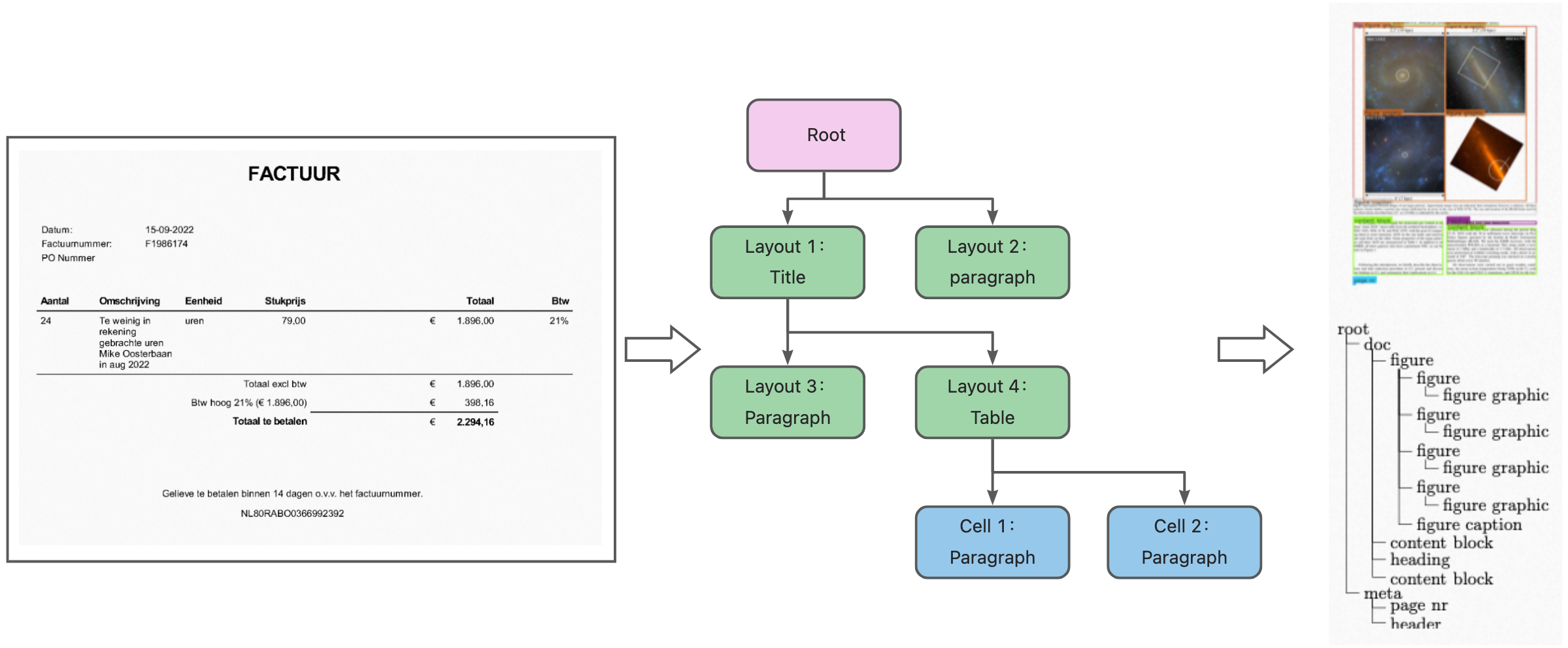
import json
response = json.load(open("demo.json", "r"))
doc_json = response["Data"]
doc_tree = doc_json["logics"]["docTree"]
layout_cache: {} = {}
for layout in doc_json["layouts"]:
    layout_cache[layout["uniqueId"]] = layout
    layout["children"] = list()

for node in doc_tree:
    father = node["backlink"]["上级"][0]
    child = node["uniqueId"]
    if father in layout_cache:
        # Set the child layout.
        layout_cache[father]["children"].append(layout_cache[child])
for layout in doc_json["layouts"]:
    # Prints the child layouts of the current layout.
    print(layout["children"])
Appendix
Doc-JSON data structure
The Doc-JSON data structure includes the following top-level objects:
Doc-JSON |
|
| |
| |
| |
|
Layout types
These tables list the supported type and subType values for layout elements returned by Document Intelligence.
Type | Description | Subtype | Description |
title | title | doc_name | document name |
doc_title | document title | ||
doc_subtitle | document subtitle | ||
para_title | paragraph title | ||
contents_title | table of contents title | cate_title | table of contents title |
contents | table of contents | cate | table of contents |
text | text | para | paragraph |
figure | figure | picture | image |
logo | logo | ||
figure_name | figure title | pic_title | image title |
figure_note | caption | pic_caption | caption |
foot | footer | page_footer | footer |
head | header | page_header | header |
head_pagenum | header page number | page | page number |
foot_pagenum | footer page number | page | page number |
corner_note | footnote | footer_note | footnote |
end_note | endnote | endnode | endnote |
side | sidebar | sidebar | sidebar |
The following types do not have subtypes:
Type | Description |
table_name | table title |
table_note | table note |
formula | formula |
The following types do not have subtypes:
Type | Description |
multicolumn | multi-column text |
table | table |
foot_image | footer image |
head_image | header image |