Other FAQs
How to display automatic configuration details
Together with the JVM running parameter -Ddebug, you can display detailed information during the startup process and display the started automatically configured bean service through the Debug level log.
How to use dependencyManagement to add SOFABoot dependencies
Indirect dependencies of SOFABoot are introduced with
parenttags in the engineering prototype.You can also use the
dependencyManagementto add dependencies, as follows:<dependencyManagement> <dependencies> <!-- SOFABoot dependencies --> <dependency> <groupId>com.alipay.sofa</groupId> <artifactId>sofaboot-enterprise-dependencies</artifactId> <version>2.3.1</version> <type>pom</type> <scope>import</scope> </dependency> </dependencies> </dependencyManagement>
When you use DEV mode to make RPC calls, you are prompted that the service cannot be found.
Check whether there is a directory named localFileRegisty in the user home directory of the computer and whether there is a file named localRegistry.reg in the localFileRegisty directory.
If yes, check whether the metadata information of the service to be called exists. In addition, make sure that the application that publishes services in DEV mode uses SOFABoot 2.1.3 or later.
If the SOFABoot application does not exist, upgrade the SOFABoot application version to 2.1.3 or later.
Does SOFABoot support iBATIS
iBATIS can be used in SOFABoot. However, SOFABoot uses Spring 4, and Spring 4 does not support iBATIS. In the process of using, you may encounter a problem similar to "SqlMapClientDAOSupport class cannot be found".
Therefore, you can add the following dependencies provided by iBATIS to the corresponding pom.xml:
<dependency>
    <groupId>org.mybatis</groupId>
    <artifactId>mybatis-2-spring</artifactId>
    <version>1.0.3</version>
</dependency>
The iBATIS community no longer supports O&M. For long-term development and business stability, we recommend that you upgrade to MyBatis. For more information about the configuration method, see Spring Boot Starter.
Unsupported major.minor version 51.0 exception
Phenomenon
When you compile the project, you receive the following error:
Exceptionin thread "main" java.lang.UnsupportedClassVersionError:
Unsupported major.minor version 51.0
Solution
Use JDK 7 or later to run the project (recommend JDK 8).
Tracer class conversion exception
Phenomenon
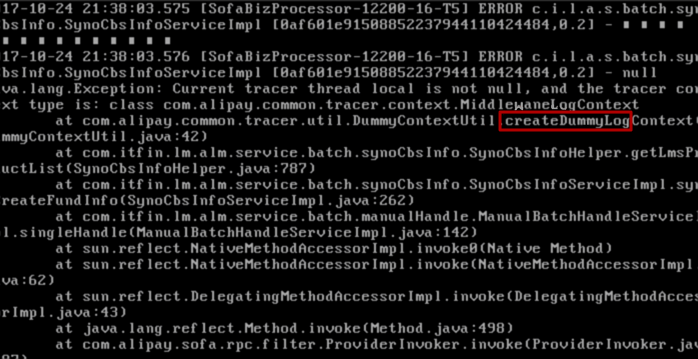
The following error occurred:
Reason
The DummyContextUtil create and clear operations must be used together. If the current Tracer context (ThreadLocal) is not empty when you call the CREATE operation, a Tracer class conversion error occurs.
Solution
When you call the create operation, you can use it with the clear operation.
Spring configuration parsing error
Phenomenon
The following error occurs when Spring parses the configuration file:
Causedby: org.xml.sax.SAXParseException; lineNumber:240; columnNumber:58; References to entity "v" must end with a ';' separator.
    at com.sun.org.apache.xerces.internal.util.ErrorHandlerWrapper.createSAXParseException(ErrorHandlerWrapper.java:203)
    at com.sun.org.apache.xerces.internal.util.ErrorHandlerWrapper.fatalError(ErrorHandlerWrapper.java:177)
    at com.sun.org.apache.xerces.internal.impl.XMLErrorReporter.reportError(XMLErrorReporter.java:400)
    at com.sun.org.apache.xerces.internal.impl.XMLErrorReporter.reportError(XMLErrorReporter.java:327)
    at com.sun.org.apache.xerces.internal.impl.XMLScanner.reportFatalError(XMLScanner.java:1472)
    at com.sun.org.apache.xerces.internal.impl.XMLScanner.scanAttributeValue(XMLScanner.java:913)
    at com.sun.org.apache.xerces.internal.impl.XMLNSDocumentScannerImpl.scanAttribute(XMLNSDocumentScannerImpl.java:447)
    at com.sun.org.apache.xerces.internal.impl.XMLNSDocumentScannerImpl.scanStartElement(XMLNSDocumentScannerImpl.java:250)
    at com.sun.org.apache.xerces.internal.impl.XMLDocumentFragmentScannerImpl$FragmentContentDriver.next(XMLDocumentFragmentScannerImpl.java:2784)
    at com.sun.org.apache.xerces.internal.impl.XMLDocumentScannerImpl.next(XMLDocumentScannerImpl.java:602)
    at com.sun.org.apache.xerces.internal.impl.XMLNSDocumentScannerImpl.next(XMLNSDocumentScannerImpl.java:112)
    at com.sun.org.apache.xerces.internal.impl.XMLDocumentFragmentScannerImpl.scanDocument(XMLDocumentFragmentScannerImpl.java:505)
    at com.sun.org.apache.xerces.internal.parsers.XML11Configuration.parse(XML11Configuration.java:841)
    at com.sun.org.apache.xerces.internal.parsers.XML11Configuration.parse(XML11Configuration.java:770)
    at com.sun.org.apache.xerces.internal.parsers.XMLParser.parse(XMLParser.java:141)
    at com.sun.org.apache.xerces.internal.parsers.DOMParser.parse(DOMParser.java:243)
    at com.sun.org.apache.xerces.internal.jaxp.DocumentBuilderImpl.parse(DocumentBuilderImpl.java:339)
    at org.springframework.beans.factory.xml.DefaultDocumentLoader.loadDocument(DefaultDocumentLoader.java:76)
    at org.springframework.beans.factory.xml.XmlBeanDefinitionReader.doLoadDocument(XmlBeanDefinitionReader.java:429)
    at org.springframework.beans.factory.xml.XmlBeanDefinitionReader.doLoadBeanDefinitions(XmlBeanDefinitionReader.java:391)
...56 more
Reason
The & character appears in the configuration file, as p=1&v=4.0.
Solution
Change the character & to the escape character &. For example, replace p=1&v=4.0 with p=1&v=4.0.
A rule check error occurred during Maven packaging
Phenomenon
The following message appears during Maven packaging:
Please check rules in your project:
1.SOFATracer dependencies should be com.alipay.sofa:tracer-core and com.alipay.sofa:tracer-extensions !!!
2.SOFALookout dependency should be com.alipay.sofa.lookout:lookout-api !!!
Reason
SOFABoot 2.4.0 and later update the SOFATracer and SOFALookout dependencies and enforce rule check. An unupdated dependency will cause Maven compilation to fail.
Solution
The SOFATracer and SOFALookout dependencies are updated as follows:
<dependency>
    <groupId>com.alipay.sofa</groupId>
    <artifactId>tracer-core</artifactId>
</dependency>
<dependency>
    <groupId>com.alipay.sofa</groupId>
    <artifactId>tracer-extensions</artifactId>
</dependency>
<dependency>
    <groupId>com.alipay.sofa.lookout</groupId>
    <artifactId>lookout-api</artifactId>
</dependency>
SOFABoot application exits without reason
Reason
Instead of using publish deployment to run the application, use Java to run it directly.
When running the application, nohup is not used. As a result, the SOFABoot application is closed after the current window is closed.
Example: 

Solution
Use a command line similar to the following to start the application: nohup java -Djava.security.egd=file:/dev/./urandom -jar XXX.jar > Log.log &
SOFABoot application starts slowly in the cloud
Phenomenon
Such as the topic
Reason
Using the default /dev/random to fetch random numbers depends on system interrupts, so when the system has insufficient interrupts, the /dev/random device will be blocked and the process trying to read will enter a waiting state until the system has sufficient interrupts.
Solution
The parameter -Djava.security.egd=file:/dev/./urandom is passed in at startup.
/dev/urandom it does not rely on system interrupts, it will not cause the process to wait, but it will cause the randomness of the data to be low.
SOFABoot application cannot start tengine in the cloud
Phenomenon
Such as the topic
Reason
The application has a hook that modifies the WORK_DIR variable. Example: 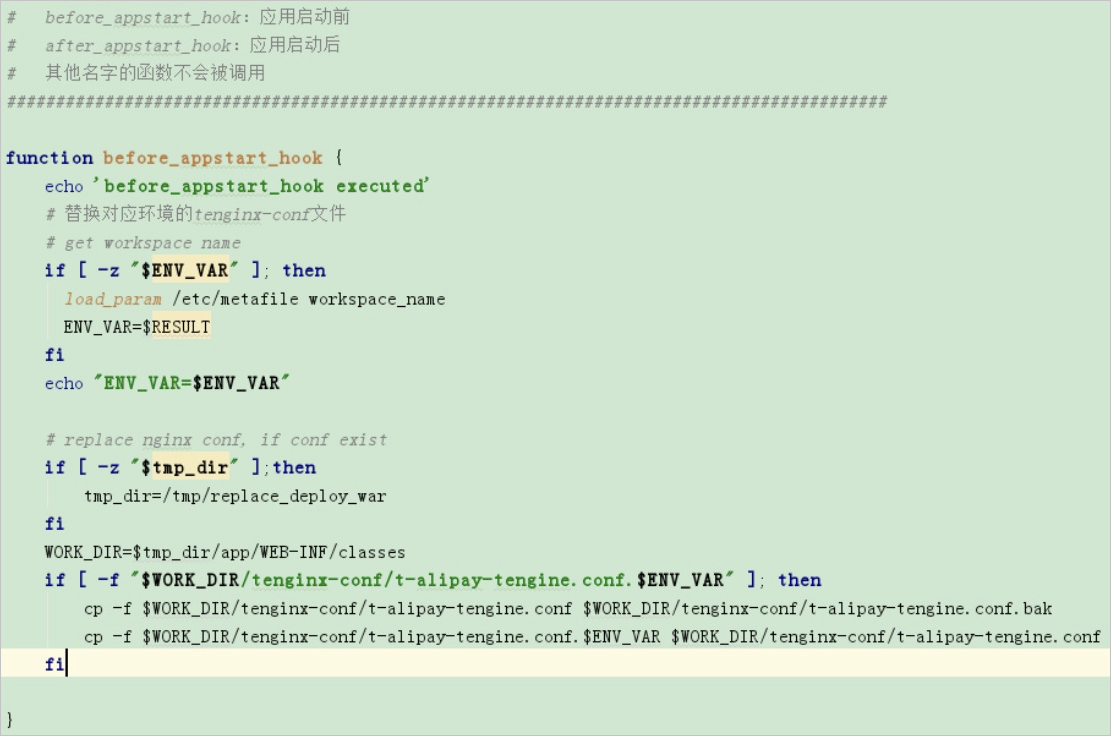
Solution
Modify the application code so that it does not modify the WORK_DIR because it is used by the technology stack.
The service fails to start due to a problem with the profiles-active startup parameter
Phenomenon
A problem with the profiles-active startup parameters prevents the service from starting.
The customer has configured 2 environment parameters on the Publish and Deploy page:
-Ddbmode=coredevand-Dspring.profiles.active = devOne more parameter
-Dspring.profiles.active=coredevin actual deploymentService failed to start
Reason
The customer's profile name is incorrect.
Solution
Change the application-dev.properties to application-coredev.properties.