IoT Platform provides multiple Wi-Fi provisioning solutions for Wi-Fi devices. For devices that lack user interfaces, you can use other devices for provisioning. To support this scenario, IoT Platform offers open provisioning capabilities that allow you to quickly adapt and implement Wi-Fi provisioning on various hardware platforms.
The following figure shows the layered framework of the Wi-Fi device provisioning module in the IoT Platform software development kit (SDK).
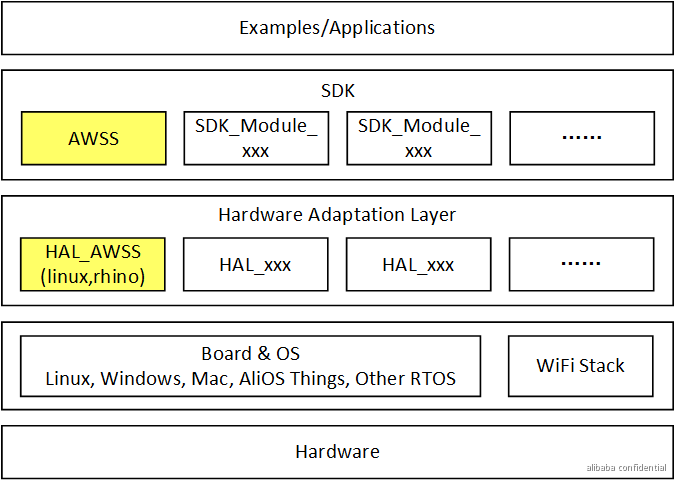
- HAL_AWSS adapts and connects interfaces to the operating system (OS) and hardware. It provides basic Wi-Fi communication capabilities for the upper-layer SDK's provisioning service.
The HAL_AWSS adaptation provides the interfaces that require adaptation for Wi-Fi provisioning.
- The AWSS module is the provisioning service in the SDK. It supports multiple provisioning methods. It depends on the HAL_AWSS component and the correct adaptation of other related interfaces in the HAL.
The AWSS module provides provisioning-related user programming interfaces for upper-layer application development. The provided examples are complete sample implementations that call these interfaces.
In the IoT Platform SDK, the AWSS user programming interfaces are used to call and implement the Wi-Fi provisioning feature for devices.
General HAL description
The Wi-Fi provisioning module depends on the public Hardware Abstraction Layer (HAL) interfaces of the IoT Platform SDK, as listed in the following table. You can complete the integration by following the instructions for the corresponding module in the IoT Platform SDK.
| No. | Adaptation interface name | Description |
| 1 | HAL_MutexCreate | Creates a mutex object and returns a pointer to the created mutex for synchronous access. For applications that support only single-threaded operations, this can be an empty function. |
| 2 | HAL_MutexDestroy | Destroys a mutex object and releases its resources. |
| 3 | HAL_MutexLock | Locks a mutex. |
| 4 | HAL_MutexUnlock | Unlocks a mutex. |
| 5 | HAL_UptimeMs | Gets the number of milliseconds that have elapsed since the device was powered on. |
| 6 | HAL_Malloc | Allocates a block of heap memory. |
| 7 | HAL_Free | Releases a block of heap memory pointed to by the ptr parameter. No operation is performed if the passed parameter is NULL. |
| 8 | HAL_SleepMs | A sleep function that puts the current execution thread to sleep for the specified number of milliseconds. |
| 9 | HAL_GetProductKey | Gets the ProductKey of the device. This key identifies the product category and is part of the device certificate. |
| 10 | HAL_GetProductSecret | Gets the ProductSecret of the device. This secret identifies the product category and is part of the device certificate. |
| 11 | HAL_GetDeviceName | Gets the DeviceName of the device. This name identifies the individual device and is part of the device certificate. |
| 12 | HAL_GetDeviceSecret | Gets the DeviceSecret of the device. This secret is the key for the individual device and is part of the device certificate. |
| 13 | HAL_Kv_Set | Writes a key-value pair to flash memory. |
| 14 | HAL_Kv_Get | Reads the value of a key-value pair from flash memory. |
| 15 | HAL_Aes128_Init | Initializes the struct for AES encryption. |
| 16 | HAL_Aes128_Destroy | Destroys the struct for AES encryption. |
| 17 | HAL_Aes128_Cbc_Encrypt | Encrypts the specified plaintext in AES-CBC-128 mode using the key passed during HAL_Aes128_Init(). |
| 18 | HAL_Aes128_Cbc_Decrypt | Decrypts the specified ciphertext in AES-CBC-128 mode using the key passed during HAL_Aes128_Init(). |
| 19 | HAL_Aes128_Cfb_Encrypt | Encrypts the specified plaintext in AES-CFB-128 mode using the key passed during HAL_Aes128_Init(). |
| 20 | HAL_Aes128_Cfb_Decrypt | Decrypts the specified ciphertext in AES-CFB-128 mode using the key passed during HAL_Aes128_Init(). |
| 21 | HAL_Timer_Create | Creates a timer based on the Name, TimerFunc, and user context. |
| 22 | HAL_Timer_Start | Starts the timer. When the timer expires, it calls the TimerFunc callback function. |
| 23 | HAL_Timer_Stop | Stops the timer. |
| 24 | HAL_Timer_Delete | Deletes the timer and releases its resources. |
- /Living_SDK/framework/protocol/linkkit/sdk/iotx-sdk-c_clone/include/imports/
- /Living_SDK/framework/protocol/linkkit/sdk/iotx-sdk-c_clone/include/iot_import.h
HAL adaptation overview
The following table describes the HAL interfaces that require adaptation for the Wi-Fi provisioning module.
| No. | Adaptation interface name | Description | Category |
| 1 | HAL_Wifi_Get_Mac | Gets the MAC address of the device. The format must be "XX:XX:XX:XX:XX:XX". | Provisioning general |
| 2 | HAL_Wifi_Get_IP | Gets the IP address of the device. The address is saved as a string array in dotted decimal notation and returned as a binary value in network byte order (big-endian). In Station mode, this is the IP address when connected to an AP. In SoftAP mode, this is the Gateway IP address of the device acting as an AP. | Provisioning general |
| 3 | HAL_Awss_Get_Channelscan_Interval_Ms | Gets the duration for scanning on each channel, in milliseconds. | General-purpose Network Provisioning |
| 4 | HAL_Awss_Get_Timeout_Interval_Ms | Gets the timeout duration for the provisioning service (AWSS), in milliseconds. | General Network Provisioning |
| 5 | HAL_Awss_Get_Encrypt_Type | Gets the security level for the one-click provisioning service. | One-click provisioning |
| 6 | HAL_Awss_Get_Conn_Encrypt_Type | Gets the security level for connection-based provisioning services, such as hot spot provisioning or zero-configuration provisioning. |
|
| 7 | HAL_Awss_Open_Monitor | Sets the device to work in Monitor mode and calls the passed callback function when an 802.11 frame is received, including management and data frames. | General-Purpose Network Provisioning |
| 8 | HAL_Awss_Close_Monitor | Closes Monitor mode. | General Network Provisioning |
| 9 | HAL_Wifi_Scan | Starts a Wi-Fi air scan. | Provisioning general |
| 10 | HAL_Awss_Switch_Channel | Sets the Wi-Fi device to switch to the specified channel. | General Network Provisioning |
| 11 | HAL_Awss_Connect_Ap | Requests the Wi-Fi network interface card to connect to a specified Access Point. The bssid parameter specifies a particular AP. The bssid can also be empty or an invalid value, such as all 0s or all 0xffs. | General Network Provisioning |
| 12 | HAL_Wifi_Send_80211_Raw_Frame | Sends a raw 802.11 frame on the current channel at the basic data rate of 1 Mbps. | Provisioning general |
| 13 | HAL_Wifi_Enable_Mgmt_Frame_Filter | Enables or disables filtering for management frames. | General-purpose Network Provisioning |
| 14 | HAL_Sys_Net_Is_Ready | Checks if the current IP address of the Wi-Fi network interface card, chip, or module is valid. | Provisioning general |
| 15 | HAL_Wifi_Get_Ap_Info | Gets information about the Access Point to which the device is connected, such as SSID, Password, and BSSID. | Provisioning general |
| 16 | HAL_Wifi_Get_Link_Stat | Gets the status information of the current link with the AP, such as channel and RSSI. | Provisioning general |
| 17 | HAL_Awss_Open_Ap | Enables the device hot spot (SoftAP mode). | Device hot spot provisioning |
| 18 | HAL_Awss_Close_Ap | Closes the current device hot spot and switches the device from SoftAP mode to Station mode. | Device hot spot provisioning |
HAL_Wifi_Get_Mac
Prototype
char *HAL_Wifi_Get_Mac(_OU_ char mac_str[HAL_MAC_LEN]);Description
Retrieves the MAC address of the Wi-Fi port. The address is formatted as XX:XX:XX:XX:XX:XX.
Parameters
| Parameter | Data type | Direction | Description |
| mac_str | char | Output | A character pointer to the start of the buffer array. |
Return values
A character pointer to the start of the buffer array.
HAL_Wifi_Get_IP
Prototype
uint32_t HAL_Wifi_Get_IP(_OU_ char ip_str[NETWORK_ADDR_LEN], _IN_ const char *ifname);Description
Retrieves the IP address of the Wi-Fi port. The address is saved as a string in dotted decimal notation and returned as a binary value in network byte order (big-endian).
Parameters
| Parameter | Data type | Direction | Description |
| ip_str | char[] | Output | An array that stores the IP address string in dotted decimal notation. |
| ifname | const char* | Input | The name of the Wi-Fi network interface. If there is only one network port, you can ignore this parameter. This parameter can be NULL. |
Return values
The IP address in binary format, organized in network byte order (big-endian).
HAL_Awss_Get_Channelscan_Interval_Ms
Prototype
int HAL_Awss_Get_Channelscan_Interval_Ms(void);Description
Retrieves the scan duration for each channel in milliseconds. The recommended value is between 200 ms and 400 ms. The default value is 250 ms.
Parameters
void
Return values
The duration in milliseconds.
HAL_Awss_Get_Timeout_Interval_Ms
Prototype
int HAL_Awss_Get_Timeout_Interval_Ms(void);Description
Retrieves the timeout duration for the provisioning service (AWSS) in milliseconds. The recommended value is 60s (60,000 ms).
Parameters
void
Return values
The timeout duration in milliseconds.
HAL_Awss_Get_Encrypt_Type
Prototype
int HAL_Awss_Get_Encrypt_Type(void);Description
Retrieves the security level for the one-click provisioning service.
Parameters
void
Return values
| Value | Description |
| 0 | open (no encrypt) |
| 1 | aes256cfb with default aes-key and aes-iv |
| 2 | aes128cfb with default aes-key and aes-iv |
| 3 | aes128cfb with aes-key per product and aes-iv = 0 |
| 4 | aes128cfb with aes-key per device and aes-iv = 0 |
| 5 | aes128cfb with aes-key per manufacture and aes-iv = 0 |
| others | Invalid |
HAL_Awss_Get_Conn_Encrypt_Type
Prototype
int HAL_Awss_Get_Conn_Encrypt_Type(void);API Description
Retrieves the security level for zero-configuration provisioning and hot spot provisioning.
Parameters
void
Return values
| Value | Description |
| 3 | aes128cfb with aes-key per product and aes-iv = random |
| 4 | aes128cfb with aes-key per device and aes-iv = random |
| 5 | aes128cfb with aes-key per manufacture and aes-iv = random |
| others | Invalid |
HAL_Awss_Open_Monitor
Prototype
void HAL_Awss_Open_Monitor(_IN_ awss_recv_80211_frame_cb_t cb);Description
Sets the Wi-Fi network interface card to Monitor mode and calls the specified callback function when an 802.11 frame is received.
Parameters
| Parameter | Data type | Direction | Description |
| cb | awss_recv_80211_frame_cb_t | Input | A callback function pointer. This function is called when the Wi-Fi receives a frame. |
/**
 * @brief   The processing function for 802.11 frames. You can pass the 802.11 Frame to this function.
 *
 * @param[in] buf @n 80211 frame buffer, or pointer to struct ht40_ctrl
 * @param[in] length @n 80211 frame buffer length
 * @param[in] link_type @n AWSS_LINK_TYPE_NONE for most rtos HAL,
 *              and for linux HAL, do the following step to check
 *              which header type the driver supported.
   @verbatim
               a) iwconfig wlan0 mode monitor    #open monitor mode
               b) iwconfig wlan0 channel 6    #switch channel 6
               c) tcpdump -i wlan0 -s0 -w file.pacp    #capture 80211 frame & save
               d) open file.pacp with wireshark or omnipeek
                   check the link header type and fcs included or not
   @endverbatim
 * @param[in] with_fcs @n 80211 frame buffer include fcs(4 byte) or not
 * @param[in] rssi @n The RSSI of the packet, in the range of [-127, -1].
 */
typedef int (*awss_recv_80211_frame_cb_t)(char *buf, int length,
        enum AWSS_LINK_TYPE link_type, int with_fcs, signed char rssi);
Return values
void
HAL_Awss_Close_Monitor
Prototype
void HAL_Awss_Close_Monitor(void);Description
Sets the Wi-Fi network interface card to exit Monitor mode and enter Station mode.
Parameters
void
Return values
void
HAL_Wifi_Scan
Prototype
int HAL_Wifi_Scan(awss_wifi_scan_result_cb_t cb);Description
Starts a Wi-Fi scan. This API call is a blocking operation and does not return until the scan is complete. After the list of available Access Points (APs) is collected, each AP is reported to AWSS through the callback function. Do not limit the number of APs. Otherwise, hot spot provisioning for SSIDs with GBK encoding may fail.
Parameters
| Parameter | Data type | Direction | Description |
| cb | awss_wifi_scan_result_cb_t | Input | Scan notification callback function. |
Return values
| Value | Description |
| 0 | The scan ended normally. |
| -1 | Other cases. |
HAL_Awss_Switch_Channel
Prototype
void HAL_Awss_Switch_Channel(
            _IN_ char primary_channel,
            _IN_OPT_ char secondary_channel,
            _IN_OPT_ uint8_t bssid[ETH_ALEN]);
Description
Sets the Wi-Fi network interface card to switch to the specified channel.
Parameters
| Parameter | Data type | Direction | Description |
| primary_channel | char | Input | Primary channel. |
| secondary_channel | char | Input | Secondary channel. Used only when the channel bandwidth is 40 MHz. This parameter is ignored when the channel width is 20 MHz. |
| bssid | uint8_t | Input | In IoT Platform SDK 1.3.0 and later, this parameter is deprecated. Use it only to be compatible with versions earlier than 1.3.0. |
Return values
void
HAL_Awss_Connect_Ap
Prototype
int HAL_Awss_Connect_Ap(
            _IN_ uint32_t connection_timeout_ms,
            _IN_ char ssid[HAL_MAX_SSID_LEN],
            _IN_ char passwd[HAL_MAX_PASSWD_LEN],
            _IN_OPT_ enum AWSS_AUTH_TYPE auth,
            _IN_OPT_ enum AWSS_ENC_TYPE encry,
            _IN_OPT_ uint8_t bssid[ETH_ALEN],
            _IN_OPT_ uint8_t channel);
Description
Requests the Wi-Fi network interface card to connect to a specified Access Point (AP). The bssid parameter specifies a particular AP. The bssid can also be empty or an invalid value, such as all 0s or all 0xFFs.
Parameters
| Parameter | Data type | Direction | Description |
| connection_timeout_ms | uint32_t | Input | The timeout period for connecting to the AP. |
| ssid | char | Input | The SSID of the destination AP. |
| passwd | char | Input | The password of the destination AP. |
| auth | enum | Input | The encryption method of the destination AP. The HAL can ignore this. |
| encry | enum | Input | The authentication method of the destination AP. The HAL can ignore this. |
| bssid | uint8_t | Input | The BSSID of the destination AP. This field can be NULL or set to all 0s. |
| channel | uint8_t | Input | The channel of the destination AP. This field can be ignored. |
Return values
| Value | Description |
| 0 | Successfully connected to the AP and obtained an IP address through DHCP. |
| -1 | Failed to connect to the AP or obtain an IP address through DHCP. |
HAL_Wifi_Send_80211_Raw_Frame
Prototype
int HAL_Wifi_Send_80211_Raw_Frame(_IN_ enum HAL_Awss_Frame_Type type,
        _IN_ uint8_t *buffer, _IN_ int len);
Description
Sends a raw 802.11 frame on the current channel at a basic data rate of 1 Mbps.
Parameters
| Parameter | Data type | Direction | Description |
| type | enum HAL_Awss_Frame_Type | Input | See the HAL_Awss_Frame_Type_t definition. |
| buffer | uint8_t * | Input | The raw 802.11 data frame, including the complete MAC header and FCS field. |
| len | int | Input | The length of the raw 802.11 frame in bytes. |
/* 80211 frame type */
typedef enum HAL_Awss_Frame_Type {
    FRAME_ACTION,                 // Action frame in 802.11
    FRAME_BEACON,                // Beacon frame in 802.11
    FRAME_PROBE_REQ,           // Probe Request frame in 802.11
    FRAME_PROBE_RESPONSE,       // Probe Response frame in 802.11
    FRAME_DATA                 // Data frame in 802.11
} HAL_Awss_Frame_Type_t;
Return values
| Value | Description |
| 0 | Sent successfully. |
| -1 | Failed to send. |
HAL_Wifi_Enable_Mgmt_Frame_Filter
Prototype
int HAL_Wifi_Enable_Mgmt_Frame_Filter(
            _IN_ uint32_t filter_mask,
            _IN_OPT_ uint8_t vendor_oui[3],
            _IN_ awss_wifi_mgmt_frame_cb_t callback);
API reference
Enables or disables filtering for specific management frames.
Parameters
| Parameter | Data type | Direction | Description |
| filter_mask | uint32_t | Input | Frame filtering parameter. |
| vendor_oui | uint8_t | Input | The vendor Organizationally Unique Identifier (OUI) assigned by the Wi-Fi Alliance. If the OUI is NULL, OUI filtering is not performed. Otherwise, filter based on the OUI. |
| callback | awss_wifi_mgmt_frame_cb_t | Input | A callback function used to receive 802.11 frames or information elements (IEs). |
Return values
| Value | Description |
| = 0 | Sent successfully. |
| = -1 | Failed to send. |
| = -2 | Not supported. |
HAL_Sys_Net_Is_Ready
Prototype
int HAL_Sys_Net_Is_Ready();Description
Checks whether the system network is ready. A ready network indicates that the device has successfully obtained an IP address and the IP address is available for use.
Parameters
void
Return values
| Value | Description |
| 0 | Network is unavailable. |
| 1 | Network is available. |
HAL_Wifi_Get_Ap_Info
Prototype
int HAL_Wifi_Get_Ap_Info(
            _OU_ char ssid[HAL_MAX_SSID_LEN],
            _OU_ char passwd[HAL_MAX_PASSWD_LEN],
            _OU_ uint8_t bssid[ETH_ALEN]);
Description
Retrieves information about the connected Access Point (AP).
Parameters
| Parameter | Data type | Direction | Description |
| ssid | char | Output | The SSID of the AP. This parameter can be NULL. |
| passwd | char | Output | The password of the AP. This parameter is NULL. |
| bssid | uint8_t | Output | The BSSID of the AP. This parameter can be NULL. An incorrect bssid will cause zero-configuration device discovery to fail. |
Return values
| Value | Description |
| 0 | Operation successful. |
| -1 | Operation failed. |
HAL_Wifi_Get_Link_Stat
Prototype
int HAL_Wifi_Get_Link_Stat(_OU_ int *p_rssi,
                           _OU_ int *p_channel);
Description
Retrieves the status information of the current link to the AP, such as channel and RSSI.
Parameters
| Parameter | Data type | Direction | Description |
| p_rssi | char | Output | The signal strength value of the AP to which the device is currently associated. |
| p_channel | char | Output | The channel of the AP to which the device is currently associated. |
Return values
| Value | Description |
| 0 | Operation successful. |
| -1 | Operation failed. |
HAL_Awss_Open_Ap
Prototype
int HAL_Awss_Open_Ap(const char *ssid,
                     const char *passwd,
                     int beacon_interval,
                     int hide);
Description
Enables the device hot spot (SoftAP mode).
Parameters
| Parameter | Data type | Direction | Description |
| ssid | const char * | Input | The SSID string of the hot spot. |
| passwd | const char * | Input | The password string of the hot spot. |
| beacon_interval | int | Input | The Beacon broadcast period (broadcast interval) of the hot spot. |
| hide | int | Input |
|
Return values
| Value | Description |
| 0 | success |
| -1 | unsupported |
| -2 | failure with system error |
| -3 | failure with no memory |
| -4 | failure with invalid parameters |
HAL_Awss_Close_Ap
Prototype
int HAL_Awss_Close_Ap(void);API Description
Disables the device hot spot.
Parameters
void
Return values
| Value | Description |
| 0 | success |
| -1 | unsupported |
| -2 | failure |