Integrating Mesh with Nacos
This topic describes how to integrate Mesh with Nacos by synchronizing service metadata from Nacos to the dsrconsole.
Background information
The dsrconsole is a microservice console that displays application and service information to support service administration, such as querying application and service lists.
Nacos is an open source distributed registry that stores service metadata. To ensure data consistency and completeness, this metadata must be synchronized and made visible in the dsrconsole.
Solution
The Nacos server-side exposes REST APIs to query application metadata, service metadata, and service details. When the dsrconsole displays Service Catalog data, it directly calls the Nacos APIs to query the data. The implementation path is shown in the following figure: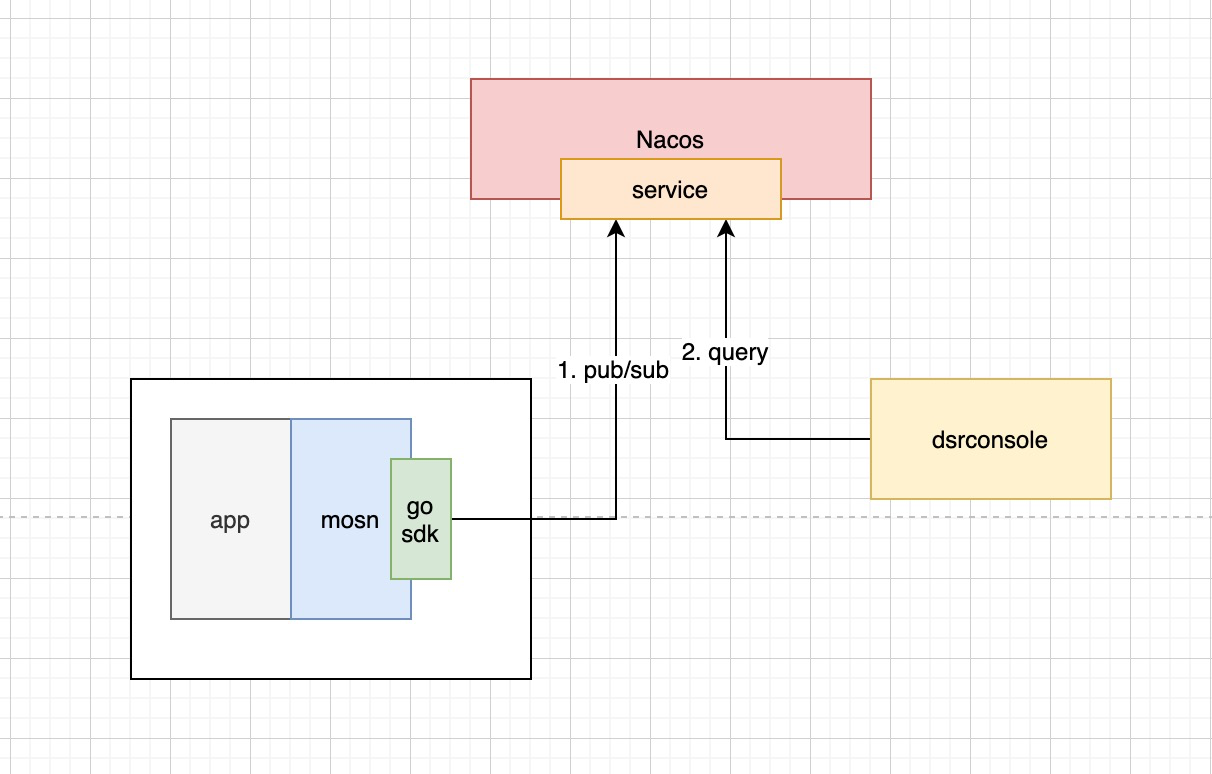
Currently, business applications are registered by a MOSN agent. This solution uses the nacos-go-client software development kit (SDK) to publish and subscribe to services in Nacos. The Nacos server-side exposes a REST API that returns client and server-side information for services. When you query service metadata or access the Service Catalog in the dsrconsole, the console calls the new Nacos API to display the information.
Changes to dsrconsole
Previously, the dsrconsole used several tables to store application and service information and fetched data from the database for queries. After this modification, data is queried by directly calling the Nacos APIs.
A switch is added to the Controller layer. The Controller layer then directly calls the Nacos API and returns the result.
Changes to Nacos Server
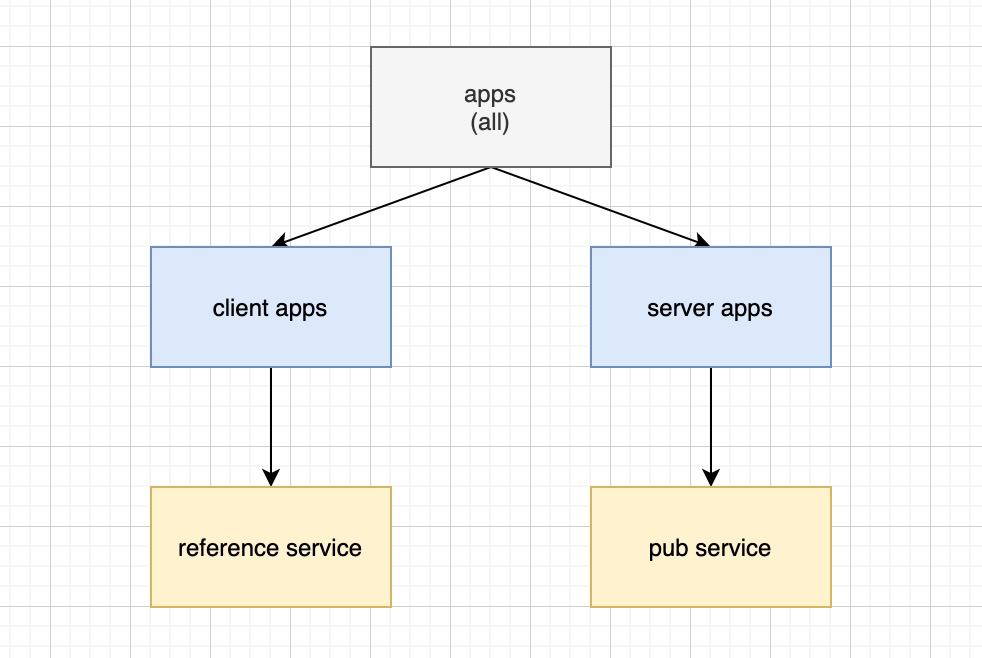
The Nacos model is service > cluster > instance, where the application name is stored under `instance`. After the changes, Nacos maintains a new `App > service` data model. This model must distinguish between client and server-side applications. You can achieve this by providing specific query APIs instead of maintaining a new data model.
Procedure
Nacos Server must be v1.3.2 or later.
The Nacos Go SDK must be v1.0.7 or later.
Download the MOSN GO Client.
For a description of the changes in the MOSN GO Client, see GitHub.
Modify the index of the
dsrconsole service_infotable.You can make the modification as follows:
ALTER TABLE `service_info` ADD UNIQUE INDEX `uk_instance_id_data_id_app_name` (`instance_id`, `data_id`(255), `app_name`(255));

drop index `uk_key` on `service_info` ;
Set the new DRM configuration items to disable the sofa registry push.
The new DRM configuration items are as follows:
Domain: AntCloud
Application: dsrconsole
Class identity:
com.alipay.antcloud.dsrconsole.core.service.config.DegradationConfigAdd property 1: processAliveDetectedSwitch. This is the switch to enable process checks.
Add property 2: syncDegrade. This is the degradation switch.
Modify the property values as follows:
Set the processAliveDetectedSwitch property, which enables process checks, to false.
Set the syncDegrade property, which is the degradation switch, to true.
Appendix: Nacos APIs
Query service list
Request type: GET
URI of the request:
/nacos/v1/ns/service/listRequest parameters:
Name
Type
Required
Description
instanceId
String
Yes
Tenant instance ID
pageNo
int
Yes
Current page number
pageSize
int
Yes
Page size
Request example:
curl -X GET '127.0.0.1:8848/nacos/v1/ns/service/list?instanceId=000001&pageNo=1&pageSize=2'Response example:
{
    "count":148,
    "list": [
      {
       "serviceName": "nacos.test.1@crpc",
        "pubApp": "crpc-server1"
      },
      {
       "serviceName": "nacos.test.2@crpc",
        "pubApp": "crpc-server2"
      }

    ]
}
Query application list
Request type: GET
URI of the request:
/nacos/v1/ns/apps/listRequest parameters:
Name
Type
Required
Description
instanceId
String
Yes
Tenant instance ID
Request example:
curl -X GET '127.0.0.1:8848/nacos/v1/ns/apps/list?instanceId=000001Response example:
{
    "apps": [
        "app1",
        "app2"
    ]
}
Query service list for a client application
Request type: GET
URI of the request:
/nacos/v1/ns/services/client/listRequest parameters:
Name
Type
Required
Description
instanceId
String
Yes
Tenant instance ID
appName
String
Yes
Application name
Request example:
curl -X GET '127.0.0.1:8848/nacos/v1/ns/services/client/list?instanceId=000001&appName=xxxResponse example:
{
    "servers": [
        "com.xxx.Facade1",
        "com.xxx.Facade2"
    ]
}
Query service list for a server-side application
Request type: GET
URI of the request:
/nacos/v1/ns/services/server/listRequest parameters:
Name
Type
Required
Description
instanceId
String
Yes
Tenant instance ID
appName
String
Yes
Application name
groupName
String
No
Group name
namespaceId
String
No
Namespace ID
Request example:
curl -X GET '127.0.0.1:8848/nacos/v1/ns/services/server/list?instanceId=000001&appName=xxxResponse example:
{
    "servers": [
        "com.xxx.Facade1",
        "com.xxx.Facade2"
    ]
}
Query service provider details
Request type: GET
URI of the request:
/nacos/v1/ns/services/serverpub/detail/listRequest parameters:
Name
Type
Required
Description
instanceId
String
Yes
Tenant instance ID
serverName
String
Yes
Service name
groupName
String
No
Group name
namespaceId
String
No
Namespace ID
Request example:
curl -X GET '127.0.0.1:8848/nacos/v1/ns/services/serverpub/detail/list?instanceId=000001&serverName=com.xxx.Facade1@crpcResponse example:
{
    "serverPubDetails": [
      {
       "serverName": "com.xxx.Facade1@crpc",
        "metadata": `crpc://30.**.**.89:30778?VMMODE=true&annotations={"serviceName":"org.example.services.userInterface.UserService:1.0.0:default@crpc","protocol":"crpc","targetPort":9999,"healthCheckConfig":{"timeout":10,"interval":10,"intervalJitter":2,"firstHealthyDelay":15,"healthyThreshold":3,"unhealthyThreshold":2,"commonCallbacks":["confregWithDelayOnce"],"http":{}}}&app.kubernetes.io/version=1.2&appName=crpc-server&datacenter=dc1&mosn=true&port=9999&pressure_test=false&tls=false&zone=GZ00T`
      },
      {
       "serverName": "com.xxx.Facade2@crpc",
        "metadata": `crpc://30.**.**.89:30778?VMMODE=true&annotations={"serviceName":"org.example.services.userInterface.UserService:1.0.0:default@crpc","protocol":"crpc","targetPort":9999,"healthCheckConfig":{"timeout":10,"interval":10,"intervalJitter":2,"firstHealthyDelay":15,"healthyThreshold":3,"unhealthyThreshold":2,"commonCallbacks":["confregWithDelayOnce"],"http":{}}}&app.kubernetes.io/version=1.2&appName=crpc-server&datacenter=dc1&mosn=true&port=9999&pressure_test=false&tls=false&zone=GZ00T`
      }
    ]
}
Query service subscriber details
Request type: GET
URI of the request:
/nacos/v1/ns/services/serversub/detail/listRequest parameters:
Name
Type
Required
Description
instanceId
String
Yes
Tenant instance ID
serverName
String
Yes
Service name
groupName
String
No
Group name
namespaceId
String
No
Namespace ID
Request example:
curl -X GET '127.0.0.1:8848/nacos/v1/ns/services/serversub/detail/list?instanceId=000001&serverName=com.xxx.Facade1@crpcResponse example:
{
    "serverPubDetails": [
      {
       "serverName": "com.xxx.Facade1@crpc",
        "ip": "30.**.**.31",
        "appName": "crpc-client"
      },
      {
       "serverName": "com.xxx.Facade2@crpc",
        "ip": "30.**.**.32",
        "appName": "crpc-client"
      }
    ]
}