Retail industry
This topic describes the best practices for the Wuying solution in the retail industry.
Scenarios
The rise of e-commerce has led to increasing labor and rent costs in the retail industry. As a result, many customers are looking to integrate their online and offline operations and use digital tools to reduce costs and improve efficiency.
Retail customers primarily use terminals for office work, branch outlet operations, and customer management. While aiming to reduce costs and improve efficiency, they also require secure, easy-to-manage terminals that are flexible and convenient.
Customer pain points
Employees in administration, finance, and sales handle core confidential data, which requires robust data security measures.
Old office computers with outdated configurations fail frequently and perform poorly. This slows down business operations and reduces efficiency.
Staff at branch outlets and outsourced research and development (R&D) personnel are geographically dispersed and have a high turnover rate. This makes user management and operations and maintenance (O&M) across multiple locations challenging. User behavior cannot be monitored. Customers require a secure office solution that is elastic, can be deployed quickly, and supports remote management and client-side O&M.
Reducing costs and improving efficiency are primary goals. As customers reduce their spending on office terminals, they seek more cost-effective solutions.
An increasing number of roles require employees to work remotely. Traditional mobile work solutions are not flexible enough to meet these needs.
Solution architecture
The Wuying solution for the retail industry focuses on three main scenarios: secure office, social community operations, and branch outlets.
Secure office
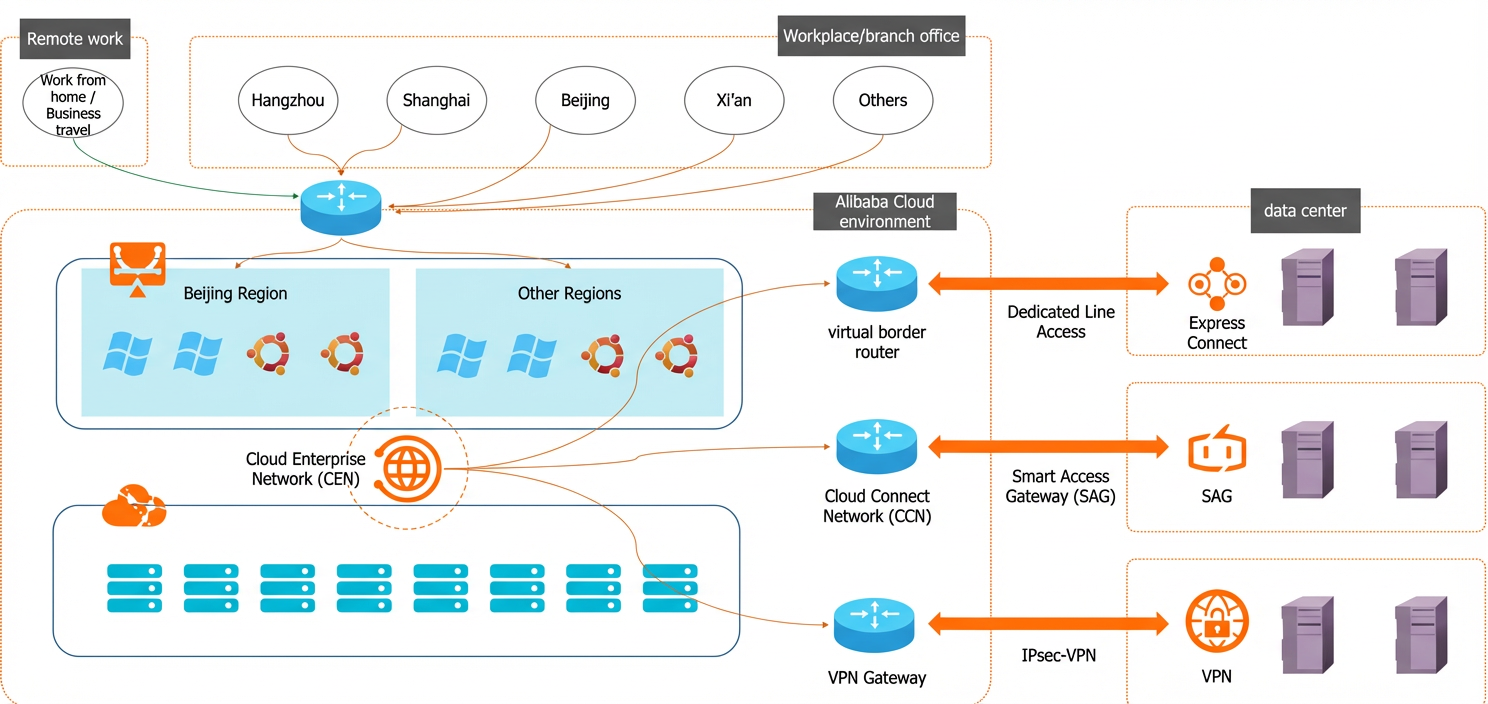
Store and manage all data centrally in the cloud, with no data saved on local devices. Data security is enforced through Wuying policies, such as USB port control, watermarks, and IP address whitelists for access.
Secure the entire environment with cloud features such as multi-replica storage, snapshot backups, and system vulnerability scans.
Provision cloud computers in batches with pre-installed software for out-of-the-box use. Remote O&M capabilities reduce the IT workload.
Wuying offers flexible billing methods that significantly reduce the initial investment. It supports upgrades or downgrades of configurations in seconds, ensuring that cloud computers always meet performance requirements.
Enable multi-device access and secure remote access to company resources. This improves efficiency for remote collaboration and work-from-home scenarios.
Social community operations
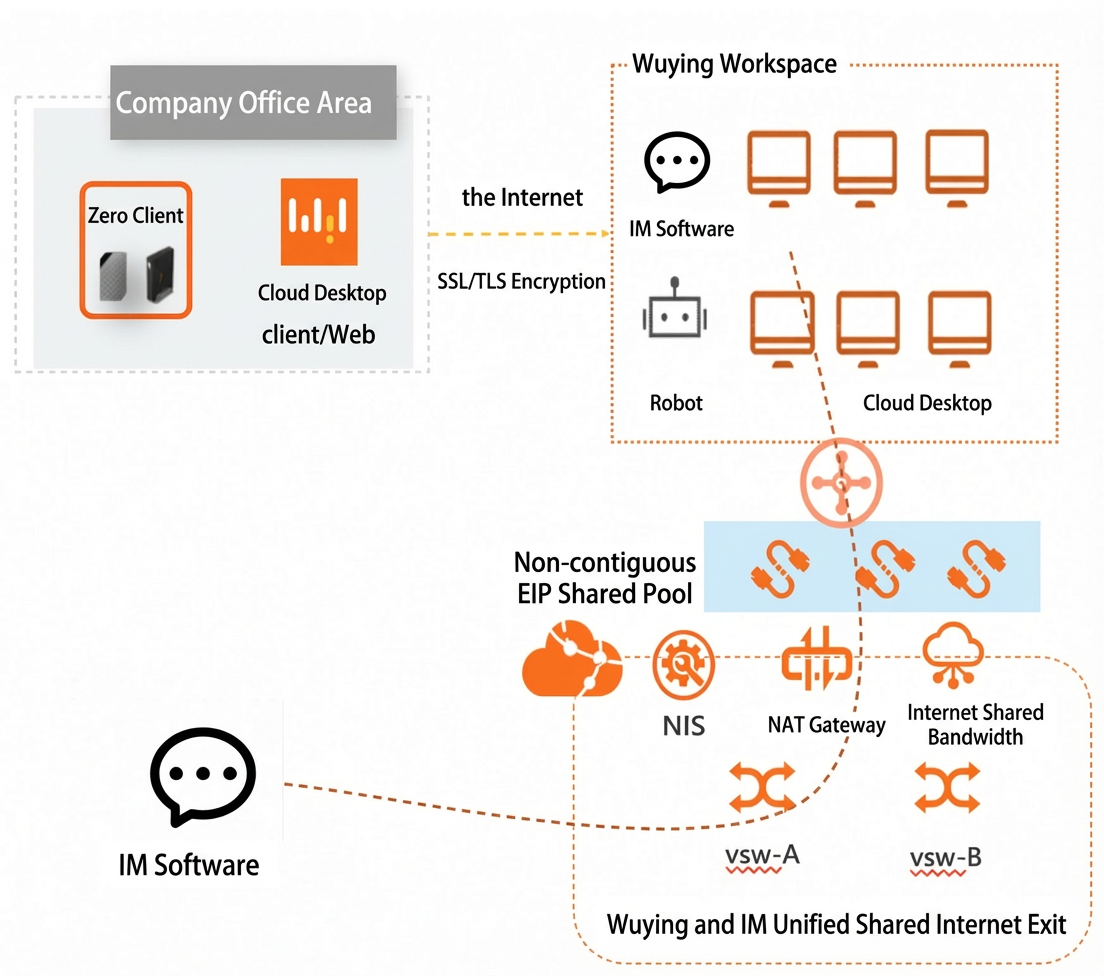
Assign multiple Wuying cloud computers to a single user. Each cloud computer can run a separate instant messaging (IM) application. This setup allows one user to manage multiple IM accounts efficiently and in compliance with regulations, without needing additional hardware.
Wuying provides a unified management console. Administrators can create, distribute, upgrade, downgrade, and revert cloud computers in batches, which significantly improves O&M efficiency.
Both subscription and pay-as-you-go billing methods are supported. Create and release cloud computers as needed to match business demands. This approach avoids large upfront investments and reduces operational costs.
Wuying integrates with Robotic Process Automation (RPA) software to provide an integrated solution with enhanced compatibility.
Wuying provides a comprehensive software development kit (SDK) and APIs. This lets you easily integrate and customize the service to meet your specific business needs.
Branch outlets
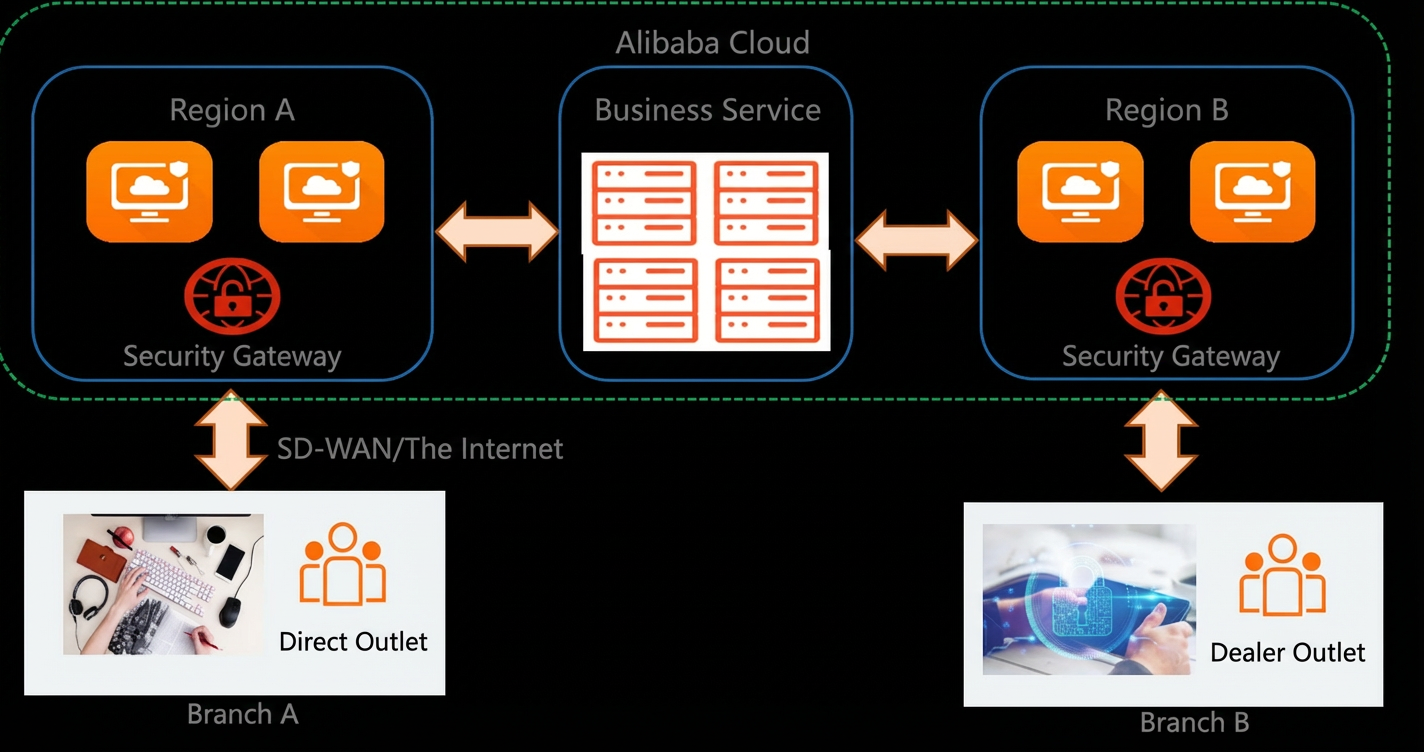
All data from production computers is moved to the cloud for centralized storage in a data center, and no data is stored on local devices. Wuying policies, such as USB port control and watermarks, help prevent data leaks from production environments.
Provision cloud computers with various specifications in batches. Software is pre-installed as part of a standardized deployment. This provides an out-of-the-box experience, so users do not need to install or configure software.
Wuying uses highly reliable thin clients. Users can get started by simply connecting a monitor. This setup significantly reduces hardware failure rates.
Outlet terminals can be upgraded in seconds. This ensures configurations never become outdated and reduces the need for repeated hardware investments.