The quality statistics feature lets you query quality overview and distribution data for a specific AppID. This topic describes how to query these statistics.
Procedure
Log on to the Real-Time Communication (RTC) console.
In the navigation pane on the left, choose .
Optional: Select an AppID, click the Quality Overview tab, and select a time range to view the quality overview data.
Click the Channel Join Success Rate tab to view the success rate of users joining channels.
Metric
Description
Channel join success rate
The ratio of successful channel joins to total channel join attempts.
5-second channel join success rate
The ratio of channel joins that succeeded within 5 seconds to total channel join attempts.
Click the First Frame Latency tab to view the initial load time for audio and video.
Metric
Description
Video first frame display time
The time from a successful subscription to a remote video stream to the display of the first frame. The unit is milliseconds.
Click the Stuttering Rate tab to view the audio and video stuttering rate.
Metric
Description
Audio stuttering rate
The ratio of the audio stuttering duration to the total audio duration.
Video stuttering rate
The ratio of the video stuttering duration to the total video duration.
Click the Network Latency tab to view the audio and video network latency.
Metric
Description
Audio network latency
The network latency for audio from the sender to the receiver.
Video network latency
The network latency for video from the sender to the receiver.
Click the High-quality Transmission Rate tab to view the audio and video high-quality transmission rate.
Metric
Description
Audio high-quality transmission rate
The percentage of audio transmission where the packet loss rate is 5% or less.
Video high-quality transmission rate
The percentage of video transmission where the packet loss rate is 5% or less.
Optional: Select an AppID, click the Quality Distribution tab, and select a time range to view the quality distribution data.
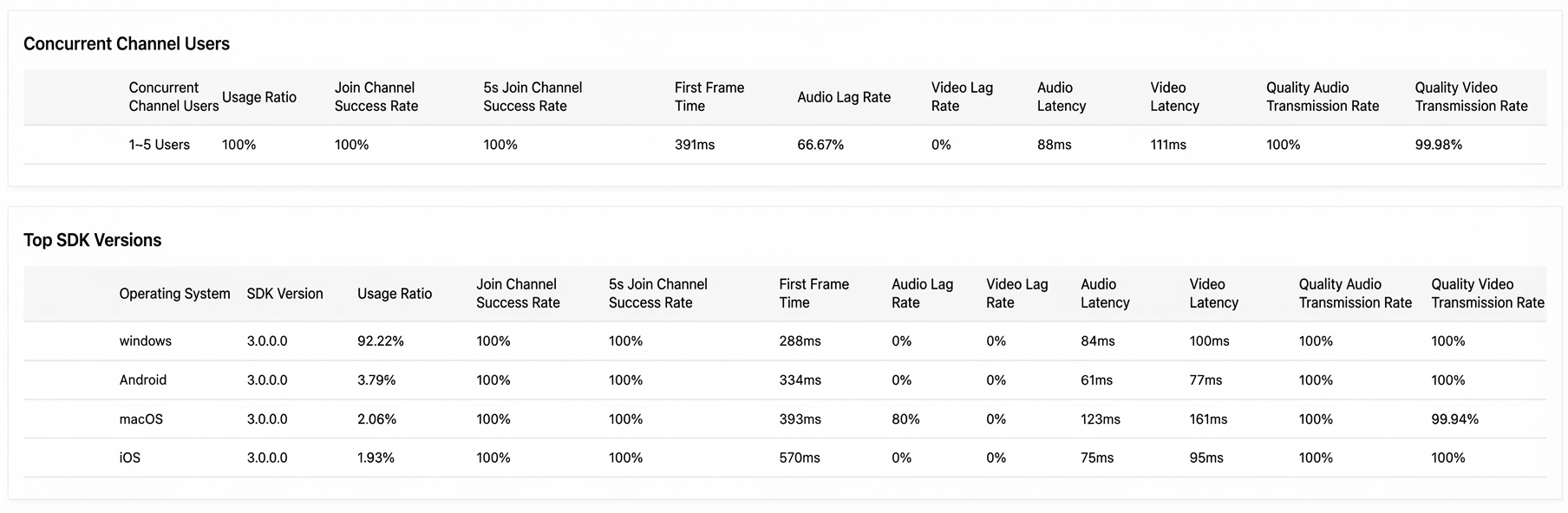
Quality distribution shows quality data across dimensions such as region, network type, operating system, concurrent online users in a channel, and top SDK versions. The metrics for each dimension are as follows:
Metric
Description
Usage percentage
The usage percentage of a specific metric within a dimension. For example, the percentage of total usage that comes from Wi-Fi within the network type dimension.
Channel join success rate
The ratio of successful channel joins to total channel join attempts.
5-second channel join success rate
The ratio of channel joins that succeeded within 5 seconds to total channel join attempts.
Initial Graph Generation
The time from a successful subscription to a remote video stream to the display of the first frame. The unit is milliseconds.
Audio stuttering rate
The ratio of the audio stuttering duration to the total audio duration.
Video stuttering rate
The ratio of the video stuttering duration to the total video duration.
Audio latency
The network latency for audio from the sender to the receiver.
Video latency
The network latency for video from the sender to the receiver.
Audio high-quality transmission rate
The percentage of audio transmission where the packet loss rate is 5% or less.
Video high-quality transmission rate
The percentage of video transmission where the packet loss rate is 5% or less.