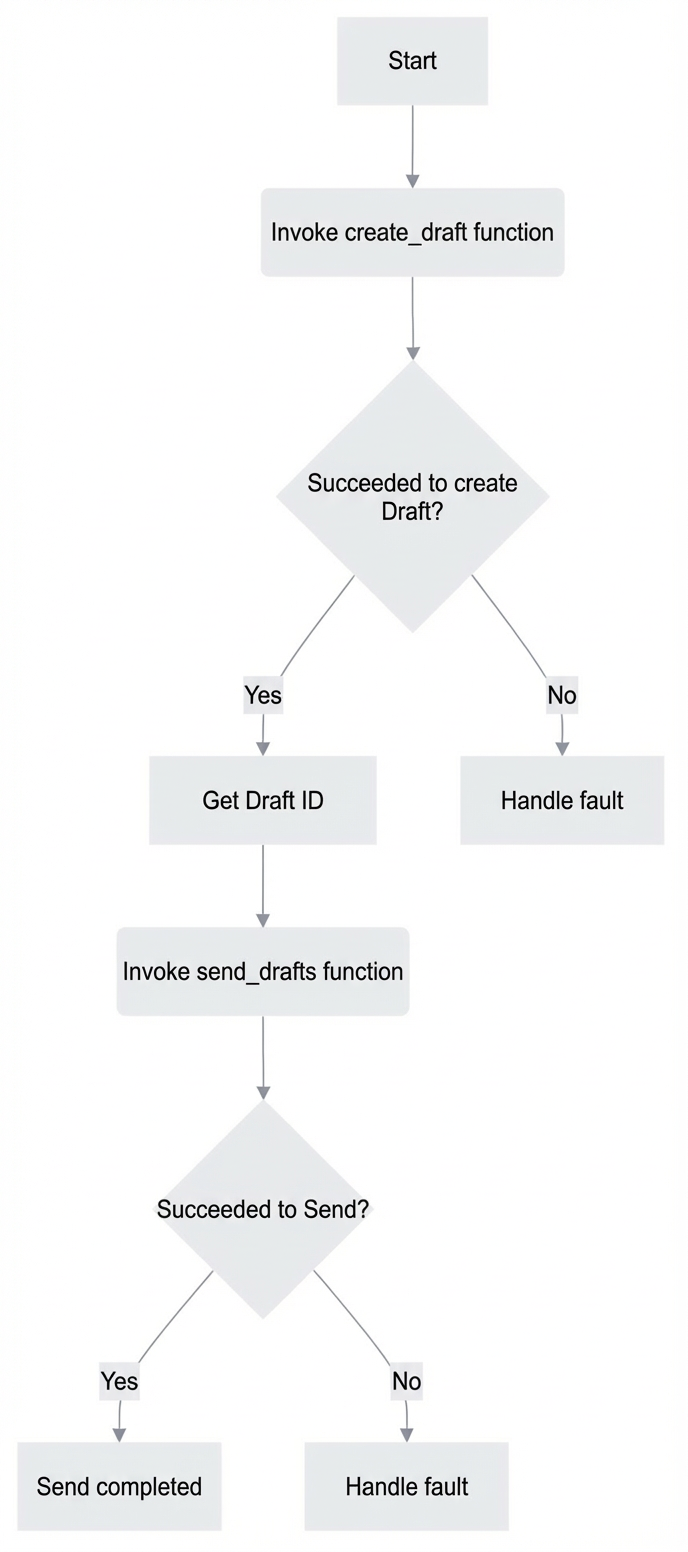
Call the Create a draft API operation and retrieve the draft ID from the response. Then, call the Send an email from the drafts folder API operation to send the email.
Note
For batch or system emails, use the SMTP or API methods of Direct Mail (What is Direct Mail?).
Sending emails with the Alibaba Cloud Mail API is suitable only for specific scenarios. It requires coordinating multiple API operations.
Related API operations
Send an email from the drafts folder
Basic flow
Python sample code
API Open Platform: Obtaining an access credential (Code example)
Important
The following code was tested on Python 3.11.9. Test the code thoroughly before you use it in a production environment.
# -*- coding: utf-8 -*-
import email

import requests
# Import the function to get the access token. Modify the path as needed, or directly assign a value to access_token for testing.
from api_demo.get_access_token import access_token


def create_draft(email_account, payload):
    """
    API operation name: Create a draft
    Document: https://mailhelp.aliyun.com/openapi/index.html#/operations/alimailpb_alimail_mailagent_open_MailService_CreateMessage

    Parameters:
    email (str): The user's mailbox address
    payload (dict): The email body in JSON format

    Returns:
    str: The ID of the created email draft
    """
    # Construct the request URL
    url = f"https://alimail-cn.aliyuncs.com/v2/users/{email_account}/messages"

    # Construct the request header, including the content type and authorization token
    headers = {'Content-Type': 'application/json', 'Authorization': 'bearer ' + access_token}

    # Send a POST request to create the email draft
    response = requests.request("POST", url, json=payload, headers=headers)

    # Print the details of the request and response
    print('##########################################################################')
    print('Request parameters:', payload)
    print('Response parameters:', response.status_code, response.text)
    print('##########################################################################')

    # Return the ID of the email draft
    return response.json()["message"]["id"]


def send_drafts(email_account, v_id):
    """
    Send an email from the drafts folder
    Document: https://mailhelp.aliyun.com/openapi/index.html#/operations/alimailpb_alimail_mailagent_open_MailService_SendMessage
    """
    url = f"https://alimail-cn.aliyuncs.com/v2/users/{email_account}/messages/{v_id}/send"

    payload = {"saveToSentItems": True}

    headers = {'Content-Type': 'application/json', 'Authorization': 'bearer ' + access_token}

    response = requests.request("POST", url, json=payload, headers=headers)

    print('##########################################################################')
    print('Request parameters:', payload)
    print('Response parameters:', response.status_code, response.text)
    print('##########################################################################')


# Define the mailbox address and the email body in JSON format
email_account = "test@example.com"
v_payload = {
    "message": {
        "internetMessageId": email.utils.make_msgid(),
        "subject": "Subject",
        "summary": "Summary",
        "priority": "PRY_NORMAL",
        "isReadReceiptRequested": True,
        "from": {
            "email": "test@example.com",
            "name": "test"
        },
        "toRecipients": [
            {
                "email": "test@example.com",
                "name": "to"
            }
        ],
        "ccRecipients": [
            {
                "email": "test@example.com",
                "name": "cc"
            }
        ],
        "bccRecipients": [
            {
                "email": "test@example.com",
                "name": "bcc"
            }
        ],
        "replyTo": [
            {
                "email": "test@example.com",
                "name": "replyTo"
            }
        ],
        "body": {
            "bodyText": "bodyText",
            "bodyHtml": "<h1>bodyHtml</h1>"
        },
        "internetMessageHeaders": {
            "property1": "string",
            "property2": "string"
        },
        "tags": ["string"]
    }
}

# Call the function to create an email draft and get the draft ID
email_id = create_draft(email_account, v_payload)
print(f'id: {email_id}')

# Send the draft
send_drafts(email_account, email_id)
print('Sending complete')
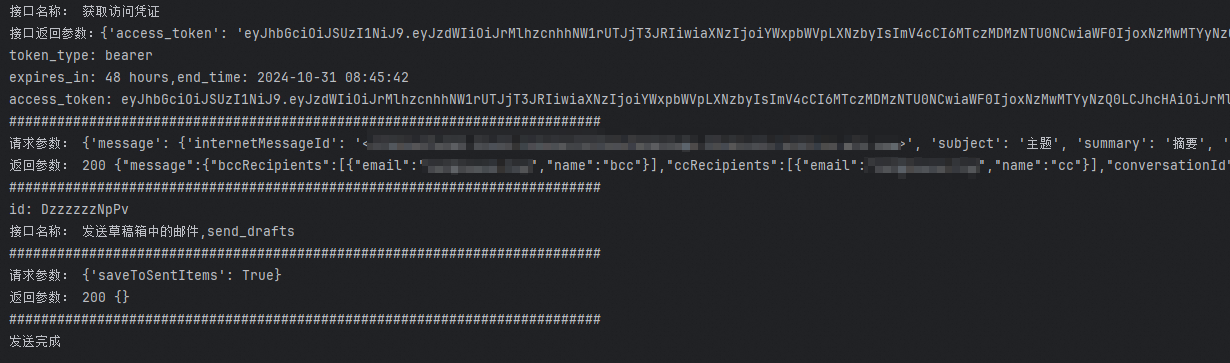
Results
该文章对您有帮助吗?