This topic describes how to create a draft and upload an attachment.
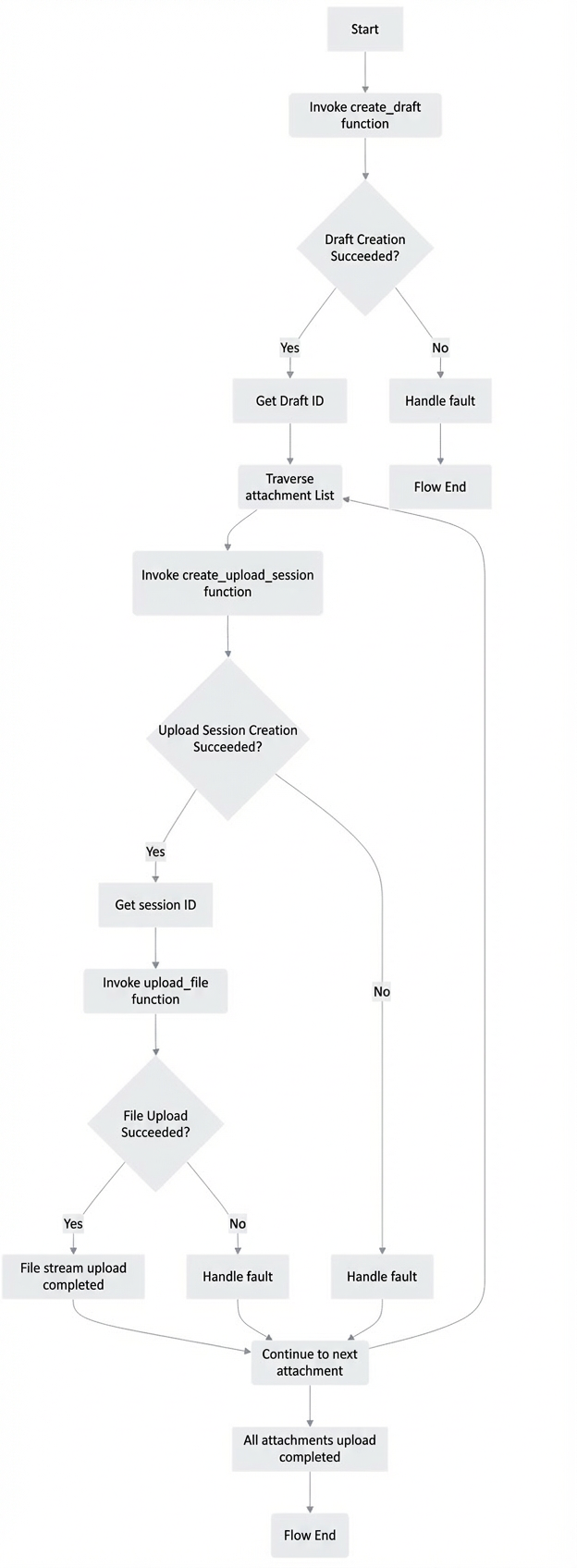
Call the Create Draft API to retrieve the draft ID from the id field in the response.
Pass the draft ID to the Create Attachment Upload Session API. Extract the session value from the uploadUrl.
Pass the session value to the Upload File Stream API to upload the file stream. Go to the Drafts folder in your web-based mailbox to verify that the attachment was uploaded.
Related APIs
Create Attachment Upload Session
Basic flow
Python code example
API Open Platform Code Sample: Obtaining Access Credentials
Security notice: This code was tested with Python 3.11.9. Test this code thoroughly before you use it in a production environment.
# -*- coding: utf-8 -*-
import email
import os

import requests
# Import the function to get the access token. Modify the path as needed, or directly assign a value to access_token for testing.
from api_demo.get_access_token import access_token


def create_draft(email_account, payload):
    """
    API name: Create Draft
    Document: https://mailhelp.aliyun.com/openapi/index.html#/operations/alimailpb_alimail_mailagent_open_MailService_CreateMessage

    Parameters:
    email (str): The user's mailbox address.
    payload (dict): The body of the email in JSON format.

    Returns:
    str: The ID of the created email draft.
    """
    # Construct the request URL.
    url = f"https://alimail-cn.aliyuncs.com/v2/users/{email_account}/messages"

    # Construct the request header, including the content type and authorization token.
    headers = {'Content-Type': 'application/json', 'Authorization': 'bearer ' + access_token}

    # Send a POST request to create the email draft.
    response = requests.request("POST", url, json=payload, headers=headers)

    # Print the details of the request and response.
    print('##########################################################################')
    print('Request parameters:', payload)
    print('Return values:', response.status_code, response.text)
    print('##########################################################################')

    # Return the ID of the email draft.
    return response.json()["message"]["id"]

def create_upload_session(email_account, v_id, file_name):
    """
    Create an upload session (attachment) to add an attachment to a draft email.
    Document: https://mailhelp.aliyun.com/openapi/index.html#/operations/alimailpb_alimail_mailagent_open_MailService_CreateAttachmentUploadSession
    """

    url = f"https://alimail-cn.aliyuncs.com/v2/users/{email_account}/messages/{v_id}/attachments/createUploadSession"

    payload = {"attachment": {
        "name": file_name,
        "contentId": "string",
        "isInline": True,
        "extHeaders": {
            "property1": "string",
            "property2": "string"
        }
    }}

    headers = {'Content-Type': 'application/json', 'Authorization': 'bearer ' + access_token}

    response = requests.request("POST", url, json=payload, headers=headers)

    print(response.text)
    json_payload = response.json()
    print('##########################################################################')
    print('Request parameters:', payload)
    print('Return values:', response.status_code, response.text)
    print('##########################################################################')
    return json_payload['uploadUrl'].split('stream/')[1]


def upload_file(v_file, v_id):
    """
    Upload file stream
    https://mailhelp.aliyun.com/openapi/index.html#/operations/alimailpb_stream_StreamService_DoUpload
    :param v_file:
    :param v_id:
    :return:
    """
    print('API name:', 'Upload file stream, upload_file')

    url = f"https://alimail-cn.aliyuncs.com/v2/stream/{v_id}"
    try:
        with open(v_file, 'rb') as file:
            payload = file.read()
    except FileNotFoundError as e:
        print(f"File not found: {e}")
        return None
    print(f'payload={type(payload)},{payload}')  # <class 'bytes'>
    headers = {
        "Content-Type": "application/octet-stream",
        "Authorization": 'Bearer ' + access_token
    }

    response = requests.request("POST", url, data=payload, headers=headers)

    print('##########################################################################')
    print('Request parameters:', payload)
    print('Return values:', response.status_code, response.text)
    print('##########################################################################')

# Define the mailbox address and the body of the email in JSON format.
email_account = "test@example.com"
v_payload = {
    "message": {
        "internetMessageId": email.utils.make_msgid(),
        "subject": "Subject",
        "summary": "Summary",
        "priority": "PRY_NORMAL",
        "isReadReceiptRequested": True,
        "from": {
            "email": "test@example.com",
            "name": "test"
        },
        "toRecipients": [
            {
                "email": "test@example.com",
                "name": "to"
            }
        ],
        "ccRecipients": [
            {
                "email": "test@example.com",
                "name": "cc"
            }
        ],
        "bccRecipients": [
            {
                "email": "test@example.com",
                "name": "bcc"
            }
        ],
        "replyTo": [
            {
                "email": "test@example.com",
                "name": "replyTo"
            }
        ],
        "body": {
            "bodyText": "bodyText",
            "bodyHtml": "<h1>bodyHtml</h1>"
        },
        "internetMessageHeaders": {
            "property1": "string",
            "property2": "string"
        },
        "tags": ["string"]
    }
}

# Call the function to create an email draft and get the draft ID.
email_id = create_draft(email_account, v_payload)
print(f'email_id: {email_id}')
print('Draft created.')

# Local attachments
files = [r'C:\Users\PycharmProjects\aliyun\api_demo\123.txt',
         r'C:\Users\PycharmProjects\aliyun\api_demo\234.txt']
for v_file in files:

    file_name = os.path.basename(v_file)
    print(f'Attachment name: {file_name}')

    # Create an upload session (attachment).
    session_id = create_upload_session(email_account, email_id, file_name)
    # print(f'session_id={session_id}')
    print('Upload session (attachment) created.')

    # Upload the file stream.
    upload_file(v_file, session_id)
    print('File stream uploaded.')
Results
FAQ
What is the data type of the uploaded attachment and how can I test it on a web page?
In the code, the attachment is uploaded as a byte stream of the bytes type.
try:
    with open(v_file, 'rb') as file:
        payload = file.read()
except FileNotFoundError as e:
    print(f"File not found: {e}")
To test a .txt attachment on a web page, directly enter the file content as a string.