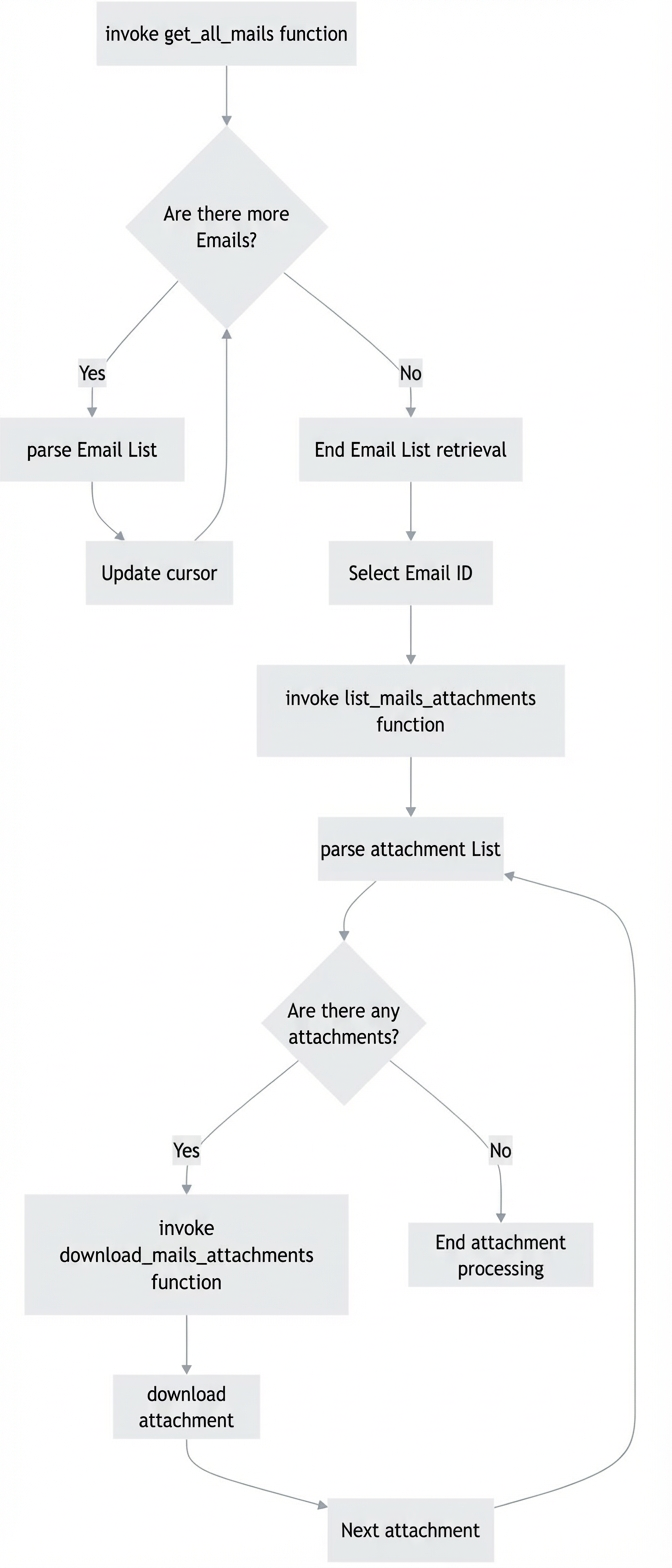
Call the `List messages in a specified folder` API to retrieve basic email information. Select an email ID and pass it to the `List all attachments of an email` API to retrieve the attachment ID and name. Then, call the `Create an attachment download session and download the attachment` API to download the file.
Related APIs
List messages in a specified folder
List all attachments of an email
Create an attachment download session and download the attachment
Basic flow
Python sample code
Open Platform API Code Sample: Obtain an Access Credential
Important
Important: The following code was tested on Python 3.11.9. Test the code thoroughly before using it in a production environment.
# -*- coding: utf-8 -*-
import requests
# Import the function to get the access token. Modify the path as needed, or directly assign a value to access_token for testing.
from api_demo.get_access_token import access_token


def list_mails(email_account, cursor, folder_id):
    """
        Lists messages in a specified folder. A maximum of 100 emails can be retrieved per call.
        Document: https://mailhelp.aliyun.com/openapi/index.html#/operations/alimailpb_alimail_mailagent_open_MailService_ListMessages
        Parameters:
        email_account -- The email account.
        cursor -- The cursor used for paging to get data.
        folder_id -- The ID of the email folder.

        Returns:
        A JSON response that contains the list of emails.
        """
    print('API name: List messages in a specified folder. A maximum of 100 emails can be retrieved per call.')
    url = f"https://alimail-cn.aliyuncs.com/v2/users/{email_account}/mailFolders/{folder_id}/messages"

    querystring = {"cursor": cursor, "size": "100", "orderby": "DES"}

    headers = {'Content-Type': 'application/json', 'Authorization': 'bearer ' + access_token}

    response = requests.request("GET", url, headers=headers, params=querystring)

    print(response.text.encode('GBK', 'ignore'))
    return response.json()


def list_mails_attachments(v_email, v_id):
    """
        Lists all attachments for a specific email.
        API name: List all attachments of an email.
        Document: https://mailhelp.aliyun.com/openapi/index.html#/operations/alimailpb_alimail_mailagent_open_MailService_ListAttachments
        Parameters:
        v_email -- The email account.
        v_id -- The email ID.

        Returns:
        A JSON response that contains the list of attachments.
        """

    url = f"https://alimail-cn.aliyuncs.com/v2/users/{v_email}/messages/{v_id}/attachments"

    querystring = {}

    headers = {'Content-Type': 'application/json', 'Authorization': 'bearer ' + access_token}

    response = requests.request("GET", url, headers=headers, params=querystring)

    print('##########################################################################')
    print('Request parameters: ', querystring)
    print('Response parameters: ', response.status_code, response.text)
    print('##########################################################################')
    return response.json()['attachments']


def download_mails_attachments(v_email, v_id, attachment_id, attachment_name):
    """
        Creates a download session and downloads an attachment.
        API name: Create an attachment download session.
        Document: https://mailhelp.aliyun.com/openapi/index.html#/operations/alimailpb_alimail_mailagent_open_MailService_CreateAttachmentDownloadSession
        Parameters:
        v_email -- The email account.
        v_id -- The email ID.
        attachment_id -- The attachment ID.
        attachment_name -- The attachment name, used to save the attachment.
        """

    url = f"https://alimail-cn.aliyuncs.com/v2/users/{v_email}/messages/{v_id}/attachments/{attachment_id}/$value"

    headers = {
        "Content-Type": "application/json",
        "Authorization": 'bearer ' + access_token
    }

    response = requests.request("GET", url, headers=headers)
    with open(attachment_name, 'wb') as f:
        f.write(response.content)


def get_all_mails(email_account, v_folder_id):
    """
        Gets basic information for all emails in a folder.

        Parameters:
        email_account -- The email account.
        v_folder_id -- The ID of the email folder.

        Returns:
        A list that contains basic email information.
    """
    records = []
    cursor = ""
    while True:
        # Get data.
        parsed_data = list_mails(email_account, cursor, v_folder_id)

        # Fetch the required fields.
        for v_mail in parsed_data['messages']:
            record = {
                'id': v_mail['id'],
                'mailId': v_mail['mailId'],
                'sentDateTime': v_mail['sentDateTime'],  # The time difference from UTC+8 is 8 hours.
                'hasAttachments': v_mail['hasAttachments']
            }
            records.append(record)
        # Update the cursor.
        cursor = parsed_data["nextCursor"]
        print(f'hasMore={parsed_data["hasMore"]},nextCursor={cursor}')
        if not parsed_data["hasMore"]:
            print(f'No more data.')
            break
    return records


print('======================================')
folder_id = {
    "Outbox": "1",
    "Inbox": "2",
    "Junk": "3",
    "Drafts": "5",
    "Deleted": "6"
}

email_account = 'test@example.com'
all_data = get_all_mails(email_account, folder_id.get('Inbox'))
print(f'Basic email information: {len(all_data)} emails in total, {all_data}')
print('======================================')
# Select the ID of the email with the attachment to download based on information such as the email time, for example, 'DzzzzzzNpQ9'.
email_id = 'DzzzzzzNpQ9'
list_attachments = list_mails_attachments(email_account, email_id)  # List all attachments of the email. Success.
print('======================================')
for v_file in list_attachments:
    print(f'Attachment name: {v_file["name"]}')
    download_mails_attachments(email_account, email_id, v_file["id"], v_file["name"])
    print('Download complete.')
print('======================================')
Results

该文章对您有帮助吗?