Video Codec/Image使用指南 (v1.5)
1. Overview
PPU is compatible with NVIDIA's hardware acceleration libraries for video and image encoding, decoding, and processing. The main libraries include:
-
Video Codec SDK: Provides hardware acceleration for
cuviddecode andnvencencode. Current version: 12.2. -
nvJPEG: Provides hardware acceleration for JPEG decode and JPEG encode. Current version: 12.3.
-
npp: Provides hardware acceleration for 2D image post-processing. Current version: 11.6.
2. Application ecosystem
The following applications and frameworks can easily use hardware acceleration.
-
FFmpeg: Enable
cuvid,nvenc, andlibnppat build time to use hardware acceleration. When you encode, decode, or transcode a video, specify thecuvid,nvenc, ornppfilters. FFmpeg is widely used, and most video encoding or decoding applications depend on it, including PyAV (the backend for torchvision). -
DALI: An NVIDIA-provided parallel acceleration framework for data loading. It supports hardware acceleration for JPEG and video encoding and decoding.
In addition to these popular frameworks, you can also use the following libraries to access the video codec and JPEG interfaces directly:
-
nvImageCodec: An NVIDIA-provided wrapper library that can read various types of image resources and convert them to tensor data. It also supports hardware-accelerated JPEG encoding and provides a Python interface.
-
Official Website: https://docs.nvidia.com/cuda/nvimagecodec/
-
Project Source Code: https://github.com/NVIDIA/nvImageCodec
-
-
VPF: An NVIDIA-provided wrapper library for the Video Processing Framework. It wraps the Video Codec SDK and provides a Python interface.
-
Official Website: https://developer.nvidia.com/blog/vpf-hardware-accelerated-video-processing-framework-in-python/
-
Project Source Code: https://github.com/NVIDIA/VideoProcessingFramework
-
VPF may have build compatibility issues with the latest version of FFmpeg. If you encounter this problem, apply the following patch:
On some Docker containers, running
pip install . -vin the VideoProcessingFramework directory may cause the process to hang. If you encounter this issue, try uninstalling ninja by runningpip uninstall ninja, and then reinstall it.
-
3. Build and run
Video Codec SDK
PPU is compatible with mainstream video encoding and decoding toolchains. For details, visit the NVIDIA Video Codec SDK download page.
We recommend downloading the Video Codec SDK version that matches the acceleration toolchain in the PPU SDK. The known version mappings are as follows:
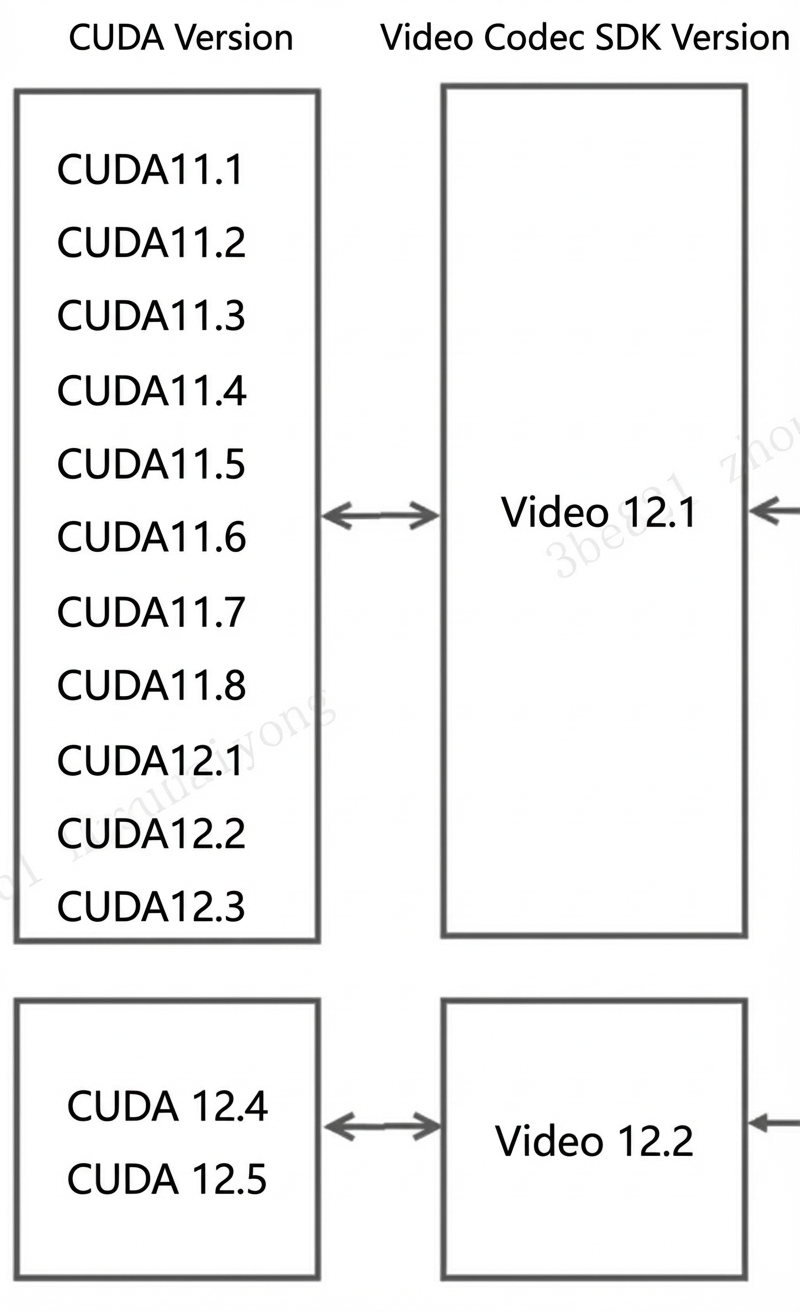
Before you build
-
PPU does not support OpenGL or Vulkan. Before building, you must modify the
Samples/CMakeLists.txtfile to remove unsupported projects. We recommend keeping only the following common projects for encoding and decoding:# Keep the following lines and comment out the others. add_subdirectory(AppEncode/AppEncCuda) add_subdirectory(AppEncode/AppEncPerf) add_subdirectory(AppEncode/AppEncMultiInstance) add_subdirectory(AppEncode/AppEncDec) add_subdirectory(AppTranscode/AppTrans) add_subdirectory(AppTranscode/AppTransPerf) add_subdirectory(AppDecode/AppDec) add_subdirectory(AppDecode/AppDecMultiFiles) add_subdirectory(AppDecode/AppDecPerf) -
The Video Codec SDK uses FFmpeg for its
demuxfeature, so you must install FFmpeg first. While the SDK only requires thedemuxfeature, which does not strictly require a hardware-accelerated version of FFmpeg (see the "Video FFmpeg User Guide"), we recommend building and installing an FFmpeg version with hardware acceleration enabled to avoid confusion.Assume that the FFmpeg installation directory is
FFMPEG_PATH. Runpkg-config --modversion libavcodecto display the version number. If the version number is not displayed, first runexport PKG_CONFIG_PATH=$FFMPEG_PATH/lib/pkgconfig:$PKG_CONFIG_PATHand then try running thepkg-configcommand again.NoteIf a directory is not specified during compilation, it defaults to the /usr/local directory. Otherwise, the specified directory is used. The contents of the
lib,include, andbindirectories of FFmpeg are copied to$FFMPEG_PATH/include,$FFMPEG_PATH/lib, and$FFMPEG_PATH/bin. -
Set the CUDA library path.
export CMAKE_LIBRARY_PATH=${CUDA_HOME}/lib64Here,
CUDA_HOMEpoints to theCUDA_SDKdirectory within the PPU SDK. -
If the downloaded Video Codec SDK version does not match the acceleration toolchain version specified for the PPU SDK, the build might fail. If it does, run the following command:
cp Interface/* ${CUDA_HOME}/includeHere,
Interfacerefers to theInterfacedirectory within the downloaded Video Codec SDK.
Build
cd Samples  # Sample folder of the video-codec-sdk download path
mkdir build
cd build
cmake ..
make
Run
# Decode: Run 12 threads to achieve maximum performance.
./AppDecode/AppDecPerf/AppDecPerf -thread 12 -i test_1920x1080_yuv420p_50fps_h264.mp4

# Encode: Run 4 threads to achieve maximum performance.
./AppEncode/AppEncPerf/AppEncPerf -i crowd_run_1920x1088_nv12_8bit_50.0fps_n500.yuv -s 1920x1088 -if nv12 -fps 30 -preset p4 -gop 60 -rc cbr -bitrate 10000000 -codec h265 -thread 4-
The PPU has 12 video decode cores, so 12 threads theoretically deliver optimal performance. While increasing the thread count may yield a minor performance boost, using more than 7 PPU processes offers no further improvement.
-
The PPU has 4 video encode cores, so 4 threads theoretically deliver optimal performance.
nvJPEG
The PPU SDK is fully compatible with nvJPEG. You can test JPEG functionality with the nvJPEG samples. For details, visit the nvJPEG official website.
nvJPEG Samples: https://github.com/NVIDIA/CUDALibrarySamples/tree/master/nvJPEG/
Build
(The decoder is in the nvJPEG-Decoder directory, and the encoder is in the nvJPEG-Encoder directory.)
$ mkdir build
$ cd build
$ cmake ..
$ make
Run
# Decode, assuming the JPEG image set is in the 1080p directory with a batch size of 128.
./nvjpegDecoder -i 1080p/ -b 128

# Encode (the sample actually decodes first and then encodes).
./nvJPEG_encoder -i input.jpg  -o output.jpg
Note:
The PPU has 4 JPEG encode cores, so 4 threads theoretically deliver optimal performance. It has 8 JPEG decode cores, and batch mode automatically enables 8 internal threads to achieve optimal performance.
4. Specifications
Video decode
-
Supports cuvid decoder.
-
Codecs:
-
HEVC (H.265) - ITU-T Rec. H.265 (04/2013), ISO/IEC 23008-2
-
Main Profile, Level 5.1, High Tier
-
Main10 Profile, Level 5.1, High Tier
-
Main Still Profile
-
-
VP9 - vp9-bitstream-specification-v0.6-20160331-draft
-
Profile 0, 8-bit
-
Profile 2, 10-bit
-
-
AVC (H.264) - ITU-T Rec. H.264 (03/2010) / ISO/IEC 14496-10
-
Main Profile, levels 1 - 5.2
-
High Profile, levels 1 - 5.2
-
High 10 Profile, levels 1 - 5.2
-
Baseline Profile, levels 1 - 5.2
-
-
AV1 Bitstream & Decoding Process Specification Version 1.0.0 with Errata 1
-
Main Profile, Level 5.1
-
-
AVS2
-
-
Resolution up to 8192×8192.
-
Up to 192 FHD video streams.
Video encode
-
Supports nvenc.
-
Codecs:
-
AVC (H.264): Spec Version 12: ISO/IEC 14496-10 / ITU-T Rec. H.264 (03/2010)
-
Baseline Profile, levels 1–5.2
-
Main Profile, levels 1–5.2
-
High Profile, levels 1–5.2
-
High 10 Profile, levels 1–5.2
-
-
HEVC (H.265): ITU-T Rec. H.265 (04/2013), ISO/IEC 23008-2
-
Main Profile, Level 5.1, High Tier
-
Main10 Profile, Level 5.1, High Tier
-
Main Still Profile
-
-
AV1 Bitstream Specification Version 1.0.0 with Errata 1
-
Main Profile, Level 5.1
-
-
-
Supports resolutions up to 4K.
-
Supports RGB input format (converted to YUV420 via inlinePP).
-
Supports crop, scale, and rotate operations with inlinePP.
-
Up to 32 FHD video streams.
JPEG
-
Supports the nvJPEG decoder and encoder.
-
Supports resolutions up to 32K×32K.
-
Supports RGB format for both input and output with inlinePP.
-
Supports crop, scale, and rotate operations with inlinePP.
-
Up to 960 FPS at UHD resolution.
Image processing
-
Supports NVIDIA Performance Primitives (NPP) for 2D images.
5. Known issues
Video decode
-
cuviddecode mode is supported, but rawnvdecmode is not. Both modes provide the same hardware acceleration, butcuvidmode is simpler to use. -
Legacy formats such as MPEG-1, MPEG-2, MPEG-4, VC-1, and VP8 are not supported.
Video encode
-
YUV444 12-bit is not supported.
JPEG
-
Lossless JPEG is not supported.
-
JPEG2000 is not supported.
2D image
-
Only the Image Processing interfaces of npp are supported, not the Signal Processing interfaces.