Validate the Remote Log Access feature
Preparations
You have integrated Remote Log Access by following the instructions in Android SDK integration.
Features
1. Set the log level
The Remote Log Access SDK provides an API to set the log level. It supports five log levels, from lowest to highest: VERBOSE < DEBUG < INFO < WARN < ERROR. The default log level is INFO. The following code shows how to set the log level to DEBUG.
import com.aliyun.emas.apm.remote.log.ApmRemoteLog
import com.aliyun.emas.apm.remote.log.ApmRemoteLogLevel

ApmRemoteLog.updateLogLevel(ApmRemoteLogLevel.DEBUG)import com.aliyun.emas.apm.remote.log.ApmRemoteLog;
import com.aliyun.emas.apm.remote.log.ApmRemoteLogLevel;
ApmRemoteLog.updateLogLevel(ApmRemoteLogLevel.DEBUG);For more information about the API, see Set the log level.
2. Print logs
The Remote Log Access SDK provides an API to print logs at different levels. The following example shows how to print an INFO log.
import com.aliyun.emas.apm.remote.log.ApmRemoteLog

ApmRemoteLog.i(MODULE, TAG, log)import com.aliyun.emas.apm.remote.log.ApmRemoteLog;
ApmRemoteLog.i(MODULE, TAG, log);For more information about the API, see Print logs.
3. Set the remote log cache file size
The Remote Log Access SDK lets you set a custom limit for the local log cache file during initialization. The maximum size is 100 MB.
The default value is 20 MB. When the size of the cached local logs exceeds the set threshold, the system clears the current local logs and starts recording again.
For the configuration, see the following code.
import com.aliyun.emas.apm.Apm
import com.aliyun.emas.apm.ApmOptions
import com.aliyun.emas.apm.remote.log.RemoteLogOptions

Apm.preStart(ApmOptions.Builder()
        .addProductOptions(RemoteLogOptions.Builder()
            .setRemoteLogFileMaxSize(30)
            .build()
        ).build()
)import com.aliyun.emas.apm.Apm;
import com.aliyun.emas.apm.ApmOptions;
import com.aliyun.emas.apm.remote.log.RemoteLogOptions;
Apm.preStart(new ApmOptions.Builder()
.addProductOptions(new RemoteLogOptions.Builder()
// Set the maximum local cache size for remote logs to 30 MB.
.setRemoteLogFileMaxSize(30)
.build())
.build()
);For more information about the API, see addProductOptions.
Validation
1. Print a log entry
To pull logs from the EMAS console, you must first use the Remote Log Access API to print them.
import com.aliyun.emas.apm.remote.log.ApmRemoteLog

override fun onCreate(savedInstanceState: Bundle?) {
    super.onCreate(savedInstanceState)
    val remoteLogButton = Button(this)
    remoteLogButton.setText("Test Remote Log")
    remoteLogButton.setOnClickListener(object : View.OnClickListener {
        override fun onClick(view: View?) {
            // Print the log.
            ApmRemoteLog.i("Main", "MainActivity", "test remote log")
        }
    })

    addContentView(
        remoteLogButton, ViewGroup.LayoutParams(
            ViewGroup.LayoutParams.MATCH_PARENT,
            ViewGroup.LayoutParams.WRAP_CONTENT
        )
    )
}import com.aliyun.emas.apm.remote.log.ApmRemoteLog;
@Override
protected void onCreate(Bundle savedInstanceState) {
super.onCreate(savedInstanceState);
Button remoteLogButton = new Button(this);
remoteLogButton.setText("Test Remote Log");
remoteLogButton.setOnClickListener(new View.OnClickListener() {
public void onClick(View view) {
// Print the log.
ApmRemoteLog.i("Main", "MainActivity", "test remote log");
}
});
addContentView(remoteLogButton, new ViewGroup.LayoutParams(
ViewGroup.LayoutParams.MATCH_PARENT,
ViewGroup.LayoutParams.WRAP_CONTENT));
}Build and run the app. Then, click the Test Remote Log button to trigger log printing.
2. Create a log pull task
Go to the console and select your project. Follow the steps in the figure below to create a log pull task.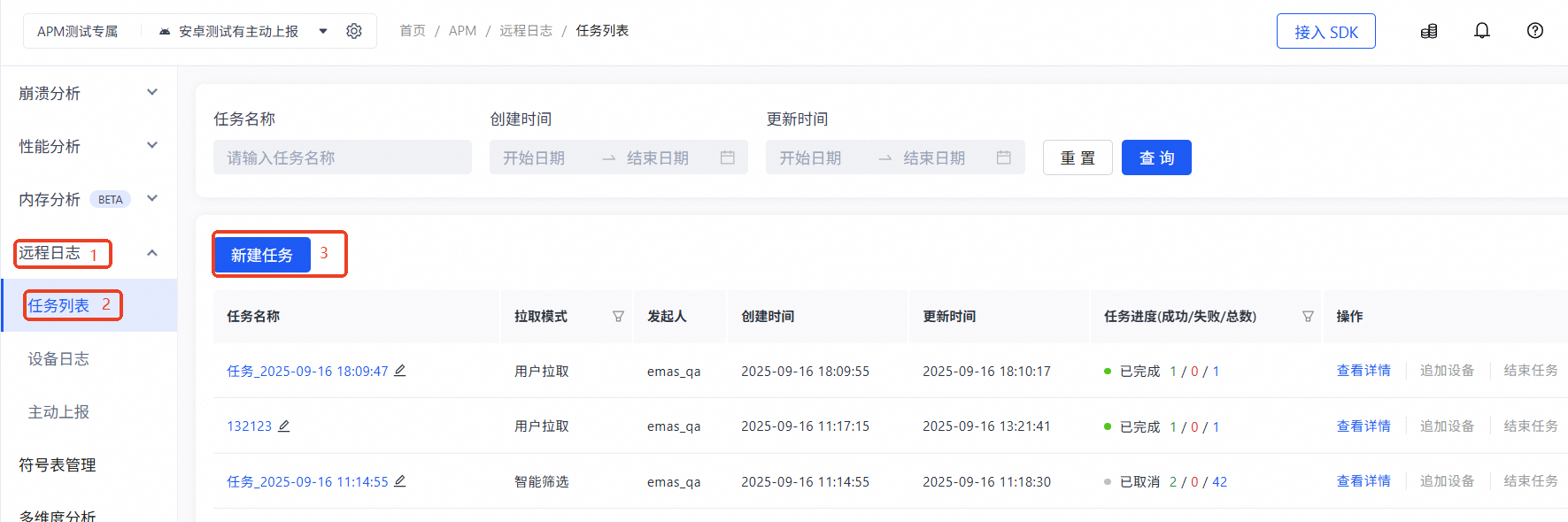
3. Upload logs
Switch the app to the background. The SDK then retrieves the log pull task from the cloud and uploads the logs.
After you create a pull task in the console, the SDK retrieves the task from the cloud when the app switches between the foreground and background. The SDK then uploads the logs based on the task.
4. View logs in the console
After the logs are uploaded successfully, go to the console and select your project. Follow the steps in the figure below to view the logs.