training-xpu-pytorch 25.06
This document provides the release notes for training-xpu-pytorch 25.06.
Main features and bug fixes
What's new
Upgraded the PPU SDK to 1.5.2.
Upgraded core training components: megatron-core to 0.12.1 and TransformerEngine to 2.3.
Resolved issues
Fixed an issue in version v1.5.1 where enabling prefix-cache caused model inference to occasionally return incorrect responses.
Fixed an error caused by the missing libacext.so file in PPU SDK 1.5.2.
Upgraded PyTorch and its related components to 2.6.0+ali.7.post2.ppu1.5.2 to resolve an issue where PyTorch did not support LAPACK on CPUs.
Container contents
Use case | Training/model inference | Training/model inference |
Image | training-xpu-pytorch:25.06.post1 | training-xpu-pytorch:25.06 |
Framework | PyTorch | PyTorch |
Requirements | PPU SDK 1.5.2 | PPU SDK 1.5.2 |
Core components |
|
|
Assets
25.06
Public images
egslingjun-registry.cn-wulanchabu.cr.aliyuncs.com/egslingjun/training-xpu-pytorch:25.06.post1
egslingjun-registry.cn-wulanchabu.cr.aliyuncs.com/egslingjun/training-xpu-pytorch:25.06
VPC images
acs-registry-vpc.{region-id}.cr.aliyuncs.com/egslingjun/{image:tag}
{region-id}is the ID of the region where your Container Service for Kubernetes (ACK) cluster is located, such ascn-beijingorcn-wulanchabu.{image:tag}is the actual image name and tag.
Driver requirements
Driver version >= 1.1.0
Key features and enhancements
PyTorch compilation optimization
The compilation optimization feature introduced in PyTorch 2.0 usually provides significant benefits in small-scale, single-GPU scenarios, but in LLM training, the need to incorporate memory optimization and distributed frameworks such as FSDP and Deepspeed makes it difficult for torch.compile() to provide benefits and can even cause performance degradation:
This optimization controls communication granularity within the DeepSpeed framework, allowing the compiler to capture a more complete computation graph and apply broader optimizations.
This release includes an optimized version of PyTorch with the following enhancements:
An optimized PyTorch compiler frontend that ensures successful compilation even when arbitrary graph breaks occur.
Enhanced pattern matching and dynamic shape capabilities to improve the performance of compiled code.
With these optimizations, you can typically achieve an end-to-end (E2E) throughput gain of around 20% when training an 8B LLM.
Selective gradient checkpointing
A model to predict memory overhead was built using extensive benchmark data from various models, clusters, and training configurations—along with system metrics like memory utilization. This allows the system to recommend the optimal number of activation checkpointing layers. Integrated into PyTorch and compatible with the DeepSpeed framework, this feature helps users optimize memory usage.
ACCL communication library
ACCL is a high-performance network communication library developed by Alibaba for Lingjun products. It is available in three versions: ACCL-N for NVIDIA GPUs, ACCL-P for PPUs, and ACCL-R for AMD accelerators. ACCL-N is based on NVIDIA NCCL, offering full compatibility and including bug fixes and optimizations for performance and stability. ACCL-P is a collective communication library built upon T-Head's open-source pccl. ACCL-R is built upon AMD's open-source ROCm rccl. This release ports key features from ACCL and ACCL-N to pccl, resolves known issues, and is deeply customized for integration with Alibaba Cloud's proprietary networking components.
End-to-end performance evaluation
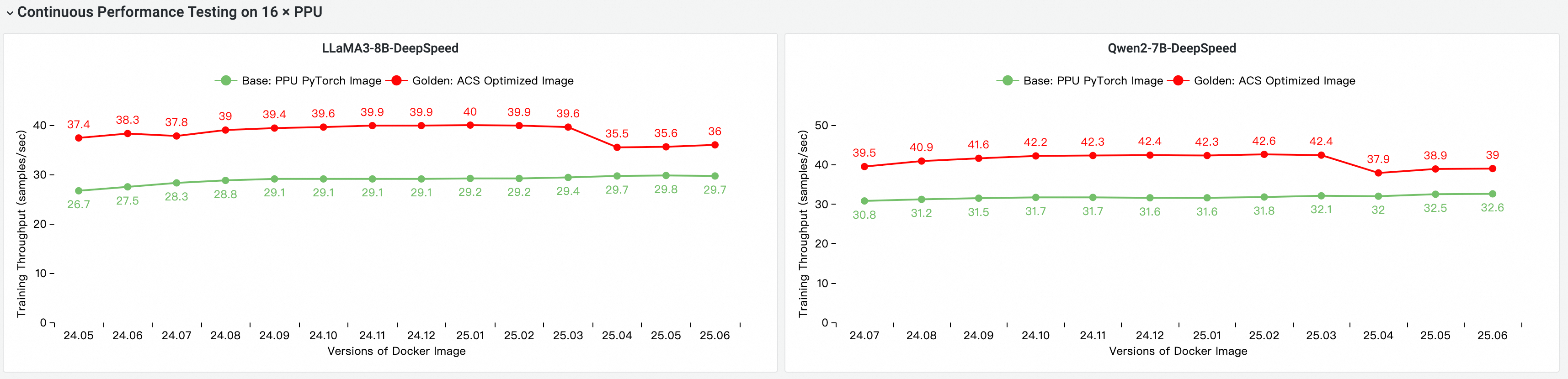
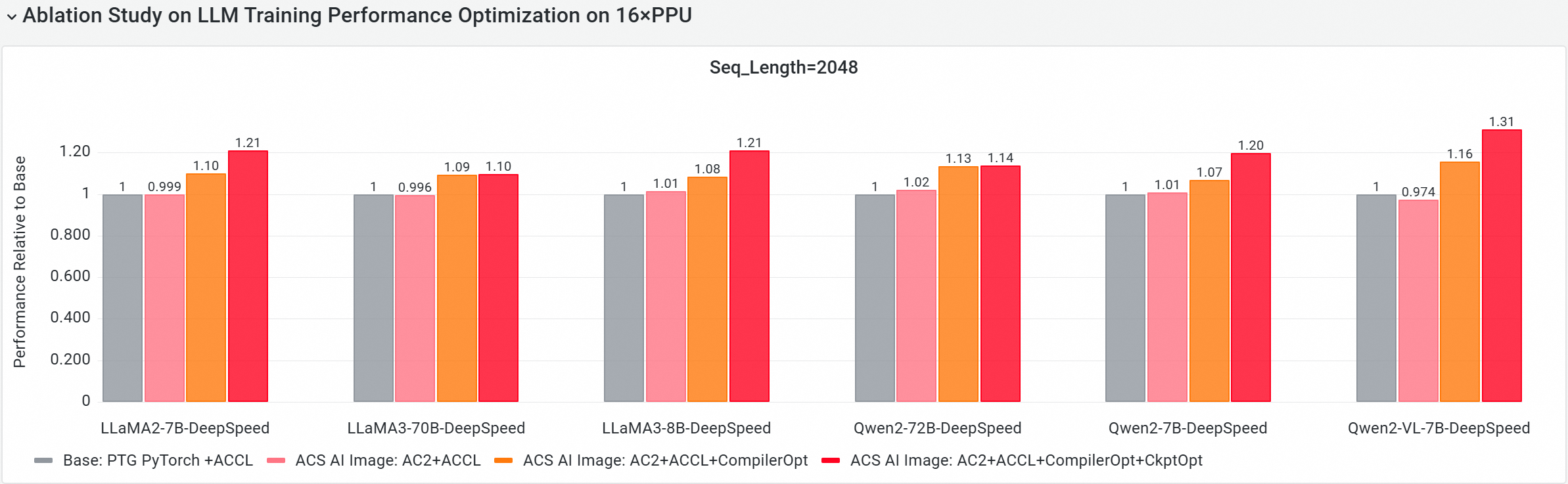
We used CNP, a cloud-native AI benchmarking tool, to compare the end-to-end performance of our image against a standard base image using mainstream open-source models and framework configurations. We also performed an ablation study to evaluate the contribution of each optimization component to the overall model training performance.
Image Performance Comparison and Iteration Evaluation
E2E Performance Contribution Analysis of PPU Core Components
We conducted the following tests on a multi-node PPU cluster using version 25.06 to evaluate and compare end-to-end training performance. The comparison items include:
Base: The standard PPU PyTorch image.
ACS AI Image: Base+ACCL: The image using the ACCL communication library.
ACS AI Image: AC2+ACCL: The golden image using AC2 BaseOS with no optimizations enabled.
ACS AI Image: AC2+ACCL+CompilerOpt: The golden image using AC2 BaseOS with only the torch compile optimization enabled.
ACS AI Image: AC2+ACCL+CompilerOpt+CkptOpt: The golden image using AC2 BaseOS with both torch compile and selective gradient checkpointing optimizations enabled.
Quick start
The following examples show how to pull the training-xpu-pytorch image by using Docker.
To use the training-xpu-pytorch image in ACS, select it from the artifact repository page when you create a workload in the console, or specify the image reference in a YAML file.
1. Select an image
docker login egslingjun-registry.cn-wulanchabu.cr.aliyuncs.com2. Enable compiler and selective gradient checkpointing
Enable compilation optimization
Use the transformers Trainer API:

Enable selective gradient checkpointing
export CHECKPOINT_OPTIMIZATION=true
3. Start the container
This topic uses the model training tool ljperf, which is built into the image, to demonstrate how to start a container and run a training task.
For ACS-based products, use a YAML file to reference the image.
LLM models
# Start the container and enter the interactive shell.
docker run --rm -it --ipc=host --net=host  --privileged egslingjun-registry.cn-wulanchabu.cr.aliyuncs.com/egslingjun/training-xpu-pytorch:25.06

# Run a training demo.
ljperf --action train --model_name deepspeed/llama3-8b
Usage notes
The image contains modified versions of libraries such as PyTorch and DeepSpeed. Do not reinstall them.
In the DeepSpeed configuration, leave the
zero_optimization.stage3_prefetch_bucket_sizeparameter empty or set it toauto.When using this image (version 25.06) to run quantized DeepSeek R1 (671B) and Qwen3 models, the following quantization methods are supported:
DeepSeek R1 (671B):
VLLM 0.8.5: Supports AWQ (w4a16), GPTQ (w4a16, w8a16), and per-token/per-channel a8w8 (int8) quantization schemes.
Qwen3:
VLLM 0.8.5: Supports AWQ (w4a16), GPTQ (w4a16, w8a16), and per-token/per-channel a8w8 (int8) quantization schemes.
The DeepEP and sailSHMEM features mentioned in the PPU SDK 1.5.1 and 1.5.2 release notes are not yet supported. A support timeline is not yet available.
For optimal performance, we recommend using this image with driver version 1.5.1 or later. For setup instructions, see Specify GPU Models and Driver Versions for ACS GPU Pods and GPU Driver Version Notes.
The built-in environment variable
NCCL_SOCKET_IFNAMEin this image needs to be dynamically adjusted based on the usage scenario:When a single pod requests only 1, 2, 4, or 8 GPUs for training or inference tasks, you need to set
NCCL_SOCKET_IFNAME=eth0(the default configuration in this image).When a single pod requests all 16 GPUs on an entire machine for training or inference tasks (which enables the use of HPN), you must set
NCCL_SOCKET_IFNAME=hpn0.
Known issues
Qwen3 model
Qwen3-235B-A22B has an inference precision issue. You can work around this by adding the environment variable
ACEXT_ENABLE_MOE_GEMV=0. It will be fixed in a future version.
Qwen2.5 model
When you run the Qwen2.5-omni model, the
ModuleNotFoundError: No module named 'vllm.vllm_flash_attn.layers'error occurs. This issue is caused by a known issue in vLLM 0.8.5 and will be fixed in a future update of vLLM.
DeepSeek R1 model
When you test the DeepSeek R1 model, the
--max-model-lensetting must be less than80k. Otherwise, an out-of-memory (OOM) error may occur during runtime.
Stability issues
An
mp_distributed_executorerror may occur during multi-GPU inference with vLLM. To prevent this issue, setVLLM_WORKER_MULTIPROC_METHOD=spawn. For more information, see the GitHub issue at https://github.com/vllm-project/vllm/issues/6152.After multi-card inference with vLLM, a known community issue may cause processes to exit with a random error. For details, see the open-source community issue at https://github.com/vllm-project/vllm/issues/6145.
Performance issue
For large Mixture-of-Experts (MoE) models, you can improve performance by using an autotune tool. vLLM includes a performance optimization that launches kernels from a hardware-specific
fused_moekernel configuration file.