Terms
This topic describes the basic concepts of Remote Log Access.
Term | Description |
Remote log/User log | Logs that an app saves on a user's device. |
Log pull | Pulls logs that an app saves on a user's device to the Remote Log Access console. |
Log level | Remote Log Access defines four log levels:
The log levels are sorted in this order: Error > Warn > Info > Debug |
Pull level | The level used to filter logs that are pulled to the Remote Log Access console. Only logs with a level equal to or higher than the pull level are pulled to the console.
The pull level is globally set during software development kit (SDK) initialization. If not set, the default level is Info. |
Pull task | Executes a log pull based on predefined settings. Specify devices for the pull task using one of two methods: Pull by device or Pull by condition. |
Task type | Remote log tasks are categorized into two types: Pull by device and Pull by condition. |
Pull by device | Targeted recovery. Issue commands to devices known to have been online previously to pinpoint and troubleshoot issues with historical devices. |
Pull by condition | Preset filtering rules to listen for device online events and capture on-site logs in real time from devices that meet the conditions, including new devices. |
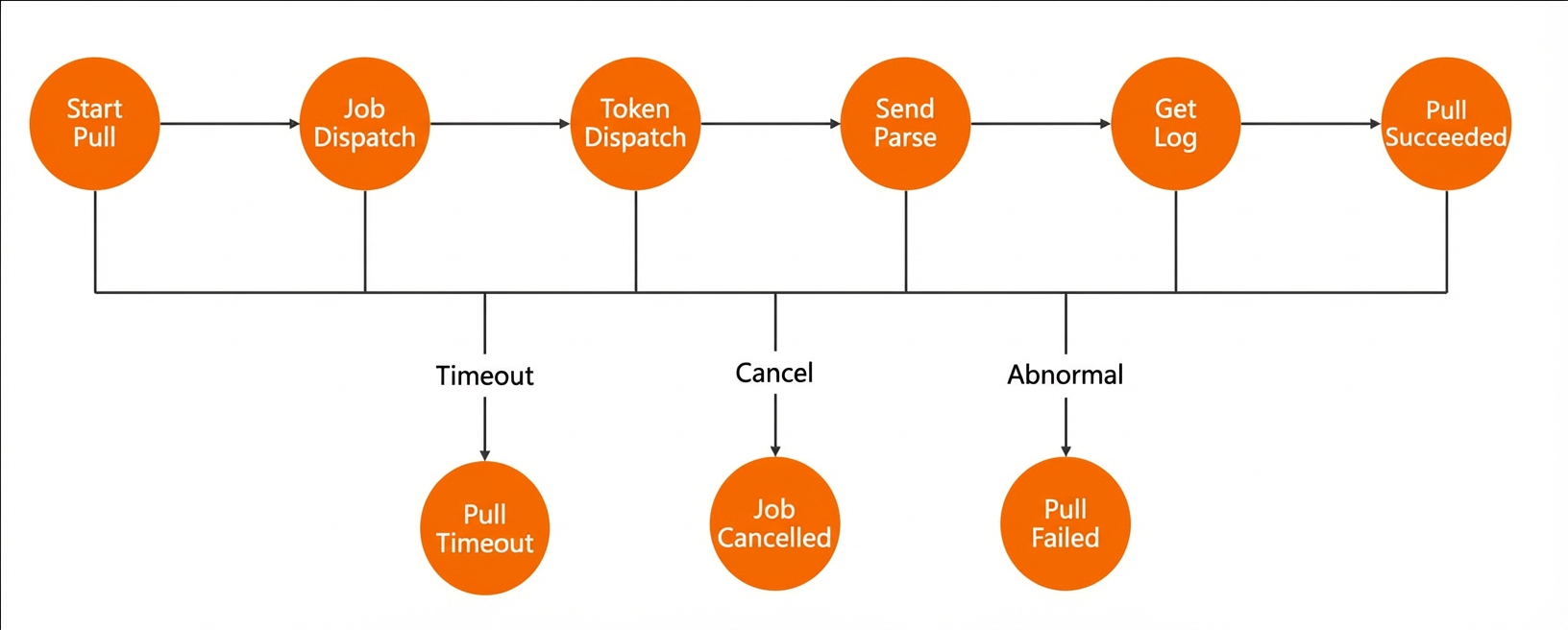
Pull status | The stages that describe the progress of a pull task during execution. Pull statuses include the following:
|