SDK release notes
PPU SDK v1.7 release notes
1. Version
1.1 Software stack
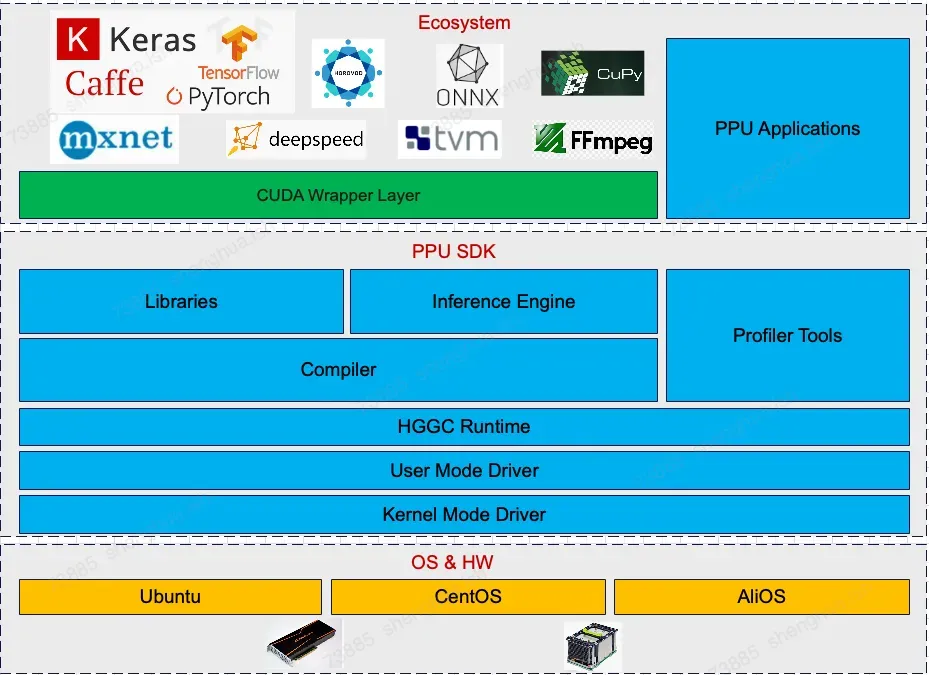
Reduces costs and improves efficiency for CUDA application developers using PPU software and hardware.
Provides three tiers of deliverables: framework packages and models compatible with the CUDA ecosystem, a CUDA SDK-compatible package, and the T-Head SAIL SDK.
1.2 Core components
Component name | Description |
firmware | PPU firmware |
KMD | PPU kernel driver |
UMD / HGGC | PPU user-mode driver and runtime |
compiler | PPU compiler toolchain |
Acompute | PPU compute acceleration library |
Acext | PPU quantization acceleration library |
PCCL | PPU communication acceleration library |
PPU SMI | PPU device management tool |
PPU DCGM | PPU online monitoring tool |
Asight System | PPU performance analysis tool |
Asight Compute | PPU performance analysis tool |
PPU GDB | PPU debugging tool |
PPU MemCheck | PPU sanitizer tool |
PPU hgobjdump | PPU device binary tool |
CUDA SDK Wrapper | CUDA API compatibility library |
1.3 Key features
1.3.1 Firmware
Supports installation from binary packages (RPM or DEB).
Supports dynamic power management. By default, the PPU firmware dynamically adjusts the core frequency (from 200 MHz to the maximum operating frequency) and operating voltage based on real-time workload, temperature, and power consumption.
Supports PPU frequency locking. For details, see Device Management Tool ppu-smi.
Supports secure firmware signing and dual firmware backup to ensure firmware security and reliability.
Supports firmware upgrades for the power chip.
Supports Baseboard Management Controller (BMC) out-of-band management, including device status monitoring and out-of-band firmware upgrades.
1.3.2 Kernel driver
Supports installation from both binary packages (RPM or DEB) and runfile packages.
Decouples the kernel driver and the PPU SDK. Kernel driver and PPU SDK versions released after v1.0 can be used in any combination.
Supports various flexible machine configurations, including single-host/single-card, single-host/16-card (ICN interconnect), multi-host/multi-card (ICN interconnect), and multi-host/multi-card (GDR). Before using the GDR feature, ensure the
alixpu-peermemkernel module, included with the PPU kernel driver, is installed on your system.Supports PPU fault reporting and handling.
The driver supports the
auto-resetfeature. It automatically resets the PPU device after detecting akill overtimeorcp invalid cmderror, which restores normal operation without requiring a manual reset. This feature is enabled by default. You can use ppu-smi to query its status or disable it.Supports Multi-Pipe Service (MPS). Use
ppudbg --config_submit_mode 1/0to enable or disable this feature.Supports tidal scenarios with alternating small and large model workloads in MPS mode.
Supports collecting NVML GPM metrics, including SM utilization, SM occupancy, tensor core utilization, video memory bandwidth utilization, PCIe read/write throughput, and ICN link read/write throughput.
Supports full-card passthrough virtualization. You can unbind the PPU driver on the host machine and pass the PPU directly to a virtual machine. In this configuration, you must ensure ICN isolation between different virtual machines.
Supports hot upgrades of the host machine driver in Single Root I/O Virtualization (SR-IOV) mode, allowing you to update the PPU driver on the host machine while services are running in virtual machines.
Adds support for single-host 16-card Zhenwu 810E configurations and optimizes the default PPU device order (sorted by rear ID).
Adds GPM metric collection for L1/L2 cache hit rates. Use the DCGM tool to query these metrics.
Adjusts the logical numbering rules for 16-card Zhenwu 810E devices to improve interconnect performance.
Adds a feature to query MPS tidal mode status.
Adds a feature to query Xid error information.
Adds features to query the GPM status and to enable or disable GPM.
Disables HBM parity Xid error reporting.
1.3.3 User-mode driver and runtime
Compatible with most CUDA runtime APIs (cudaXXX) and driver APIs (cuXXX).
Outputs more detailed error logs when an Xid 896 error occurs for easier troubleshooting.
Optimizes the performance of 2D/3D
cudaMemcpyandcudaMemsetoperations.Supports stream memory operation v2 APIs.
Supports graph management APIs related to edge data.
Supports graph management APIs related to batch memory op nodes.
Supports basic texture features.
Optimized PPU performance when
CUDA_DEVICE_MAX_CONNECTIONS=1.Supports the cuCtxCreate_v3 API.
Correctly displays
printfoutput from device code after an exception occurs.Support for mapping stream groups to different hardware queues using the
HGGC_EXCLUSIVE_STREAMSenvironment variable.Fixes an issue where CUDA graphs did not support cooperative kernel nodes.
Supports the
cudaLaunchKernelExCinterface.Supports collecting hardware channel information for streams by using the
asystool.Supports AD extension APIs.
Fixes a
cudaErrorIllegalAddresserror that occurred when callingcudaCreateTextureObjectwhile running COLMAP.Fixes an error that occurs when the
sizeparameter of thecudaMallocAsyncinterface is 0.Supports the
cudaGetDriverEntryPointByVersioninterface.Supports the
cudaLaunchAttributeLaunchCompletionEventfeature.Optimizes the performance of the
cudaCreateTextureObjectinterface.Improves the performance of the ppu-gdb tool when the split section option is enabled.
Fixes intermittent hangs when using
cudaLaunchHostFunc.Fixes an error when using the
cuMemImportFromShareableHandleinterface to import video memory from a device not visible to the process.
1.3.4 Compiler
Provides a C/C++ extension language compiler for the PPU architecture, based on the Clang/LLVM framework. It supports a host/device mixed programming model and is fully compatible with the CUDA C/C++ language specification.
Provides API-callable modules for building flexible compilation pipelines and integrating Just-in-Time (JIT) compilation.
Supports inline PTX instructions, including partial support for dense MMA, sparse MMA, and texture-related instructions. The PTX instruction definition has also been extended for PPU tensor cores.
To add support for the CUDA device API, this update extends the
Compiler Optimization Hint Function : __builtin_assume_uniform().Supports the system-level reserved shared memory feature.
Supports GCC host compiler versions from 5.5 to 14.2 and Clang host compiler versions from 9 to 18.
Supports Triton versions 2.3.x, 3.0.x, 3.1.x, 3.2.x, 3.3.x, and 3.4.x. Extends the
triton.langsyntax to include support for AIU.The split section option is enabled by default for the Device ELF binary format to reduce module load overhead at runtime.
Provides a rich set of development libraries and binary tools to simplify development and debugging, including
hgobjdump,memcheck,ppu-gdb, sanitizer libraries,hgprune,hgfatbin,hglink, andhgJitlink.hgrtc: A runtime JIT compilation library. Key update:
Supports caching of compilation artifacts to reduce JIT compilation time.
PPU-GDB: A PPU debugging tool for debugging both PPU and CPU code simultaneously within the same application.
PPU Memcheck: A suite of tools for functional correctness checking. The suite includes several checkers, such as
memcheck,initcheck,synccheck, andracecheck.hgobjdump: A PPU binary tool that extracts device-related information from a binary file.
hgprune: A PPU tool that prunes a binary file by removing unnecessary device-related information.
hgfatbin: A PPU fatbin development library that supports various runtime operations on fatbin files.
hglink: A PPU link tool for linking PPU device code.
hgjitlink: A PPU JIT link development library that supports runtime linking of PPU device code.
1.3.5 Accelerated libraries
Compute acceleration library
Supports closed-source compute libraries: acdnn, acblas, acfft, acsolver, acrand, and acsparse.
acdnn supported operators:
Conv
BatchNorm
Pooling
Softmax
Activation
CTCLoss
Dropout
LRN
LSTM
GRU
MultiHeadAttn
Tensor Ops
SpartialTransform
Backend fusion
acblas supported operators:
Level 1 series operators
Gemv
Gemm
Matmul + epilogue
MatrixTransform
trsm
getrfBatched
getrsBatched
geqrfBatched
gelsBatched
acfft supports R2C/C2R/C2C/D2Z/Z2Z + FFT/iFFT transforms.
acsolver supports LU factorization/solve, Cholesky factorization/solve, QR factorization, SVD factorization, and eigenvalue decomposition.
acrand supports:
Pseudo-random number generators: XORWOW, MRG32K3A, PHILOX4_32_10.
Data distributions: Default, Uniform, Normal, LogNormal.
acsparse supports:
Most generic APIs and some legacy APIs.
APIs marked as [DEPRECATED] in cuSPARSE 13.0 are not supported.
The acext quantization library supports:
Various kernel variations for A16W8/A16W4 and per-channel/group-wise quantization.
Various kernel variations for A8W8 and per-channel/per-token quantization.
Accelerated kernels for
WeightonlyBatchedGemvwith small batch sizes.The following Mixture-of-Experts (MoE) types: FP16/BF16, and A8W8 per-channel/per-token.
Open-source project support:
PPU FlashMLA 1v5
PPU FlashAttention 2.4.2/2.5.6/2.5.7/2.7.2/2.7.4.post1
PPU cutlass 2.5
PPU cutlass 3.3/3.4/3.6
PPU Xformers 0.0.22/0.0.25/0.0.27/0.0.29.post1/0.0.30
PPU FasterTransformer
PPU extension library
acext:Supports high-performance implementations of A16W8, A16W4, and A8W8 quantization, group-gemm, MoE, and batch gemv.
Provided as both a PPU SDK library and an open-source repository for integration with various frameworks and applications.
PPU DeepGemm:
Supports dense gemm and group gemm.
Supports FP16 and A8W8 formats, but does not support FP8.
Supports per-channel/per-token quantization, but does not yet support block-wise quantization.
Key updates:
Adds initial support for DeepGemm, achieving competitive performance in typical EP scenarios.
Optimizes MoE performance for scenarios such as DPSK/Qwen3, improving average performance by over 50% compared to the Triton version.
blaslt: Enhances cross-version descriptor support and improves support for compute-communication overlap schemes.
conv: Improves support for different format combinations and adds support for strided channels.
solver: Adds support for
gesvda.Enhances error message handling for driver/runtime call failures in the compute libraries.
Optimizes deconvolution performance, improving it by up to 40% in some scenarios.
Optimizes LSTM performance, improving it by up to 30% in some scenarios.
Interconnect acceleration library
Because customer-facing cloud products use EIC network interface cards (NICs), the available accelerated libraries are ACCL-P (which replaces PCCL) and ACCLEP-P (which replaces DeepEP).
PCCL:
Compatible with most NCCL APIs (ncclXXX) and environment variables.
Supports typical collective communication operators such as AllReduce, AllGather, ReduceScatter, Broadcast, Reduce, Send, and Recv.
Supports intra-node multi-card communication through ICN, PCIe, and shared memory.
Supports communication between multiple machines through GDR & non-GDR Remote Direct Memory Access (RDMA), Socket, and Interconnection Network (ICN).
Supports server types with multiple Zhenwu 810E cards.
Supports the new
comm configoptionCTA_POLICY. When set to '1', this option saves CU resources on Zhenwu 810E and improves performance in certain scenarios that involve parallel computation and communication.Supports the new comm config option 'maxCTAs'. This option sets the maximum number of channels to '64' per comm.
Implemented initial support for memory management functions, such as
ncclMemAlloc,ncclMemFree,ncclCommRegister, andncclCommDeregister. This feature is experimental and disabled by default. To enable features such as IPC Register, setNCCL_CUMEM_ENABLEto 1.Added initial support for the symmetric memory API, including new APIs such as
pcclCommWindowRegisterandpcclCommWindowUnregister, and kernel implementations for allreduce, allgather, and reducescatter.Added initial support for the
CE collectivefeature. To use this feature, setCTA_POLICYtoPCCL_CTA_POLICY_ZEROfor each communicator.Added support for the
ncclCommInitRankScalablefeature to optimize initialization time for large-scale communication groups.Added initial support for UCX functionality in third-party net plugins.
Supports the 'blocking' CUDA launch mode.
Debug feature enhancements:
Added support for NCCL RAS. This feature is disabled by default. Set NCCL_RAS_ENABLE to '1' to enable it.
Enhanced some 'hang monitor' features.
pccl tools:
pccl perf:
Supports AllReduce, AllGather, ReduceScatter, AlltoAll, Broadcast, and Reduce.
Enhancements to the p2pBandwidthAndLatencyPerf tool:
Evaluates the ICN P2P interconnect bandwidth and latency performance for products such as Zhenwu 810E on servers with multi-card interconnect topologies.
DeviceOrderSearch tool:
Finds the optimal visible device order setting on Zhenwu 810E machines for model training tasks in the Megatron framework based on the parallel training configuration. For usage details, see:
pccl check tools:
Performs functional readiness checks for products such as Zhenwu 810E in multi-card or multi-node multi-card scenarios.
sailbandwidth:
The initial version is now supported. Key P2P performance meets expected levels.
sailSHMEM:
Supports all nvshmem pt2pt-related APIs.
Supports pt2pt operations for PPU cards on a single machine and across multiple nodes. This includes thread, warp, and block-level operations for put/get bandwidth (bw) and latency, and synchronization operations such as signal and wait.
Supports peer-to-peer (P2P) transmission over ICN links and Remote Direct Memory Access (RDMA) network transmission using ibrc and ibgda.
Supports bitcode compilation.
Includes new APIs for bulk copy operations between cards on a single machine. These APIs improve bandwidth by approximately 30% compared to existing features.
DeepEP:
Supports most Python API use cases for DeepEP.
Supports intranode, internode, and internode low latency kernel implementations for dispatch and combine operations within a single machine and between nodes.
Supports communication using transport methods such as ICN link and inter-node RDMA IBGDA or IBRC.
Supports int8 groupwise and channelwise quantization for low latency kernel transport.
Rebased to community version 2.0.
Improved the performance of combine kernels on multiple machines.
Enhanced DeepEP kernel NVTX info.
Fixed an issue where the intranode kernel failed during random operations.
1.3.6 Video/Image codec hardware acceleration
It is compatible with the Nvidia Video Codec SDK, including cuvid decode, nvenc (up to v13.0), and nvjpeg (up to v12.4). It is also compatible with NVIDIA Performance Primitives (NPP) (up to v12.9) interfaces. This provides direct codec hardware acceleration for higher-level frameworks such as ffmpeg (up to v7.1.1), OpenCV4, DALI (up to v1.44), PyAV, and TorchCodec.
Video Decode
Supports the Nvidia cuvid decoder.
Codecs:
HEVC (H.265) - ITU-T Rec. H.265 (04/2013), ISO/IEC 23008-2
Main Profile, Level 5.1, High Tier
Main10 Profile, Level 5.1, High Tier
Main Still Profile
VP9 - vp9-bitstream-specification-v0.6-20160331-draft
Profile 0, 8-bit
Profile 2, 10-bit
AVC (H.264) - ITU-T Rec. H.264 (03/2010) / ISO/IEC 14496-10
Main Profile, levels 1 - 5.2
High Profile, levels 1 - 5.2
High 10 Profile, levels 1 - 5.2
Baseline Profile, levels 1 - 5.2
AV1 Bitstream & Decoding Process Specification Version 1.0.0 with Errata 1
Main Profile, Level 5.1
AVS2
Supports resolutions up to 8192 × 8192.
Supports up to 192 FHD streams.
Video Encode
Supports nvenc.
Codecs:
AVC (H.264): Spec Version 12:ISO/IEC 14496-10 / ITU-T Rec. H.264 (03/2010)
Baseline Profile, levels 1 – 5.2
Main Profile, levels 1 - 5.2
High Profile, levels 1 – 5.2
High 10 Profile, levels 1 - 5.2
HEVC (H.265): ITU-T Rec. H.265 (04/2013), ISO/IEC 23008-2
Main Profile, Level 5.1, High Tier
Main10 profile, Level 5.1, High Tier
Main Still Profile
AV1 Bitstream Specification Version 1.0.0 with Errata 1
Main Profile, Level 5.1
Supports resolutions up to 4K.
Supports RGB input format (converted to YUV420 via inlinePP).
Supports crop, scale, and rotate with inlinePP.
Supports up to 32 FHD streams.
JPEG
Supports the nvjpeg decoder and encoder.
Supports resolutions up to 32K × 32K.
Supports RGB format input and output with inlinePP.
Supports crop, scale, and rotate with inlinePP.
Supports up to 960 FPS for UHD.
Image processing
Supports Nvidia 2D Image NPP.
1.3.7 Software tools
To meet the monitoring needs of large-scale cloud computing clusters, we released the following PPU management and monitoring tools and library files. You can integrate them into your cluster's operations and maintenance monitoring system:
The PPU-SMI device management tool is similar to nvidia-smi. For more information, see PPU-SMI device management tool.
New features in ppu-smi v1.3 include:
Added a description for querying the HBM manufacturer.
Added a description for setting and querying the drain state.
Added a description for querying the chassis ID.
Added a description for the
toposubcommand to display a topology map that supports filtering and grouping by chassis ID.Added a description for the
toposubcommand to display RDMA network adapter information in the topology map.
New features in ppu-smi v1.4 include:
Added a description for querying XID error codes.
Added a description for querying the status of performance counters.
Added a description for the
gpmsubcommand to query and set GPM.Added a description for querying the tidal mode.
Added a description for querying the product architecture and minor number.
Added a description for setting and querying the MPS mode.
New features in ppu-smi v1.5 include:
Updated known issues.
Added a description for querying the version information of each SDK component.
The DCGM data center management and monitoring tool is similar to NVIDIA DCGM. For more information, see DCGM management and monitoring tool.
New features in DCGM v1.3 include:
Support for field IDs related to cache hit rate.
Support for field IDs related to Tensor Core utilization.
New features in DCGM v1.4 include:
Support for field IDs related to the transmit and receive rates of each ICN link.
Updated the list of supported field IDs.
New features in DCGM v1.5 include:
Added instructions for using DCGM in a Docker environment.
Enhancements in DCGM v1.6 include:
Support for field IDs related to the utilization of the integer computation pipe.
New features in DCGM v1.7 include:
Added instructions for the
nvbandwidthdiagnostic test program.Indicated unsupported features for each subcommand.
Updated the Field ID support status for DCGM version 4.2.3.
hgml is similar to NVIDIA NVML.
We released Asight Systems and Asight Compute, two PPU performance analysis tools similar to NVIDIA Nsight Systems and NVIDIA Nsight Compute. They support performance analysis for single-machine training, multi-machine training, and inference scenarios.
Asight Systems is a low-overhead, system-level performance analysis tool. It collects various system events, CPU and PPU activities, API execution times with their call stacks, NVTX data, and CPU/PPU activity correlations. All this data is visualized in a unified Timeline View. Using the Timeline View, developers can analyze CPU and PPU workloads and their correlations to find performance bottlenecks. This helps ensure that the CPU and PPU work together efficiently for maximum parallelism. For more information, see Asight Systems application performance analysis suite.
New features in Asight Systems v1.3 include:
Support for Python Functions Trace to profile specified Python functions without modifying user Python code.
Support for collecting application log output. Support for tracing failed device memory allocation requests.
Added an expert system and a statistics system that support 15 analysis rules.
asys statssupports time consumption statistics and trace export for HGGC APIs, OSRT APIs, HGTX ranges, and HGGC kernels.asys statssupports correlating HGTX and PPU-side traces to output statistical reports and export correlated data.
Timeline View enhancements:
HGGC Launch APIs in the Timeline View can now be displayed by the name of the kernel they launch.
User-created streams in the Timeline View now support displaying the blocking attribute.
Added WASD shortcut keys for zooming and panning in the Timeline View. Added a user prompt when the
acucommand generated by right-clicking a kernel-type timeline item is inaccurate.Function tables, such as the Top-Down View, now support searching by module name.
The advanced open feature now supports specifying more event types, such as PCCL, Log, Backtrace, and NIC metrics.
New features in Asight Systems v1.4 include:
Improved UI style and layout adjustments, with more tab styles for switching. Support for closing report tabs while a report is opening.
asysenhancements:asysnow supports specifying the call stack depth for CPU and Python profiling. It supports collecting trace data for specific application processes. It supports collecting basic PPU information such as frequency and temperature. It supports shorter sampling periods for CPU call stack information.asys statsnow supports statistics and trace export for HGGC kernel grid blocks.asyssupports collecting HGGC Python backtrace call stacks.asyssupports collecting memory Python backtrace call stacks.asyspython functions trace now supports collecting data from all threads in a Python process.Timeline View enhancements: The Timeline View now supports displaying custom colors for HGTX. It supports updating the time percentage of PPU nodes after filtering. It supports displaying RDMA network adapter metrics. It supports displaying PPU Activity dependencies. It supports displaying HGGC Graph information independently. It supports marking timelines. It supports displaying different types of Video timelines in different colors. HGGC Launch APIs in the Timeline View can be displayed by kernel name. The Events View has a new tile mode and enhanced auto-fill for search history. The Function View has new flame graphs and icicle graphs. HGTX range summaries now support specifying a list of processes and threads.
New features in Asight Systems v1.5 include:
asys statssupports HGTX PPU projection summary statistics.asys statssupports statistics for the data volume and time consumption of HGGC PPU memory traces.The PPU kernel statistics feature of the
asys statssubcommand now supports adding an HGTX range prefix.The HGTX Range Summary feature of the
asys statssubcommand now supports filtering by process.The PPU trace statistics feature of the
asys statssubcommand now supports specifying a list of PPU devices for statistics.The Device Memory Usage Details/Summary feature of the
asys statssubcommand now supports two or four viewing modes.The PPU time utilization analysis feature of the
asys analyzesubcommand now supports a selection mode for specifying a time range.Simplified the description text in the
asysexpert system and statistics system, and added links to documentation.asysnow supports limiting the size of generated report files.asysnow supports collecting device and pinned memory usage by using the--hggc-memory-usageoption.Support for collecting usage data of dynamically allocated memory on the CPU side. Support for memory leak analysis, memory usage statistics, and allocation count statistics.
Support for collecting information about computing resources associated with HGGC contexts when MPS mode is enabled.
The Memory View now supports four viewing modes and a flame graph.
Optimized the display of PPU activity dependencies in the Timeline View.
The Timeline View now supports a grouping feature, which allows adding timeline rows of interest to a Group View for separate display.
The Timeline View now supports the Device Memory Timeline to help users analyze memory usage of each module. It supports three modes: normal, grouped, and grouped with color.
The Timeline View now supports hierarchical display of communication operators.
The Timeline View now supports displaying different kernels in different colors.
The Timeline View now supports displaying the CPU-side heap memory timeline.
The time range tooltip now displays the percentage of PPU active/idle time.
When selecting a time range in the Timeline View, you can now hold the Shift key to snap to the nearest timeline start/end point.
The Timeline View now supports multi-selecting timeline rows using Shift/Ctrl.
Optimized the performance of the Timeline View, resolving the issue of the GUI freezing when opening very large reports.
HGGC APIs now support a mixed display of C and Python call stacks.
New features in Asight Systems v1.6 include:
asysnow supports trace collection for CPU metrics.The PPU time utilization analysis feature of the
asys analyzesubcommand now supports specifying a list of Compute Pipes in MPS mode for statistics.asysnow supports collecting trace data for multi-node applications launched by the Ray framework, generating one report per server.asysnow supports collecting trace data for multi-node applications launched bympirun, generating one report per server.asysnow supports collecting trace data related to HGGC stream memory operations.The HGTX PPU Projection Trace/Summary feature of the
asys statssubcommand now supports filtering by HGTX range.The HGTX PPU Projection Summary feature of the
asys statssubcommand now supports outputting the time percentage and total projection time of HGTX.The HGTX Range Kernel Trace/Summary feature of the
asys statssubcommand now supports filtering by HGTX range.The HGTX Range Kernel Trace feature of the
asys statssubcommand now supports exporting information related to HGGC Graph.The
asys statsandanalyzesubcommands now support specifying the output precision for ratio-type data.The
asys statssubcommand now supports analyzing desynchronization between PCCL communication kernels, and supports exporting trace and summary data.asysnow supports projecting HGTX ranges from the HGGC graph capture phase to the corresponding activities of PPU-side HGGC graph nodes.asysnow supports repeated starting and stopping of the capture range through events, writing traces from multiple capture ranges into a single report.asysnow supports restricting trace data collection to only those processes that use specified PPU device IDs.The Timeline View now supports local options, allowing users to hide uninteresting rows and customize the display behavior of the report.
Kernel nodes in the Timeline View can now be organized and displayed by kernel name.
Added global tips to the Timeline View to provide information on shortcut operations.
The time range tooltip in the Timeline View now calculates the time percentage of PCCL separately.
CPU timelines now support being displayed in different colors based on the thread name.
The HGGC PPU Kernel Summary rule now supports automatic summation of the percentage data in the Time and Total Time columns.
Added new PCCL Desynchronization Summary/Trace rules to the statistics system for analyzing desynchronization between PCCL kernels.
Bookmarks now support import/export and load/save.
The statistics system and expert system now support searching and filtering tables.
New features in Asight Systems v1.7 include:
The
asys statssubcommand now supports exporting PPU device attribute information.The
asys statssubcommand now supports PPU operator summary statistics, PPU operator classification statistics, and hardware utilization estimation.The
asys statssubcommand now supports MoE operator summary statistics and hardware utilization estimation for GEMM operations in MoE operators.The
asys statssubcommand now supports PCCL operator summary statistics, including transfer time statistics and bandwidth estimation for PCCL operators.The
asys statsandasys analyzesubcommands now support specifying a column filter to output only the specified columns.The
asys statssubcommand now supports PPU metric trace export, allowing the export of PPU metrics sampling trace data.The
asys statssubcommand now supports HGTX push pop range trace export, allowing the export of HGTX range parent-child relationship information.asysnow supports collecting the hardware queue index used by the PPU for executing kernels, memcpy, and other operations.The PCIe bus transmit and receive data volume metrics in the PPU Metrics trace feature now include the data volume of communication between the PPU and other peripherals, such as RDMA network adapters.
Querying PPU activity dependencies now supports querying dependencies of PPU activities within an HGGC graph.
When opening multiple reports, you can now automatically align them by their start time.
The Events View now supports jumping to a target row.
Unified the height scale of memory-type timelines to make it easier to locate which device or process caused an Out of Memory (OOM) error.
Optimized the jump behavior in the Events view and the expert/statistics systems. Double-clicking now jumps directly to the timeline.
Asight Compute is a kernel performance analysis tool. It collects PPU hardware performance counters and combines them into a series of performance indicators, called metrics. The GUI presents these metrics from various perspectives to facilitate in-depth kernel analysis and optimization. For more information, see Asight Compute kernel analyzer.
New features in Asight Compute v1.3 include:
The Metric Details Widget now supports displaying a list of metric instances.
The Raw Page and Summary Page now support selecting the display format for multi-instance metrics. The selection mode has been changed from row-based to cell-based.
Added an ICN link throughput table.
acunow supports the--clock-controloption.
New features in Asight Compute v1.4 include:
Added a topology map display for the 16-card Zhenwu 810E.
The Source Page now supports displaying Source Markers. It also supports collecting and displaying execution information for kernel assembly instructions, including Instructions Executed and Thread Instructions Executed.
Corrected metrics and enhanced stability.
New features in Asight Compute v1.5 include:
The Memory Chart in the Details Page now supports display by transfer size or throughput.
The tooltip for connection links in the Memory Chart on the Details Page now displays link utilization.
Tooltips on the Details Page can now be pinned. Pinned tooltips support text selection and copying.
Added Stack Size Per Thread to Launch Statistics on the Details Page.
Added Driver SharedMemory Per Block to Launch Statistics on the Details Page.
Updated the layout of the Baseline buttons to clarify the function of each button.
The Source Page now supports jumping by clicking branch instructions and highlighting all search results.
Enhanced source code resolution on the Source Page. It now supports automatic resolution of other files in the same directory structure.
New features in Asight Compute v1.6 include:
The Source Page now indicates whether the source code has been imported and its origin, and provides tips on how to collect lineinfo information.
The Source Page and Details Page now support viewing not issued stall reasons.
The Source Page now provides a Source Lookup entry button and a "remember import directory" option.
On the Source Page, you can now click the "file not found" prompt to open the source code import window.
The Source Page now supports syntax highlighting for Python and Pasm.
The Source Page now supports header tooltips.
The function list on the Source Page is now sorted in ascending order of address.
The Source Page now supports displaying the source code included with the report.
The Metric Details window now sorts the searched metrics.
New features in Asight Compute v1.7 include:
Enhanced the rule system to support user-defined rules.
Enhanced the section tool window, adding a rule file display.
When opening a report, section files are now read from the report, and metrics are displayed according to their definitions.
Adapted the ICN link topology map for 890P/890L.
A warning icon is now displayed when multi-pass metrics in tables exceed their limits.
The Source Page now includes a column selector, allowing you to customize the display of columns of interest.
Enhanced the tooltip display style on the Source Page to show the proportion of stall reasons graphically.
Added some CU-level metrics, covering information such as CU active cycles, tensor instructions, and L1 cache data transfers. You can view the details in Metrics Details.
Improved the accuracy of utilization-related metrics under low load.
Support for tracing kernels launched by more types of launch APIs.
Adjusted the cell spacing in tables for better readability.
Other minor GUI enhancements.
1.4 Supported operating systems
Category | Operating system | Architecture | Kernel version | GCC |
Ubuntu | Ubuntu 24.04 LTS | x86_64 | 6.8.0-53-generic | 13.3.0 |
Ubuntu 22.04 LTS | 6.2.0-39-generic | 11.4.0 | ||
Ubuntu 20.04 LTS | 5.4.0-131-generic (GA) | 9.5.0 | ||
5.4.0-92-generic | 9.5.0 | |||
Ubuntu 18.04 LTS | 4.15.0-112-generic (GA) | 7.5.0 | ||
4.18.0-15-generic | 7.5.0 |
1.5 SDK compatibility
1.5.1 KMD compatibility
SDK v1.7 is backward compatible with the KMD from v1.6.x, v1.5.x, and v1.4.x.
1.5.2 Firmware compatibility
Zhenwu 810E requires mcu_fw firmware v1.2.1 or later.
1.5.3 SDK compatibility
SDK v1.7 maintains compatibility with SDK v1.6 and v1.5 across APIs, device binary format, and library files. However, like v1.5, it is not compatible with SDK v1.4 in these areas. The breaking changes are described below.
SDK v1.4 introduced four breaking changes related to files, APIs, and the compilation environment. These changes cause incompatibilities when you mix components from different SDK versions. The changes are as follows:
The
libgomp.soandlibomp.solibrary files have been removed from the SDK. The SDK now relies on the versions of these libraries provided by the host operating system and host compiler (GCC/Clang).This change may cause legacy applications to fail with "shared object file not found" errors when running in the v1.5, v1.6, or v1.7 SDK environment.
The naming format for compile command options changed from
-alippu-xxxto-ppu-xxx.These options are primarily used in customized builds. This change can cause compilation errors when you build mixed-version source code or use JIT.
Several PTX extended instructions have been renamed:
The
alippu.mma.xxxinstructions are nowppu.mma.xxx.The
alippu.ldmatrix.xxxinstructions are nowppu.ldmatrix.xxx.The
cp.async.aiu.xxxinstructions are nowppu.cp.async.aiu.xxx.
In SDK header files, the custom type
__ali_bfloat16is now__ppu_bfloat16.
The last three changes cause compilation issues in some open-source PPU code repositories, such as vllm, cutlass, flash-attn, and flashinfer. You must use versions of these repositories that are adapted for SDK v1.5 and later.
In summary, these four changes cause compilation and runtime issues if you perform a partial component upgrade without updating your source code. Our internal SDK compatibility tests confirmed these issues. To ensure optimal compatibility and stability, use a complete SDK environment from v1.5, v1.6, or v1.7 for all compilations and deployments.
1.5.4 Asight file compatibility
SDK v1.7 is compatible with report files generated by v1.5 and v1.6.
2. CUDA ecosystem compatibility
2.1 Introduction
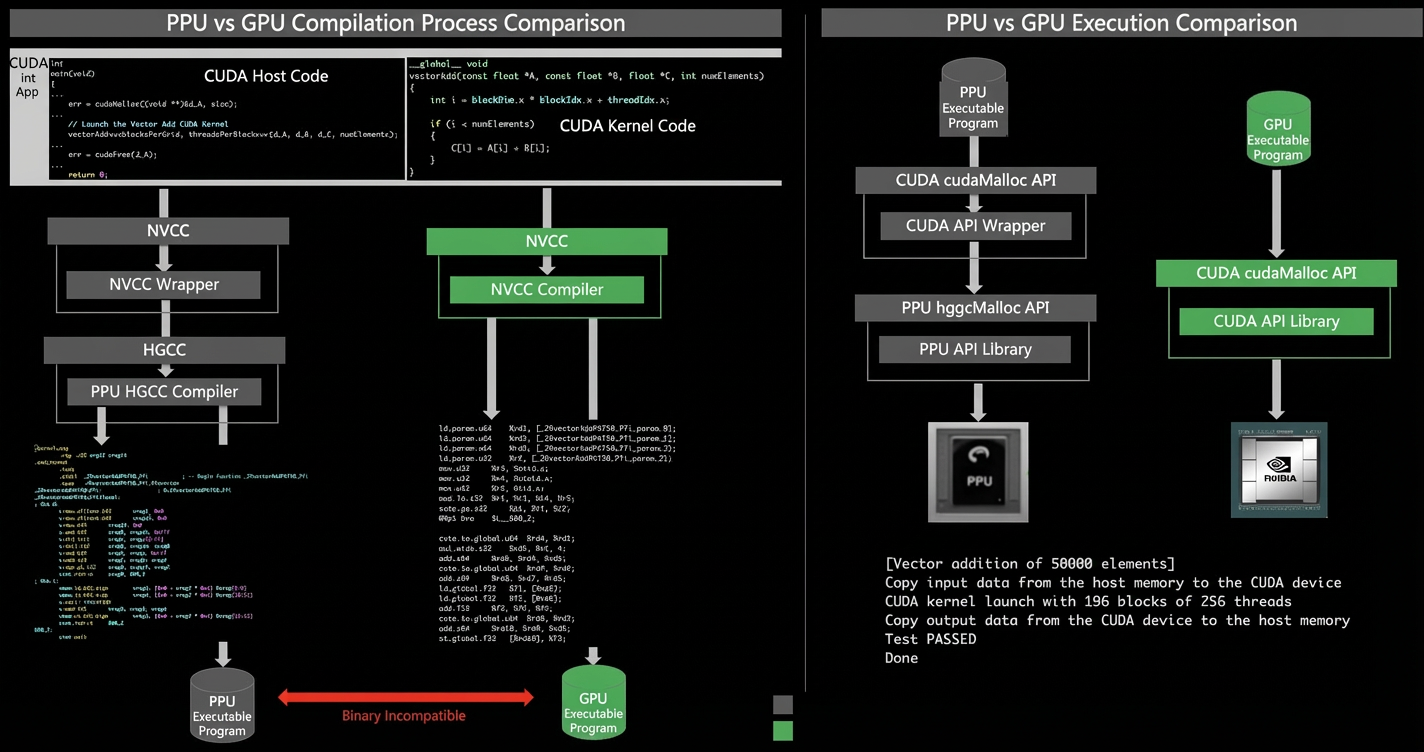
You can develop applications on the PPU platform by using either the PPU SDK API or the CUDA language. Applications written in the CUDA language must be recompiled with the PPU compiler to run on a PPU. The following figure illustrates the differences between compiling and running the same CUDA application on a PPU and a GPU.
CUDA ecosystem compatibility approach: PPU uses an automatically generated CUDA SDK wrapper to ensure compatibility with various CUDA API versions. This allows you to run CUDA applications on a PPU by recompiling them with the PPU compiler.
This compatibility approach provides source-level compatibility between PPU and GPU. However, PPU and GPU binaries are not compatible.
2.2 Supported CUDA API versions
PPU SDK V1.7 supports CUDA API versions up to 12.9.0. Due to differences in hardware architecture, this compatibility primarily focuses on the deep learning domain. The following table lists the currently supported versions. For more information about CUDA compatibility, see Compatibility.
CUDA version |
11.1 |
11.2 |
11.3 |
11.4 |
11.5 |
11.6 |
11.7 |
11.8 |
12.1 |
12.2 |
12.3 |
12.4 |
12.5 |
12.6 |
12.8 |
12.9 |
CUDA 13.0 was released during this release cycle. However, it introduces significant changes that affect backward compatibility for executable programs, even in native NVIDIA environments. These changes are most prominent in the CUDA Runtime API definitions. Due to the significant development effort required to adapt the PPU SDK, we plan to add support for CUDA 13.0 in the v2.1 release.
2.3 Supported open source frameworks and libraries
See the following topics:
PPU v1.7.0 PIP package list
3. Known issues
3.1 Driver
For a list of unsupported CUDA APIs, see Unsupported CUDA APIs.
3.2 Compiler
Most CUDA C++ extension APIs and inline PTX related to textures and surfaces are not supported. Using them causes a compilation failure.
CUDA C++ extension APIs and inline PTX instructions for Dynamic Parallelism are not supported. Using them causes a compilation failure.
For new instructions in PTX versions later than 8.7, some features are not supported by the hardware architecture. This does not affect compilation but causes a runtime error.
The 128-bit atomic instructions in inline PTX are not supported. This does not affect compilation but causes a runtime error.
The
multimeminstructions in inline PTX are not supported. This does not affect compilation but causes a runtime error.The
griddepcontrolinstruction in inline PTX is not supported. Its definition is ignored and does not affect the compilation or runtime process.The
{.level::eviction_priority}and{.level::prefetch_size}modifiers forld/stinstructions in inline PTX are not supported. Their definitions are ignored and do not affect the compilation or runtime process.Instructions and operands related to cache eviction policies in inline PTX are not supported. Their definitions are ignored and do not affect the compilation or runtime process.
The device file compilation pipeline is CUDA Device C++ code -> LLVM (hgvm) IR -> Device Binary. This process does not produce PTX-format files. If your build or code generation pipeline on other platforms requires PTX files, code adaptation is necessary.
Most CUDA MMA and related data movement PTX instructions are compatible, including dense and sparse MMA instructions for specific data types (
.u8/.s8/.tf32/.bf16/.f16). However, performance may be lower than when using PPU-specific tensor core PTX instructions. If such kernels are critical to your end-to-end performance, we recommend refactoring the kernel's algorithm (refer to the PPU tensor core PTX user programming manual and algorithm refactoring guide). For unsupported data types and features (such asu4/f64/sp::ordered_metadata), compilation is not affected, but a runtime error occurs.
3.3 Acceleration library
Performance: Performance generalization needs improvement.
aublas:
Only the listed APIs are supported. For details, see CUBLAS API Support Status. Support for more APIs is being added based on demand.
The complex data type is not supported.
Gemm: FP32 Tensor Core is enabled by default. Due to differences in calculation order and other factors, the precision does not exactly match FP32 FMA, which causes the matrixMulCUBLAS test case to fail.
Gemv: Only host pointer mode is supported.
BlasLt: Does not support specifying attributes such as
algoandperf.
audnn:
Only the listed APIs are supported. For details, see CUDNN API Support Status. Support for more APIs is being added based on demand.
Conv: Does not support
INT64andBOOLEANdata types or configurations with FP16 input and FP32 output.3DConv: Tuning is limited, and performance needs to be improved.
depthwise: Performance needs to be improved for some dgrad use cases.
BN: 1) Only
alpha==1andbeta==0parameters are supported. 2) TheACDNN_BATCHNORM_PER_ACTIVATIONmode is not supported.Pooling:
ACDNN_PROPAGATE_NANis not supported.RNN: Only
acdnnRNNBiasMode_t DOUBLEis supported. OnlyFP16andF32data types are supported. OnlyACDNN_RNN_ALGO_STANDARDis supported.Activation:
ACDNN_PROPAGATE_NANis not supported. TheSWISHoperation is not supported.Softmax:
SoftmaxAlgorithm_t FASTis not supported.TensorOp:
acdnnReduceTensordoes not supportMUL_NO_ZEROS.MultiHeadAttn: Only the forward operation is supported.
Backend: 1) Pre-processing fusion is not supported. 2) Post-processing fusion is limited to a maximum of four pointwise operations. 3) Only
fp16,fp32, andbf16data types are supported. 4) Fused pointwise operations only supportalpha1 = 1andalpha2 = 1.
ausolver:
Only the listed APIs are supported. For details, see CUSOLVER API Support Status. Support for more APIs is being added based on demand.
The complex data type is not supported.
aufft:
Only the listed APIs are supported. For details, see CUFFT API Support Status. Support for more APIs is being added based on demand.
Link-Time Optimization (LTO) is not supported.
aurand:
Only the listed APIs are supported. For details, see CURAND API Support Status. Support for more APIs is being added based on demand.
Only the following generator types are supported:
XORWOW,MRG32K3A, andPHILOX4_32_10.Only legacy order is supported.
Only the following distribution types are supported: default, uniform, uniform double, normal, normal double, lognormal, and lognormal double.
acsparse:
Only the listed APIs are supported. For details, see CUSPARSE API Support Status. Support for more APIs is being added based on demand.
3.4 Interconnect library
Collective operation performance: When using TP 2/4/8 mode on a 16-GPU Zhenwu 810E server, we recommend choosing the optimal device placement based on your machine's ICN topology.
Only NCCL netplugin v7 is supported.
Executing
alltoallV-type operations with unbalanced send and receive sizes may cause an intermittent deadlock. When this occurs, exceptions of type "ERR_FAB_REQ_TO" appear in dmesg. Restoring normal operation requires a device reset.Running multiple pccl communicators concurrently on the same PPU can cause deadlocks. To prevent this issue, avoid launching multiple pccl kernels on the same PPU device, and do not set
NCCL_MIN_NCHANNELSto a value greater than 16.Features such as the NCCL comm register and window register must be enabled by explicitly setting
NCCL_CUMEM_ENABLE. Currently, enablingCUMEMsupport leads to an unexpected increase in device memory allocation, which will be fixed in a future release.
3.5 Video codec and image hardware acceleration
Video decode does not support legacy formats such as MPEG-1, MPEG-2, MPEG-4, VC-1, and VP8.
JPEG does not support lossless mode or the JPEG 2000 format.
NPP currently supports only Image Processing interfaces, not Signal Processing interfaces.
3.6 Tools
For known issues with PPU-SMI, see PPU-SMI Known Issues.
For known issues with Asight Systems, see Asight Systems Known Issues.
For known issues with Asight Compute, see Asight Compute Known Issues.
For known issues with the DCGM management and monitoring tool, see DCGM Known Issues.
3.7 Frameworks and models
Known issues for open-source frameworks:
Framework | Version | Known issue |
Pytorch | 2.6 |
|
2.7 |
| |
2.8 |
| |
SGlang | 0.4.3 |
|
0.4.7 |
| |
0.5.2 |
| |
VLLM | 0.7.3 |
|
0.9.1 |
| |
0.10.2 |
| |
0.11.0 |
| |
TransformerEngine | 2.0 |
|
flashinfer | 0.2.6.post1 |
|