training-xpu-pytorch 26.01
This document provides the release notes for the training-xpu-pytorch 26.01 image.
Main features and bug fixes
Main features
Upgraded the PPU SDK to version 2.0.0.
Upgraded transformer_engine to 2.8 and the vLLM inference component to 0.12.0+ppu2.0.0.oe.
Updated health_check to be compatible with shuttle 1.5.3.
Added a new image compatible with vLLM 0.14.0, which includes upgrades to torch 2.9, triton 3.5, deepspeed 0.18.5, and transformers 4.57.6.
Upgraded vLLM to 0.16.0, which also upgrades Flashinfer to 0.6.3 and megatron-core to 0.16.0.
Bug fixes
Fixed the following issues in vLLM 0.16.0:
Fixed garbled output in GLM-5 responses.
Fixed a server failure when running the Qwen3.5-35B-A3B model with TP=2.
Contents
Image name | training-xpu-pytorch | ||
Image tag | 26.01 | 26.01-pytorch2.9-20260215 | 26.01-pytorch2.9-20260320 |
Application scenarios | training/inference | ||
Framework | pytorch 2.8.0 | pytorch 2.9.0 | pytorch 2.9.0 |
Requirements | PPU SDK 2.0.0 | ||
Supported architectures | amd64 | ||
Core components |
|
|
|
Assets
We recommend using a VPC to accelerate image pulls and reduce pull times.
Public images
egslingjun-registry.cn-wulanchabu.cr.aliyuncs.com/egslingjun/training-xpu-pytorch:26.01
egslingjun-registry.cn-wulanchabu.cr.aliyuncs.com/egslingjun/training-xpu-pytorch:26.01-pytorch2.9-20260215
egslingjun-registry.cn-wulanchabu.cr.aliyuncs.com/egslingjun/training-xpu-pytorch:26.01-pytorch2.9-20260320
VPC images
Replace the AI container image asset URI egslingjun-registry.cn-wulanchabu.cr.aliyuncs.com/egslingjun/{image:tag} with acs-registry-vpc.{region-id}.cr.aliyuncs.com/egslingjun/{image:tag} for accelerated pulling of PPU AI container images from within your VPC.
{region-id}: The region ID of the available region for your ACS product (including Finance Cloud, Government Cloud, and others). For example:cn-beijing,cn-wulanchabu, orcn-shanghai-finance-1.{image:tag}: The name and tag of the AI container image. For example:inference-xpu-pytorch:25.11-v1.7.0-vllm0.10.2-torch2.8-cu129-20251113ortraining-xpu-pytorch:25.11.
Driver requirements
Driver version >= 1.1.0
Key features and enhancements
PyTorch compilation optimization
The compilation optimization feature introduced in PyTorch 2.0 usually provides significant benefits in small-scale, single-GPU scenarios, but in LLM training, the need to incorporate memory optimization and distributed frameworks such as FSDP and Deepspeed makes it difficult for torch.compile() to provide benefits and can even cause performance degradation:
This optimization controls communication granularity within the DeepSpeed framework, allowing the compiler to capture a more complete computation graph and apply broader optimizations.
This release includes an optimized version of PyTorch with the following enhancements:
An optimized PyTorch compiler frontend that ensures successful compilation even when arbitrary graph breaks occur.
Enhanced pattern matching and dynamic shape capabilities to improve the performance of compiled code.
With these optimizations, you can typically achieve an end-to-end (E2E) throughput gain of around 20% when training an 8B LLM.
Memory optimization with gradient checkpointing
A model to predict memory overhead was built using extensive benchmark data from various models, clusters, and training configurations—along with system metrics like memory utilization. This allows the system to recommend the optimal number of activation checkpointing layers. Integrated into PyTorch and compatible with the DeepSpeed framework, this feature helps users optimize memory usage.
ACCL communication library
ACCL is a high-performance network communication library developed by Alibaba for Lingjun products. It is available in three versions: ACCL-N for NVIDIA GPUs, ACCL-P for PPUs, and ACCL-R for AMD accelerators. ACCL-N is based on NVIDIA NCCL, offering full compatibility and including bug fixes and optimizations for performance and stability. ACCL-P is a collective communication library built upon T-Head's open-source pccl. ACCL-R is built upon AMD's open-source ROCm rccl. This release ports key features from ACCL and ACCL-N to pccl, resolves known issues, and is deeply customized for integration with Alibaba Cloud's proprietary networking components.
End-to-end performance evaluation
Using CNP, a cloud-native AI performance evaluation and analysis tool, we conducted a comprehensive end-to-end performance comparison against the standard base image with mainstream open-source models and framework configurations. We also performed an ablation study to evaluate the performance contribution of each optimization component to the overall model training performance.
Image comparison with base image and iterative evaluation
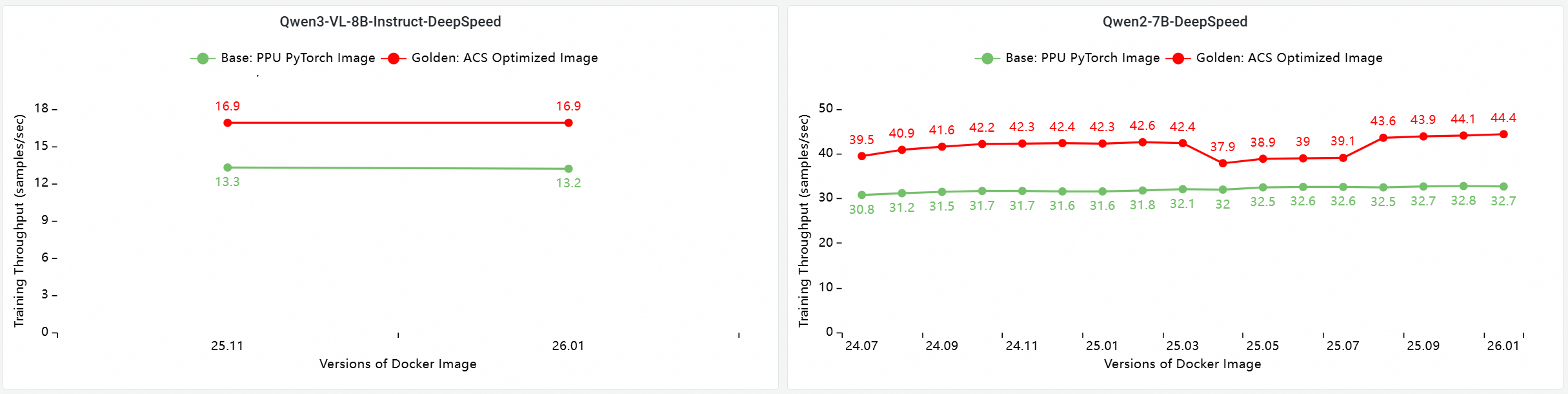
E2E performance contribution analysis of PPU and GPU core components
The following tests were based on version 26.01 and conducted on a multi-node PPU cluster to evaluate and compare end-to-end training performance. The comparison items include:
Base: The PPU PyTorch base image.
ACS AI Image: Base+ACCL: The base image using the ACCL communication library.
ACS AI Image: AC2+ACCL: The golden image using AC2 BaseOS with no optimizations enabled.
ACS AI Image: AC2+ACCL+CompilerOpt: The golden image using AC2 BaseOS with only the
torch.compileoptimization enabled.ACS AI Image: AC2+ACCL+CompilerOpt+CkptOpt: The golden image using AC2 BaseOS with both
torch.compileand selective gradient checkpointing optimizations enabled.
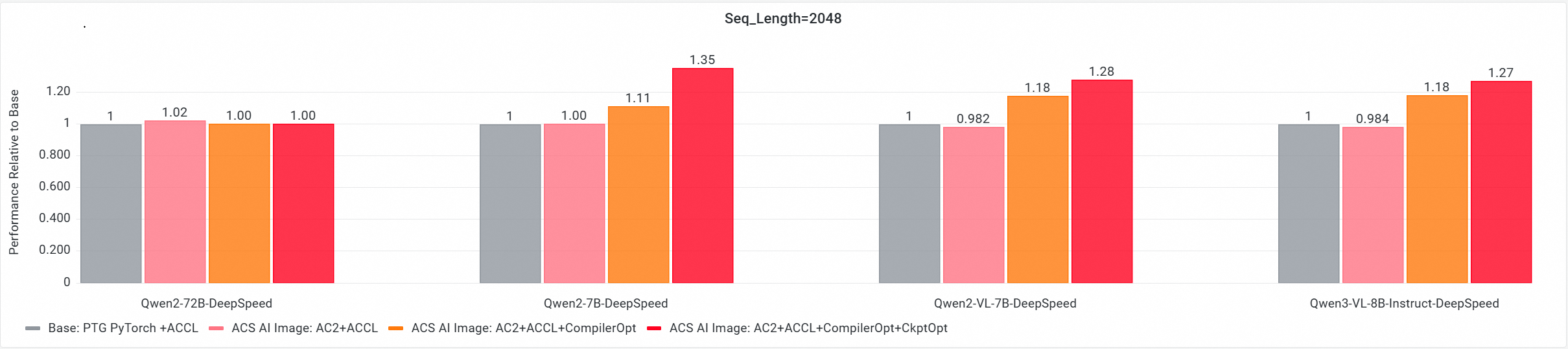
Quick start
The following example shows how to pull the training-xpu-pytorch image by using Docker.
In ACS, use the training-xpu-pytorch image by providing its address when you create a workload in the console or by referencing it in a YAML file.
Step 1: Log in to the image registry
docker login egslingjun-registry.cn-wulanchabu.cr.aliyuncs.comStep 2: Enable performance optimizations
Enable compilation optimization
Use the transformers Trainer API:

Enable gradient checkpointing
export CHECKPOINT_OPTIMIZATION=true
Step 3: Start the container
The image has a built-in model training tool named ljperf, which is used to demonstrate how to start a container and run a training task.
For ACS products, use a YAML file to reference the image.
LLM tasks
# Start the container and enter it.
docker run --rm -it --ipc=host --net=host  --privileged egslingjun-registry.cn-wulanchabu.cr.aliyuncs.com/egslingjun/training-xpu-pytorch:[tag]

# Run a training demo.
ljperf --action train --model_name deepspeed/llama3-8b
Usage recommendations
This image contains modified versions of libraries such as PyTorch and DeepSpeed. Do not reinstall them.
In the DeepSpeed configuration, leave
zero_optimization.stage3_prefetch_bucket_sizeempty or set it to auto.The built-in environment variable
NCCL_SOCKET_IFNAMEin this image needs to be dynamically adjusted based on the usage scenario:When a single Pod requests only 1, 2, 4, or 8 GPUs for training or inference tasks, you need to set
NCCL_SOCKET_IFNAME=eth0(the default configuration in this image).When a single pod requests all 16 GPUs on a machine to perform training/inference tasks by using HPN, you must set
NCCL_SOCKET_IFNAME=hpn0.
We recommend that you use this image with "Use the Alibaba Cloud PPU PIP service in ACS products". This provides password-free access to the PIP service within an ACS VPC, eliminating the need to use other PIP sources. The image includes the necessary pip configuration, but you may need to make additional adjustments based on your specific use case by following the guide.
To use AcclEP-P (the PPU version of DeepEP) in an ACS environment, you must set the environment variable
export EIC_VSOLAR=1. This setting is required for the current image, and this limitation is expected to be removed in future images.For optimal performance, we recommend that you use this image with the latest driver version. For instructions, see Specify GPU models and driver versions for ACS GPU Pods and GPU driver version notes.
Quantization support in PPU SDK 2.0.0 container images:
Standard quantization capability supported in SAIL vLLM 0.12.0: per-token/per-channel w8a8 (int8).
SAIL vLLM 0.12.0 is not yet adapted for or optimized with the Marlin kernel. As a result, performance for AWQ (w4a16), GPTQ (w4a16, w8a16), and mxfp4 is poor. We recommend that you use the int8 w8a8 quantization scheme.
Examples of quantized models compatible with SDK 2.0 are provided. The system login credentials are the same as your PTG PIP credentials. If you do not have them, contact your account manager.
DeepSeek-R1: Supports the per-token/per-channel a8w8 (int8) quantization scheme.
DeepSeek v3.2: Supports the per-token/per-channel a8w8 (int8) quantization scheme.
Kimi-K2-Instruct: Supports the per-token/per-channel a8w8 (int8) quantization scheme.
Qwen3-235B-A22B: Supports the per-token/per-channel a8w8 (int8) quantization scheme.
GLM-5: Supports the per-token/per-channel w8a8 (int8) quantization scheme.
MiniMax-M2.5: Supports the per-token/per-channel w8a8 (int8) quantization scheme.
Qwen3.5-397B-A17B: Supports the per-token/per-channel w8a8 (int8) quantization scheme.
When running inference with vLLM 0.14.0, you must update the flash-attn dependency to v2.8.2.
Known issues
Known issues in vLLM 0.16.0
The community version of vLLM 0.16.0 does not support Qwen3.5 series models. PPU provides partial support, but not all features and use cases of the Qwen3.5 models are supported. Potential issues include but are not limited to:
Probabilistic failures when the MTP feature is enabled.
Precision test failures for bfcl_v3 when the tool call feature is enabled.
To adapt to GLM-5 and Qwen3.5 series models, the transformers version has been upgraded to 5.2.0. This version does not support Qwen VL models. To run Qwen VL models, you must downgrade the transformers version to 4.57.1.
DP+EP+DeepEP low latency issues:
When you start the server for the first time, you must set
export VLLM_ENGINE_READY_TIMEOUT_S=6000. Otherwise, the server will fail to start. The community also encounters this issue on the GU8TF card model.A precision issue exists for the Qwen3 MoE BF16 scenario. This is also a known issue in the community.
The MiniMax-M2.5 model fails to start when
TP=16. UseTP=8to run int8 quantized weights.The MiniMax-M2 model scores low on the ifeval precision test. This issue also occurs on GU8TF instances.
When the value of
--gpu_memory_utilizationexceeds 0.96, a segment fault may rarely occur due to a Driver OOM.The Flashinfer Sampler may cause a drop in precision. If you encounter this issue, you can use
export VLLM_USE_FLASHINFER_SAMPLER=0to disable the feature.The Kimi-linear model has a precision issue, which is also a known issue in the community.
For Kimi-linear or DeepSeek-OCR series models, using DeepGemm causes the server to fail to start. Set the following environment variables to use the Acext MoE backend.
# Set environment variables to use the Acext MoE backend.
export VLLM_USE_DEEP_GEMM=0
export VLLM_MOE_USE_ACEXT=1
export VLLM_DENSE_USE_ACEXT=1
export ACEXT_NUM_TOKENS_LIMIT=16385
If you use the DeepGemm backend, the server automatically performs a warmup during startup to compile the required DeepGemm kernels. This may lead to a long warmup time:
The warmup time is long. We recommend specifying the deepgemm cache path by using an environment variable to avoid repeated compilation:
export DG_CACHE_DIR=<your path>.You can use
export VLLM_DEEP_GEMM_WARMUP="skip"to skip the DeepGemm warmup. During performance testing, ensure that DeepGemm JIT compilation does not occur. Otherwise, this will cause performance degradation.
Regarding quantization, SAIL vLLM 0.16.0 is not yet adapted to or optimized for the Marlin kernel. As a result, performance for AWQ (w4a16), GPTQ (w4a16, w8a16), and mxfp4 is suboptimal. We recommend using the int8 w8a8 quantization scheme.