inference-xpu-pytorch 26.01
These are the release notes for inference-xpu-pytorch 26.01.
Main features and bug fixes
Main features
Upgraded the PPU SDK in the base image to 2.0.0.
Released five vLLM image versions: vLLM0.12.0, vLLM0.14.0, vLLM0.15.0, vLLM0.16.0, and vLLM0.18.0.
Released four SGLang image versions: SGLang0.5.6, SGLang0.5.7, SGLang0.5.8, and SGLang0.5.9.
Upgraded the Torch version to 2.9 for the vLLM0.14.0, vLLM0.15.0, vLLM0.16.0, vLLM0.18.0, SGLang0.5.7, SGLang0.5.8, and SGLang0.5.9 images.
Bug fixes
vLLM 0.16.0 resolves the following issues:
Fixed an issue where GLM-5 responses contained garbled characters.
Resolved a startup failure of the Qwen3.5-35B-A3B model when
TP=2.
SGLang 0.5.9 resolves the following issues:
Fixed an occasional out-of-bounds error in the community's bench_serving when testing with random mixed image and text inputs.
Resolved a startup error of GLM4.5V when
tp_size==8.Resolved an error in selecting the correct compute interface based on the device type when using the NSA backend with the community's Deepseek-V3.2.
Fixed a bug affecting support for Qwen3 hybrid Int8/BF16 quantized models (the first 90 layers use Int8 and the last 4 layers use BF16).
Fixed a data inconsistency issue in the
_fwd_kernel_ep_scatter_1triton kernel caused by a lack of synchronization during warp racing.Resolved an issue where weights could not be retrieved for community DeepSeek models with AWQ or GPTQ quantization.
Fixed an issue where the draft model used an unsupported quantization method when its quantization method differed from the target model's in the community MTP.
Contents
Image name | inference-xpu-pytorch | ||||||||
Image tag | 26.01-v2.0.0-vllm0.12.0-torch2.8-cu129-20260127 | 26.01-v2.0.0-sglang0.5.6-torch2.8-cu129-20260126 | 26.01-v2.0.0-vllm0.14.0-torch2.9-cu129-20260209 | 26.01-v2.0.0-sglang0.5.7-torch2.9-cu129-20260209 | 26.01-v2.0.0-vllm0.15.0-torch2.9-cu129-20260212 | 26.01-v2.0.0-sglang0.5.8-torch2.9-cu129-20260212 | 26.01-v2.0.0-vllm0.16.0-torch2.9-cu129-20260316 | 26.01-v2.0.0-sglang0.5.9-torch2.9-cu129-20260316 | 26.01-v2.0.0-vllm0.18.0-torch2.9-cu129-20260330 |
Application scenario | LLM inference | LLM inference | LLM inference | LLM inference | LLM inference | LLM inference | LLM inference | LLM inference | LLM inference |
Framework | pytorch | pytorch | pytorch | pytorch | pytorch | pytorch | pytorch | pytorch | pytorch |
Requirements | PPU SDK V2.0.0 | PPU SDK V2.0.0 | PPU SDK V2.0.0 | PPU SDK V2.0.0 | PPU SDK V2.0.0 | PPU SDK V2.0.0 | PPU SDK V2.0.0 | PPU SDK V2.0.0 | PPU SDK V2.0.0 |
System components |
|
|
|
|
|
|
|
|
|
Image assets
We recommend that you accelerate AI container image pulls over VPC to reduce pull times.
Public images
egslingjun-registry.cn-wulanchabu.cr.aliyuncs.com/egslingjun/inference-xpu-pytorch:26.01-v2.0.0-vllm0.12.0-torch2.8-cu129-20260127
egslingjun-registry.cn-wulanchabu.cr.aliyuncs.com/egslingjun/inference-xpu-pytorch:26.01-v2.0.0-sglang0.5.6-torch2.8-cu129-20260126
egslingjun-registry.cn-wulanchabu.cr.aliyuncs.com/egslingjun/inference-xpu-pytorch:26.01-v2.0.0-vllm0.14.0-torch2.9-cu129-20260209
egslingjun-registry.cn-wulanchabu.cr.aliyuncs.com/egslingjun/inference-xpu-pytorch:26.01-v2.0.0-sglang0.5.7-torch2.9-cu129-20260209
egslingjun-registry.cn-wulanchabu.cr.aliyuncs.com/egslingjun/inference-xpu-pytorch:26.01-v2.0.0-vllm0.15.0-torch2.9-cu129-20260212
egslingjun-registry.cn-wulanchabu.cr.aliyuncs.com/egslingjun/inference-xpu-pytorch:26.01-v2.0.0-sglang0.5.8-torch2.9-cu129-20260212
egslingjun-registry.cn-wulanchabu.cr.aliyuncs.com/egslingjun/inference-xpu-pytorch:26.01-v2.0.0-vllm0.16.0-torch2.9-cu129-20260316
egslingjun-registry.cn-wulanchabu.cr.aliyuncs.com/egslingjun/inference-xpu-pytorch:26.01-v2.0.0-sglang0.5.9-torch2.9-cu129-20260316
egslingjun-registry.cn-wulanchabu.cr.aliyuncs.com/egslingjun/inference-xpu-pytorch:26.01-v2.0.0-vllm0.18.0-torch2.9-cu129-20260330
VPC images
Replace the AI container image asset URI egslingjun-registry.cn-wulanchabu.cr.aliyuncs.com/egslingjun/{image:tag} with acs-registry-vpc.{region-id}.cr.aliyuncs.com/egslingjun/{image:tag} for accelerated pulling of PPU AI container images from within your VPC.
{region-id}: The region ID of the available region for your ACS product (including Finance Cloud, Government Cloud, and others). For example:cn-beijing,cn-wulanchabu, orcn-shanghai-finance-1.{image:tag}: The name and tag of the AI container image. For example:inference-xpu-pytorch:25.11-v1.7.0-vllm0.10.2-torch2.8-cu129-20251113ortraining-xpu-pytorch:25.11.
E2E performance evaluation
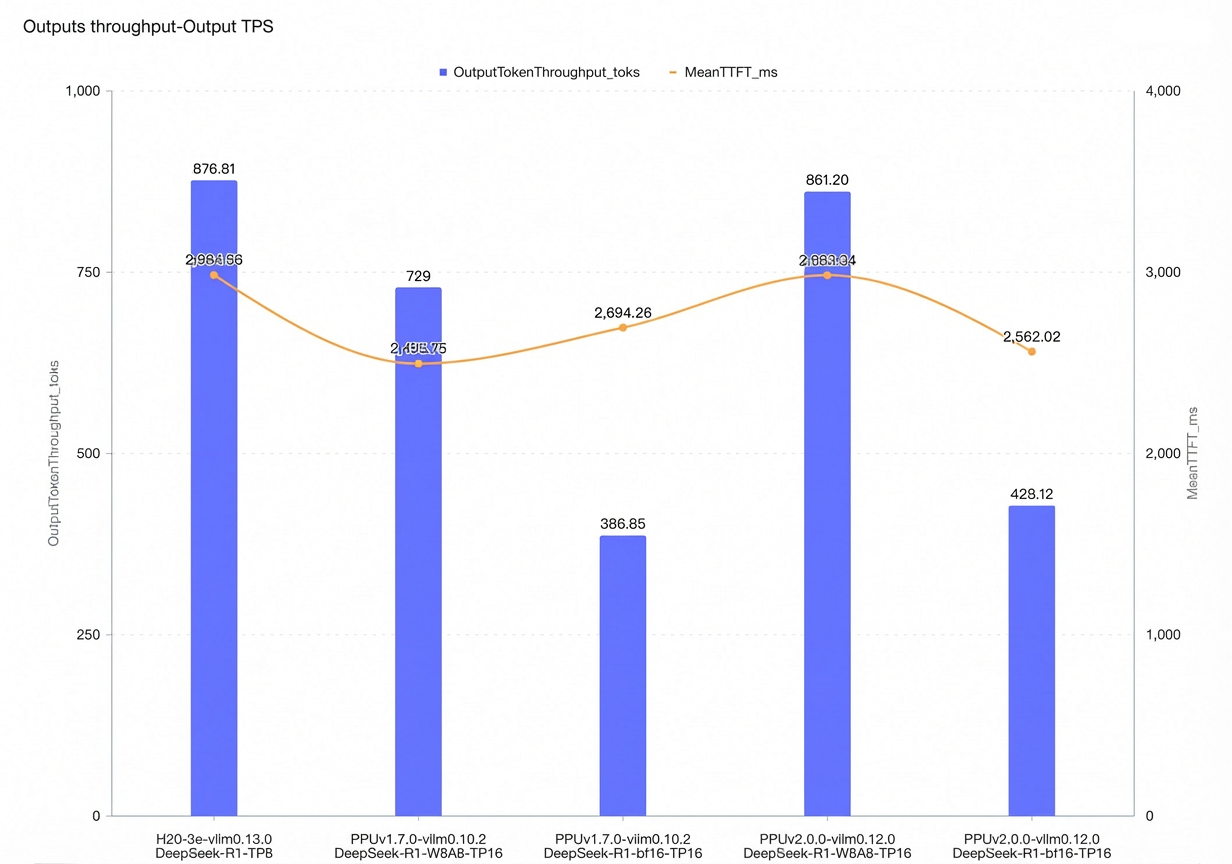
For vLLM online inference, we measured the maximum concurrency and compared throughput under the following conditions: time to first token (TTFT) < 3s, time per output token (TPOT) < 100ms, with input and output token lengths of 4096 and 2048, respectively.
On a single Zhenwu 810E node, the output token throughput for DeepSeek-R1-bf16 represents a 10% increase over V1.7.0.
On a single Zhenwu 810E node, the output token throughput for DeepSeek-R1-W8A8 represents an 18% increase over V1.7.0.
Quick start
The following example shows how to pull the inference-xpu-pytorch image using Docker and test the inference service with the Qwen2.5-7B-Instruct model.
To use the inference-xpu-pytorch image in Container Service for Kubernetes (ACK), you can enter the image address when creating a workload in the console, or specify the image reference in a YAML file.
For instructions on using LLM inference images in an ACK cluster, see Using LLM Inference Images in ACK Clusters.
For instructions on deploying a DeepSeek inference service on PPUs in ACK, see Quickly Deploying a DeepSeek V3/R1 Inference Service on a PPU in ACK.
Pull the inference container image.
We recommend that you accelerate AI container image pulls over VPC to reduce pull times.
docker pull egslingjun-registry.cn-wulanchabu.cr.aliyuncs.com/egslingjun/inference-xpu-pytorch:[tag]Download the open-source model from ModelScope.
pip install modelscope
cd /mnt
modelscope download --model Qwen/Qwen2.5-7B-Instruct --local_dir ./Qwen2.5-7B-Instruct
Run the following command to start and enter the container.
docker run -d -t --network=host --privileged --init --ipc=host \
--ulimit memlock=-1 --ulimit stack=67108864  \
-v /mnt/:/mnt/ \
egslingjun-registry.cn-wulanchabu.cr.aliyuncs.com/egslingjun/inference-xpu-pytorch:[tag]
Run an inference test to verify the vLLM conversational inference feature.
Start the server-side service.
python3 -m vllm.entrypoints.openai.api_server \
--model /mnt/Qwen2.5-7B-Instruct \
--trust-remote-code --disable-custom-all-reduce \
--tensor-parallel-size 1
Run the client-side test.
curl http://localhost:8000/v1/chat/completions \
    -H "Content-Type: application/json" \
    -d '{
    "model": "/mnt/Qwen2.5-7B-Instruct",
    "messages": [
    {"role": "system", "content": "You are a friendly AI assistant."},
    {"role": "user", "content": "Tell me about deep learning."}
    ]}'
The output is as follows:

For more information about vLLM, see the vLLM documentation.
Usage notes
Standard quantization capabilities supported by different frameworks in SDK 2.0.0:
Standard quantization for SAIL vLLM 0.12.0/0.14.0/0.15.0/0.16.0/0.18.0: per-token/per-channel w8a8 (int8).
SAIL vLLM 0.12.0/0.14.0/0.15.0/0.16.0/0.18.0 is not yet adapted to or optimized for the Marlin kernel. As a result, performance for AWQ (w4a16), GPTQ (w4a16, w8a16), and mxfp4 is suboptimal. We recommend using the int8 w8a8 quantization scheme.
Standard quantization for SAIL SGLang 0.5.6/0.5.7/0.5.8/0.5.9: per-token/per-channel w8a8 (int8), AWQ (w4a16), and GPTQ (w4a16, w8a16).
The AWQ and GPTQ methods in SAIL SGLang 0.5.6/0.5.7/0.5.8/0.5.9 have performance issues because they are not highly optimized. Targeted optimizations will be implemented in the future based on business needs. We recommend using the int8 quantization solution provided by PTG. To run an a8w8 (int8) quantized model, add the
--quantization w8a8_int8option.A8W8 (INT8) quantization demo models
The following are examples of quantized models adapted for SDK 2.0. The system login credentials are the same as your PTG PIP credentials. If you do not have them, contact your account manager:
DeepSeek-R1: Supports per-token/per-channel a8w8 (int8) quantization.
DeepSeek v3.2: Supports per-token/per-channel a8w8 (int8) quantization.
Kimi-K2-Instruct: Supports per-token/per-channel a8w8 (int8) quantization.
Qwen3-235B-A22B: Supports per-token/per-channel a8w8 (int8) quantization.
GLM-5: Supports per-token/per-channel w8a8 (int8) quantization.
MiniMax-M2.5: Supports per-token/per-channel w8a8 (int8) quantization.
Qwen3.5-397B-A17B: Supports per-token/per-channel w8a8 (int8) quantization.
For optimal performance, we recommend using this image with the latest driver version. For driver configuration details, see Specify the GPU model and driver version for an ACK GPU pod and GPU driver versions.
To use AcclEP-P (the PPU version of DeepEP) in an ACS environment, you must set the environment variable
export EIC_VSOLAR=1. This setting is required for the current image and is expected to be removed in subsequent images.The built-in environment variable
NCCL_SOCKET_IFNAMEin this image needs to be dynamically adjusted depending on the use case:When a single Pod requests only 1, 2, 4, or 8 GPUs for an inference task, you need to set
NCCL_SOCKET_IFNAME=eth0. This is the default configuration in this inference image.When a single Pod requests all 16 GPUs on an entire machine for an inference task, you must set
NCCL_SOCKET_IFNAME=hpn0to use HPN.
We recommend using this image with the Alibaba Cloud PPU PIP service. This service provides one-stop, password-free access to PIP services within an ACK VPC, eliminating the need to combine it with other PIP sources. This image includes the necessary pip config, but you may need to perform additional configuration based on your use case and the instructions in the documentation.
In scenarios that have strict requirements for Time to First Token (TTFT), you can add the server argument:
--no-async-schedulingto reduce TTFT.
Known issues
vLLM 0.12.0/0.14.0/0.15.0/0.16.0 images
In DP + EP mode with DeepEP low latency, there is a precision issue with Qwen3 MoE BF16. This is also a known issue in the community.
The server fails to start when using DeepGemm with the Kimi-linear model. Use the Acext MoE backend instead.
# Set environment variables to use the Acext MoE backend.
export VLLM_USE_DEEP_GEMM=0
export USE_ACEXT_CUDA=1
If you use the DeepGemm backend, the server automatically performs a warmup during startup to compile the required DeepGemm kernels. This may lead to a long warmup time:
The warmup time is long. The recommended practice is to specify the deepgemm cache path by using an environment variable:
export DG_CACHE_DIR=<your-path>to avoid repeated compilation.You can use
export VLLM_DEEP_GEMM_WARMUP="skip"to skip the DeepGemm warmup. During performance testing, ensure that DeepGemm JIT compilation does not occur. Otherwise, this will cause performance degradation.
SGLang 0.5.6/0.5.7/0.5.8/0.5.9 images automatically perform a warmup during server startup to compile the required DeepGemm kernels. Note the following:
The warmup time is long. We recommend that you increase the server timeout by using the
--watchdog-timeoutand--dist-timeoutparameters. For example:--watchdog-timeout 3600 --dist-timeout 3600.You can use
SGLANG_JIT_DEEPGEMM_PRECOMPILEto disable the DeepGemm warmup. During performance testing, ensure that DeepGemm JIT compilation does not occur. Otherwise, performance will decrease.
Appendix
Known issues in vLLM 0.16.0
The community version of vLLM 0.16.0 does not support Qwen3.5 series models. PPU provides partial support, but not all features and use cases of the Qwen3.5 models are supported. Potential issues include but are not limited to:
Probabilistic failures when the MTP feature is enabled.
Precision test failures for bfcl_v3 when the tool call feature is enabled.
To adapt to GLM-5 and Qwen3.5 series models, the transformers version has been upgraded to 5.2.0. This version does not support Qwen VL models. To run Qwen VL models, you must downgrade the transformers version to 4.57.1.
DP+EP+DeepEP low latency issues:
When you start the server for the first time, you must set
export VLLM_ENGINE_READY_TIMEOUT_S=6000. Otherwise, the server will fail to start. The community also encounters this issue on the GU8TF card model.A precision issue exists for the Qwen3 MoE BF16 scenario. This is also a known issue in the community.
The MiniMax-M2.5 model fails to start when
TP=16. UseTP=8to run int8 quantized weights.The MiniMax-M2 model scores low on the ifeval precision test. This issue also occurs on GU8TF instances.
When the value of
--gpu_memory_utilizationexceeds 0.96, a segment fault may rarely occur due to a Driver OOM.The Flashinfer Sampler may cause a drop in precision. If you encounter this issue, you can use
export VLLM_USE_FLASHINFER_SAMPLER=0to disable the feature.The Kimi-linear model has a precision issue, which is also a known issue in the community.
For Kimi-linear or DeepSeek-OCR series models, using DeepGemm causes the server to fail to start. Set the following environment variables to use the Acext MoE backend.
# Set environment variables to use the Acext MoE backend.
export VLLM_USE_DEEP_GEMM=0
export VLLM_MOE_USE_ACEXT=1
export VLLM_DENSE_USE_ACEXT=1
export ACEXT_NUM_TOKENS_LIMIT=16385
If you use the DeepGemm backend, the server automatically performs a warmup during startup to compile the required DeepGemm kernels. This may lead to a long warmup time:
The warmup time is long. We recommend specifying the deepgemm cache path by using an environment variable to avoid repeated compilation:
export DG_CACHE_DIR=<your path>.You can use
export VLLM_DEEP_GEMM_WARMUP="skip"to skip the DeepGemm warmup. During performance testing, ensure that DeepGemm JIT compilation does not occur. Otherwise, this will cause performance degradation.
Regarding quantization, SAIL vLLM 0.16.0 is not yet adapted to or optimized for the Marlin kernel. As a result, performance for AWQ (w4a16), GPTQ (w4a16, w8a16), and mxfp4 is suboptimal. We recommend using the int8 w8a8 quantization scheme.
Known issues in SGLang 0.5.9
SGLang 0.5.9 automatically performs a warmup during server startup to compile the required DeepGemm kernels. Note the following:
If the warmup time is long, you can use
--watchdog-timeoutand--dist-timeoutto increase the server timeout, for example,--watchdog-timeout 3600 --dist-timeout 3600.You can disable the deepgemm warmup by using
SGLANG_JIT_DEEPGEMM_PRECOMPILE. During performance testing, ensure that DeepGemm JiT compilation does not occur. Otherwise, it will degrade performance.
To adapt to GLM-5 and Qwen3.5 series models, the transformers version has been upgraded to 5.2.0. This version does not support Qwen VL models. To run Qwen VL models, you must downgrade the transformers version to 4.57.1.
Known issues in vLLM 0.18.0
Running the GLM-5 model requires an upgrade to
transformers==5.2.0.DP+EP+DeepEP low latency issues:
When you start the server for the first time, you must set
export VLLM_ENGINE_READY_TIMEOUT_S=6000. Otherwise, the server may fail to start due to a DeepGemm warmup compilation timeout. The community has reported the same issue on GU8TF card models.A precision issue exists for the Qwen3 MoE BF16 scenario. This is also a known issue in the community. Do not use the DP+EP+DeepEP low latency combination to start Qwen3 MoE BF16 model weights.
The MiniMax-M2.5 model fails to start when
TP=16. UseTP=8to run int8 quantized weights.If the value of
--gpu_memory_utilizationis higher than 0.96, you may encounter an Out of Memory (OOM) error in rare cases, which can cause a segment fault.Enabling the Flashinfer Sampler can improve performance, but it may cause a drop in precision (this feature is disabled by default). This is also a known issue in the community. You can use the
VLLM_USE_FLASHINFER_SAMPLERenvironment variable to enable or disable this feature.If you use the DeepGemm backend, the server automatically performs a warmup during startup to compile the required DeepGemm kernels. This may lead to a long warmup time:
The warmup time can be long. We recommend that you specify the deepgemm cache path by using an environment variable to avoid repeated compilation:
export DG_CACHE_DIR=<your path>.You can use
export VLLM_DEEP_GEMM_WARMUP="skip"to skip the DeepGemm warmup. During performance testing, ensure that DeepGemm JIT compilation does not occur. Otherwise, performance will be degraded.
Regarding quantization, SAIL vLLM 0.18.0 is not yet adapted to or optimized for the Marlin kernel. As a result, performance for AWQ (w4a16), GPTQ (w4a16, w8a16), and mxfp4 is suboptimal. We recommend using the int8 w8a8 quantization scheme.