Feature scope
Quick Tracking > Behavior Analysis > User Insights > Audience Management > Create Audience
Workflow
1.1 Permission verification
Authentication credentials
Authentication uses your API ID and API Secret. Because these credentials are sensitive, they are only visible to the primary account. You can find them by navigating to Console > Data Collection.
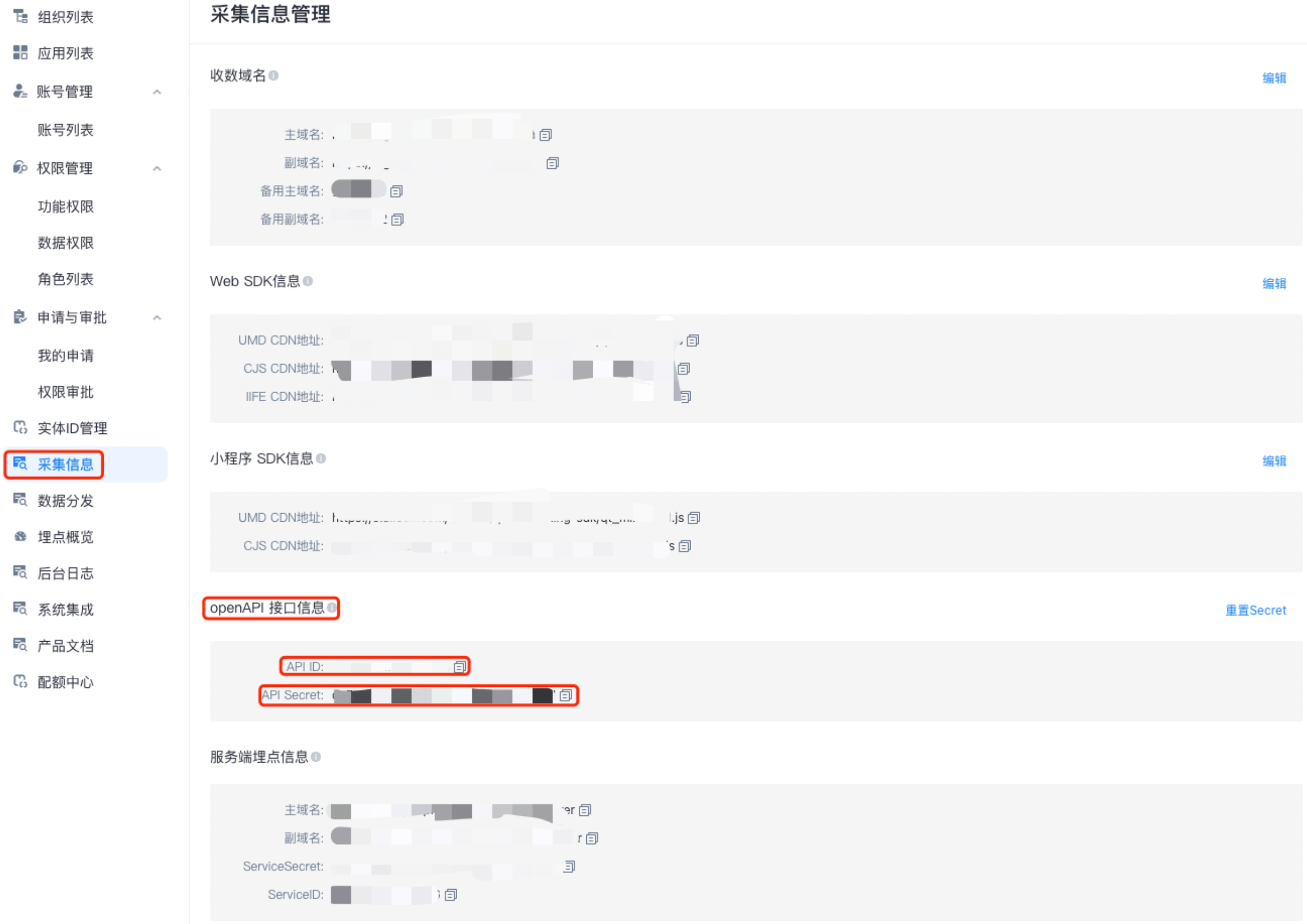 URL parameters
http://xxx.yyy.com/api/{service}?api_id=abcdef&api_sign=abcdef&api_ts=123456Parameter | Description | Note |
api_id | API ID. | The primary account can view this in the Quick Tracking console. |
api_sign | Signature. | For details, see the "Authentication signature" section. |
api_ts | Timestamp. | In milliseconds. This timestamp must match the request time and use the time zone of the Quick Tracking server. Requests with a significant time skew will fail. |
Frontend page management domain. | The domain displayed in your browser after you log on to Quick Tracking. |
Body parameters
{
    "name": "audience upload api",
    "idType": "userid",
    "idList": ["userid1", "userid2"]
}
Authentication signature
To generate the signature, create a source string by concatenating the service name, the query string, and the request body, using a newline character (\n) as a separator. The parameters in the query string must be sorted alphabetically by key.
/**
 * The API Secret. Can be viewed by the primary account in the Quick Tracking console.
 */
String secret = "abcdef";

/**
 * The name of the service to call.
 */
String service = "portrait.userGroup.upload";

/**
 * 1. Get all URL parameters except for api_sign.
 *    For example: api_id=abcdef&api_ts=123456
 * 2. Sort the parameters alphabetically by key.
 */
String queryString = sort("api_id=abcdef&api_ts=123456");

/**
 * The body content of the POST request.
 */
String bodyString = "{
    "name": "audience upload api",
    "idType": "userid",
    "idList": ["userid1", "userid2"]
}";

String source = service
    + "\n"
    + queryString
    + "\n"
    + bodyString;
Encrypt the source string
String sign = new HmacUtils(HmacAlgorithms.HMAC_SHA_1, secret).hmacHex(source);<dependency>
<groupId>com.squareup.okhttp3</groupId>
<artifactId>okhttp</artifactId>
<version>3.3.0</version>
</dependency>
<dependency>
<groupId>commons-codec</groupId>
<artifactId>commons-codec</artifactId>
<version>1.15</version>
</dependency>
package com.alibaba.umeng.base.product.advanced.controller;

import com.alibaba.fastjson.JSONObject;
import okhttp3.*;
import org.apache.commons.codec.digest.HmacAlgorithms;
import org.apache.commons.codec.digest.HmacUtils;
import org.slf4j.Logger;
import org.slf4j.LoggerFactory;

import java.io.IOException;
import java.util.Arrays;

/**
 * @author demo
 */
public class OpenApiControllerTest {

    private static final MediaType APPLICATION_JSON = MediaType.parse("application/json; charset=utf-8");

    private final static Logger LOGGER = LoggerFactory.getLogger(OpenApiControllerTest.class);

    public static void main(String[] args) {

        String URL = "http://pre.aplus.xxxx-poc.com/api/";
        String service = "portrait.userGroup.upload";

        String apiId = "axxxxxxxxxxxxV8p";
        String apiSecret = "xexxxxxxxxxxxxxxxxxxxxxxxxxxCu8";

        /**
         * Construct the URL parameters.
         */
        String query = new StringBuilder()
                .append("api_id=").append(apiId)
                .append("&")
                .append("api_ts=").append(System.currentTimeMillis())
                .toString();

        /**
         * Construct the body parameters.
         */
        JSONObject body = new JSONObject();
        body.put("name", "audience upload api");
        body.put("idType", "userid");
        body.put("idList", Arrays.asList("userid1", "userid2"));

        String bodyString = body.toJSONString();

        /**
         * service
         * query
         * body
         */
        StringBuilder valueToDigest = new StringBuilder()
                .append(service)
                .append("\n")
                .append(query)
                .append("\n")
                .append(bodyString);

        String sign = new HmacUtils(HmacAlgorithms.HMAC_SHA_1, apiSecret).hmacHex(valueToDigest.toString());

        try {
            Response response = post(URL + service + "?" + query + "&api_sign=" + sign, bodyString);
            System.out.println(response.body().string());
        } catch (Exception e) {
            LOGGER.info("invoke post error", e);
        }
    }

    /**
     * Sends an HTTP POST request.
     * @param URL The request URL.
     * @param body The request body.
     * @return The server response.
     */
    private static Response post(String URL, String body) throws IOException {

        LOGGER.info("http post start, URL = {}, body = {}", URL, body);

        RequestBody requestBody = RequestBody.create(APPLICATION_JSON, body);
        Request request = new Request.Builder()
                .url(URL)
                .post(requestBody)
                .build();
        Response response = new OkHttpClient().newCall(request).execute();

        LOGGER.info("http post success");

        return response;
    }
}
1.2 Audience upload
portrait.userGroup.upload
Request
The
idTypeparameter accepts the following values:userid,utdid,imei, oridfa.The
idListarray supports up to 1 million IDs, which must be uploaded in plaintext.
{
    "name": "audience upload api",
    "idType": "userid",
    "idList": ["userid1", "userid2"]
}
Response
A successful response returns the
uploadIdfor the upload job.
{
    "code": 200,
    "msg": "SUCCESS",
    "sCode": 200,
    "sMsg": "SUCCESS",
    "data": {
        "uploadId": "upload_000_8dk6fd_b5onq2vjamm8",
        "groupId": "group_000_8dk6fd_b5onq2vlsiyo",
        "status": "uploading"
    },
    "success": true
}
1.3 Audience upload status
portrait.userGroup.uploadStatus
Request
The request must include the
uploadIdreturned by the initial upload request.
{
  "uploadId": "upload_000_8dk6fd_b5onq2vjamm8"
}
Response
Returns the audience upload status.
{
    "code": 200,
    "msg": "SUCCESS",
    "sCode": 200,
    "sMsg": "SUCCESS",
    "data": {
        "status": "done",
        "percent": 100.0,
        "total": 2,
        "match": 0,
        "matchRatio": 0.0
    },
    "success": true
}