1 Applicable functions
Quick Tracking 「behavior analysis」-「behavior insight」-「user insight」-「audience management」
2 Use process
2.1 Obtain Application ID
「Behavior analysis」-「audience management」 The current page link can obtain application ID, as shown in the following figure box to select the location:
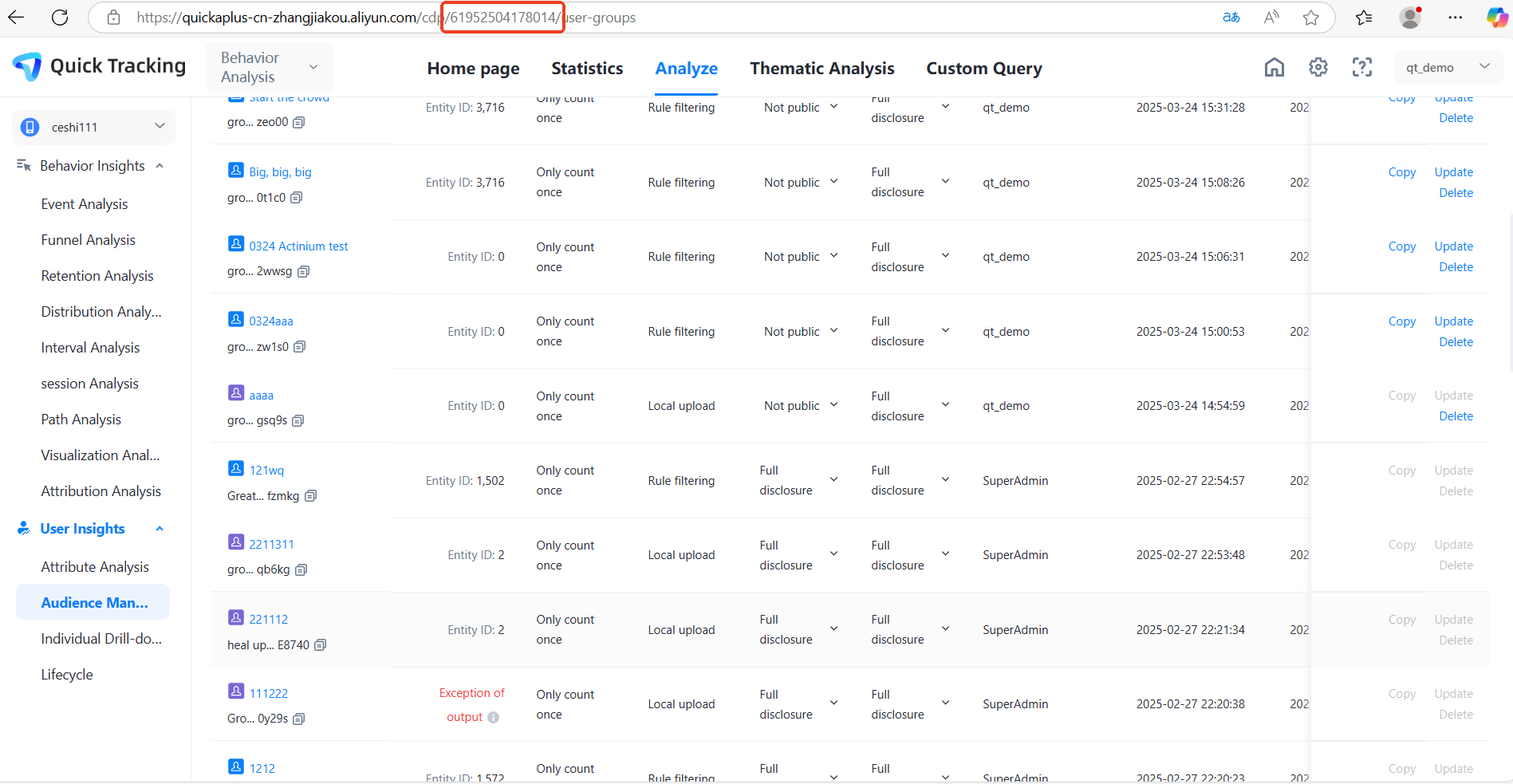
2.2 Get audience ID
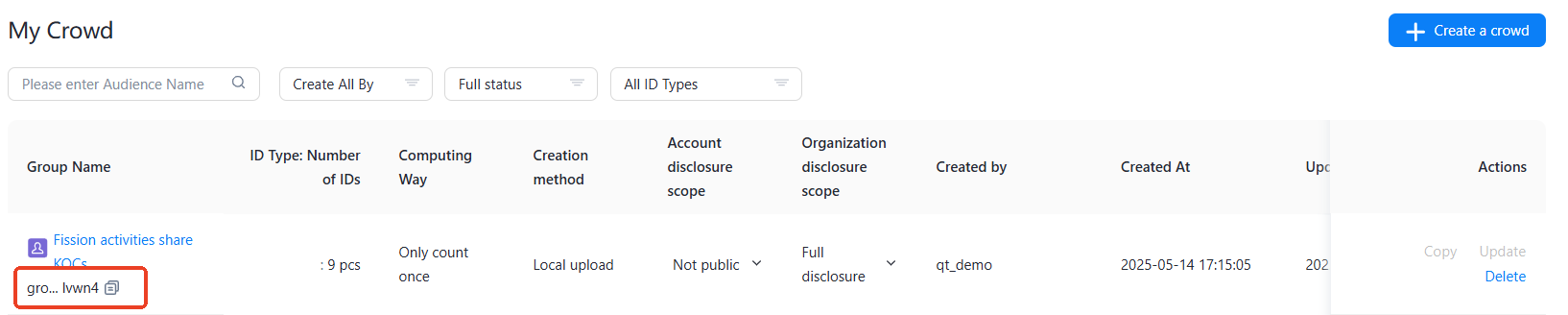
In my audience list, you can click the copy button under the audience name to copy the audience ID.
2.3 use openapi to obtain population details
2.3.1 Permission verification
Authentication Basis
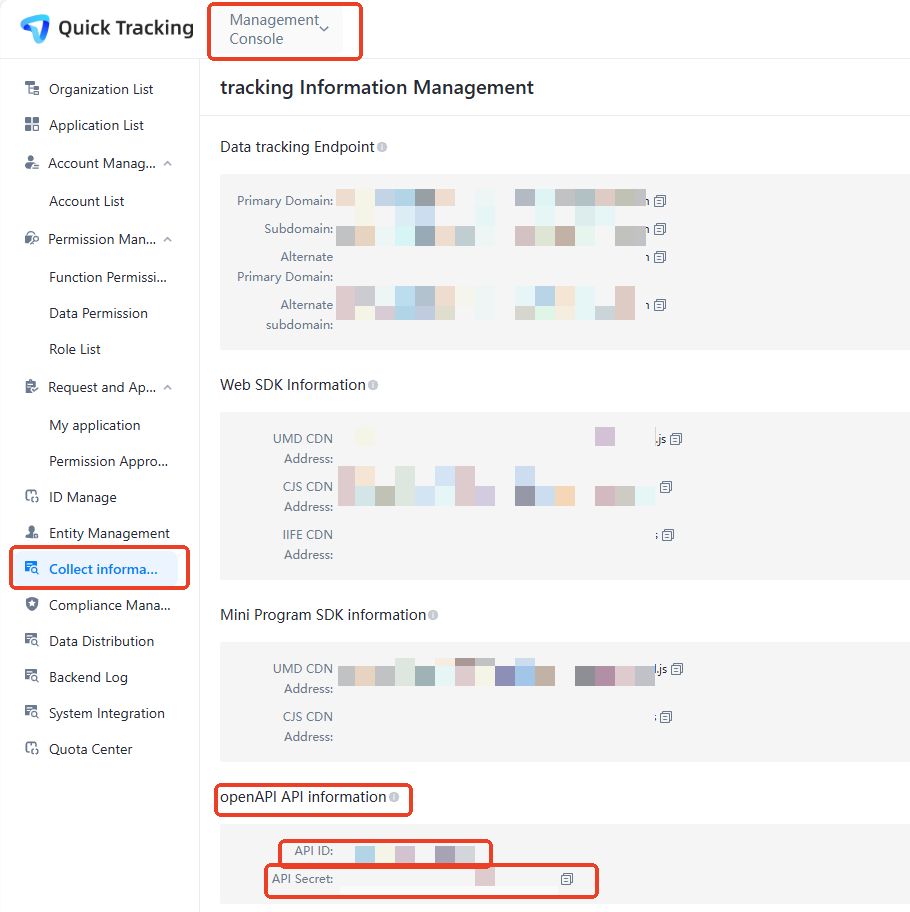
API ID and API Secret
Note: Because the data is sensitive, it is only visible in the main account. The specific display location is:
"Management Console"--> "Collecting Information" .
URL parameters
http://xxx.yyy.com/api/{service}?api_id=abcdef&api_sign=abcdef&api_ts=123456Parameter | Description | Remarks |
api_id | API ID | Quick Tracking background master account can be viewed |
api_sign | Signature | For more information, see "Authentication signature". |
api_ts | Timestamp | Millisecond |
http://xxx.yyy.com/ | Manage domain on the front page | After logging in to Quick Tracking, the browser foreground displays the domain. |
body parameter
{
    "dataSourceId": "xxxx",
    "groupId":"yyyy",
    "pageIndex":1,
    "pageSize":1000"
}
Authentication signature
Sort method names and parameters alphabetically by key
/**
 * Quick Tracking background master account can be viewed
 */
String secret = "abcdef";

/**
 * The name of the service to be requested.
 */
String service = "analysis.userGroup.userList";

/**
 * 1. Obtain the URL parameters, such as apiId=abcdef&sign=abcdef&ts=123456.
 * 2. Sort by key and remove the sign. The result is apiId=abcdef&ts=123456.
 */
String queryString = sort("api_id=abcdef&api_ts=123456");

/**
 * POST interface, body content
 */
String bodyString = "{
    "dataSourceId": "xxxx",
    "groupId":"yyyy",
    "pageIndex":1,
    "pageSize":1000"
}";

String source = service
    + "\n"
    + queryString
    + "\n"
    + bodyString;
Use an API Secret to encrypt source data
String sign = new HmacUtils(HmacAlgorithms.HMAC_SHA_1, secret).hmacHex(source);sign = 1cfc10a297397e91f1e50e1f41ac24b8c45fd53d
<dependency>
  <groupId>com.squareup.okhttp3</groupId>
  <artifactId>okhttp</artifactId>
  <version>3.3.0</version>
</dependency>
package com.alibaba.dt.atm.apsara.init;
import com.alibaba.fastjson.JSONObject;
import okhttp3.*;
import org.apache.commons.codec.digest.HmacAlgorithms;
import org.apache.commons.codec.digest.HmacUtils;
import org.slf4j.Logger;
import org.slf4j.LoggerFactory;
import java.io.IOException;
import java.util.concurrent.TimeUnit;
/**
* @author mingpeng.spc
* @date 2022/01/07
*/
public class OpenApiControllerTest {
private static final MediaType APPLICATION_JSON = MediaType.parse("application/json; charset=utf-8");
private final static Logger LOGGER = LoggerFactory.getLogger(OpenApiControllerTest.class);
public static void main(String[] args) {
String url = "https://{domain}/api/";
String service = "analysis.userGroup.userList";
String apiId = "xxxx";
String apiSecret = "yyyy";
LOGGER.info("current time = {}", System.currentTimeMillis());
/**
* Construct url parameters.
*/
String query = new StringBuilder()
.append("api_id=").append(apiId)
.append("&")
.append("api_ts=").append(System.currentTimeMillis())
.toString();
/**
* Construct the body parameter.
*/
JSONObject body = new JSONObject();
body.put("dataSourceId", "xxxx");
body.put("groupId", "yyyy");
body.put("pageIndex", 1);
body.put("pageSize", 100);
String bodyString = body.toJSONString();
/**
* service
* query
* body
*/
StringBuilder valueToDigest = new StringBuilder()
.append(service)
.append("\n")
.append(query)
.append("\n")
.append(bodyString);
String sign = new HmacUtils(HmacAlgorithms.HMAC_SHA_1, apiSecret).hmacHex(valueToDigest.toString());
Response response = null;
try {
response = post(url + service + "?" + query + "&api_sign=" + sign, bodyString);
System.out.println(response.body().string());
} catch (Exception e) {
LOGGER.info("invoke post error", e);
} finally {
if (response != null) {
response.close();
}
}
}
/**
* HTTP Post
*
* @param url URL
* @param body The request body.
* @return
*/
private static Response post(String url, String body) throws IOException {
LOGGER.info("http post start, url = {}, body = {}", url, body);
RequestBody requestBody = RequestBody.create(APPLICATION_JSON, body);
Request request = new Request.Builder()
.url(url)
.post(requestBody)
.build();
OkHttpClient client = new OkHttpClient.Builder()
.connectTimeout(300, TimeUnit.SECONDS)
.writeTimeout(300, TimeUnit.SECONDS)
.readTimeout(300, TimeUnit.SECONDS).build();
Response response = client.newCall(request).execute();
LOGGER.info("http post success");
return response;
}
}
.
2.3.2 Data acquisition
Request:
Field | Type | Required | Description |
dataSourceId | String | Required | ID |
grportId | String | Required | audience ID |
pageIndex | Integer | Required | Page Number |
pageSize | Integer | Required | pagination, maximum 50000 |
{
    "dataSourceId": "xxxx",
    "groupId":"yyyy",
    "pageIndex":1,
    "pageSize":1000"
}
Sample response:
{
    "code":200,
    "msg":"SUCCESS",
    "sCode":200,
    "sMsg":"SUCCESS",
    "data":[
        {
            "eid":"e001",
            "utdid":"u001,u002,u003",
            "sys_user_id":"user01",
            "Custom user attribute key1":"Attribute value",
            "Custom user attribute key2":"Attribute value",
            "Custom user attribute key3":"Attribute value",
            "Custom user attribute key4":"Attribute value",
            ......
        },
        {
            "eid":"e002",
            "utdid":"ut001,ut002,ut003",
            "sys_user_id":"user02",
            "Custom user attribute key1":"Attribute value",
            "Custom user attribute key2":"Attribute value",
            "Custom user attribute key3":"Attribute value",
            "Custom user attribute key4":"Attribute value",
            ......
        },
      ......
    ],
    "traceId":"2e00f4415a6746e2a5870870b1b2784e",
    "success":true
}