Intelligent conversation API
API
The Web Q&A Agent uses web search capabilities to deliver an end-to-end Q&A service, incorporating intent understanding, search, inference, and generation. When you send a user message through the Agent Conversation API, the service performs a sequence of operations, including intent understanding, query rewriting, real-time web retrieval, and tool calling. This process uses an iterative search to generate answers with citations. The service can also return structured cards for weather, stocks, news, sports, and Points of Interest (POIs), along with a recommended follow-up question. Ideal use cases include AI Q&A assistants, in-vehicle conversational interfaces, and mobile AI assistants.
Before using the Agent Conversation API, use the console to create a Web Q&A application, configure its features and policies based on your use case, and obtain the application appId. (Note: Use the console's debugging features to test and improve your application's Q&A performance.)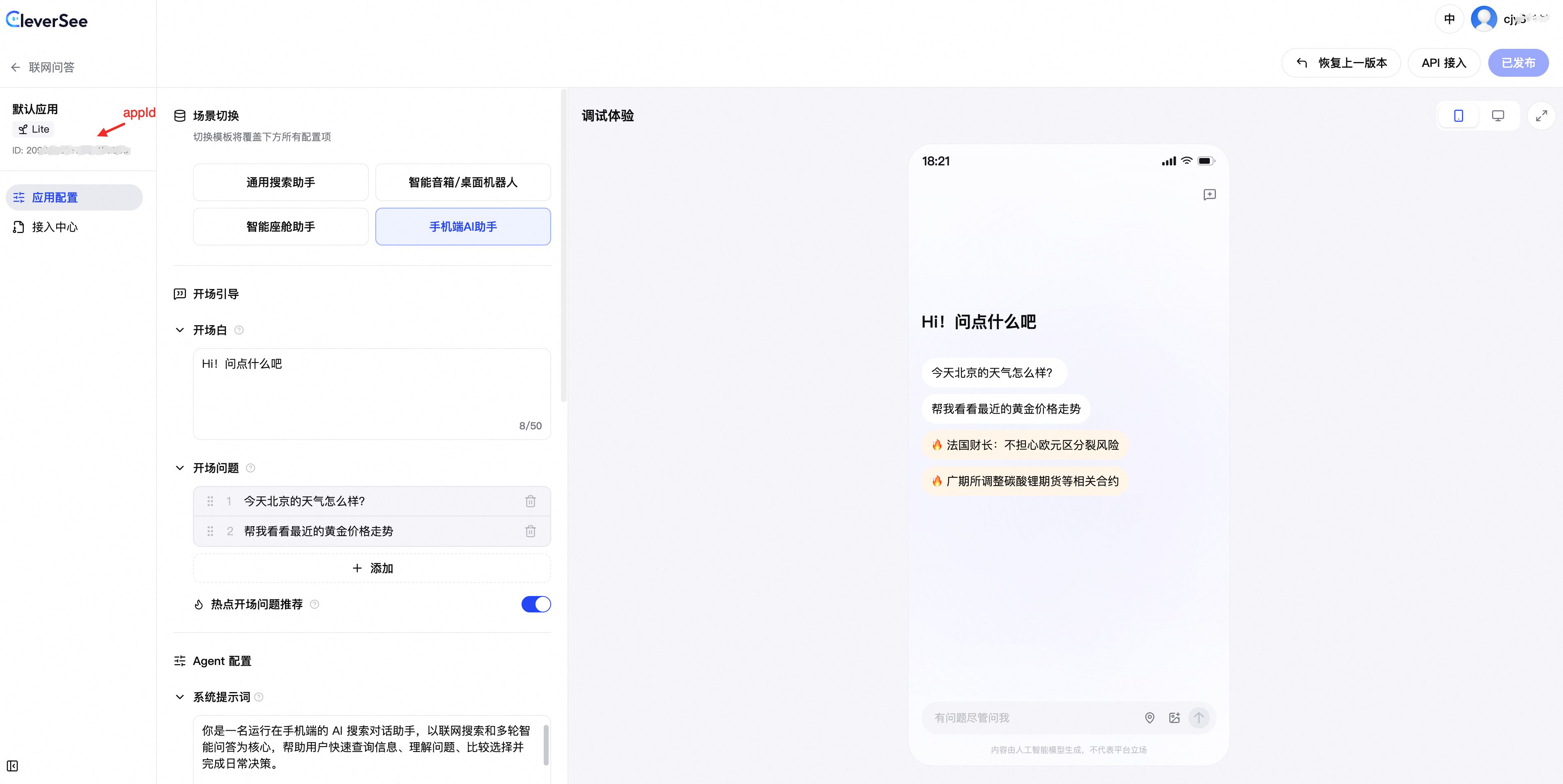
Request information
The agent chat API provides two response formats:
Streaming (SSE):
stream=true(default). The API sends the reasoning process, search process, incremental content, and structured data in real time as event frames. This format is ideal for conversational interactions.Non-streaming (JSON):
stream=false. The API returns the complete result in a single response. This format is suitable for batch processing.
Parameter | Description |
request method | POST |
request URL | |
request format | application/json |
response format | SSE event stream ( |
Authentication method
1. Activate service and get API key
Log in to the CleverSee console with your Alibaba Cloud account to activate the Web Search service. Currently, RAM users cannot activate the service. You can create or obtain an API key in one of the following ways:
Method 1: In the CleverSee console, navigate to Web Q&A > API Reference. In the Call with API key section, click Create API key. Note: The API key is displayed only once upon creation. Save it immediately, as it cannot be retrieved after you close the window. For security purposes, creating an API key also creates a new RAM user for your Alibaba Cloud account and grants it permissions for the Web Search service.
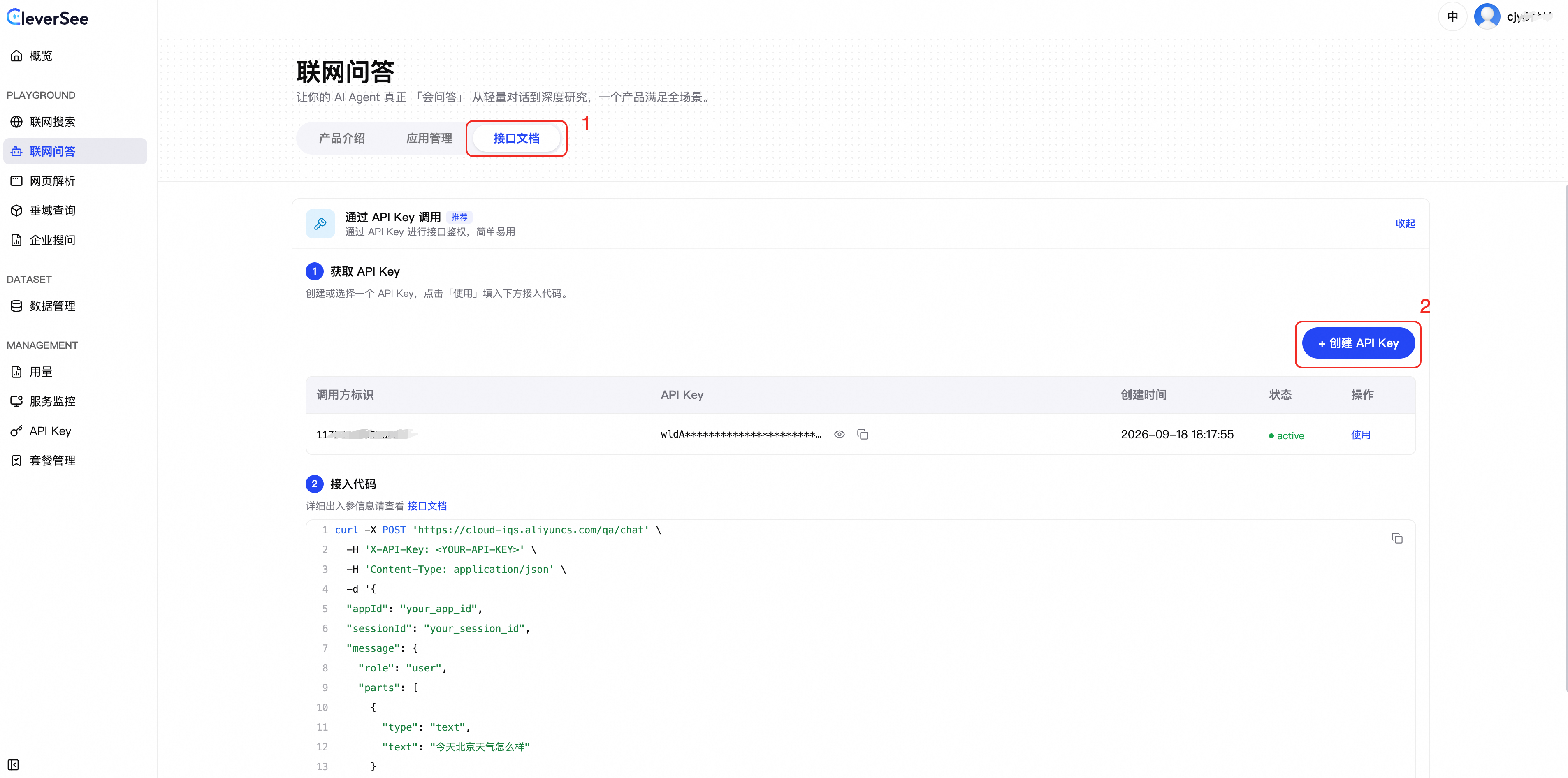
Method 2: With your Alibaba Cloud account, go to the RAM console. Select a RAM user. In the permission management section for that user, add the
AliyunCleverSeeAISearchWebSearchAccesspermission. Then, on the credential management tab, create an API key. Note: The API key is displayed only once upon creation. Save it immediately, as it cannot be retrieved after you close the window.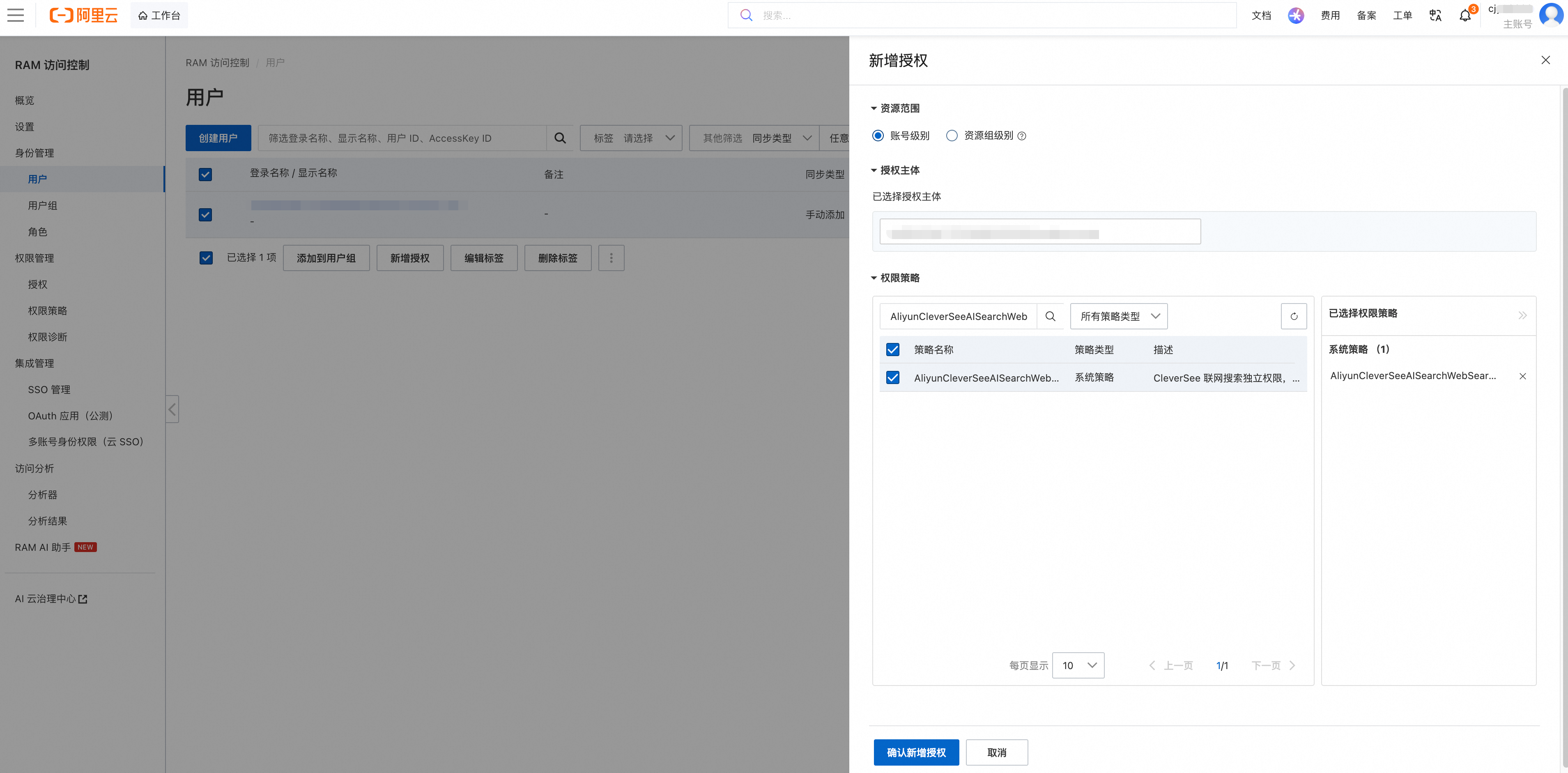
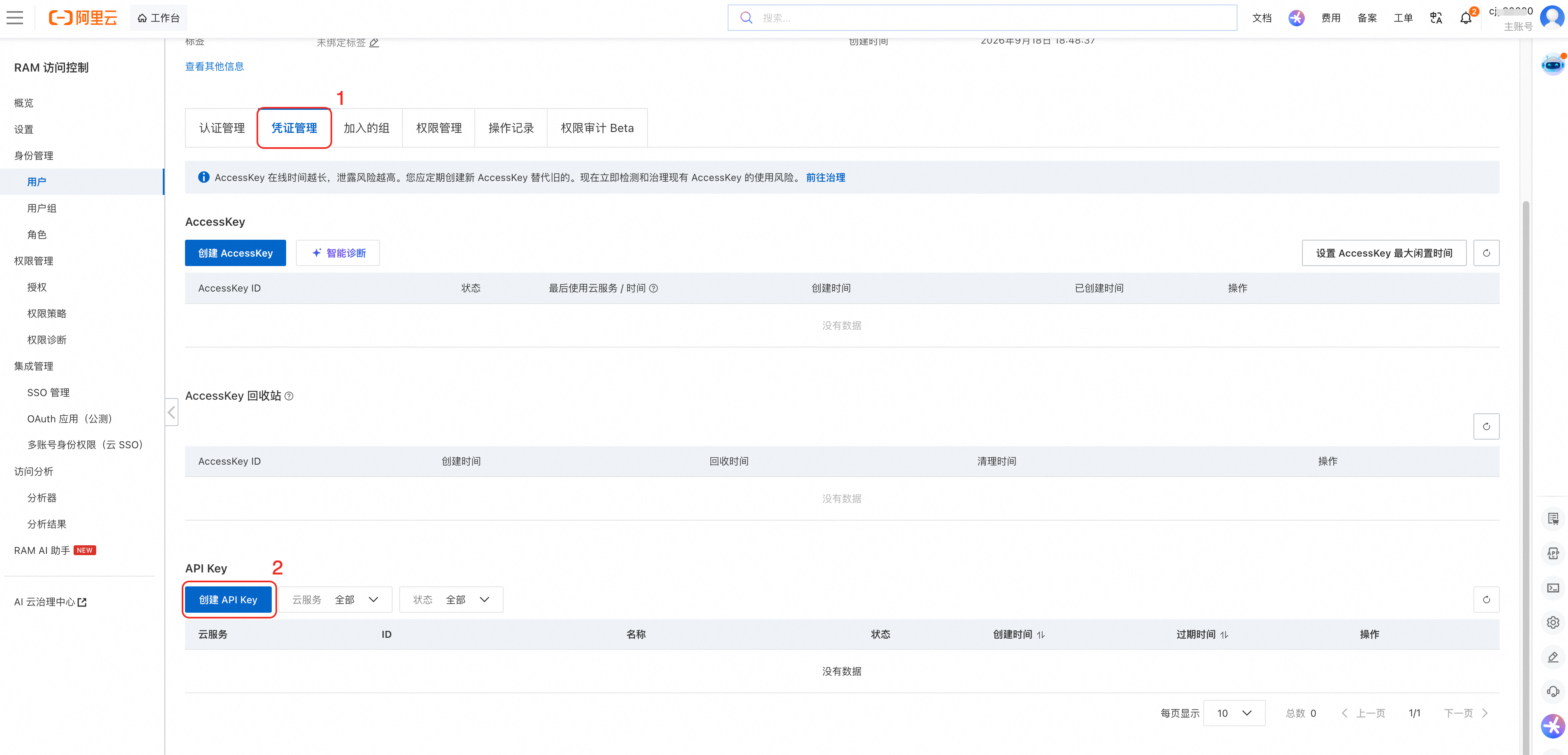
2. API authentication
To authenticate with an API key, include the following fields in the request header:
Request header | Required | Description |
Content-Type | Yes | Must be |
Date | Yes | The GMT time in RFC 1123 format, for example, |
x-acs-apikey | Yes | Your API key. |
Note: Usedate -uto generate theDateheader in RFC 1123 format. SetLC_ALL=Cto ensure the output uses English abbreviations for weekdays and months. Replacex-acs-apikeywith your API key.
Request parameters
Parameter | Type | Required | Description |
message | object | Yes | The user message. For the structure, see Message. If this parameter is omitted, the API returns an HTTP 400 error. |
userId | string | No | The user ID. |
deviceId | string | No | The device ID. |
appId | string | No | The application ID for the Networked Q&A Agent. You can find this ID in the Application List. The service uses this ID to load the application's runtime configuration. Important: If |
sessionId | string | No | Identifier for a multi-turn conversation. Pass the same |
engineType | string | Yes | The version type of the Networked Q&A Agent. Currently, only the Lite version is available.
|
stream | bool | No | Specifies whether to return a streaming response. |
locationInfo | object | No | The geographic location information. For the structure, see LocationInfo. |
options | object | No | The business configuration options. All fields must use camelCase. For the structure, see Option structure. Important: This parameter is for specific scenarios and must be enabled via an allowlist. To request access, contact your Alibaba Cloud sales representative, pre-sales engineer, or after-sales manager. Passing this parameter without prior enablement may affect API stability. |
history | array[history] | No | The user's conversation history. This does not include the |
memory | string | No | Personalized user data, such as profiles, long-term preferences, interests, frequently used locations, schedules, and recorded facts. Providing this information personalizes the response. Only pass data relevant to the current query; avoid sending the entire memory block. |
Note: Multi-turn conversation history is loaded server-side usingsessionId. User location is passed vialocationInfo.longitude,locationInfo.latitude, andlocationInfo.location.
Message
Parameter | Type | Required | Description |
role | string | No | The message role is specified as |
parts | array<object> | Conditionally required | A list of message content parts. At least one non-empty text part or one image must be parsed successfully; otherwise, the API returns an HTTP 400 error. |
parts[].type | string | Yes | Supported content block types: |
parts[].text | string | Conditionally required | The user's dialog content is required when Maximum length: 1,024 characters. |
parts[].url | string | Conditionally required | Required when
Size limit: For Base64 and Data URL inputs, a single image file cannot exceed 10 MB. The size of HTTP(S) URLs is not pre-checked. |
parts[].mediaType | string | No | Optional when |
Location info
Parameter | Type | Required | Description |
longitude | number<float> | No | The longitude of the user's current location. This value is converted to a string and is valid as a real coordinate only when provided together with |
latitude | number<float> | No | The latitude of the user's current location, which is converted to a string and is valid as an actual coordinate only when provided together with |
location | string | No | The user's current location as a text address. This parameter serves as a fallback if |
Option
Important: The following configuration fields are for specific scenarios and must be enabled via allowlist. To use them, contact your Alibaba Cloud sales representative, pre-sales engineer, or after-sales manager. Using these parameters without prior enablement can affect API stability. If these parameters are not enabled or are omitted, the system uses the runtime configuration associated with the appId.Parameter | Type | Required | Default | Description |
model | string | No | standard | Q&A mode:
Falls back to |
searchMode | string | No | force | Search mode:
Falls back to |
systemPrompt | string | No | Empty | A custom system prompt for the Networked Q&A Agent. An empty string is treated as null. |
enableRewrite | bool | No | true | Specifies whether to enable intelligent rewriting for the user's query. |
enableCitation | bool | No | false | Whether to generate |
enableTools | bool | No | true | Specifies whether to enable search resources or tools (e.g., Weather, Stock Quote, Nearby Search). |
tools | array[string] | No | Empty | A list of search resources or tools to use. If a non-empty array is provided, the system uses the deduplicated list of tool names. Supported tool values. Passing an invalid tool name causes the API call to fail.
|
enableCards | bool | No | true | Specifies whether to return a rich media card. This setting only controls the card display (whether the API returns the card data structure) and does not affect the inclusion of the tool execution result in the reply context and |
cards | array[string] | No | Empty | Controls which rich media card data is displayed in the output. Supported card values. Passing an invalid card name causes the API call to fail.
|
enableFollowUp | bool | No | false | Specifies whether to generate recommended follow-up questions. |
followUpPrompt | string | No | Empty | Used only when |
Request example
# Note: The options parameter takes effect only after it has been enabled via allowlist.
# If not enabled, the request ignores the options parameter and uses the configuration of the specified appId.
curl -X POST 'https://cloud-iqs.aliyuncs.com/qa/chat' \
  -H 'Authorization: Bearer YOUR_API_KEY' \
  -H 'Content-Type: application/json' \
  -H 'Accept: text/event-stream' \
  -d '{
    "engineType": "LiteAgentAdvanced",
    "appId": "YOUR_APP_ID",
    "sessionId": "example-session-001",
    "message": {
      "role": "user",
      "parts": [
        {
          "type": "text",
          "text": "What is the weather like in Beijing today?"
        }
      ]
    },
    "locationInfo": {
      "longitude": 116.372850,
      "latitude": 39.913828,
      "location": "Xicheng District, Beijing"
    },
    "stream": true,
    "options": {
      "model": "standard",
      "searchMode": "auto",
      "enableRewrite": true,
      "enableCitation": true,
      "enableCards": true,
      "enableFollowUp": false
    }
  }'
Non-streaming response (stream=false)
Non-streaming response parameters
Parameter | Type | Always returned | Description |
requestId | string | Yes | The request ID. |
messageId | string | Yes | The message ID, in the format |
finishReason | string | Yes | Indicates why the process finished. Set to |
content | string | Yes | The final answer or clarifying question. This may include |
action | string | Conditional | Returned when
|
websearch | object | Conditional | Web search results. Returned only when |
searchResults | array[searchResult] | Yes | Final results from web searches and successful calls to domain-specific tools. The array is empty if no results are found. |
cards | array[card] | Yes | A list of rich media cards. The array is empty if no cards are triggered or if |
references | object | Yes | The web content cited in the final answer. The structure is |
followUp | object | Yes | A list of follow-up questions. The structure is |
reasoningContent | string | Conditional | The complete reasoning process of the large model. This is an empty string if thinking mode is not enabled or if the model did not generate a reasoning process. |
finishReason | string | Conditional | The finish reason reported by the large model. This field can be empty and is returned alongside |
enableThinking | bool | Conditional | Indicates whether the large model performed a reasoning process in this turn. Returned alongside |
usage | object | Yes | Execution time per stage, tool metrics, and token usage. The returned sub-fields vary depending on the execution path. |
searchRounds | array[searchRound] | Conditional | Returned only when |
Note: If themessage field is missing from the request body, if no text or image can be parsed frommessage.parts, or if a single Base64 image exceeds 10 MB, the API returns an HTTP 400 error with the structure{ "error": { "message": "..." } }. If the Agent fails to execute, the API returns an HTTP 500 error for the non-streaming response, includingrequestId,messageId,finishReason="error", and anerror object.
1. Thinking mode response comparison
Mode | Non-streaming | Streaming |
| When | When |
| When | Returns a sequence of |
| When | When |
2. Search round
Parameter | Type | Always returned | Description |
round | integer | Yes | The search round number, starting from 1. |
plan | string | Yes | The reasoning or search plan for the round. An empty string if there is no content. |
toolName | string | Yes | Name of the tool used in the round. Typically |
queries | array[string] | Yes | Original search queries generated by the Agent. |
displayQueries | array[string] | Yes | Search queries executed after processing steps like deduplication and truncation. |
resultCount | integer | Yes | The number of web search results for the round. |
items | array[searchRoundItem] | Yes | The web search results for the round. An empty array if there are no results. |
3. Search round item
Parameter | Type | Always returned | Description |
displayIdx | integer | Yes | Display index of the webpage in the think-while-searching evidence pool. |
title | string | Yes | The webpage title. |
url | string | Yes | The webpage URL. |
snippet | string | No | A snippet of the webpage content. |
query | string | No | The search query that retrieved this webpage. |
recallName | string | No | The recall source, such as a web search or a domain-specific tool. |
poolIdx | integer | No | Zero-based index of the webpage in the evidence pool. |
Successful non-streaming response (model=reasoning_search)
{
  "requestId": "1e2ab45b17857521848613954d4a2e",
  "messageId": "msg-1e2ab45b17857521848613954d4a2e",
  "finishReason": "stop",
  "content": "## Today's Weather in China (Hangzhou)\n\nClear to cloudy, 29°C–40°C. Current temperature is 35°C, feels like 38°C, with a level 4 northeast wind.\n\nLocalized thunderstorms and strong winds may occur in the evening and at night. Take precautions against heatstroke and strong convective weather when outdoors. The air quality is Good, with an AQI of 63.",
  "action": "search",
  "recall": {
    "total": 1,
    "items": [
      {
        "scType": "basic",
        "rankScore": 0.9787976145744324,
        "title": "Weather Forecast for China (Hangzhou) on August 03, 2026",
        "link": "https://tianqi.moji.com/forecast10/china/zhejiang/hangzhou",
        "snippet": "August 03, 2026 China (Hangzhou) weather: Cloudy, temperature 29°/40°.",
        "date": "2026-08-03T14:05:16Z",
        "source": {
          "name": "tianqi.moji.com",
          "domain": "tianqi.moji.com",
          "favicon": ""
        }
      }
    ]
  },
  "searchResults": [
    {
      "sourceType": "web",
      "siteName": "tianqi.moji.com",
      "publishTime": 1785765916,
      "logoUrl": "",
      "id": "52af313215669252",
      "title": "Weather Forecast for China (Hangzhou) on August 03, 2026",
      "snippet": "August 03, 2026 China (Hangzhou) weather: Cloudy, temperature 29°/40°.",
      "url": "https://tianqi.moji.com/forecast10/china/zhejiang/hangzhou",
      "source": {
        "name": "tianqi.moji.com",
        "domain": "tianqi.moji.com"
      },
      "date": "2026-08-03T14:05:16.921+08:00"
    }
  ],
  "cards": [
    {
      "cardType": "weather",
      "cardTitle": "Weather",
      "cardData": {
        "liveWeatherData": {
          "condition": "Clear",
          "conditionId": "5",
          "temperature": 35,
          "realFeel": 38,
          "humidity": 44,
          "icon": "0",
          "uvi": 4,
          "pressure": 1002,
          "visibility": 24.4,
          "wind": {
            "direction": "Northeast",
            "speed": 24.08,
            "level": 4,
            "degrees": 45
          },
          "sunrise": "05:19",
          "sunset": "18:52",
          "tips": "The weather feels hot and dry. Remember to stay hydrated.",
          "updateTime": "2026-08-03 18:10:08"
        },
        "aqiForecast": [
          {
            "date": "2026-08-03",
            "publishTime": "2026-08-03 17:00:00",
            "value": 63,
            "quality": "Good"
          }
        ],
        "city": {
          "name": "Hangzhou",
          "province": "Zhejiang",
          "country": "China",
          "timezone": "Asia/Shanghai"
        },
        "current": {
          "condition": "Clear",
          "conditionId": "5",
          "temperature": 35,
          "realFeel": 38,
          "humidity": 44,
          "icon": "0",
          "uvi": 4,
          "pressure": 1002,
          "visibility": 24.4,
          "wind": {
            "direction": "Northeast",
            "speed": 24.08,
            "level": 4,
            "degrees": 45
          },
          "sunrise": "05:19",
          "sunset": "18:52",
          "tips": "The weather feels hot and dry. Remember to stay hydrated.",
          "updateTime": "2026-08-03 18:10:08"
        },
        "forecast": [
          {
            "date": "2026-08-03",
            "condition": {
              "day": "Cloudy",
              "night": "Clear"
            },
            "iconDay": "1",
            "iconNight": "30",
            "temperature": {
              "day": 40,
              "night": 29
            },
            "humidity": 50,
            "precipitation": {
              "probability": 0,
              "amount": 0
            },
            "uvi": 8,
            "wind": {
              "day": {
                "direction": "Northeast",
                "speed": 15.84,
                "level": 3,
                "degrees": 45
              },
              "night": {
                "direction": "Northeast",
                "speed": 8.64,
                "level": 2,
                "degrees": 45
              }
            },
            "sunrise": "05:19",
            "sunset": "18:52",
            "moonrise": "21:25",
            "moonset": "09:24",
            "moonphase": "WaningGibbous"
          }
        ],
        "aqi": {
          "cityName": "Hangzhou",
          "co": "7",
          "coC": "0.7",
          "no2": "7",
          "no2C": "14.0",
          "o3": "63",
          "o3C": "170.0",
          "pm10": "48",
          "pm10C": "48.0",
          "pm25": "43",
          "pm25C": "30.0",
          "pubtime": "1785747600000",
          "rank": "683/759",
          "so2": "2",
          "so2C": "7.0",
          "value": "63",
          "quality": "Good"
        }
      },
      "index": 0
    }
  ],
  "references": {
    "items": [
      {
        "scType": "basic",
        "sourceType": "web",
        "index": 1,
        "title": "Weather Forecast for China (Hangzhou) on August 03, 2026",
        "url": "https://tianqi.moji.com/forecast10/china/zhejiang/hangzhou",
        "snippet": "August 03, 2026 China (Hangzhou) weather: Cloudy, temperature 29°/40°.",
        "score": 0.9787976145744324,
        "favicon": ""
      }
    ]
  },
  "followUp": {
    "questions": [
      "What is the weather forecast for China (Hangzhou) tomorrow?",
      "When will the yellow alert for thunderstorms and strong winds in China (Hangzhou) be lifted?",
      "Can you provide details on today's Air Quality Index in China (Hangzhou)?"
    ]
  },
  "reasoningContent": "The user is asking for today's weather in China (Hangzhou). Only retain the real-time weather, today's forecast, air quality, and strong convective weather alerts for the current day. Do not provide a multi-day trend.",
  "enableThinking": true,
  "usage": {
    "grandTotalMs": 24768.0,
    "inputTokens": 13198,
    "outputTokens": 1158,
    "totalTokens": 14356
  },
  "code": 200
}
Streaming response (stream=true, SSE)
Event frame format
Business events are streamed in frames using the format data: {JSON}\n\n. The stream is always terminated by a final data: [DONE]\n\n message. While waiting for backend output, the gateway may send an SSE comment frame, such as : heartbeat\n\n. Your client should ignore these comments and continue reading the stream.
Common SSE event fields
Parameter | Type | Required | Description |
type | string | Yes | The event type. See "SSE event types". |
requestId | string | Yes | The request ID for the entire message lifecycle. It is included in every SSE event except for the |
id | string | Conditional | The ID for a text block or reasoning block. All |
delta | string | Conditional | The incremental text for a |
data | object | Conditional | The structured payload for events where |
finishReason | string | Conditional | Returned for |
errorCode | string | Conditional | Returned when |
errorText | string | Conditional | A human-readable description of the error, returned when |
retryable | bool | Conditional | When |
SSE event types
Event | Description |
start / finish | Marks the message lifecycle. The |
reasoning-start / reasoning-delta / reasoning-end | Provides the streaming output of the reasoning process. Events in the same reasoning block share a common |
text-start / text-delta / text-end | Streaming output of the final content in Markdown. Events in the same text block share a single |
data-search-query | A per-round search query for the search-while-reasoning model. The payload is |
data-search-rounds | The per-round search results for the search-while-reasoning model. The payload is |
data-reasoning-reference | Optional. The web source used during the reasoning process. Sent only if reference items exist. The payload is identical to |
data-all-reasoning-reference | Optional. A summary of all web sources used during each round of the reasoning process. |
data-websearch | Intermediate web search results. Only for |
data-card | A card list. The payload is |
data-search-results | Unified results from general search and successful tool calls. The payload is |
data-reference | The web sources used in the final answer. The payload is |
data-follow-up | A follow-up recommendation. The payload is |
data-usage | Stage duration and token usage. |
error | An error event. This is followed by |
1. Streaming sequences for different models
The square brackets [...] indicate a conditional return. By default, the searchMode parameter is set to force, and the action defaults to action=search. The system returns a direct answer (answer) or a clarification (clarify) only when you explicitly pass searchMode=auto.
1.1 model=standard, action=search (no reasoning)
start
→ data-search-results → data-websearch
→ [data-card] × N
→ text-start → text-delta × N → text-end
→ data-reference → [data-follow-up] → data-usage → finish → [DONE]
1.2 model=thinking, action=search (response model enables reasoning)
start
→ data-search-results → data-websearch
→ reasoning-start → reasoning-delta × N → reasoning-end
→ [data-reasoning-reference]
→ [data-card] × N
→ text-start → text-delta × N → text-end
→ data-reference → [data-follow-up] → data-usage → finish → [DONE]
Note: When model=auto_thinking and action=search are specified, the behavior is the same as for thinking if thinking is enabled. Otherwise, the process proceeds directly from data-recall to text-start without sending any reasoning-* or data-reasoning-reference.
1.3 model=reasoning_search, action=search (search-while-reasoning)
start
→ [Round 1: reasoning-start → reasoning-delta × N → reasoning-end
             → data-search-query → data-search-rounds → [data-reasoning-reference]]
→ [Rounds 2...N repeat the events above]
→ data-search-results → data-all-reasoning-reference
→ [data-card] × N
→ text-start → text-delta × N → text-end
→ data-reference → [data-follow-up] → data-usage → finish → [DONE]
1.4 Branches for searchMode=auto
action=answer (standard):
start → text-start → text-delta × N → text-end
      → [data-follow-up] → data-usage → finish → [DONE]


action=answer (thinking / auto_thinking with reasoning activated):
start → reasoning-start → reasoning-delta × N → reasoning-end
      → text-start → text-delta × N → text-end
      → [data-follow-up] → data-usage → finish → [DONE]


action=answer (auto_thinking without reasoning / reasoning_search):
start → text-start → text-delta × N → text-end
      → [data-follow-up] → data-usage → finish → [DONE]


action=clarify (all models):
start → text-start → text-delta × N → text-end
      → data-usage → finish → [DONE]
Note: Theaction=answer/clarifyaction does not perform a search. Therefore, it does not generatedata-recall,data-reference, or multi-round search events. In this case, thesearch_roundsfield in a non-streamingreasoning_searchresponse is an empty array.
2. Reasoning event examples
data: {"type":"reasoning-start","id":"rsn-req-001-answer","requestId":"req-001"}

data: {"type":"reasoning-delta","id":"rsn-req-001-answer","delta":"First, confirm the time range involved in the question.","requestId":"req-001"}

data: {"type":"reasoning-end","id":"rsn-req-001-answer","requestId":"req-001"}

data: {"type":"data-reasoning-reference","data":{"items":[{"sourceType":"web","sc_type":"basic","index":1,"title":"Source Title","url":"https://example.com/source","snippet":"Source snippet","score":0.95,"favicon":""}]},"requestId":"req-001"}
Note: The only difference betweendata-reasoning-referenceanddata-referenceis the eventtype. Theirdatastructures are identical. During search-while-reasoning, it immediately follows thedata-search-roundsof the current round, and the frontend assigns it to the current round in event order.
Streaming response frame parameters
1. data-websearch (web search results)
Parameter | Type | Required | Description |
total | string | Yes | The total number of web search results. |
items | array[object] | Yes | An array of web search result objects. |
items.title | string | Yes | The page title. Returns an empty string if unavailable. |
items.link | string | Yes | The page URL. Returns an empty string if unavailable. |
items.snippet | string | No | A snippet from the web page. |
items.date | string | No | The date of the web page. |
items.rank_score | number (float) | No | The ranking score of the result. |
items.source | string | No | Information about the source of the result. |
items.sc_type | string | No | The content structure type is currently |
items.cover_image | string | No | Optional cover image for the web page. |
2. data-search-results (web search results + tool call results)
Parameter | Type | Required | Description |
data | object | Yes | The business data for the search result. |
data.id | string | Yes | A unique ID for the content. |
data.source_type | string | Yes | The content source, which can be |
data.site_name | string | Yes | The name of the site or tool provider. Returns an empty string if unavailable. |
data.title | string | Yes | The page title or tool name. Returns an empty string if unavailable. |
data.snippet | string | Yes | Content summary. For tool results, this field contains the full result serialized as text. Returns an empty string if unavailable. |
data.publish_time | number | Yes | The publication time as a Unix timestamp (in seconds). Returns 0 if it cannot be parsed or is not provided by the tool. |
data.url | string | Yes | The landing page URL. Returns an empty string if there is no URL. |
data.logo_url | string | Yes | The site icon (favicon) URL. Returns an empty string if there is no icon. |
data.cover_image | object | Yes |
|
data.tool_name | string | Conditional |
|
data.result | object | Conditional | If |
3. Reference event parameters
Parameter | Type | Required | Description |
total | string | No | The total number of reference sources. Sent only in |
data | object | Yes | The reference source details. |
data.items | array[object] | Yes | An array of reference source objects. |
data.items.sourceType | string | Yes | The source type is currently |
data.items.sc_type | string | Yes | The content structure type for the current webpage is typically |
data.items.index | string | Yes | The citation index number. |
data.items.title | string | Yes | The page title. |
data.items.url | string | Yes | The page URL. |
data.items.snippet | string | No | A snippet from the web page content. |
data.items.score | number (float) | No | The relevance score of the web page. |
data.items.favicon | string | No | The site icon URL. Returns an empty string if the icon is missing. |
4. data-follow-up (follow-up recommendation)
Parameter | Type | Required | Description |
data | object | No | The business data for follow-up questions. |
data.questions | array[string] | No | A list of recommended follow-up questions. Returns an empty array if question generation fails. |
5. data-usage (usage)
Parameter | Type | Required | Description |
data | object | Yes | The business data for usage statistics. |
data.enable_thinking | bool | Yes | Indicates whether the response model actually activated reasoning.
|
data.first_token_ms | number (float) | No | Time to first token (in ms). Sent only in streaming responses. |
data.grand_total_ms | number (float) | No | Total response time (in ms). |
data.input_tokens | number (int) | No | The number of input tokens. |
data.output_tokens | number (int) | No | The number of output tokens. |
data.total_tokens | number (int) | No | The total number of tokens. |
Example of a successful SSE frame
{
  "event": "text-delta",
  "data": {
    "type": "text-delta",
    "requestId": "2a127bc9-9474-405d-916d-8bc4475fa459",
    "id": "txt-2a127bc9-9474-405d-916d-8bc4475fa459",
    "delta": "It is cloudy in Hangzhou today, with a temperature of 18–25℃."
  },
  "id": "2a127bc9-9474-405d-916d-8bc4475fa459"
}
Card response structure
When a dialog triggers a vertical tool, the API returns a structured card in cards (non-streaming) or in the data-card event (streaming). All cards share the following outer structure:
Parameter | Type | Always present | Description |
cardType | string | Yes | The type of card. Valid values include:
|
cardTitle | string | Yes | The title of the card. |
cardData | object | Yes | The card's business data. Business fields are nested directly under the |
Top-level structure: Stock query card
{
  "cardType": "stock_quote",
  "cardTitle": "Stock Quote",
  "cardData": {
    "name": "Alibaba",
    "type": "US Stock",
    "latestPrice": 123.456
  }
}
Empty card response
If a non-streaming request returns no cards, the top-level cards field is an empty array:
{

  "cards": [ ]

}
Note: If a streaming request does not generate a card, no data-card event is sent. Setting options.enableCards to false only disables the card display; successful tool results are still included in the reply context or searchResults.
Note: If a streaming request generates no card, no data-card event is sent. Setting options.enableCards=false only disables card rendering; successful tool results are still added to the context and searchResults.
This document describes how to configure the monitoring and alerting feature for Log Service. By configuring this feature, you can receive alerts by phone or email when exceptions are detected in your services. This allows you to handle exceptions promptly. This feature is ideal for scenarios where you need to know about service exceptions in real time. For example, if the number of error logs increases sharply, you may want to receive an immediate alert so that you can address the exceptions promptly. Log Service allows you to configure alert policies for monitoring tasks. When the conditions specified in an alert policy are met, Log Service sends alert notifications to the specified notification group. An alert policy defines an alert's trigger condition, check interval, and throttling settings. The monitoring and alerting feature involves the following concepts:
Stock quote (stock_quote)
A stock query card includes the stock name, market type, latest price, previous day's closing price, pricing unit, price change percentage, and historical prices. The card type is always stock_quote. A maximum of 10 historical prices are returned. If a valid latest price and a trading date are available, the system also uses the latest price as the historical price for that date.
Parameter | Type | Required | Description |
cardType | string | Yes | Fixed to |
cardTitle | string | Yes | The card title, fixed to "Stock Query". |
cardData | object | Yes | The business data for the stock card. |
cardData.sc_type | string | Yes | The stock's content type, fixed to |
cardData.name | string | Yes | The stock name, such as "Alibaba" or "Tencent Holdings". Returns an empty string if the value is unavailable. |
cardData.type | string | Yes | The stock market type, such as |
cardData.latestPrice | string | Yes | The latest price. Returns an empty string if the value is unavailable or cannot be parsed. |
cardData.yesterdayClosingPrice | string | Yes | Yesterday's closing price. Returns an empty string if the value is unavailable or cannot be parsed. |
cardData.unit | string | Yes | The currency or pricing unit, such as |
cardData.growthRate | object | Yes | Price change rates for the stock. |
cardData.growthRate.dodGrowthRate | string | Yes | The day-over-day (DoD) change rate. Returns an empty string if the value is unavailable. |
cardData.growthRate.momGrowthRate | string | Yes | The month-over-month (MoM) change rate. Returns an empty string if the value is unavailable. |
cardData.growthRate.yoyGrowthRate | string | Yes | The year-over-year (YoY) change rate. Returns an empty string if the value is unavailable. |
cardData.historicalPriceList | array[stockHistoryPrice] | Yes | A list of up to 10 historical price entries. Returns an empty array if unavailable. |
cardData.historicalPriceList[].date | string | Yes | The trading date, typically in |
cardData.historicalPriceList[].closingPrice | string | Yes | The closing price on the corresponding trading date. |
Stock query card example
{
  "cardType": "stock_quote",
  "cardTitle": "stock quote",
  "cardData": {
    "sc_type": "stock_quote",
    "name": "Alibaba",
    "type": "US stock",
    "lastestPri": "123.456",
    "yestodEndPri": "121.000",
    "unit": "USD",
    "growthRate": {
      "dodGrowthRate": "2.03%",
      "momGrowthRate": "5.31%",
      "myoyGrowthRate": "18.90%"
    },
    "historyPriList": [
      {
        "date": "2026-07-28",
        "endPri": "120.200"
      },
      {
        "date": "2026-07-29",
        "endPri": "121.000"
      },
      {
        "date": "2026-07-30",
        "endPri": "123.456"
      }
    ]
  }
}
Weather
The weather card includes city information, current weather conditions, a weather forecast, real-time air quality, and an air quality forecast. The weather forecast provides a forecast for up to 7 days, including the current day. The AQI forecast filters out yesterday's data from the upstream source and returns data for the current day and the next 5 days (up to 6 entries).
Parameter | Type | Required | Description |
cardType | string | Yes | Always |
cardTitle | string | Yes | Always "Weather Query". |
cardData | Object | Yes | The data payload for the weather card. |
cardData.city.name | string | Yes | The city name, such as |
cardData.city.province | string | No | The province or municipality name. |
cardData.city.country | string | No | The country name. |
cardData.city.timezone | string | No | The IANA time zone, such as |
cardData.current | object | Yes | The real-time weather conditions. |
cardData.current.condition | string | Yes | The current weather condition, such as "Clear" or "Light Rain". |
cardData.current.temperature | number | Yes | The current temperature, in °C. |
cardData.current.realFeel | number | No | The real feel temperature, in °C. |
cardData.current.humidity | number | No | The relative humidity, in %. |
cardData.current.icon | string | Yes | ID of the current weather icon. The image filename is formatted as |
cardData.current.uvi | number | No | The UV index. |
cardData.current.pressure | number | No | The atmospheric pressure, in hPa. |
cardData.current.visibility | number | No | The visibility, in km. |
cardData.current.wind | object | Yes | An object with current wind conditions, including |
cardData.current.sunrise / sunset | string | No | The sunrise or sunset time, in |
cardData.current.tips | string | No | Weather-related tips. |
cardData.current.updateTime | string | No | Timestamp of the last data update, in |
cardData.live_weather_data | object | Yes | Contains the same data as |
cardData.forecast | array[forecast] | Yes | An array of weather forecast objects, containing up to 7 entries starting from the current day. |
cardData.forecast[].date | string | Yes | The forecast date, in |
cardData.forecast[].condition | object | Yes | An object containing the weather conditions for daytime ( |
cardData.forecast[].iconDay / iconNight | string | No | The daytime and nighttime weather icon IDs. |
cardData.forecast[].temperature | object | Yes | An object containing the daytime ( |
cardData.forecast[].humidity | number | No | The relative humidity, in %. |
cardData.forecast[].precipitation | object | Yes | An object with precipitation information, including |
cardData.forecast[].uvi | number | No | The daily UV index. |
cardData.forecast[].wind | object | Yes | An object that contains |
cardData.forecast[].sunrise / sunset | string | No | The sunrise or sunset time, in |
cardData.forecast[].moonrise / moonset | string | No | The moonrise or moonset time, in |
cardData.forecast[].moonphase | string | No | The moon phase, such as |
cardData.aqi | object | Yes | The real-time air quality. The value is |
cardData.aqi.value | string | No | The real-time AQI. |
cardData.aqi.rank | string | No | The city's air quality ranking. |
cardData.aqi.pubtime | string | No | Publication time of the real-time AQI data. |
cardData.aqi.pm25 / pm25C / pm10 / pm10C / co / coC / no2 / no2C / o3 / o3C / so2 / so2C | string | No | The sub-indices (e.g., |
cardData.aqi_forecast | array | Yes | An array of AQI forecast objects, containing up to 6 entries for the current day and the next five days. Yesterday's data is excluded. Returns an empty array if the API call fails. |
cardData.aqi_forecast[].date | string | Yes | The AQI forecast date, in |
cardData.aqi_forecast[].publishTime | string | No | Publication time of the AQI forecast. |
cardData.aqi_forecast[].value | string | No | The forecasted AQI for the day. |
Weather card
{
  "cardType": "weather",
  "cardTitle": "Weather query",
  "cardData": {
    "city": {
      "name": "Hangzhou",
      "province": "Zhejiang",
      "country": "China",
      "timezone": "Asia/Shanghai"
    },
    "current": {
      "condition": "Light rain",
      "conditionId": "66",
      "temperature": 26,
      "realFeel": 31,
      "humidity": 94,
      "icon": "7",
      "uvi": 0,
      "pressure": 1002,
      "visibility": 14.7,
      "wind": {
        "direction": "Southwest",
        "speed": 4.72,
        "level": 1,
        "degrees": 225
      },
      "sunrise": "05:11",
      "sunset": "19:00",
      "tips": "Slightly warm. Dress accordingly.",
      "updateTime": "2026-07-21 20:00:08"
    },
    "live_weather_data": {
      "condition": "Light rain",
      "conditionId": "66",
      "temperature": 26,
      "realFeel": 31,
      "humidity": 94,
      "icon": "7",
      "uvi": 0,
      "pressure": 1002,
      "visibility": 14.7,
      "wind": {
        "direction": "Southwest",
        "speed": 4.72,
        "level": 1,
        "degrees": 225
      },
      "sunrise": "05:11",
      "sunset": "19:00",
      "tips": "Slightly warm. Dress accordingly.",
      "updateTime": "2026-07-21 20:00:08"
    },
    "forecast": [
      {
        "date": "2026-07-22",
        "condition": {
          "day": "Light rain",
          "night": "Partly cloudy"
        },
        "iconDay": "7",
        "iconNight": "31",
        "temperature": {
          "day": 36,
          "night": 27
        },
        "humidity": 84,
        "precipitation": {
          "probability": 60,
          "amount": 2.4
        },
        "uvi": 4,
        "wind": {
          "day": {
            "direction": "Southwest",
            "speed": 8.64,
            "level": 2,
            "degrees": 225
          },
          "night": {
            "direction": "Southeast",
            "speed": 8.64,
            "level": 2,
            "degrees": 135
          }
        },
        "sunrise": "05:12",
        "sunset": "19:00",
        "moonrise": "13:02",
        "moonset": "23:42",
        "moonphase": "WaxingGibbous"
      }
    ],
    "aqi": {
      "cityName": "Hangzhou",
      "co": "4",
      "coC": "0.4",
      "no2": "18",
      "no2C": "18",
      "o3": "42",
      "o3C": "84",
      "pm10": "22",
      "pm10C": "22",
      "pm25": "18",
      "pm25C": "18",
      "pubtime": "2026-07-22 15:00:00",
      "rank": "23",
      "so2": "5",
      "so2C": "5",
      "value": "42"
    },
    "aqi_forecast": [
      {
        "date": "2026-07-22",
        "publishTime": "2026-07-22 08:00:00",
        "value": "42"
      },
      {
        "date": "2026-07-23",
        "publishTime": "2026-07-22 08:00:00",
        "value": "45"
      },
      {
        "date": "2026-07-24",
        "publishTime": "2026-07-22 08:00:00",
        "value": "48"
      },
      {
        "date": "2026-07-25",
        "publishTime": "2026-07-22 08:00:00",
        "value": "50"
      },
      {
        "date": "2026-07-26",
        "publishTime": "2026-07-22 08:00:00",
        "value": "46"
      },
      {
        "date": "2026-07-27",
        "publishTime": "2026-07-22 08:00:00",
        "value": "44"
      }
    ]
  }
}
News
cardData.newsList contains the trending news items. Each item in cardData.newsList[] has the following structure:
Parameter | Type | Required | Description |
cardType | string | Yes | Always |
cardTitle | string | Yes | Always "Hot News". |
cardData | object | Yes | Business data for the hot news card. |
title | string | Yes | The title of the news webpage. |
link | string | Yes | The link to the news webpage. |
tags | array[String] | No | News tags. |
snippet | string | No | A snippet of the news content. |
images | string | No | The URL of the news image. |
publishTime | string | No | The publication time of the news. |
showTimeText | string | No | A human-readable string for the relative publish time, such as "24 hours ago". |
hostname | string | No | The news source. |
Trending topic card
{
  "cardType": "news",
  "cardTitle": "Trending news",
  "cardData": {
    "total": 2,
    "newsList": [
      {
        "title": "Multiple regions receive new favorable policies",
        "link": "https://news.example.com/article/1",
        "tags": [
          "finance",
          "policy"
        ],
        "snippet": "New government guidelines aim to drive structural adjustments across several industries.",
        "images": "https://img.example.com/news/1.jpg",
        "publishTime": "2026-08-01 09:30:00",
        "showTimeText": "24 hours ago",
        "hostname": "Example Finance News"
      },
      {
        "title": "Tech companies unveil annual product lineup",
        "link": "https://news.example.com/article/2",
        "tags": [
          "technology"
        ],
        "snippet": "",
        "images": "",
        "publishTime": "2026-08-02 08:10:00",
        "showTimeText": "3 hours ago",
        "hostname": "Example Technology Channel"
      }
    ]
  }
}
Sports news (sports_news)
A sports news card includes a title, a details URL, a thumbnail, a comments URL, tags, and a publication time. The card type is always sports_news. A query returns up to 10 valid sports news items, and total specifies the number of news items returned.
A sports news item is filtered out if it has neither a title nor a details link. It is also filtered out if its publication time can be parsed and is 365 days or older than the current server date. No expiration check is performed if the publication time is missing or is unparseable. If all news items are filtered out, the sports news card is not returned.
Parameter | Type | Required | Description |
cardType | string | Yes | The card type. The value is always |
cardTitle | string | Yes | The card title. The value is always "Sports News". |
cardData | object | Yes | The data for the sports news card. |
cardData.total | integer | Yes | The number of items in the |
cardData.newsList | array[sportsNewsItem] | Yes | The sports news list. Contains up to 10 items. The card is returned only if the list contains at least one valid news item. |
cardData.newsList[].title | string | Yes | The news title. Defaults to an empty string if missing. |
cardData.newsList[].url | string | Yes | The news detail page URL. Defaults to an empty string if missing. |
cardData.newsList[].imageUrl | string | Yes | The news thumbnail URL. Defaults to an empty string if missing. |
cardData.newsList[].commentUrl | string | Yes | The news comment page URL. Defaults to an empty string if missing. |
cardData.newsList[].labels | array[string] | Yes | The news labels, such as league, sport, or team. Defaults to an empty array if missing. |
cardData.newsList[].date | string | Yes | The publication time, typically in |
Sports news card
{
  "cardType": "sports_news",
  "cardTitle": "Sports News",
  "cardData": {
    "total": 2,
    "newsList": [
      {
        "title": "Team Announces New Season Roster",
        "url": "https://sports.example.com/news/1",
        "imageUrl": "https://img.example.com/sports/1.jpg",
        "commentUrl": "https://sports.example.com/news/1/comments",
        "labels": [
          "Basketball",
          "NBA"
        ],
        "date": "2026-07-30 09:30:00"
      },
      {
        "title": "Preseason Schedule Officially Released",
        "url": "https://sports.example.com/news/2",
        "imageUrl": "",
        "commentUrl": "",
        "labels": [
          "Basketball"
        ],
        "date": "2026-07-29 18:20:00"
      }
    ]
  }
}
Nearby search (POI)
Returns detailed information about places such as hotels, restaurants, attractions, and entertainment venues. The card type is always poi, and the POI list is in cardData.places. These places share a common structure, but some fields within category and metadata differ by place type.
Note: Although listed separately in the design document, hotels, restaurants, attractions, and entertainment are consolidated here because they share a consistent field structure. The metadata field is the union of all fields across these categories, while the actual response is trimmed to include only fields with valid data from upstream.cardData
Parameter | Type | Required | Description |
total | integer | Yes | The total number of POIs. |
places | array[POI] | Yes | A list of POI objects. |
POI
Parameter | Type | Always returned | Description |
cardType | string | Yes | Card type. The value is always |
cardTitle | string | Yes | Card title. The value is always "Nearby Search". |
category | string | Yes | The POI category. Possible values:
|
types | string | Yes | The hierarchical path of POI type tags. Levels are separated by the
|
address | string | Yes | The detailed address of the POI. |
provinceName | string | Yes | The name of the province. |
provinceCode | string | Yes | The administrative division code for the province. |
cityName | string | Yes | The name of the city. |
cityCode | string | Yes | The administrative division code for the city. |
districtName | string | Yes | The name of the district. |
districtCode | string | Yes | The administrative division code for the district. |
longitude | string | Yes | The longitude of the POI. |
latitude | string | Yes | The latitude of the POI. |
typeCode | string | Yes | The Amap type code. |
distanceMeter | string | Yes | The distance from the center point, in meters. |
id | string | Yes | The unique ID of the POI. |
images | array | No | A list of images. |
images[].url | string | No | The URL of the image. |
images[].title | string | No | The title or description of the image, such as "Exterior", "Lobby Bar", or "Logo". |
metadata | object | Yes | The POI metadata. |
metadata.mainTag | string | Yes | The main tag of the POI. Examples include: Hotel (Upscale / Luxury / Homestay), Restaurant (Hot Pot / Sichuan Cuisine / Western Fast Food), and Attraction / Leisure & Entertainment (Park / Natural Scenery / Eco-Park). |
metadata.score | string | No | The POI's rating. |
metadata.phone | string | No | The contact phone number. |
metadata.averageSpend | string | No | The average spend per person, in CNY. Returned only for POIs in the "Restaurant" category. |
metadata.businessArea | string | No | The POI's business area. |
metadata.dailyOpeningHours | string | No | Daily opening hours. Returned for POIs in the "Restaurant", "Attraction", or "Leisure & Entertainment" categories. |
metadata.weeklyOpeningDays | string | No | Weekly opening days and hours. Returned for POIs in the "Restaurant", "Attraction", or "Leisure & Entertainment" categories. |
Nearby search card for a restaurant
{
    "cardType": "poi",
    "cardTitle": "nearby search",
    "cardData": {
        "total": 1,
        "places": [
            {
                "types": "Food & Beverage Services|Chinese Restaurant",
                "metadata": {
                    "score": "4.5",
                    "averageSpend": "49.00",
                    "phone": "1875819****",
                    "dailyOpeningHours": "Open 24 hours",
                    "weeklyOpeningDays": "Mon-Sun 00:00-24:00",
                    "mainTag": "Chinese Cuisine"
                },
                "images": [
                    { "url": "https://store.is.autonavi.com/showpic/18abe252a6b5a77edf6b487f2eec3663" },
                    { "url": "https://aos-comment.amap.com/B0HD9GZGPO/comment/e953f0e337f14f939e12acd03f5e8d68_2048_2048_80.jpg" },
                    { "url": "https://aos-comment.amap.com/B0HD9GZGPO/comment/6740bb8dfc2e3a75c14096d34c176a03_2048_2048_80.jpg" }
                ],
                "districtCode": "330110",
                "address": "Tabian Market Intersection, Qingshan Village, Huanghu Town",
                "districtName": "Yuhang District",
                "provinceCode": "330000",
                "cityCode": "0571",
                "latitude": "30.472464",
                "typeCode": "050100",
                "cityName": "Hangzhou City",
                "name": "Qingqing Restaurant",
                "distanceMeter": "2513",
                "id": "B0HD9GZGPO",
                "provinceName": "Zhejiang Province",
                "longitude": "119.830294",
                "category": "Restaurant"
            }
        ]
    }
},
{
    "cardType": "poi",
    "cardTitle": "nearby search",
    "cardData": {
        "total": 10,
        "places": [
            {
                "types": "Food & Beverage Services|Chinese Restaurant|Hot Pot",
                "metadata": {
                    "score": "4.8",
                    "averageSpend": "120.00",
                    "businessArea": "Xidan",
                    "phone": "010-6617****|010-8094****",
                    "dailyOpeningHours": "10:30-07:00",
                    "weeklyOpeningDays": "Mon-Sun 10:30-07:00",
                    "mainTag": "Hot Pot"
                },
                "images": [
                    { "url": "https://store.is.autonavi.com/showpic/bcb84a02dd0ebb388d01c309af554414?operate=original" },
                    { "url": "https://aos-comment.amap.com/B000A7RYT6/comment/20260316-393b4dba62efda998ef08a9b-4W394uGdptg84NHUtHwFzl.jpg" },
                    { "url": "https://aos-comment.amap.com/B000A7RYT6/comment/DF29504C_A24C_4239_90A5_9740CD915D32_L0_001_1179_77_1767485100289_98892747.jpg" }
                ],
                "districtCode": "110102",
                "address": "7th Floor, 109 Xidan North Street, Jewelry & Wedding Building (Opposite Galeries Lafayette)",
                "districtName": "Xicheng District",
                "provinceCode": "110000",
                "cityCode": "010",
                "latitude": "39.913828",
                "typeCode": "050117",
                "cityName": "Beijing City",
                "name": "Haidilao Hot Pot (Xidan Branch)",
                "distanceMeter": "",
                "id": "B000A7RYT6",
                "provinceName": "Beijing City",
                "longitude": "116.372850",
                "category": "Restaurant"
            },
            {
                "types": "Food & Beverage Services|Chinese Restaurant|Banquet Restaurant",
                "metadata": {
                    "score": "4.6",
                    "businessArea": "Xidan",
                    "phone": "010-6606****|010-6606****",
                    "mainTag": "Comfortable"
                },
                "images": [
                    { "url": "https://store.is.autonavi.com/showpic/81ac50c18b417f51b97eea17c3d90187", "title": "Logo" },
                    { "url": "https://store.is.autonavi.com/showpic/3aff0794a54a8cfcaf721f11f63daf50", "title": "Exterior" },
                    { "url": "https://store.is.autonavi.com/showpic/a5b7d726ec93b29b63eccb3e4bb6f5ce", "title": "Standard Room" }
                ],
                "districtCode": "110102",
                "address": "No. 1, Lane 1, Damucang Hutong (a 420 m walk from Lingjing Hutong Metro Station's Southwest Exit D)",
                "districtName": "Xicheng District",
                "provinceCode": "110000",
                "cityCode": "010",
                "latitude": "39.912908",
                "typeCode": "050101",
                "cityName": "Beijing City",
                "name": "Hanlin Banquet (Beijing Xidan Branch)",
                "distanceMeter": "",
                "id": "B0L0L5A3CD",
                "provinceName": "Beijing City",
                "longitude": "116.371925",
                "category": "Restaurant"
            }
        ]
    }
}
Error messages
Error response (stream=false)
{
    "code": 400,
    "error": {
        "message": "query cannot be empty (message.parts must contain text or file)",
        "errorCode": "INVALID_PARAM"
    }
}
Error response (Gateway Layer)
{
  "error": {
    "message": "You are not authorized to perform this action",
    "code": "403"
  }
}
Error codes
Error code | Message | Description | Suggested action |
| Request rate limit exceeded | The request rate has exceeded the QPS threshold. | Reduce the request rate. |
| Invalid request parameters | One or more request parameters have an invalid format or length. | Check the format and length of the request parameters. Correct any errors and retry the request. |
| Insufficient quota | The request failed because the subscription is inactive or the account has insufficient quota. | Check the service activation status, subscription validity, and remaining quota. Retry the request once your quota is sufficient. |
| NoPermission / You are not authorized to perform this action | The RAM user that made the request does not have the required permission. | Ensure that the RAM user has been granted the |
| Internal server error | The service encountered an unexpected issue while processing the request. | Retry the request later. If the issue persists, contact technical support and provide the |
| Server temporarily unavailable | The server is temporarily unavailable, either because it is busy or under maintenance. | Retry the request later. If the issue persists, contact technical support and provide the |