Opening remark and guided questions API
API description
This API retrieves the configured opening remark and guided questions for a Web Search-based Question Answering application. The guided questions include both custom questions and hot questions. You can use this API with the intelligent conversation API to create a complete intelligent conversation experience.
Authentication
Service activation and API key
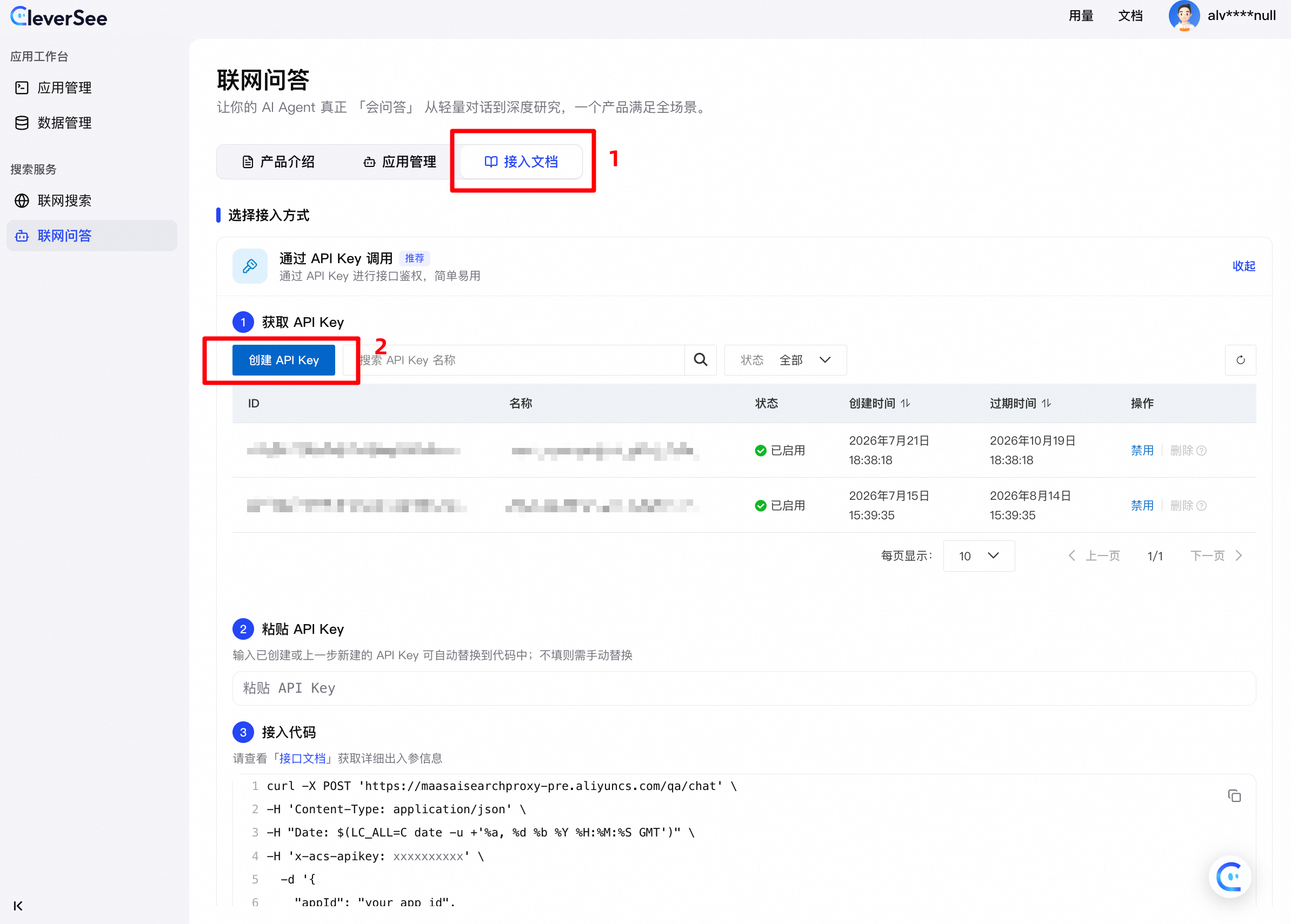
Log on to the CleverSee console with your Alibaba Cloud account to activate the web search service. Note that Resource Access Management (RAM) users cannot activate the service. To create or get an API key:
Method 1: In the CleverSee console, navigate to Web Search-based Question Answering > Integration Documents > Call with API key and create an API key. (Note: The API key is displayed only once upon creation. Save it immediately, as you cannot view it again after closing the window.) For security purposes, this action also creates a new RAM user under your Alibaba Cloud account with permissions for the CleverSee web search service.
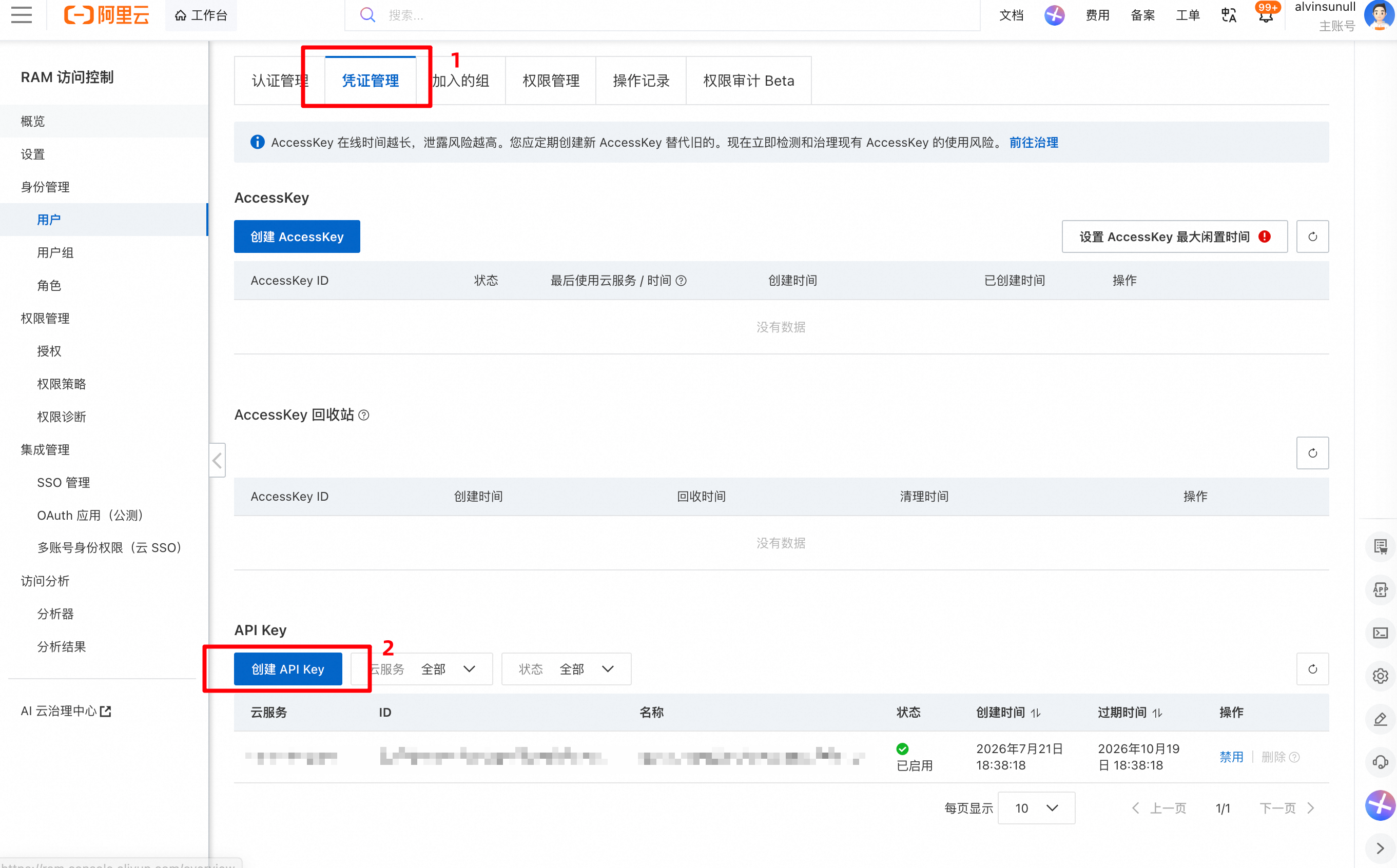
Method 2: Use your Alibaba Cloud account to go to the RAM console. Select a RAM user and add the
AliyunCleverSeeAISearchWebSearchAccesspermission in the permission management section for that user.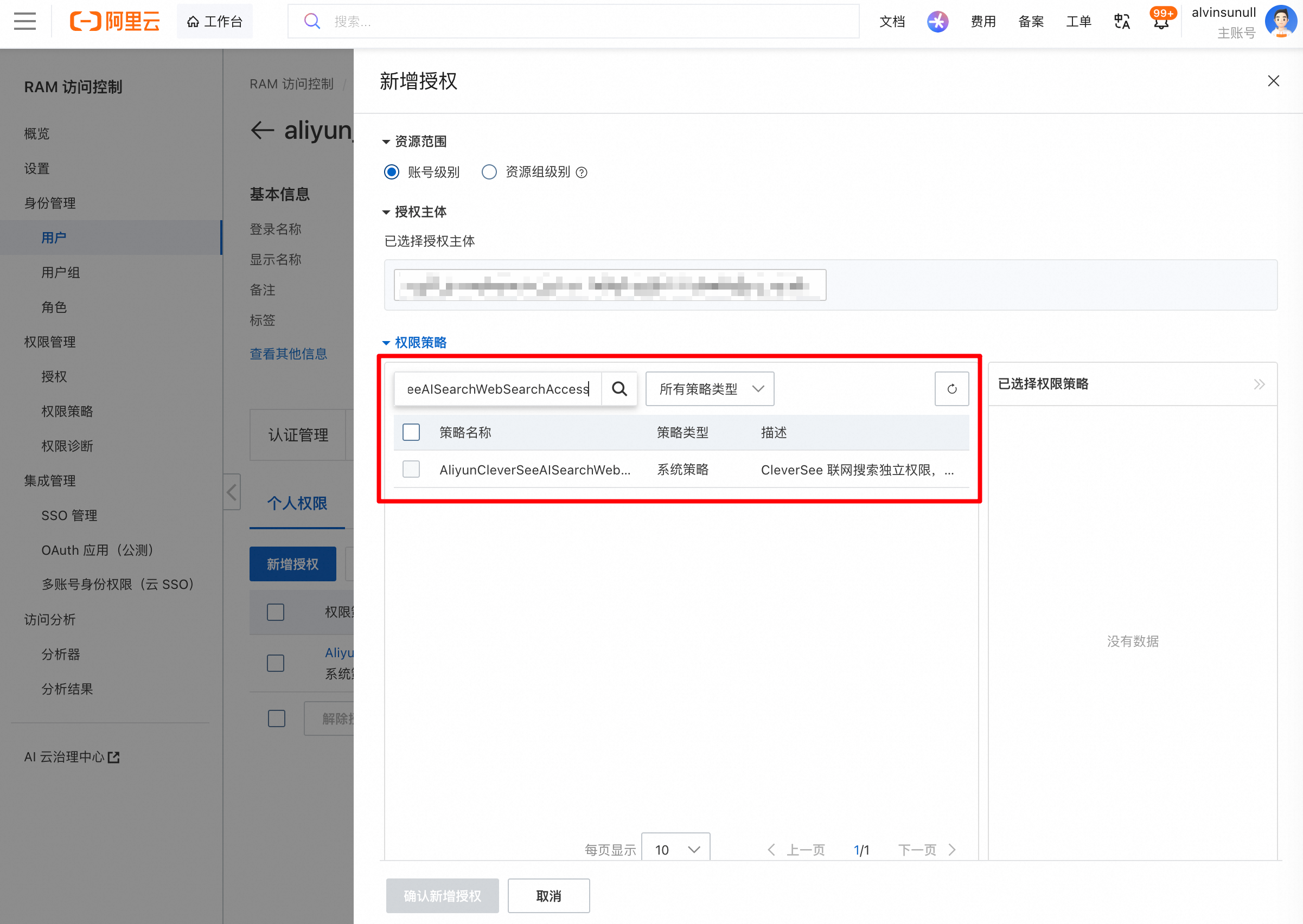 Then, on the credential management tab for that user, create an API key. (Note: The API key is displayed only once upon creation. Save it immediately, as you cannot view it again after closing the window.)
Request information
Item | Description |
Method | POST |
Endpoint | https://maasaisearchproxy.aliyuncs.com/api/qa/opening |
Format | application/json |
Request headers
This API authenticates requests using an API key. Include the following fields in the request headers:
Header | Required | Description |
Content-Type | Yes | Must be set to |
Date | Yes | The GMT time in RFC 1123 format. For example: |
x-acs-apikey | Yes | Your API key. |
Request parameters
Parameter | Type | Required | Example / default | Description |
appId | String | Yes | The application ID. | |
userInfo | Object | No | User information. | |
userInfo.deviceId | String | No | The device ID. Can be combined with the user ID to create a unique identifier. | |
userInfo.userId | String | No | The user ID. Can be combined with the device ID to create a unique identifier. | |
hotQuestion | Boolean | No | Default: false | Specifies whether to enable the hot question feature.
|
count | Integer | No | Example: 10 | The number of hot questions to return. Maximum: 20. The default value is 10, which is also used if the parameter is omitted or set to a value of 0 or less. Values greater than 20 are treated as 20. Note: The number of questions returned depends on trending search results and may be less than the |
Request example
curl -X POST 'https://maasaisearchproxy.aliyuncs.com/api/qa/opening' \
  -H 'Content-Type: application/json' \
  -H "Date: $(LC_ALL=C date -u +'%a, %d %b %Y %H:%M:%S GMT')" \
  -H 'x-acs-apikey: <YOUR_API_KEY>' \
  -d '{
    "appId": "<YOUR_APP_ID>",
    "userInfo": {
      "deviceId": "example-device-12345",
      "userId": "example-user-67890"
    },
    "hotQuestion": true,
    "count": 3
  }'
Response information
Response parameters
Parameter | Type | Always returned | Description |
requestId | String | Yes | The unique request ID generated by the system. |
code | Integer | Yes | The status code of the response. A value of |
message | String | Yes | A description of the status. For a successful request, the value is |
data | Object | Yes | The returned data. |
data.openingRemark | String | Yes | The opening remark. Returns |
data.openingQuestions | Array<string> | No | An array of custom guided questions. Returns all configured questions, up to a maximum of 5. |
data.hotQuestions | Array<string> | No | An array of dynamic hot questions. This array is empty if the |
Successful response example
{
	"requestId": "1a0f40dc17847733549126077ef789",
	"code": 200,
	"message": "successful",
	"data": {
		"openingRemark": "Hi, how can I help you today?",
		"openingQuestions": ["Your guided question 1","Your guided question 2"],
		"hotQuestions": ["Latest stock market updates","Best goals of the World Cup","Popular weekend travel destinations"]
	}
}
Failed response example
{
  "code": 401,
  "message": "Invalid request parameters",
  "requestId": "some-request-id-for-failure",
  "data": null
}
Error codes
Error code | Message | Description | Recommended action |
| Request was denied due to user flow control | The request frequency exceeded the QPS threshold. | Reduce the call frequency. |
| Invalid request parameters | One or more request parameters are invalid. | Check the request parameters for correct formatting and values, then try again. |
| NoPermission / You are not authorized to perform this action | The RAM user or Alibaba Cloud account lacks the required permissions. | Ensure the RAM user has the |
| Internal server error | The server encountered an unexpected error. | Try again later. If the error persists, contact technical support and provide the request ID, timestamp, and parameters. |
| The request has failed due to a temporary failure of the server | The server is temporarily unavailable due to high load or maintenance. | Wait and retry the request. If the problem persists, contact technical support and provide the request ID, timestamp, and parameters. |