Verify the sender of a suspicious email
Learn how to identify and handle emails from unknown or potentially spoofed senders in Alibaba Mail.
Overview
When using Alibaba Mail, you typically communicate with accounts within the same domain. However, you may occasionally receive emails from accounts outside your domain.
Handle suspicious emails
You may receive emails from accounts that do not exist in your domain. These senders fall into two types:
-
Unknown accounts that are not in your contacts
-
Accounts that are in your contacts
Unknown senders
A suspicious email from an unknown account may be a phishing attempt. Review the Phishing Email Protection Security Guide and proceed with caution.
Known contacts
If a suspicious email appears to be from a known contact, first confirm whether the contact actually sent it.
1. If the contact did not send the email and their account was compromised with unusual logon history, secure the account by following Receiving unusual logon notifications when using Alibaba Mail.
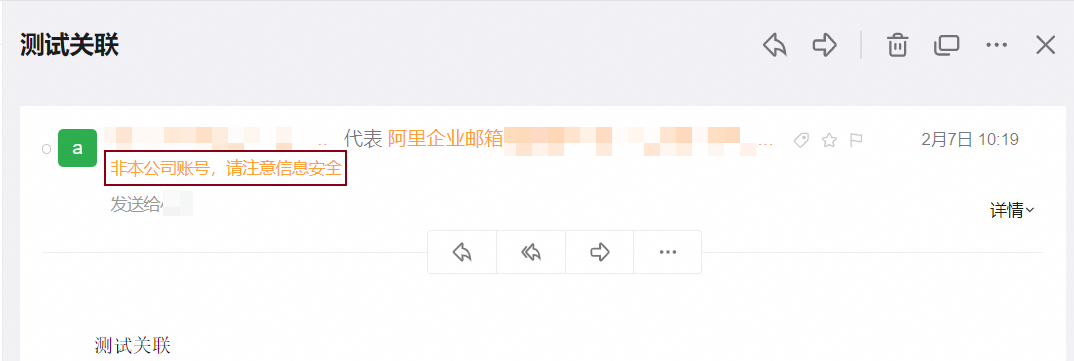
3. If the contact did not send the email and their mailbox was not compromised, the email may have been spoofed. To check, log on to the Alibaba Mail web client and hover over the sender's account. A spoofed email displays a mark such as A on behalf of B in the sender field, which means A sent the email on behalf of B.