An email in Alibaba Mail is marked as sent on behalf of another user
When an email in your Alibaba Mail account shows a red exclamation mark icon and the warning "Sent on behalf of xxxx. Please handle with caution.", the sender's display address does not match the actual sending address. This page explains what triggers the warning and what actions you can take.
Problem description
An email in your Alibaba Mail account displays a red exclamation mark icon with the warning: Sent on behalf of xxxx. Please handle with caution.
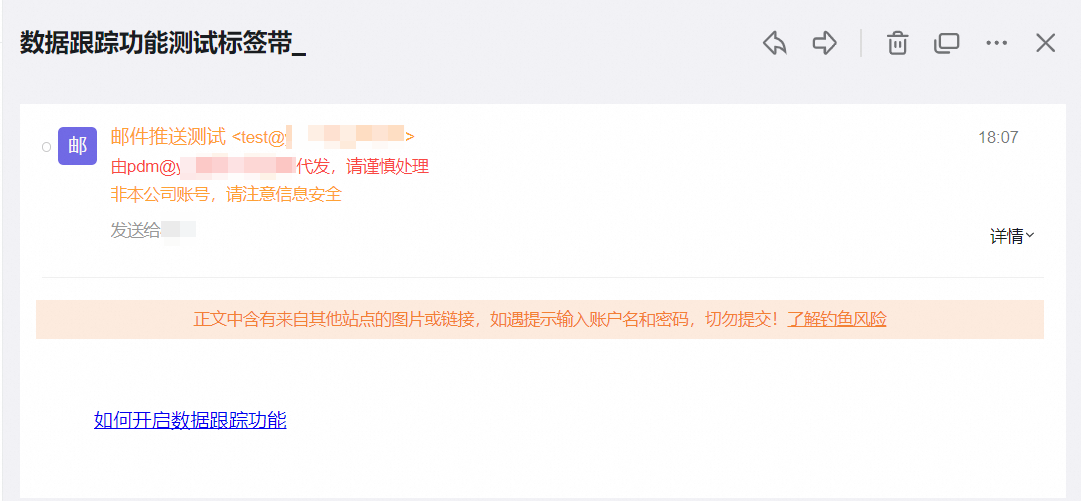
Cause
This warning appears when the sender's display address does not match the actual sending address. Malicious senders can forge the From field to impersonate a trusted contact, which is a common technique used in phishing and spoofing attacks.
Not every email with this warning is malicious. Legitimate services and delegated senders can also trigger this flag. If you do not recognize the sender, or if a trusted sender suddenly shows this warning, treat the email with caution.
Solutions
Emails with forged sender addresses may carry phishing links, malware, or credential-theft attempts. Choose one of the following actions:
Delete the email. For more information, see Delete or empty emails in the Alibaba Mail web client.
Report the email, add the sender to the blocklist, or create an inbox rule to reject such emails. For more information, see Handle spam in Alibaba Mail.
Applicable to
Alibaba Mail