Delayed email reception in a third-party client for Alibaba Mail
When you use a third-party email client with Alibaba Mail over POP3, emails may arrive later than expected because the client syncs on a scheduled interval rather than in real time. Shorten the sync interval or manually trigger a sync to receive emails immediately.
Problem description
Emails are delayed when you use a third-party client with your Alibaba Mail account.
Cause
When you use a third-party client such as Foxmail or Outlook with the Post Office Protocol 3 (POP3) protocol, the client sends a request to the mail server to retrieve emails. After the server authenticates the client, the client syncs existing emails from the server to its inbox. Most clients check for new emails on a fixed interval rather than continuously.
The delay occurs in the client, not on the mail server. The client does not sync emails from the server immediately — it waits for the next scheduled check.
Solutions
To receive emails sooner, shorten the automatic check interval in your client. For an immediate sync, click Receive in your client (or press F9 in Outlook).
The following sections cover how to adjust the check interval in each supported client:
Foxmail 7.2
Outlook 2010
Windows Live Mail 2012
Foxmail 7.2
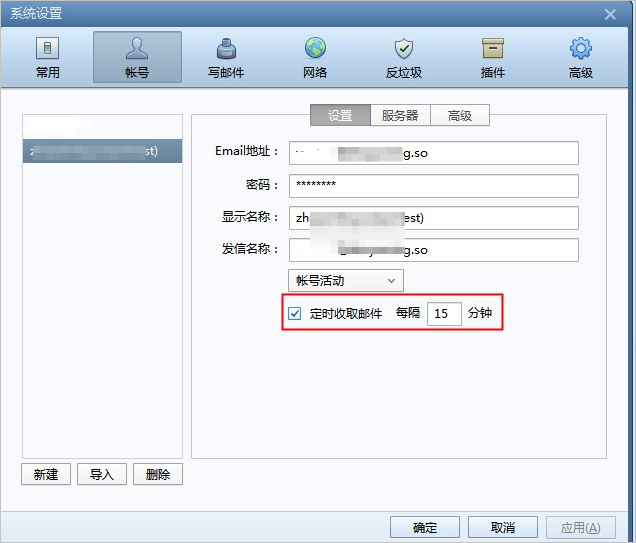
Open Foxmail 7.2. Go to System Settings > Account. Select Receive mail automatically, set the interval as needed, and then click OK.
Outlook 2010
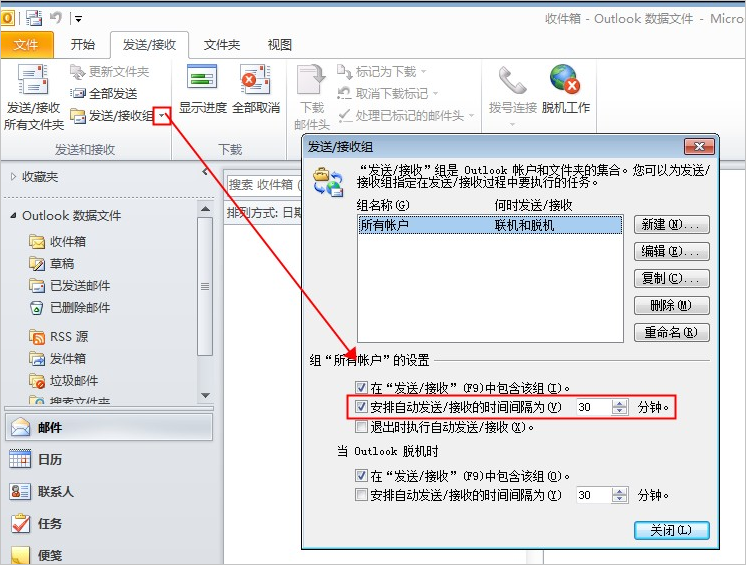
Open Outlook 2010. Go to Send/Receive > Send/Receive Groups > Define Send/Receive Groups. Select Schedule an automatic send/receive every XX minutes and set the interval as needed.
Windows Live Mail 2012
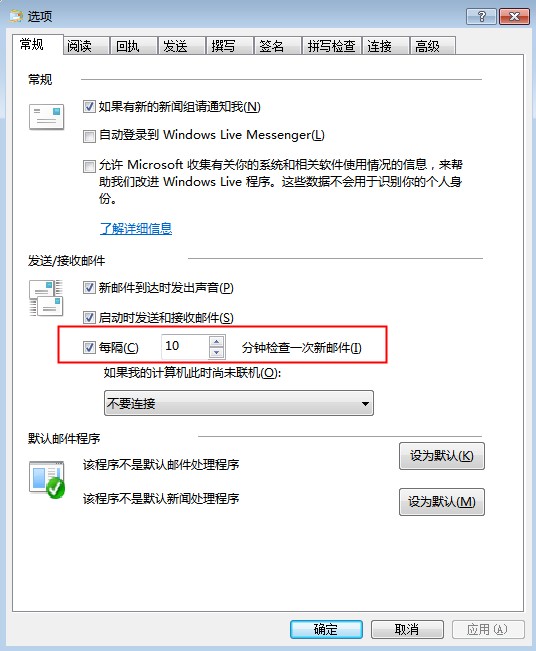
Open Windows Live Mail 2012. On the General tab of the Options window, select Check for new messages every XX minutes. Set the interval as needed, and then click OK.
References
For more information, see Troubleshoot delayed reception of external emails in Alibaba Mail.
Applies to
Alibaba Mail