Legitimate emails marked as spam in a third-party client
Explains why a third-party email client may classify legitimate Alibaba Mail messages as spam, and how to adjust anti-spam rules in Foxmail and Outlook.
Symptom
A third-party email client moves legitimate Alibaba Mail messages to the spam folder.
Solution
This issue has two causes and corresponding fixes:
1. The Alibaba Mail server identifies spam based on standards and specifications. You can also create custom rules in Anti-spam Options (web client) or Mailbox Filtering (domain management).
2. Third-party clients apply their own spam policies. Adjust these rules as described below.
If the third-party client uses IMAP, spam classification changes sync with the Alibaba Mail web client.
The following examples cover Foxmail 7.0 and Outlook 2016.
Foxmail 7.0
In Foxmail, go to System Settings > Anti-spam > Adjust Settings. Set the filtering strength and configure the blocklists and allowlists.
Refer to the Foxmail documentation for full details.
Outlook 2016
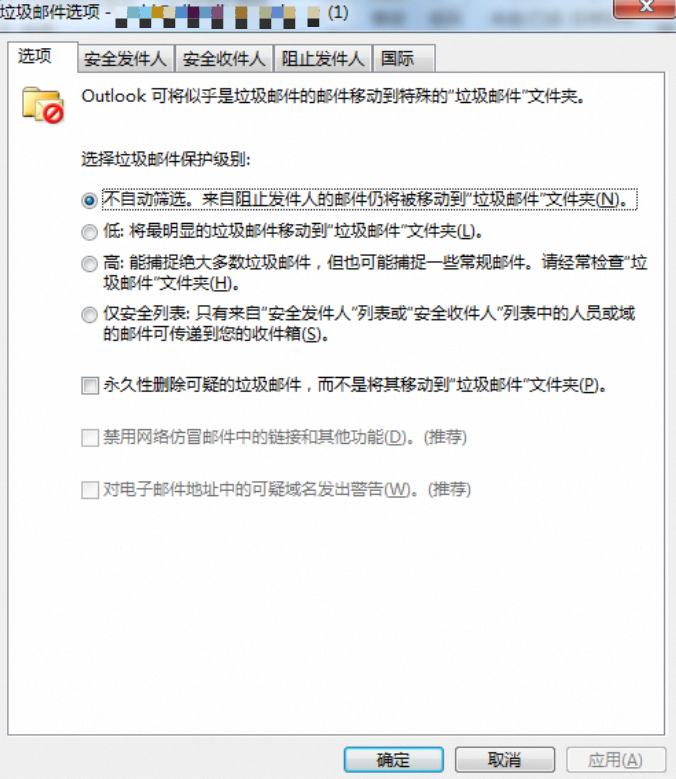
1. In Outlook, click Home > Junk > Junk E-mail Options. 
2. Configure the desired options, then click OK.
Refer to the Microsoft Outlook documentation for full details.
Applies to
-
Alibaba Mail