Member Access
View key usage metrics for workspace members across the User Insights and User Marketing modules.
Member Access Statistics
In the upper-right corner of the page, click the  icon and choose Workspace > Workspace > Member Access.
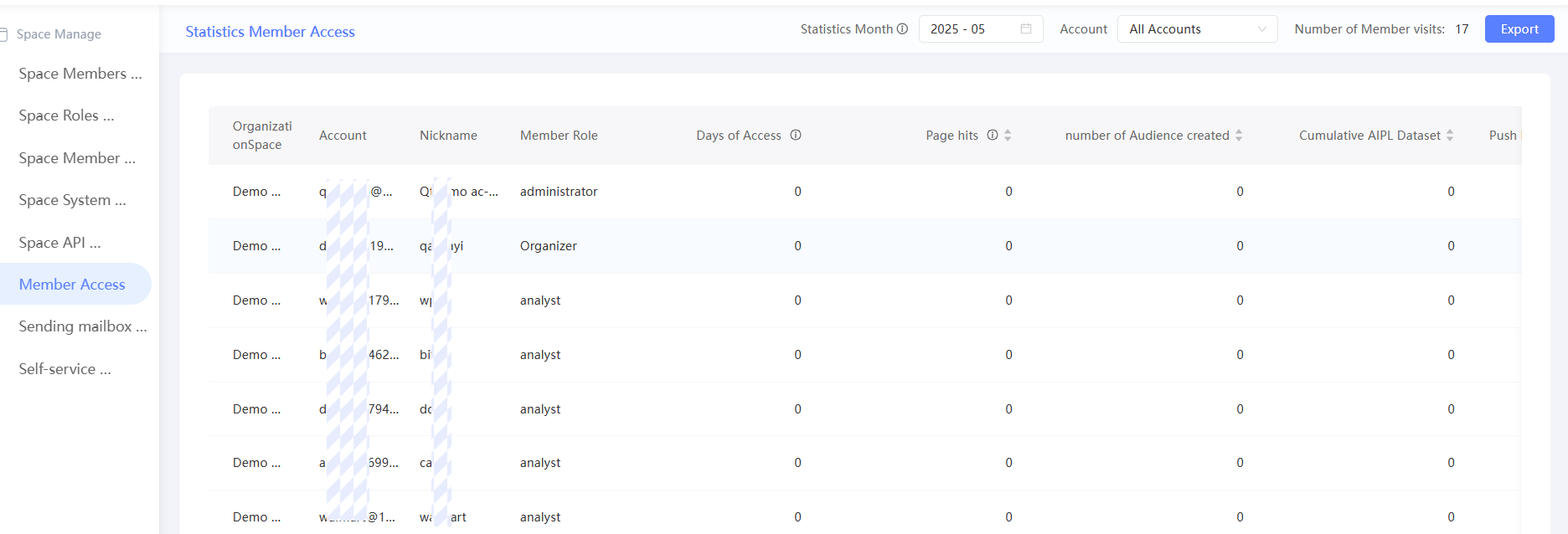
This page shows access days, page clicks, and usage counts for actions such as creating a crowd, creating AIPL models, pushing data to Data Bank or Kafka, and sending marketing tasks.
By default, statistics for all accounts in the current month are displayed. Data excludes the current day and is refreshed daily at 2:00 a.m.
You can perform the following operations:
-
Specify a statistical month: Select a month in the upper-left corner to view statistics for that month.
-
Specified Account: Select a workspace member from the drop-down list to view that member's access statistics.
-
Export: Click Export to export the access statistics that match your current query conditions.
-
Sort: Click the
 icon next to a metric to sort it in ascending or descending order.