Function nodes
Function nodes include built-in functions and user-defined functions. You can also write functions in the service registry and then use a service invocation node to call them.
Built-in functions
General built-in functions
These functions support the HTTP and HTTPS protocols. You can configure settings for the standard HTTP protocol, such as the POST or GET method and the query, header, or body of the request.
To reference variables when you configure a built-in function, use the following syntax based on the variable type:
Slot value reference
Original value: ${intent.slot.origin}
Normalized value: ${intent.slot}
Global variable: ${global.var}
External environment variable: ${var}
User-defined functions
When you call Function Compute for the first time, you are prompted for authorization if you have not granted it to your Dialog Studio (DS) account. The following figure shows the prompt. For more information about the authorization process, see Function Compute.
Go to Function Compute
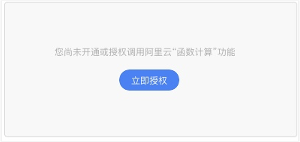
After you grant authorization, you can attach a JavaScript (JS) function that you wrote in Alibaba Cloud to a function node in DS. To do this, select a service and a function, as shown in the following figure:
Select a function node.
Select a service and a function.

Code template (Node.js syntax):
module.exports.handler = function(event, context, callback) {
    /** event structure definition
    {
      // Read-only variables
      "environment": "Object",
      "lastOutputForFunction": "String",
      "slotSummary": "Object",

      // Read/write variables
      "global": "Object",
      "outputForResponse": "Object",
      "outputForFunction": "String",
      "routeVariable": "String"
    }
    **/
    var eventResult = "";
    try {
        var eventObj = JSON.parse(event);

        // Add your code here.
        /**
        * code block
        **/

        eventResult = JSON.stringify(eventObj);
        callback(null, eventResult);
    } catch (e) {
        callback(null, e);
    }
};
Function parameters
Parameter name |
Parameter type |
Description |
Writable |
environment |
json |
For more information, see the environment parameters section below. |
Read-only |
lastOutputForFunction |
String |
The output of the previous function. |
Read-only |
slotSummary |
json |
The filled values of each slot. |
Read-only |
global |
String |
A global variable defined when you design the conversation flow. You can reference or assign a value to it during function execution. |
Yes |
outputForResponse |
json |
The result returned by the function. |
Yes |
outputForFunction |
String |
The output value of the current function. Other functions can reference this value using lastOutputForFunction. |
Yes |
routeVariable |
String |
The routing variable for the branch logic of the function node. This parameter is required for branch logic evaluation. |
Yes |
Environment parameters
Parameter |
Type |
Description |
SENDER_ID |
STRING |
The ID of the sender. |
SENDER_NICK |
STRING |
The nickname of the sender. |
IS_ADMIN |
STRING |
Indicates whether the sender is an enterprise administrator. |
SENDER_STAFF_ID |
STRING |
If the sender is an employee of the enterprise that owns the chatbot, this parameter returns the sender's employee ID. |
MEMBER_TYPE |
STRING |
The member type. |
TOKEN |
STRING |
The session token. |
FROM |
STRING |
The session source. Valid values: im_h5 (H5 chat window), group_chat (group chat), single_chat (one-on-one chat), and console_im_test (test window). |
FROM_SITE |
STRING |
If FROM is set to group_chat, FROM_SITE is the group ID. |
Sample code:
module.exports.handler = function(event, context, callback) {
    /** event structure definition
    {
      // Read-only variables
      "environment": "Object",
      "lastOutputForFunction": "String",
      "slotSummary": "Object",

      // Read/write variables
      "global": "Object",
      "outputForResponse": "Object",
      "outputForFunction": "String",
      "routeVariable": "String"
    }
    **/
    var arr = "";
    var eventResult = "";
    try {
        var eventObj = JSON.parse(event);
        // Add your code here.

        if (eventObj.environment.hasOwnProperty("orderId")) {
            eventObj.routeVariable = '1';
        } else {
            eventObj.routeVariable = '0';
        }
        eventResult = JSON.stringify(eventObj);
        callback(null, eventResult);
    } catch (e) {
        arr += e;
        eventObj.outputForResponse.htmlText = [arr];
        eventResult = JSON.stringify(eventObj);
        callback(null, eventResult);
    }
};
Event data structure:
{
    "environment": {
        "user_id": "1323011"
    },
    "lastOutputForFunction": "{\"query\":{\"count\":1,\"created\":\"2018-03-28T10:20:59Z\",\"lang\":\"en-US\",\"results\":{}}}}",
    "slotSummary": {
        "QueryWeatherIntent.date": "2018-03-29",
        "QueryWeatherIntent.date_origin": "Tomorrow",
        "QueryWeatherIntent.city": "Shanghai",
        "QueryWeatherIntent.city_origin": "Shanghai"
    },
    "global": {
        "phoneNumber": "13*****000"
    },
    "outputForResponse": {
        "htmlText": [
            "It's a fine today.",
            "It's a sunny day."
        ],
        "useRandom": true
    },
    "outputForFunction": "invoke API successfully",
    "routeVariable":"OK"
}