Terms
This topic describes the basic concepts of Remote Log Access.
Term | Description |
Remote log/User log | Logs that an application saves on a user's device. |
Log pull | Pulls logs that an application saves on a user's device to the Remote Log Access console. |
Log level | Remote Log Access defines four log levels:
The log levels are sorted in the following order: Error > Warn > Info > Debug |
Pull level | The level that limits which logs are pulled to the Remote Log Access console. Only logs with a level equal to or higher than the pull level are pulled.
The pull level is set globally during software development kit (SDK) initialization. If you do not set a pull level, the default value is Info. |
Pull task | Executes a log pull based on predefined settings. You can select devices for the pull task in two ways: Smart filter and Manual add. |
Task type | Remote Log Access tasks are categorized into two types: Smart filter and Manual add. |
Smart filter | Sets filter conditions based on multiple dimensions to select devices and pull their logs. The dimensions include Application version, Brand, Region, Model, OS version, Carrier, and Device last online time. |
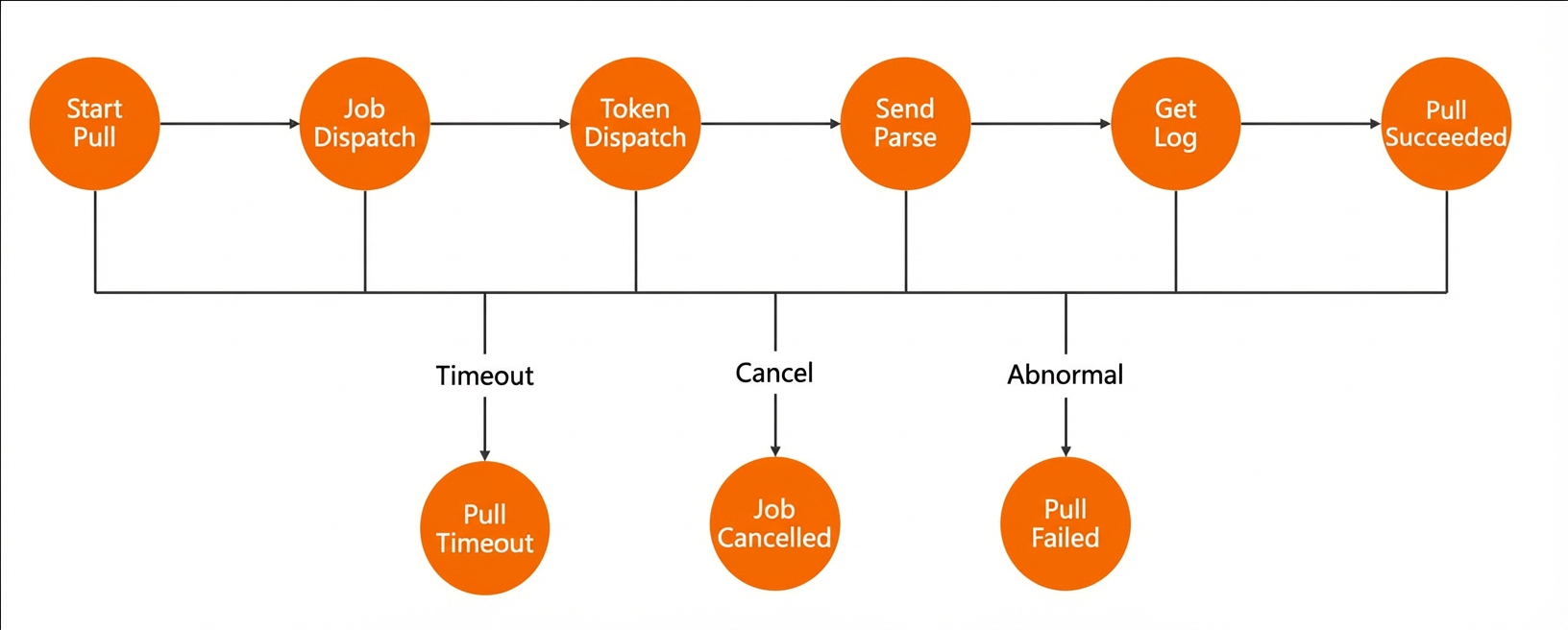
Pull status | The stages of a pull task during its execution. Pull statuses include the following:
|
Manual add | Pulls logs from a specific device by specifying its Device ID or User nickname. |
Crash Analytics pull | A log pull that is triggered by the Crash Analytics service for a specific crash. |
Crash ID | A unique identifier for a crash. |