Product update history
This page lists the features included in each product update.
July 14, 2022
Update overview
Feature |
Description |
Offline messaging feature |
Adds a feature that automatically displays a message box for users to leave a message if no agent is online after a transfer to a human agent. |
Visitor card feature |
Adds a visitor card feature. Use an API to pass custom parameter information, such as customer identity and customer level. |
File transfer feature |
Adds a file transfer feature. Transfer files and images after a successful transfer to a human agent. Currently, only one-way transfer from agent to customer is supported. |
Hotline and ticket integration |
Integrates with Cloud Customer Service System to enable ticket creation, editing, and submission in the agent console of Cloud Call Center. |
Intelligent quality inspection and conversation analysis module |
Integrates the menu for the intelligent quality inspection and analysis product. Adjusts frontend redirection logic. Optimizes the payment and activation processes. |
Intelligent outbound call module |
Integrates the menu for the intelligent outbound call product. Adjusts frontend redirection logic. Optimizes the payment and activation processes. |
Voice navigator module |
Integrates the menu for the voice navigator product. Adjusts frontend redirection logic. Optimizes the payment and activation processes. |
Unified product control upgrade |
Upgrades the product frame, frontend components, and interactions across the entire platform. This includes the navigation menu, level styles, and button positions. |
Specific capabilities
1. New offline messaging feature
If no agent is online after a transfer to a human agent, a message box automatically appears, allowing users to leave a message. The message is then sent to the Cloud Customer Service System backend for management.
You can configure the fields and text of the message box.
Messages are automatically converted into pending tickets, which you can use for follow-up processing and tracking.
Message entry point: This feature is triggered after a transfer to a human agent when no agents are online.
Message box configuration: Go to Settings > Message Configuration.
Message ticket processing: Go to Tickets > Ticket Processing.
2. Visitor card feature
You can use an API to transfer custom parameter fields after a user enters the chat window. This feature identifies the user with information such as their name, level, and tags. These fields are sent to the Cloud Customer Service System or the conversation interface to display the visitor card.
You can use an API to implement the data parameters for visitor cards.
You can use custom transfer fields.
Visitor cards are displayed in the Cloud Customer Service System.
3. File transfer feature
After a transfer to a human agent, users and agents can send files. Currently, users can only send images. Agents can send various file types, such as documents, images, audio, and video. After an agent sends a file, the user can download it from the chat window.
This feature is triggered after a transfer to a human agent.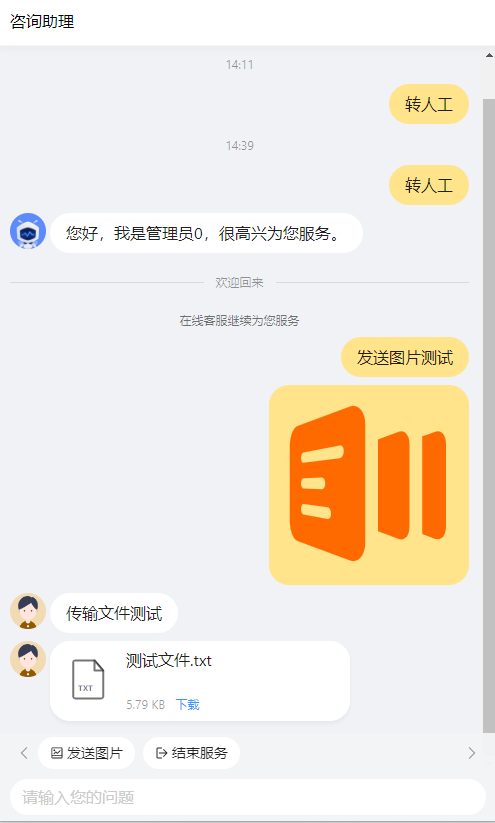
4. Hotline and ticket integration
This feature integrates with Ticket Management in the Cloud Customer Service System. A new entry point for creating tickets is added to the hotline console (Cloud Call Center agent console). When answering or making calls, agents can select relevant templates to create tickets.
Entry point: Go to Agent Console > Create Ticket.
5. Intelligent quality inspection and conversation analysis module
This update integrates the menu for the intelligent quality inspection and analysis product, adjusts the frontend redirection logic, and optimizes the payment and activation processes.
6. Intelligent outbound call module
This update integrates the menu for the intelligent outbound call product, adjusts the frontend redirection logic, and optimizes the payment and activation processes.
7. Voice navigator module
This update integrates the menu for the voice navigator product, adjusts the frontend redirection logic, and optimizes the payment and activation processes.
8. Unified product control upgrade
This update upgrades the product frame, frontend components, and interactions across the entire platform. These upgrades include the following:
The style of the navigation pane on the left.
Unified breadcrumbs.
Display of level-3 tabs.
Unified button positions.
March 30, 2022
Update overview
Closed-loop product integration: Cloud Customer Service System now includes capabilities such as an online instant messaging (IM) console, online agents, tickets, and Customer Relationship Management (CRM). It integrates channels and knowledge bases and forms a product matrix with chatbots and Cloud Call Center to provide customers with an end-to-end, closed-loop intelligent customer service solution.
Unified package sales: Cloud Customer Service System can be sold as a unified package with chatbots and Cloud Call Center. Customers can purchase the product matrix from a single interface and quickly navigate to or manage each product.
Product capability reuse: This update reuses product capabilities. It provides a unified knowledge base for human agents and bots, an IM channel interface for human-agent collaboration, a human-machine integrated solution, and a unified data dashboard.
Feature |
Description |
Multi-product integration |
Unified home page for intelligent customer service products. |
Multi-instance management for intelligent customer service. |
|
Cloud Call Center, Cloud Customer Service System, and chatbots share a unified foundation and are available as a package. |
|
Seamless human-computer collaboration |
Channels are connected to the online customer service IM system, which supports multiple human-agent collaboration patterns. |
A unified knowledge base is available for human agents and bots. One knowledge base is shared by chatbots and agent assistants. |
|
Unified data dashboard |
Unified data dashboard for multiple products. |
Data dashboard for human-agent collaboration. |
Detailed feature descriptions
1. Multi-product integration
An extensible, unified home page is provided for multiple products. It integrates chatbots, Cloud Call Center, and Cloud Customer Service System. It also provides a unified management portal, combined activation, and efficient management.
2. Enabling human-machine collaboration
(1) Channel access to IM
Diversified transfer-to-agent policies: This feature supports multiple custom policies for transferring to a human agent, which enables flexible human-agent interaction.
Image transfer and session resumption: This feature supports IM features such as image transfer and session resumption to improve message delivery rates.
Multimodal home page: This feature supports diverse home pages, such as "You may want to ask" and operational home pages, to enrich the interface style.
(2) Unified knowledge base
Knowledge search: The console supports quick searches of the chatbot knowledge base. It automatically selects the knowledge scope of the corresponding chatbot. This creates a shared knowledge base for human agents and bots, which helps agents serve customers efficiently.
3. Unified data dashboard
Data overview: You can quickly view the core data architecture of intelligent customer service and understand the service reception status with a single click.
Session records: You can query end-to-end human-agent service records and session records in real time to quickly assess the quality of human-agent sessions.