Manually install Apache, MySQL, and PHP on CentOS 7

更新时间: 2026-01-15 15:55:17

Step 1: Install Apache

  1. Run the following command to install the Apache service and its extension packages.

    yum -y install httpd httpd-manual mod_ssl mod_perl
  2. Run the httpd -v command to check the Apache version number.

    httpd -v

  3. Run the following commands to start the Apache service and set it to start on boot.

    1. systemctl start httpd
    2. systemctl enable httpd
  4. Verify the installation.

    1. Log on to the ECS console.

    2. In the navigation pane on the left, click Instances & Images > Instances.

    3. On the Instances page, find the instance on which you are deploying the environment. In the IP Address column, copy the public IP address of the instance.

    4. In the address bar of your browser, enter http://<instance_public_IP_address> and press Enter.

      If a page similar to the following figure appears, the Apache service has started successfully.httpd

Step 2: Install MySQL

  1. Run the following command to update the Yellowdog Updater, Modified (YUM) source.

    rpm -Uvh  http://dev.mysql.com/get/mysql57-community-release-el7-9.noarch.rpm
  2. Run the following command to install MySQL.

    Note

    If you use an operating system with an el8 kernel version, the error message `No match for argument` may appear. If this happens, run the `yum module disable mysql` command to disable the default MySQL module, and then run the MySQL installation command again.

    yum -y install mysql-community-server --nogpgcheck
  3. Run the following command to check the MySQL version number.

    mysql -V

    A result similar to the following indicates that MySQL is installed successfully.

    mysql  Ver 14.14 Distrib 5.7.31, for Linux (x86_64) using  EditLine wrapper
  4. Run the following command to start MySQL.

    systemctl start mysqld
  5. Run the following command to set MySQL to start on boot.

    systemctl enable mysqld
    systemctl daemon-reload
  6. Run the following command to retrieve the initial temporary password.

    grep 'temporary password' /var/log/mysqld.log
  7. Run the following command to log on securely and change your password.

    mysql -u root -p

    After you log on to MySQL, run the following command to change the password.

    Note

    The password must contain uppercase and lowercase letters, digits, and special characters to meet the requirements of the default password policy.

    ALTER USER 'root'@'localhost' IDENTIFIED BY 'YourNewPassword';
  8. Run the following command to exit MySQL.

    exit

Step 3: Install PHP

  1. Update the YUM source.

    1. Run the following command to add the Extra Packages for Enterprise Linux (EPEL) source.

      yum install -y \
      https://repo.ius.io/ius-release-el7.rpm \
      https://dl.fedoraproject.org/pub/epel/epel-release-latest-7.noarch.rpm
    2. Run the following command to add the Webtatic source.

      rpm -Uvh https://mirror.webtatic.com/yum/el7/webtatic-release.rpm
  2. Run the following command to install PHP.

    yum -y install php70w-devel php70w.x86_64 php70w-cli.x86_64 php70w-common.x86_64 php70w-gd.x86_64 php70w-ldap.x86_64 php70w-mbstring.x86_64 php70w-mcrypt.x86_64  php70w-pdo.x86_64   php70w-mysqlnd  php70w-fpm php70w-opcache php70w-pecl-redis php70w-pecl-mongodb

    If the error message "Cannot find a valid baseurl for repo: webtatic/x86_64" appears, follow these steps and then run the PHP installation command again.

    1. Run the following command to open the configuration file.

      vi /etc/resolv.conf
    2. Press i to enter edit mode, and then paste nameserver 8.8.8.8 into the configuration file.

    3. Press Esc to exit edit mode, and then enter :wq to save the file and exit.

    4. Run the following command to restart the network service.

      service network restart
  3. Run the following command to check the PHP version number.

    php -v

    A result similar to the following indicates that the installation is successful.

    20230921181224.jpg

  4. Run the following command to create a test file in the Apache website root directory.

    echo "<?php phpinfo(); ?>" > /var/www/html/phpinfo.php
  5. Run the following command to restart the Apache service.

    systemctl restart httpd
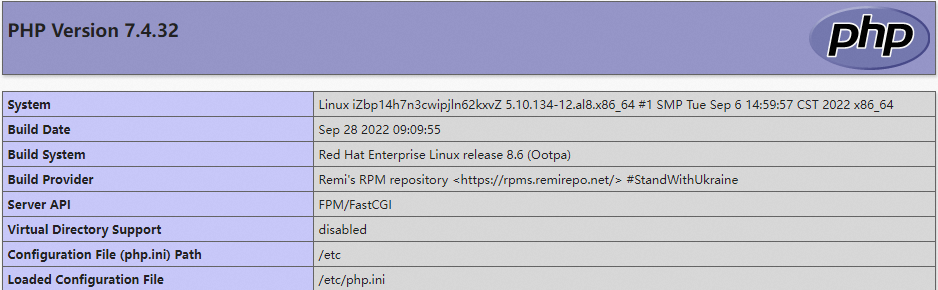
  6. In the address bar of your browser, enter http://<instance_public_IP_address>/phpinfo.php and press Enter.

    If a page similar to the following is displayed, the installation is successful.PHP

上一篇: Install an Apache, MySQL, and PHP environment on Ubuntu 下一篇: Manually install an Nginx+MySQL+PHP environment on Alibaba Cloud Linux 2