The IoT Platform provides multiple network provisioning solutions that enable smart devices to connect to a network.
Network provisioning overview
The platform offers different network provisioning solutions based on the device type and chip. For more information, see the following table.
Device type | Chip/Module | Network provisioning solution | Network provisioning technology | Description | Additional information |
WiFi | WiFi chip/module | Bluetooth-assisted provisioning |
|
|
|
WiFi Combo | WiFi+BLE chip/module | Bluetooth-assisted provisioning |
|
|
|
BLE | Bluetooth communication chip/module | Bluetooth provisioning | Data transfer using BLE (Bluetooth) | The app transfers provisioning information to the device through a Bluetooth channel. | The device must support Wi-Fi and BLE dual-mode communication (combo chip). |
BLE Mesh | Bluetooth communication chip/module | Bluetooth Mesh provisioning | Data transfer over a Bluetooth Mesh network | Encrypted data is transferred to an unprovisioned device through a provisioner (Mesh gateway). |
|
WiFi Combo Mesh | TG7100C only | Combo Mesh provisioning |
|
| The device must support Wi-Fi and BLE dual-mode communication (combo chip). Use this provisioning method. |
Camera (WiFi, Ethernet, cellular, other) | WiFi chip/module | One-click provisioning (smart-config or broadcast provisioning) |
|
| (p2p) is supported only on Android. The total length of the SSID and password cannot exceed 32 bytes. On some Samsung phones, the limit is 25 bytes. |
Device hot spot provisioning (dev-ap-config) | Phone connects to device hot spot to transfer data | The app connects to the hot spot created by the device to transfer provisioning information. | - | ||
Camera QR code provisioning (webcam-config) | Camera scans QR code to parse data | The app generates a QR code. The camera device then scans and parses the provisioning information from the QR code. | The device must have a camera and support QR code decoding. | ||
ZigBee, OPC UA, Modbus, other | Other chips/modules | - | - | - | - |
Network provisioning methods
Zero-config provisioning
Wi-Fi and Wi-Fi combo devices support zero-config provisioning by default.
Zero-config provisioning does not require you to enter the Wi-Fi hot spot SSID or password on your phone. The provisioning flow is as follows.
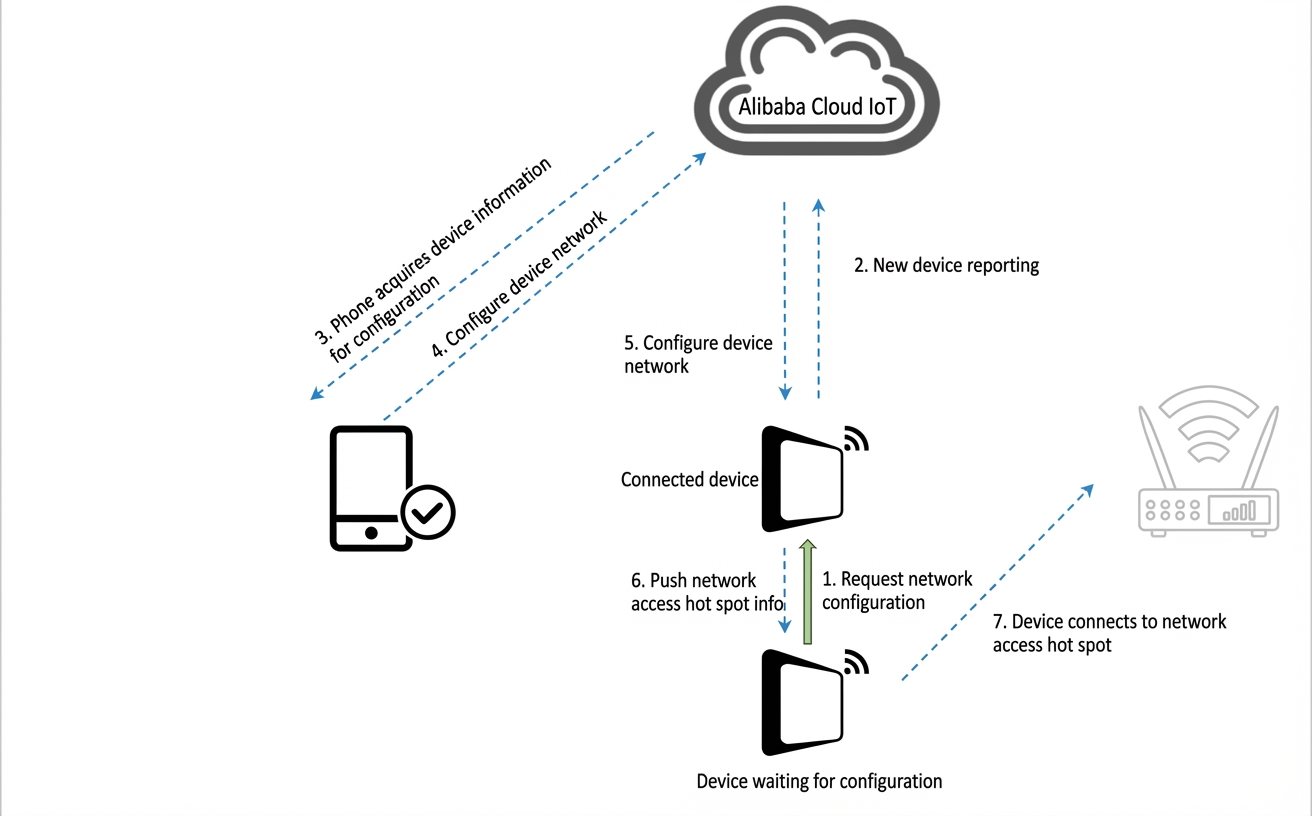
The device to be provisioned sends a provisioning request to a device that is already connected to the Wi-Fi hot spot (router).
The connected device reports the new device to the IoT Platform.
The IoT Platform requests information about the device to be provisioned from the phone app.
The phone sends detailed information about the device to be provisioned back to the platform.
The platform authorizes the connected device to provision the new device.
The connected device pushes the Wi-Fi hot spot's SSID and password to the device to be provisioned.
The device to be provisioned connects to the Wi-Fi hot spot.
Bluetooth-assisted provisioning
The Bluetooth-assisted provisioning (ble-config) solution provides a consistent user experience on both iOS and Android. This method has a high success rate and reliability. To use this solution, the device must support Wi-Fi and Bluetooth Low Energy (BLE) dual-mode communication. The provisioning flow is as follows.
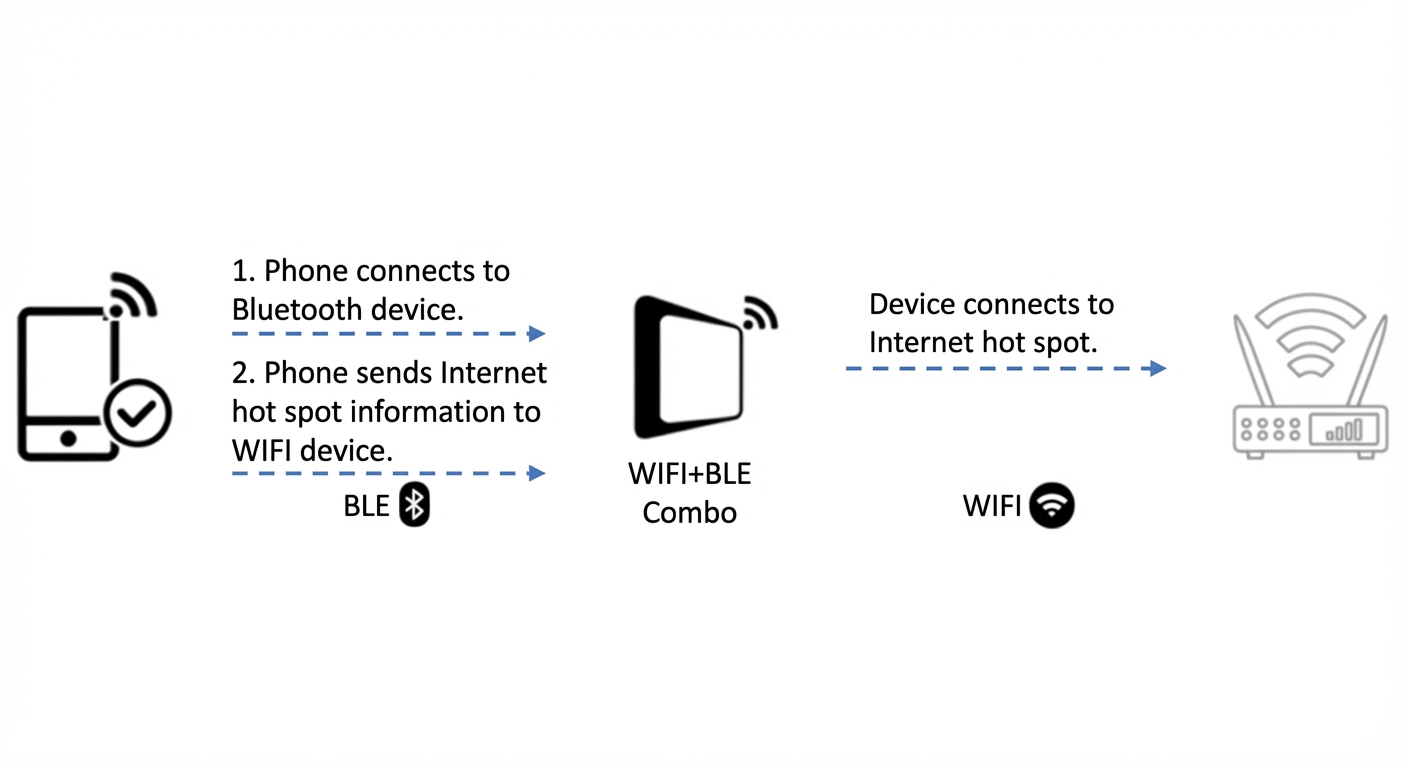
The phone connects to the dual-mode device to be provisioned through Bluetooth.
The phone sends the SSID and password of the Wi-Fi hot spot (router) to the device through Bluetooth.
The device connects to the Wi-Fi hot spot.
One-click provisioning
One-click provisioning (smart-config) only requires the Wi-Fi password. The provisioning flow is as follows.
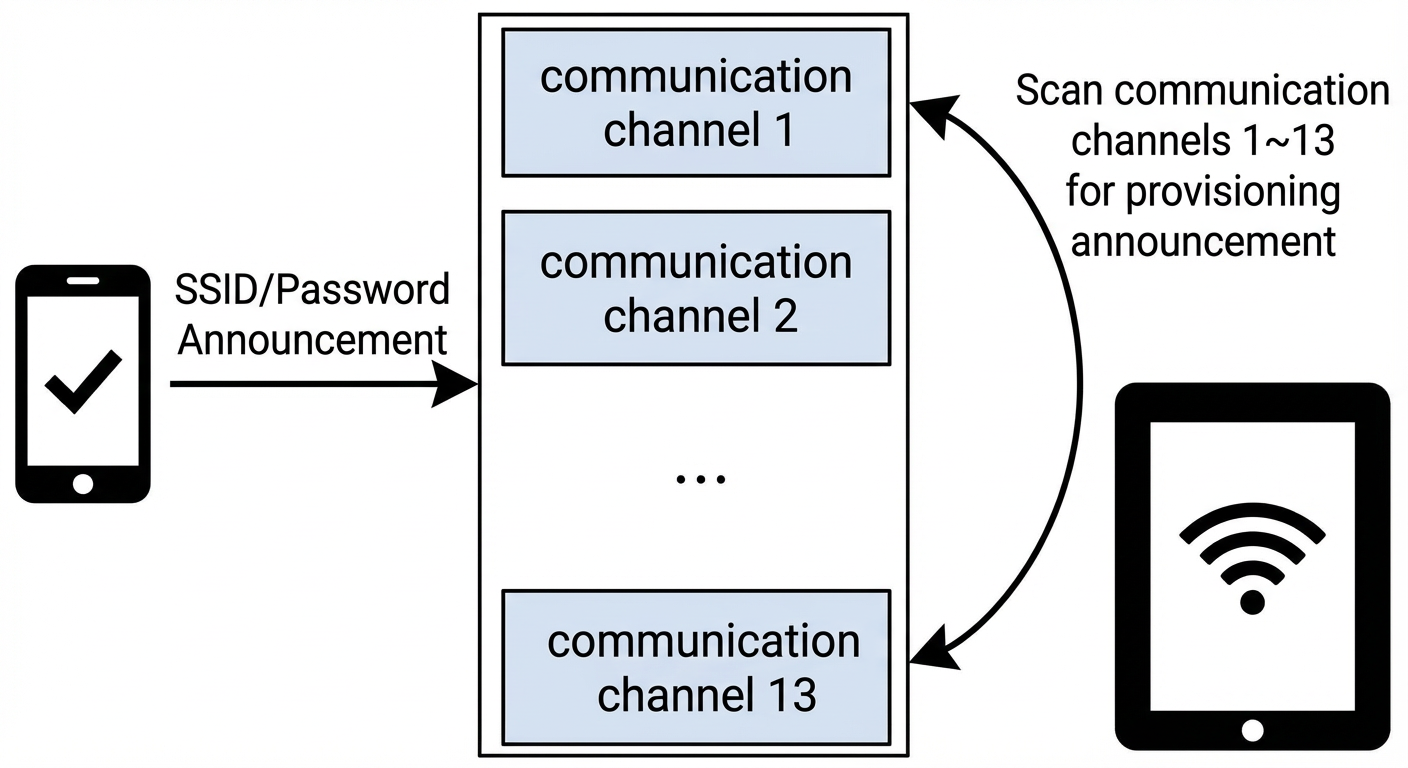
The phone broadcasts the SSID and password of the Wi-Fi hot spot.
The device obtains the information by listening for the broadcast and then connects to the hot spot.
Device hot spot provisioning
The provisioning flow for device hot spot provisioning (dev-ap-config) is as follows.
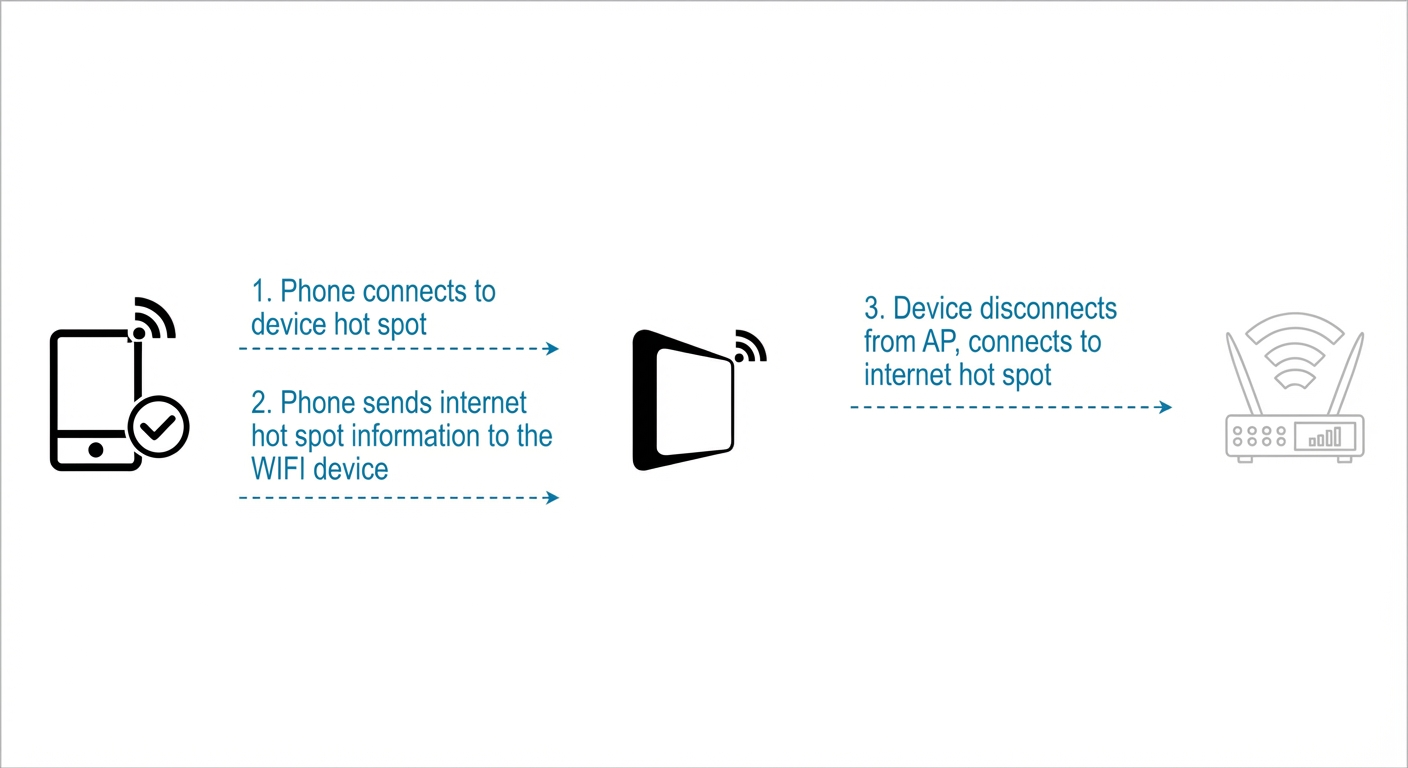
The device enables its built-in Wi-Fi hot spot. The phone searches for, discovers, and connects to the device's hot spot.
After the connection is established, the phone sends the SSID and password of the main Wi-Fi hot spot (router) to the device.
The Wi-Fi device uses the SSID and password to connect to the main Wi-Fi hot spot (router).
Camera QR code provisioning
Camera QR code provisioning (webcam-config) is designed for devices that have a camera and QR code decoding capabilities. The provisioning flow is as follows.
The app generates a QR code that contains information such as the SSID and password.
The device's camera scans the QR code from the app, decodes the information, and connects to the router.
After you pass the SSID and password to the software development kit (SDK), the SDK returns the complete QR code information in a callback and starts a listener on the local area network. The information contained in the QR code is described in the following table. You can then display the QR code and listen for the provisioning result.
Key | Description | Required |
v | version. The version number used to distinguish Alibaba's QR code rules. The current value is Ali_1. | Required |
s | ssid. The SSID of the home router. | Required |
p | password. The password of the home router. | Required |
b | BSSID. The BSSID of the home router. It is a hex string used to resolve issues such as GBK encoding. | Required |
t | token. The token information required for attaching the device. It is a 3-byte random string. | Optional |
The QR code data is formatted as a JSON string. The following is an example.
{"v":"Ali_1","s":"Router","p":"12345678","b":"EC26CAB68CC","t":"93DAB7"}