Access cloud services over private networks
For hybrid cloud and enterprise scenarios, use Cloud Enterprise Network (CEN) to connect your corporate network to a VPC. This lets you access cloud services or self-hosted services over an internal network. CEN supports various connection methods, including Express Connect, Smart Access Gateway (SAG), and VPN. For personal devices, we recommend using SSL-VPN to connect to a VPC to access and use cloud services or self-hosted services.
Security risks of public network access
Public network access exposes services to DDoS attacks, remote vulnerability exploits, and unauthorized access with leaked credentials. To meet enterprise requirements for data security, unified network management, and cost control, the following scenarios require private network access:
-
Hybrid cloud collaboration: Connect your on-premises data center to cloud resources such as OSS and ECS over a leased line or VPN to unify the private network for data backup, disaster recovery, and address planning.
-
Corporate intranet access: Employees access cloud-deployed internal systems such as ERP and OA, and Alibaba Cloud services such as OSS, without exposing data to the Internet.
-
Secure remote work: Remote employees connect to the corporate intranet through a VPN before accessing cloud resources, unifying security policies and avoiding direct Internet login risks.
-
Service-to-service access: When an ECS instance in a VPC calls Alibaba Cloud APIs, using VPC endpoints improves security, reduces latency, and saves Internet traffic costs.
Alibaba Cloud provides private connection solutions that let you use most Alibaba Cloud services in a private network environment.
Best practices
Access Alibaba Cloud services from an ECS instance with VPC endpoints
Most Alibaba Cloud services provide both public and VPC endpoints. ECS instances in a VPC should use VPC endpoints. See How to call APIs over an internal network.
Example: When you use the Alibaba Cloud CLI on an ECS instance in the China (Hangzhou) region, specify the VPC endpoint.
# The --endpoint parameter specifies the VPC Endpoint for the China (Hangzhou) region
aliyun ecs DescribeZones --RegionId cn-hangzhou --endpoint ecs-vpc.cn-hangzhou.aliyuncs.comNote: Each Alibaba Cloud service has independent VPC endpoints per region. Cross-region private access is not supported. To enable cross-region private communication, connect VPCs across regions and configure routes.
Note: Resolving a VPC endpoint domain name may return a public IP address. This is a virtual IP address (VIP) used by Alibaba Cloud — traffic does not travel over the Internet, and these VIPs are not accessible from the Internet.
Connect a corporate network to a VPC with CEN
CEN connects your corporate intranet to a VPC and supports connection types such as Express Connect circuits, SAG, and VPN, each with different security, reliability, and bandwidth levels.
The following figure shows an on-premises data center connected to the Alibaba Cloud Hangzhou region, enabling mutual access between the VPC and the data center's private network. See Connect cloud and on-premises networks. After you configure routes, the corporate intranet can access VPC endpoints of Alibaba Cloud services without using the Internet.
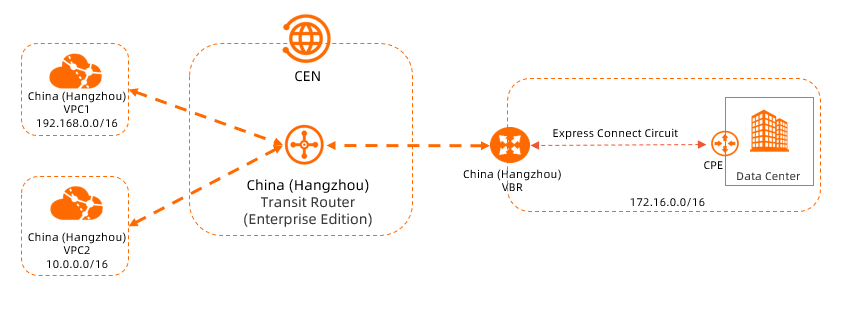
Connect a personal device to a VPC with SSL-VPN
SSL-VPN connects a personal device to a VPC, enabling access to self-managed services and Alibaba Cloud services through private or VPC endpoints (as shown in the following figure). See Connect PC and Android clients via SSL-VPN.
The Alibaba Cloud console does not support VPC endpoints and can only be accessed from the Internet.
