For certain cluster types, such as ACK Serverless clusters, Enterprise Distributed Application Service (EDAS) does not support installing or accessing Cloud Native Kit (CNKIT) through the EDAS console. Use Helm to install CNKIT to these clusters and the IntelliJ IDEA plug-in to access the CNKIT page locally.
Prerequisites
Helm installed on your local machine
A kubeconfig file for the target Kubernetes cluster available on your local machine
Step 1: Download the CNKIT chart package
Download the CNKIT Helm chart package: cnkit.tgz.
Step 2: Get cluster information from the EDAS console
Before you install CNKIT, log on to the EDAS console and collect the following cluster details:
| Information | Description |
|---|---|
| Cluster ID | The unique identifier for the cluster |
| Cluster name | The display name of the cluster |
| Region | The region where the cluster is deployed |
The following screenshot shows where to find this information on the cluster list page.
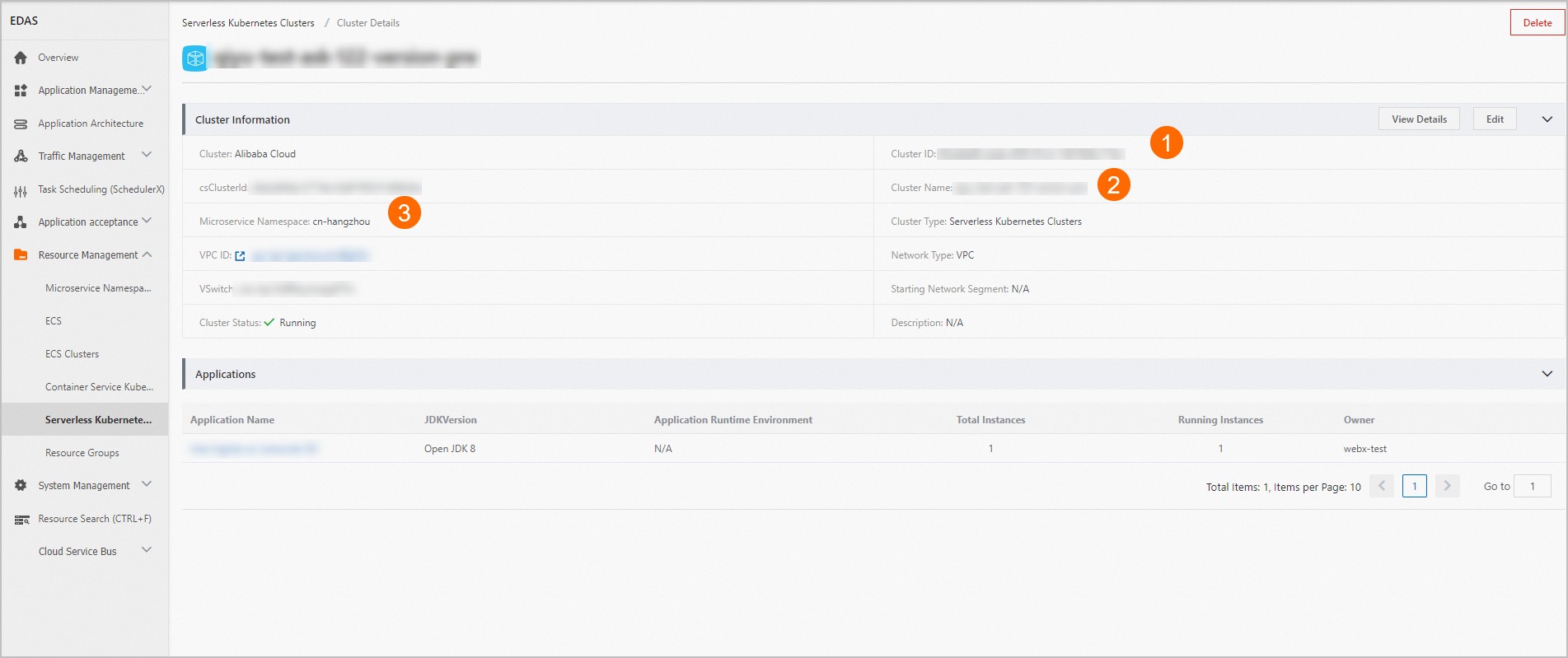
The microservices namespace uses the region ID as part of its identifier. Two formats are supported: cn-hangzhou (region only) and cn-hangzhou:dev (region with a custom suffix). For example, cn-hangzhou indicates the China (Hangzhou) region.
Step 3: Install CNKIT with Helm
Run the following command. Replace the placeholders with the values from Step 2.
helm install \
  --set cluster.clusterId=<cluster-id> \
  --set cluster.clusterName=<cluster-name> \
  --set cluster.regionId=<region-id> \
cnkit cnkit.tgz| Placeholder | Description |
|---|---|
<cluster-id> | The cluster ID from the EDAS console |
<cluster-name> | The cluster name from the EDAS console |
<region-id> | The region ID, such as cn-hangzhou |
In this command, cnkit (before cnkit.tgz) sets the Helm release name, and cnkit.tgz is the path to the downloaded chart package.
After CNKIT is installed, the following message appears:

Step 4: Enable remote debugging for a microservices namespace
For microservices namespaces other than the default, manually enable Allow Remote Debugging:
Log on to the EDAS console. In the left-side navigation pane, choose Resource Management > Microservice Namespaces. In the top navigation bar, select a region.
In the Microservice Namespace list, find the target namespace and click Edit in the Actions column.
In the Edit Microservice Namespace dialog box, turn on Allow Remote Debugging and save the configuration. The configuration takes effect after you save it.
To enable remote debugging for the default microservices namespace, join the DingTalk group (ID: 31723701) for technical support.
Step 5: Access CNKIT locally
Configure the IntelliJ IDEA plug-in to access the CNKIT page from your local environment. For detailed instructions, see Locally access CNKIT by using the IntelliJ IDEA plug-in.
Uninstall CNKIT
To remove CNKIT from the cluster:
helm uninstall cnkitVerify that the release has been removed:
helm lsThe cnkit entry should no longer appear in the output.