Manage microservices namespaces
A microservices namespace provides an isolated runtime environment for applications, such as development, testing, and production environments. You can use microservices namespaces to isolate resources and services. You cannot create two microservices namespaces with the same name in the same region.
Scenarios
For example, if you have three environments in the same Virtual Private Cloud (VPC) for application development, testing, and production, you can create a separate microservices namespace for each environment, such as Dev, Test, and Prod. You can then create clusters and deploy applications in each of these namespaces. The resources, applications, and services in different microservices namespaces are isolated from each other. Service invocations and configuration pushes are not allowed between them.
Default microservices namespace
When you create an application in Enterprise Distributed Application Service (EDAS), you can select the Default microservices namespace. This option indicates that the application does not use a microservices namespace for resource and service isolation.
When you select the default microservices namespace for a region in the application list, the list shows only applications that do not belong to any microservices namespace.
Create a microservices namespace
-
Log on to the EDAS consoleEDAS console.
- In the navigation pane on the left, choose .
- In the upper-right corner of the Microservices Namespace page, click Create Microservices Namespace.
- In the Create Microservices Namespace dialog box, configure the parameters for the microservices namespace, and then click Create.
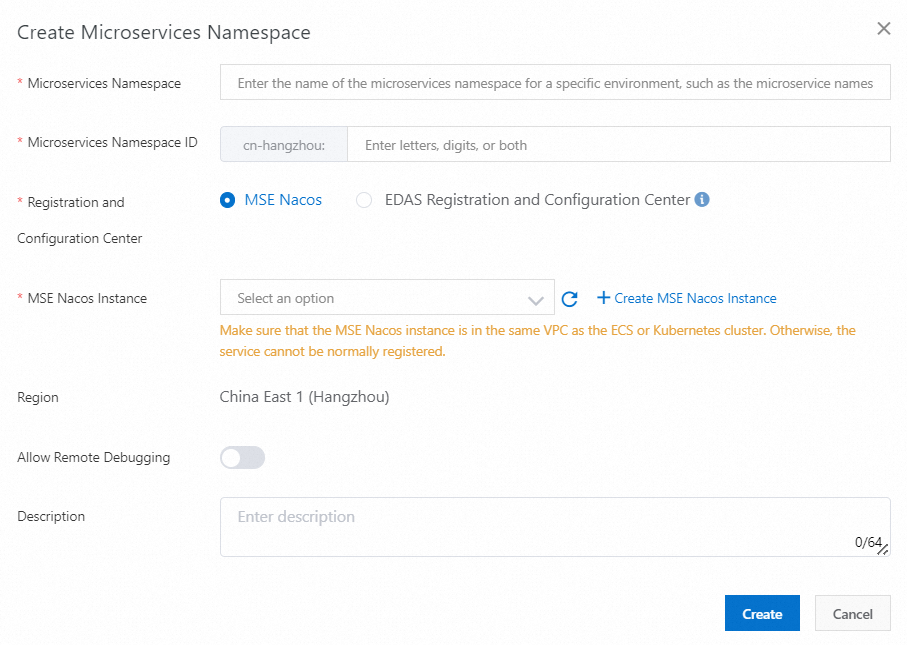
Configuration Item Description Microservices Namespace Enter a name for the microservices namespace. Microservices Namespace ID Enter a custom string of letters or digits to create an ID for the microservices namespace. Registry and Configuration Center - MSE Nacos: The Alibaba Cloud Microservices Engine (MSE) Nacos engine that you purchased. It integrates seamlessly with EDAS to provide service registration and configuration management.
- EDAS Registry and Configuration Center: A free service registry and configuration center provided by EDAS. If your application has high requirements for performance and stability, use MSE Nacos as the service registry and configuration center.
MSE Nacos Instance A Nacos instance created in MSE. For more information, see Create an MSE Nacos instance. Region The region to which the microservices namespace belongs. This parameter cannot be changed. Allow Remote Debugging To connect your device to the cloud for your application, manually enable Allow Remote Debugging. For more information about device-cloud connection, see Introduction to device-cloud connection. Description Enter a description for the microservices namespace.
Edit a microservices namespace
- In the Actions column of the microservices namespace list, click Edit.
- In the Edit Microservices Namespace dialog box, modify the Microservices Namespace name and Description, or enable or disable the remote debugging feature. Then, click OK.
Delete a microservices namespace
- No clusters exist in the microservices namespace.
- No Elastic Compute Service (ECS) instances exist in the microservices namespace.
- In the Actions column of the microservices namespace list, click Delete.
- In the Confirm dialog box, click Delete.