Application creation and deployment overview (ECS)
You can use Enterprise Distributed Application Service (EDAS) to create and deploy applications developed with Java microservice frameworks in Elastic Compute Service (ECS) clusters.
Applications
ECS clusters in EDAS support mainstream Java microservice frameworks, such as Spring Cloud and Dubbo, and Alibaba Cloud's proprietary High-speed Service Framework (HSF).
To help you quickly get started with creating and deploying applications, EDAS provides demo applications for various microservice frameworks.
ECS environments
EDAS provides Alibaba Cloud ECS environments and hybrid cloud ECS environments.
An Alibaba Cloud ECS environment contains only Alibaba Cloud resources, such as microservices namespaces, virtual private clouds (VPCs), ECS clusters, and ECS instances.
To help you quickly get started with application creation and deployment, EDAS provides a default ECS environment in each region. The default ECS environment includes a default cluster created in the default microservices namespace. This cluster uses the default VPC of the region.
You can also create a custom ECS environment as needed. A custom environment consists of the resources that you create, such as microservices namespaces, VPCs, ECS clusters, and ECS instances.
In a hybrid cloud ECS environment, application instances are deployed on servers from Alibaba Cloud ECS, on-premises data centers, and other cloud service providers. However, the microservices namespaces, VPCs, and ECS clusters are created in Alibaba Cloud.
Creation and deployment
You can create and deploy applications in the appropriate ECS environment based on your requirements.
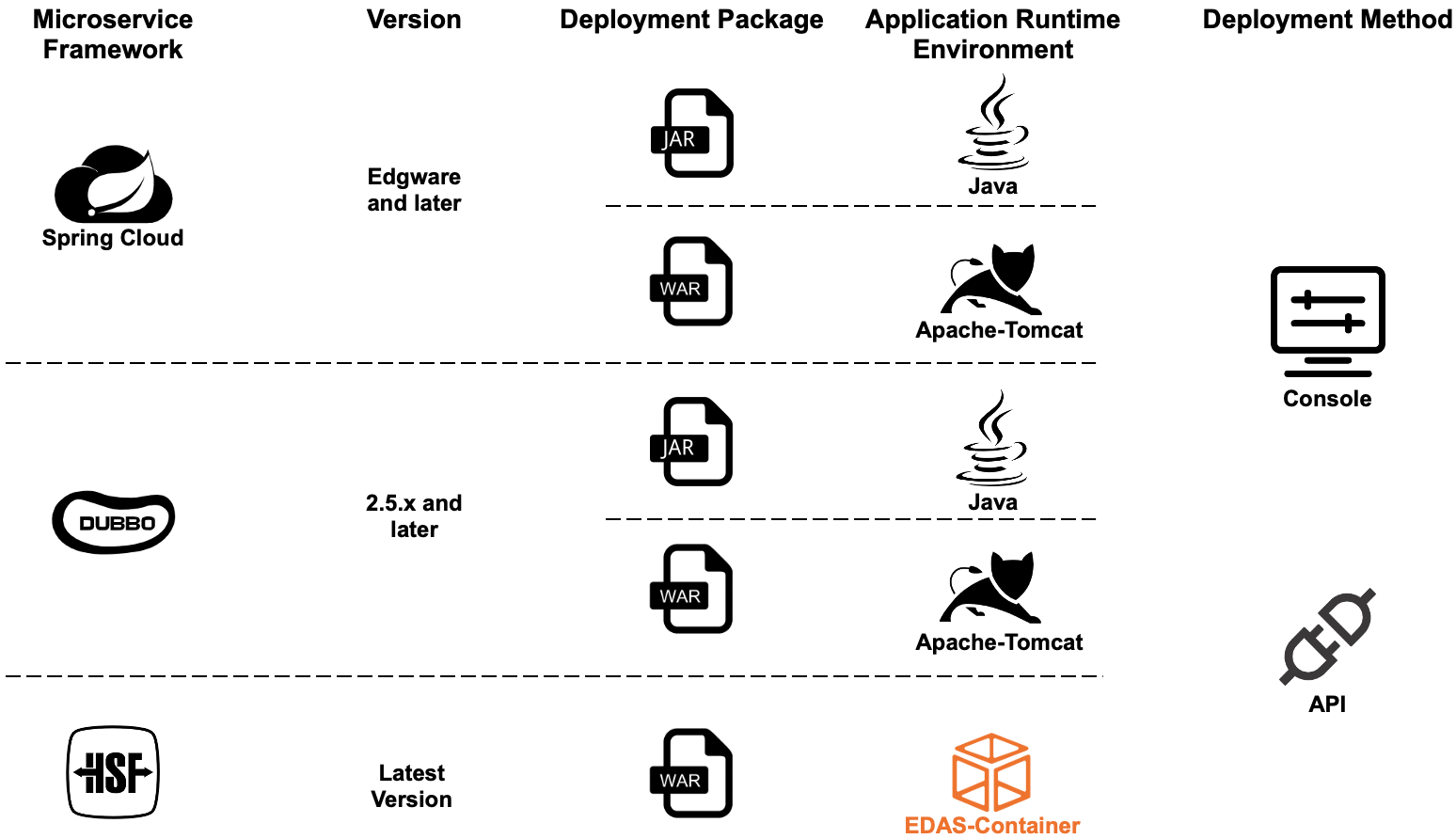
The supported package types and required application runtime environments vary depending on the application framework.
Package types
Spring Cloud and Dubbo applications support JAR and WAR package types. HSF applications support only the WAR package type.
Application runtime environments
When you deploy a Spring Cloud or Dubbo application from a JAR package, select the standard Java environment.
When you deploy a Spring Cloud or Dubbo application from a WAR package, set the application runtime environment to Apache Tomcat.
When you deploy an HSF application, which supports only WAR package deployment, you must set the application runtime environment to EDAS-Container. EDAS-Container includes Ali-Tomcat and Pandora.
You can create and deploy Java applications in ECS clusters using the console or an API.
Scenarios
For your first deployment, select a solution based on your scenario.
Quick start: Create and deploy an application
Deploy a demo application in the default ECS environment. For more information, see Deploy a microservice application in a default ECS environment.
You can deploy a demo application in a custom ECS environment. A custom environment includes resources such as microservices namespaces, VPCs, and clusters. For more information, see Deploy a Java microservice application in a custom ECS environment.
Alibaba Cloud deployment
Deploy an existing application to a custom Alibaba Cloud ECS environment. For more information, see Create and deploy an application in an ECS cluster.
Hybrid cloud deployment
Deploy an existing application to a hybrid cloud ECS environment. For more information, see Deploy an application in a hybrid cloud.