Configure a whitelist
Whitelist protection policies exempt trusted requests from all or specific protection modules, such as basic protection rules and custom rules.
Prerequisites
The Edge WAF service is activated. For more information, see Activate Edge WAF.
You have added a domain name to Edge WAF. For more information, see Add a protected domain name.
Create a whitelist policy
-
Log on to the DCDN console.
-
In the left-side navigation pane, choose .
-
On the Protection Policies page, click Create Policy.
-
On the Create Policy page, configure the following parameters.
Section
Parameter
Description
Policy information
Policy type
Select Whitelist.
Policy name
Enter a custom name for the policy. The name can be up to 64 characters long and can contain Chinese characters, uppercase and lowercase letters, digits (0-9), and underscores (_).
Make default
Specifies whether to use this policy as the default whitelist policy.
Note-
Once a policy is set as the default, this designation cannot be changed.
-
If a default policy already exists for this policy type, this switch is disabled.
Rule information
Rule
Define the rules for this whitelist protection policy. For configuration details, see Whitelist rule parameters.
NoteYou can add up to 10 rules. To increase this quota, contact your Alibaba Cloud account manager or submit a ticket.
Protected domain names
Select Association Mode
You can associate a domain name with multiple policies of the same type. If the domain name is already associated with another policy of this type, you can add the new policy or replace the existing one. For domain names associated with a default policy, you can only replace the policy. Valid values:
Add and replace original policy: Unbind the existing policy and replace it with the current one.
Add and retain original policy: Both policies coexist without affecting each other.
Protected domain names
Select the domain names to protect with this policy.
-
-
Click Create Policy.
By default, the new protection policy is enabled.
Whitelist rule parameters
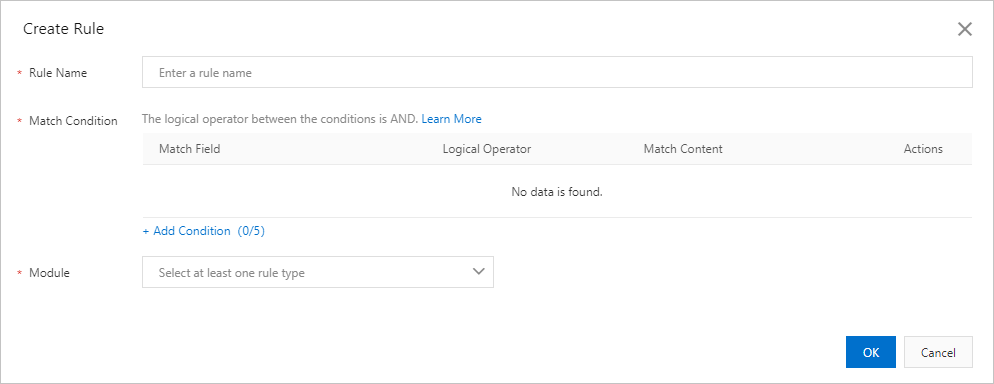
You can create a whitelist rule when you create a whitelist protection policy, or add a rule to an existing policy.
|
Parameter |
Description |
|
Rule name |
A custom name for the rule. The name can be up to 64 characters long and can contain Chinese characters, uppercase and lowercase letters, digits (0-9), and underscores (_). |
|
Match condition |
The request characteristics that trigger this rule. Click Add Condition to add a condition. You can add up to five conditions to a single rule. If you define multiple conditions, the rule triggers only when all conditions are met. Each condition consists of a match field, a logical operator, and match content. For configuration examples, see Match condition configuration examples. For detailed information about match fields and logical operators, see Match conditions. |
|
Module |
The protection modules to bypass for requests that match the conditions. Valid values:
|
Related APIs
CreateDcdnWafPolicy — Creates a custom protection policy.
BatchCreateDcdnWafRules — Creates multiple custom rules in a batch.
DescribeDcdnWafPolicies — Queries custom protection policies.
DescribeDcdnWafDefaultRules — Queries the default rule set.
DescribeDcdnWafPolicies — Queries custom protection policies.
DescribeDcdnWafPolicyValidDomains — Queries the valid domains for a custom protection policy.